
How to Get Google Guaranteed (Now Google Verified), Step by Step
- What happened to Google Guaranteed
- What you need before you start
- Step 1: Start at Local Services Ads
- Step 2: The welcome screen
- Step 3: Choose your Business Profile
- Step 4: Sign up and build your profile
- Step 5: Pass screening and verification
- Step 6: Go live, and keep the badge
- What slows Google Verified down
- Is the badge still worth it without the guarantee?
- Frequently asked questions
- Want help getting verified and getting calls?
The short version
Google replaced Google Guaranteed with the Google Verified badge on October 20, 2025, and ended the money-back guarantee. You earn the badge by signing up for Local Services Ads and passing Google's screening, which takes three to four weeks on average.
Screenshots taken October 2026. Google changes these screens often.
If you’re looking for how to get Google Guaranteed, the first thing to know is that the badge has a new name. On October 20, 2025, Google replaced Google Guaranteed with the Google Verified badge, and it ended the money-back guarantee that came with the old one. The way you earn it hasn’t really changed: you sign up for Local Services Ads with a verified Google Business Profile, then pass Google’s screening and verification. This walkthrough shows each screen of the sign-up, what Google checks, and how long it takes.
This guide is part of our broader local ads services for home-service businesses.
What happened to Google Guaranteed
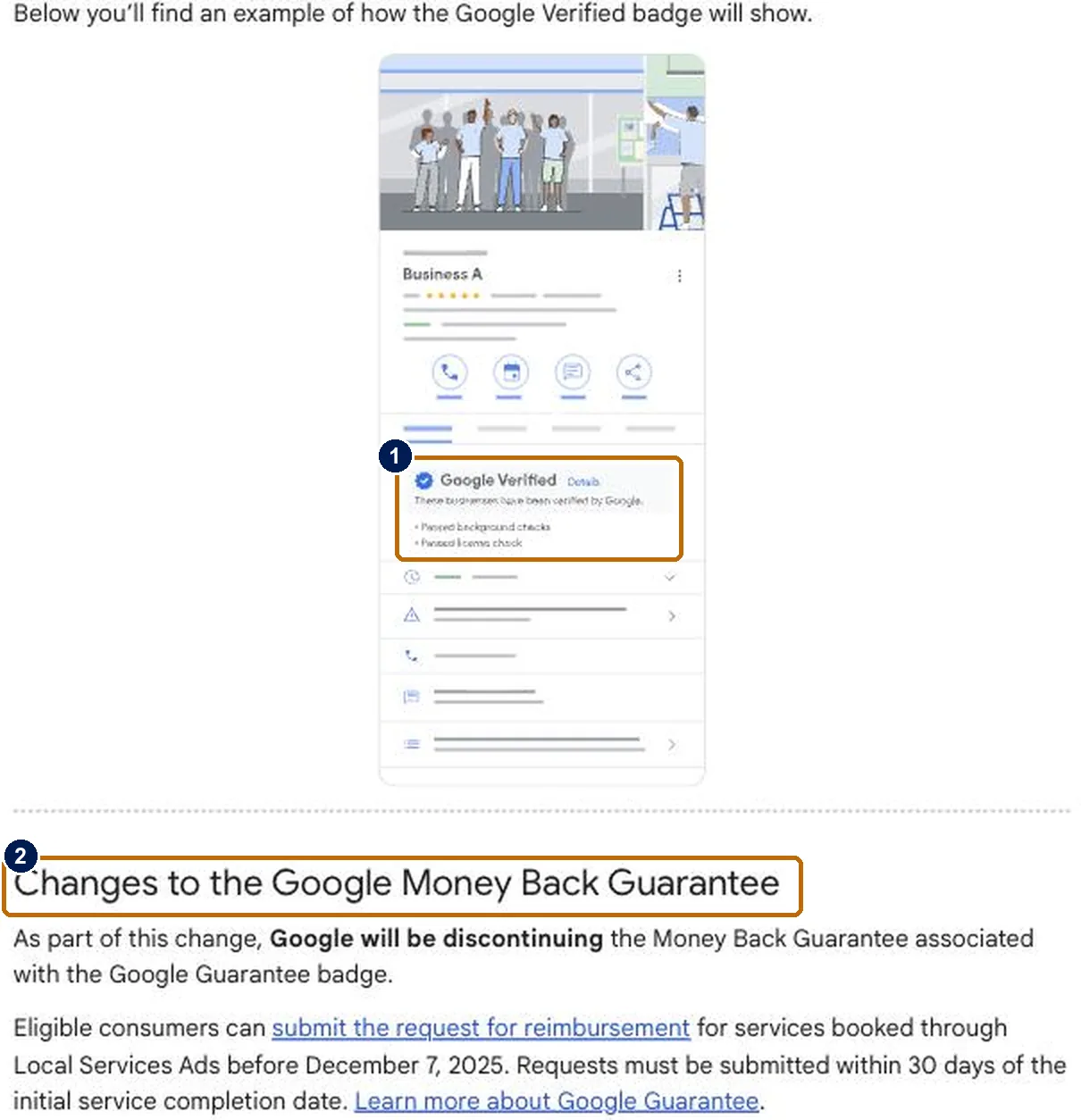
Google used to give Local Services advertisers different badges depending on their category: Google Guaranteed for most home services, Google Screened for professional services, and License Verified for some others. In October 2025 it merged them into one Google Verified badge (1). The badge now lists the specific checks a business has passed, such as background and license checks, right on its profile.
The money-back guarantee went with the old name (2). Homeowners could only request reimbursement for services booked before December 7, 2025, within 30 days of the job. Advertisers who were already verified got the new badge automatically, and Google says the change doesn’t affect how ads are ranked.
For a homeowner, the badge still means the same thing it did before: this business has been checked by Google. It’s also only available through Local Services Ads. You can’t buy it on its own, and there’s no separate fee for it.
What you need before you start
- An eligible trade. Google’s list includes roofers, plumbers, electricians, HVAC, water damage restoration, pool contractors, siding, solar and many other home services.
- A public, verified Google Business Profile. Google requires it for Local Services Ads. If you don’t have one, follow our Business Profile setup walkthrough and verify it first.
- Your license details, for the business and, in some trades and states, the owner.
- Proof of insurance and business registration, if Google asks for them in your category.
- The names of the owner and field workers who go into customers’ homes, for background checks where they’re required.
- A few reviews, since some categories have a minimum.
- A payment method for the ad budget.
Step 1: Start at Local Services Ads
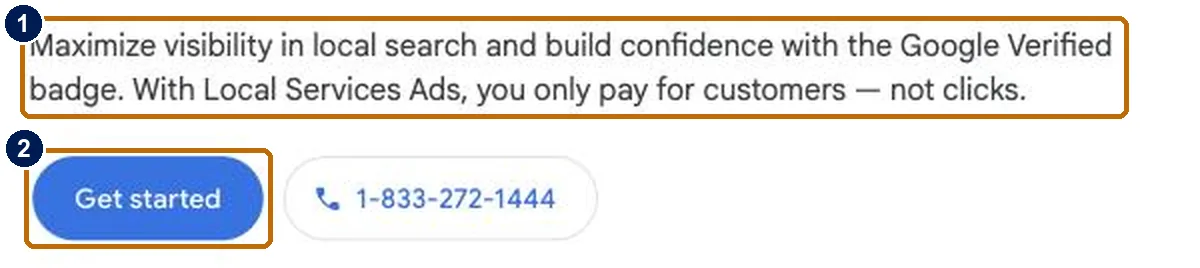
Go to Google’s Local Services Ads page. It now leads with the Google Verified badge and the promise that you pay for customers, not clicks (1). Click Get started (2) and sign in with the Google account that manages your Business Profile.
Step 2: The welcome screen
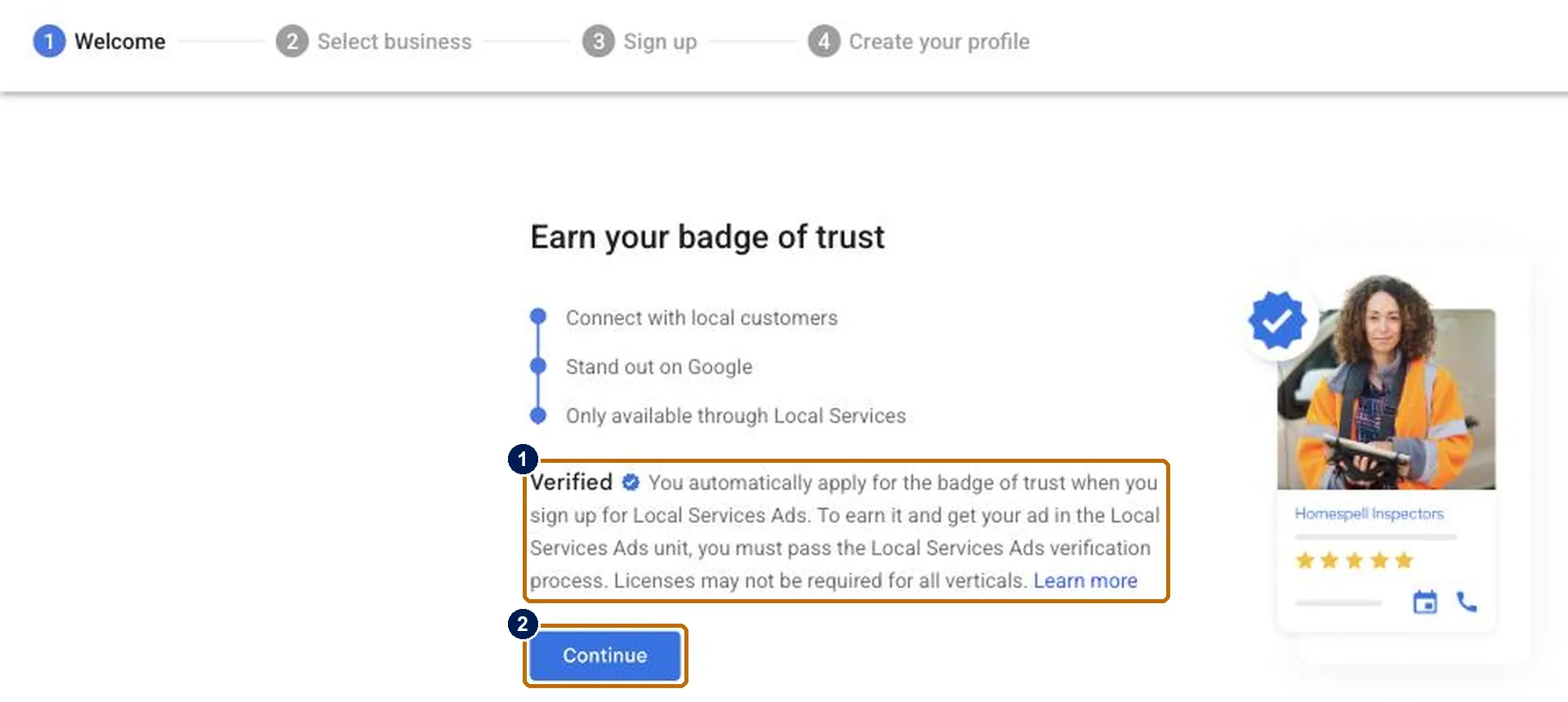
The sign-up has four stages, shown across the top: Welcome, Select business, Sign up and Create your profile. The first screen explains how the badge works (1). You apply for it automatically when you sign up, and you earn it by passing the verification process. Click Continue (2).
Curious what your marketing is actually booking?
Get a free visibility audit — no obligation, no sales pitch.
Step 3: Choose your Business Profile
Google lists the Business Profiles your account manages. Select yours (1) and click Next (2). Google uses the profile to fill in your ad, and you can edit those details later. You can skip this step and connect a profile afterward, but the profile has to be public and verified before your ads can run.
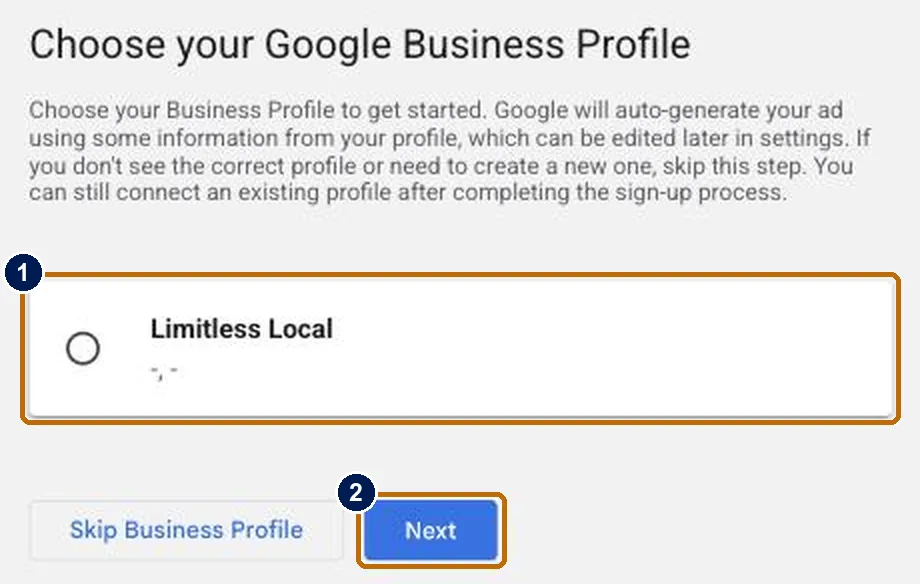
We took these screenshots on our own account and stopped here, because the next screen creates a live Local Services account with billing. The remaining steps below follow Google’s own documentation.
Step 4: Sign up and build your profile
Next you tell Google about your business: your services, the job types you take, the areas you serve and your hours. Then you set a weekly budget. Draw your service areas and job types carefully, because Google no longer credits leads from outside your area or for jobs you don’t do. Our guide to how Local Services Ads work covers budgets, bidding and how leads are charged.
Step 5: Pass screening and verification
This is the step that earns the badge. The checks depend on your trade and location, and Google’s requirements for home services can include:
- Background checks on the business, the owner and field workers: identity and criminal history for people, and civil litigation history for the business. They’re run by Google’s background check partners, they don’t include a credit check, and Google doesn’t charge for them.
- License checks at the state level.
- Insurance and business registration checks, for some businesses.
- Identity verification for the owner and, in some trades, field workers.
Google says the process takes three to four weeks on average after you submit your documents, so start as soon as your account is open. Some businesses qualify for accelerated verification, which gives them the badge quickly and 14 days to finish the remaining checks. While you wait, Google may let you run pre-badge ads once the preliminary checks are done, though those listings sit below fully verified providers.
Step 6: Go live, and keep the badge
Once you pass, your ad goes live with the Google Verified badge and a call or message button. Verification isn’t one-and-done. Google re-evaluates advertisers regularly and may ask you to repeat one or more of the checks to keep participating. If you don’t complete a requested review, you can lose the badge, have your ads paused or have the account suspended.
After that, what decides how many jobs the badge brings in is the same as for any Local Services ad: answering calls, keeping reviews coming, adding real photos and tracking which leads become booked jobs. Google’s ranking factors reward exactly those things.
What slows Google Verified down
Most of the three to four weeks is spent waiting on checks, and most delays come from the business side, not Google’s. Before you start, make sure you’ve covered these:
- An unverified Business Profile. Local Services Ads need a public, verified profile. If yours is still pending, nothing else can finish, so verify it before you sign up.
- Missing field workers. Where background checks apply, they cover everyone who works in customers’ homes, including subcontractors. Have their details ready rather than adding them one at a time.
- License details that don’t match. Have your state license number and the exact business name on it in front of you, so what you enter matches the record Google checks.
- Slow replies to Google. If Google asks for more information or a follow-up review, answer quickly. An unanswered request can hold up the badge or, later, pause your ads.
- Too few reviews. Some categories need a minimum number of reviews, so start asking past customers before you apply.
Is the badge still worth it without the guarantee?
For most home-service businesses, yes. The money-back guarantee was a backstop for homeowners, but it was never the reason they called. They call the listing at the top of the page with a trusted badge, good reviews and a phone button, and all of that is unchanged. The badge also now spells out which checks you’ve passed, which gives a careful homeowner more to go on, not less.
Whether Local Services Ads pay off for your business is a separate question, and it comes down to your cost per booked job. If you’re comparing them with click-based ads, see our breakdown of whether Google Ads are worth it for a roofing company.
Frequently asked questions
Is Google Guaranteed still a thing?
Not under that name. Since October 20, 2025, Google has given every Local Services advertiser a single Google Verified badge instead, and the Google Guarantee money-back program has been discontinued.
How much does it cost to get Google Verified?
There’s no separate fee for the badge, and Google doesn’t charge for the background checks. You pay for the leads you receive through Local Services Ads, based on the weekly budget you set.
How long does it take to get the Google Verified badge?
Google says screening and verification take three to four weeks on average after you submit your documents. Some businesses qualify for accelerated verification and get the badge sooner.
Can I get the badge without running Local Services Ads?
No. Google says the badge is only available through Local Services, and you apply for it automatically when you sign up for Local Services Ads.
What happened to the $2,000 Google Guarantee?
Google discontinued the money-back guarantee when it introduced the Google Verified badge. Homeowners could still request reimbursement for services booked through Local Services Ads before December 7, 2025, within 30 days of the job being completed.
Want help getting verified and getting calls?
The badge gets you into the Local Services unit. Turning it into booked jobs takes a profile that ranks, a phone that gets answered and someone watching the cost per job, which is what our local ads management covers. If you want to see what that would look like for your business, start with a free visibility audit, or book a growth call and we’ll walk through it together.
Last updated: November 2026.
About the author
Bradley Lewis is a co-founder of Limitless Local, with 20+ years in digital marketing. He and his partner, Matt Ford, have run local service businesses across their own brands and built the Limitless playbook to get roofing and home-service owners more booked jobs, not more dashboards. Limitless has helped over 500 business owners get more work through marketing that’s measured in booked jobs.