
How much should a restoration company budget for landing pages?
- How much should a restoration company spend on landing pages and conversion fixes?
- What does a landing page budget actually pay for?
- Do I need landing pages if I already have a website?
- How many landing pages does a restoration company need?
- How do I size the landing page budget from my ad spend?
- What's a one-time cost, and what keeps costing?
- What does a full restoration website cost compared with landing pages?
- Should the money go to a new website or landing pages first?
- What makes a cheap landing page expensive?
- How much should I set aside for testing and conversion fixes?
- How do I know the landing page money paid off?
- When should I hold off on landing pages?
- What's different about landing page budgets for restoration companies
- A worked example: what a better page is worth
- Frequently asked questions
- Key takeaways
- More in this section
- Sources
The short version
- Size the page budget against the ad spend it serves, not against a price list.
- Start with one page per job type you advertise; add town pages later.
- The build is one-time; testing, speed and edits keep costing a little.
- Track calls first, so you can see cost per booked job before and after.
For restoration owners deciding how much of the marketing budget belongs on the pages ads send people to, versus the ads themselves.
Get a free visibility audit · Book a growth call
How much should a restoration company spend on landing pages and conversion fixes?
Budget landing pages from the ad spend they serve: the more you pay for clicks each month, the more a page that turns those clicks into calls is worth. Most restoration companies need one page for each main job they advertise, such as water extraction, sewage cleanup, mold and fire, before they need pages for each town. Treat the build as a one-time cost and set aside a smaller, steady amount for testing and fixes. Don’t spend on pages until calls are tracked, or you won’t be able to tell whether the new page paid for itself.
Landing pages are where ad money turns into calls or leaks away, which is why our packages pair them with the ads. Essentials includes a landing page and Google Ads management, and a full website build is priced separately, with ad spend always paid to Google directly. See how it fits water, fire and mold companies on our restoration marketing page, read the restoration marketing guide for the full channel picture, or browse more restoration marketing questions.
What does a landing page budget actually pay for?
A landing page is the page someone lands on after clicking your ad. For a restoration company it usually means one focused page per job, such as water extraction, sewage cleanup or mold remediation, with a tap-to-call button at the top and nothing that pulls the visitor away.
The money goes to a handful of things:
- The build: design, page layout and making it fast and easy to use on a phone.
- The words: a headline that matches the search, the towns you serve, how fast you respond, and a plain line about working with insurance.
- Proof: your own job photos, reviews and the certifications your firm actually holds.
- Tracking: a call tracking number and form tracking, so every lead from the page gets counted.
- Upkeep: hosting, edits when your services or hours change, and fixes when something breaks.
None of that is ad spend. Clicks are paid to Google separately, and that split is what the rest of this page is about.
Do I need landing pages if I already have a website?
If you run Google search ads, usually yes. Google’s guide to optimizing ads and landing pages says people who click an ad expect a page that’s relevant to what they saw, and that if they don’t find it right away, they’re more likely to leave. A homepage that lists every service you offer makes a homeowner with a flooded basement hunt for the right button.
Your existing service pages can work as landing pages if they’re focused, fast on a phone and put the phone number up top. Many restoration sites aren’t built that way, because the pages were written for SEO first: long, broad and full of menus. In that case a few dedicated ad pages often do more than a full redesign.
What a restoration Google Ads landing page should include covers what goes on the page itself. This page is about what to spend on them.
How many landing pages does a restoration company need?
Count them from your ad campaigns, not from your service list. A page is worth building when an ad campaign is going to send it steady traffic.
- Start with your main paid job: for most restoration companies, that’s water damage and water extraction.
- Add a page for each separate campaign: sewage cleanup, mold and fire or smoke each draw a different searcher, with different worries, so each needs its own page.
- Add a storm or freeze page if your area gets them, built before the season so it’s ready when budgets go up.
- Town pages come later, and only for towns where you run separate campaigns and can actually get a crew there fast.
For most companies, that’s three to five pages to start, not twenty. Every extra page is another thing to keep accurate, so build them as campaigns earn them.
How do I size the landing page budget from my ad spend?
Work from what the page could change. Look at your monthly ad spend, how many clicks it buys, and how many of those clicks turn into calls. A better page doesn’t change the clicks; it changes how many become calls, and that’s where the value is.
The math is simple. Divide your ad spend by booked jobs to get cost per booked job. Then ask what happens if the page turns a few more clicks into calls at the same spend. The more you spend on ads, the more each point of improvement is worth, so a company spending heavily on clicks can justify far more on pages than one testing ads on a small budget.
That gives you a practical ceiling: a page build should pay for itself within a few months of extra booked jobs. If you can’t see how it would, spend the money on the ads, the Google profile or answering the phone first. The worked example below runs the numbers.
For where landing pages sit in the overall budget, what monthly marketing budget a restoration company needs covers the full split.
What's a one-time cost, and what keeps costing?
Split the budget in two, because the two halves behave differently.
One-time: designing and building each page, writing it, getting photos of your real crews and equipment, and setting up tracking. You pay for this once per page, and again only if you rebuild it.
Ongoing: hosting, small edits when your hours, towns or services change, speed checks, replacing photos, and testing new headlines or layouts. This is a smaller amount, but it’s not zero. A page that was right two years ago can quietly fall behind when your phone number, service area or insurance process changes.
Plan the ongoing half as part of whoever manages your ads. Pages and ads work as a pair: when the ads change what they say or which towns they target, the page should change with them.
Curious what your marketing is actually booking?
Get a free visibility audit — no obligation, no sales pitch.
What does a full restoration website cost compared with landing pages?
A full site and a set of landing pages solve different problems. Landing pages turn paid clicks into calls. The website carries your SEO, your service and town pages, and the trust a homeowner checks before calling.
Here’s how our pricing works. Essentials, at $3,500 a month, includes 1 landing page along with Google Ads management up to $2,500 a month in ad spend, a content sprint of up to 10 pages, Google Business Profile management, review response and call, web and form tracking. A full website is a separate build:
- Themed website: $3,750, or $3,000 with any Limitless Engine package, up to 25 pages.
- Custom website: from $5,000.
- Payment: 6- or 12-month payment plans, or 10% off paid in full, with 30 days of support after launch.
Concept to launch takes 100 days or less, and themed sites about 60 days. Ad spend is never included in any package; it’s paid directly to Google.
Should the money go to a new website or landing pages first?
Follow the money you’re already spending. If most of your new work comes from ads, the pages those ads land on come first, because every click you pay for passes through them today. A redesign of the whole site can wait a season.
If most of your work comes from Maps and organic search, or you’re planning to lean on SEO, the website comes first. Landing pages built only for ads won’t carry much SEO weight, while a site with strong service and town pages does both jobs.
If the site is so slow or dated that it’s hurting both, fix speed and the phone button on the pages that get the most traffic before anything else. Speed fixes for restoration websites on mobile lists where to start.
What makes a cheap landing page expensive?
A page that costs little to build can cost a lot every month if it turns fewer clicks into calls. The usual problems:
- It’s slow on a phone. Google’s landing page performance guide says that in retail, it has seen a 1-second delay on mobile affect mobile conversions by up to 20 percent. That’s a retail figure, not a restoration benchmark, but a stressed homeowner on a phone has no more patience than a shopper.
- It’s generic. One page for every service doesn’t match what the person searched for.
- The phone number isn’t tracked or rings a line nobody answers at night.
- The form goes nowhere, or to an inbox nobody checks.
- It’s cluttered. Google’s mobile landing page article warns that full-size pop-ups and chat boxes covering the page can disrupt the visit.
Poor pages can raise what you pay per click too. Google’s ad quality page says ad quality covers the experience people have once they reach your landing page, and that higher-quality ads typically cost less per click than lower-quality ads.
How much should I set aside for testing and conversion fixes?
Keep it small and steady, and only start once tracking is in place. Testing without tracking is guessing.
A sensible rhythm: change one thing at a time, such as the headline, the photo at the top or the length of the form, and give each change enough clicks to judge it. Small restoration ad budgets may need a few weeks to show a real difference, especially in a slow month.
Google Ads gives you two free checks. Each keyword gets a landing page experience status of above average, average or below average, and Google’s landing page experience definition says a below average status means you might want to make some changes. The Landing pages report in your Google Ads account also shows how each page performs and flags pages that could work better on mobile.
How do I know the landing page money paid off?
Compare before and after on the same numbers:
- Calls and forms per click from the campaign that uses the page.
- Booked jobs from those calls, matched in your job software.
- Cost per booked job for the campaign, at roughly the same ad spend.
Look at a few weeks before and after, and compare similar weeks: a freeze or a storm will swamp any page change. If calls per click went up and cost per booked job went down, the page paid off. If clicks rose but calls didn’t, the problem may be the search terms or your answering, not the page. Why a restoration website gets clicks but no calls walks through how to tell which.
When should I hold off on landing pages?
Some situations make page money wasted money, at least for now:
- Calls aren’t tracked. Fix tracking first, or you’ll never know whether the page helped.
- Ad spend is very small. If the campaign only buys a handful of clicks a week, a better page has little to work with. Spend on the Google profile and reviews instead.
- Nobody answers after hours. A page that wins more calls just sends more to voicemail. What missed calls cost a restoration company covers that leak.
- You only run Local Services Ads. Google’s guide to how Local Services leads work counts calls, messages and booking requests as leads, so the homeowner reaches you without a landing page, and your reviews and response time matter more.
Talk it through with someone who runs this every day
A 15-minute growth call: your market, your numbers, and what a realistic budget looks like. No pressure.
What's different about landing page budgets for restoration companies
Every job type needs its own page. A homeowner with sewage in the basement and one worried about a musty smell are in very different places. One page can’t speak to both, which pushes restoration companies toward more pages than most trades.
Emergency visitors decide in seconds. Water damage searches happen on a phone, often at night. Budget for speed and a clear call button before design touches.
Insurance comes up on every page. Homeowners want to know whether you work with their insurer. A plain line on how you handle the paperwork, without promising coverage, belongs on each page, so budget the writing time.
Storm pages are seasonal assets. A storm or freeze page built in a quiet month is ready when ad budgets jump. Built mid-surge, it’s late.
A worked example: what a better page is worth
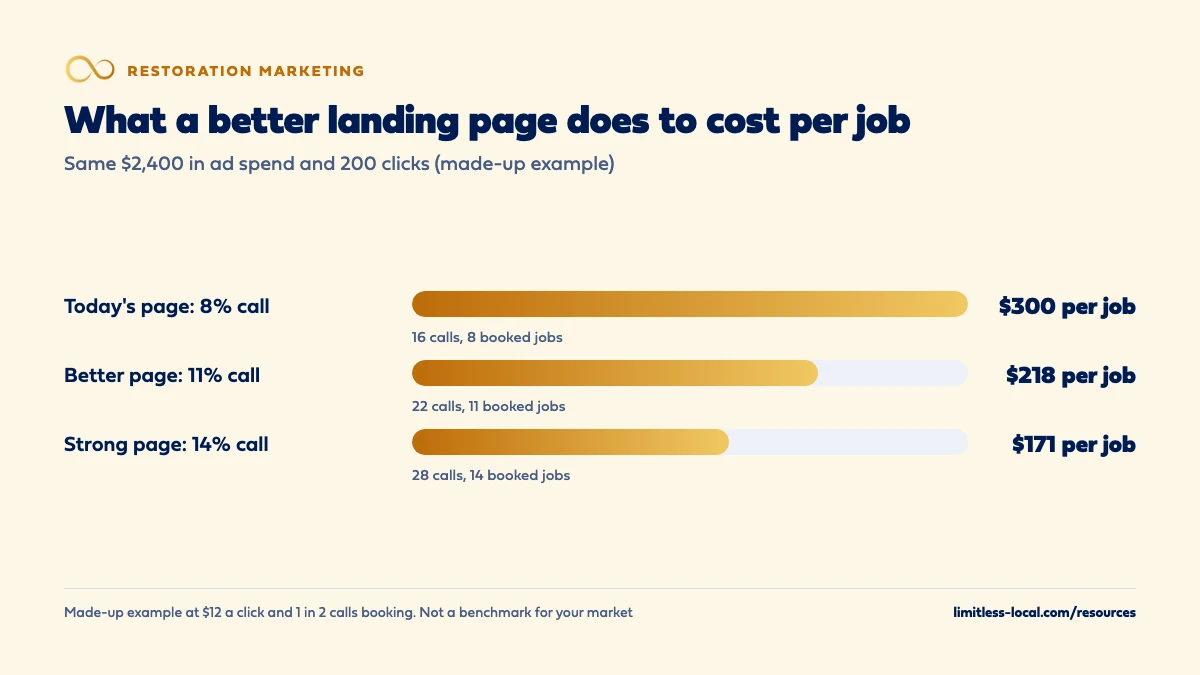
These numbers are made up to show the math, not a benchmark for your market. Say a water damage campaign spends $2,400 a month at $12 a click, which buys 200 clicks, and about 1 in 2 calls books a job.
- Today’s page turns 8% of clicks into calls: 16 calls, 8 booked jobs, about $300 in ad spend per booked job.
- A better page turns 11% into calls: 22 calls, 11 booked jobs, about $218 per booked job.
- A strong page turns 14% into calls: 28 calls, 14 booked jobs, about $171 per booked job.
Same ad spend, same clicks, and 3 to 6 more booked jobs a month. Whatever the page costs to build, compare it with what those extra jobs are worth to you over a few months. That comparison, not a price list, tells you how much the page is worth.
Frequently asked questions
Can I build restoration landing pages myself?
Yes, with most website builders, as long as the page is fast on a phone, matches the search and has a tracked phone number at the top. The build is the easy part; keeping it matched to your ads takes the ongoing time.
Should every town I serve get its own landing page?
Not at first. Build pages per job type, then add town pages only for towns with their own campaigns where your crews can respond fast.
Do Local Services Ads need a landing page?
No. Local Services leads come in as calls, messages and booking requests, so your reviews, response time and profile matter more there.
Is a landing page the same as a service page?
Not quite. A service page is written to rank and to explain; a landing page is built to turn a paid click into a call, with less to distract from the phone number.
How long does a new landing page need before I judge it?
Long enough for a fair number of clicks, which may be a few weeks on a small budget. Avoid judging it during a storm or freeze week, when demand swamps everything.
Does a better landing page lower what I pay per click?
It can help. Ad quality includes the experience people have on your landing page, and Google says higher-quality ads typically cost less per click.
Key takeaways
- Budget landing pages from the ad spend they serve: more spend means a better page is worth more.
- Start with one page per job type you advertise, then add storm and town pages as campaigns earn them.
- The build is one-time; hosting, edits, speed checks and testing keep costing a little.
- A cheap page that turns fewer clicks into calls is the most expensive option.
- Track calls before you spend, and judge the page on cost per booked job before and after.
Ready to compare options?
Book a short growth call and we'll walk through the math for your service area, including when we're not the right fit.
More in this section
- What monthly marketing budget does a restoration company need?
- Should a restoration company budget for content and reviews?
- How much should a restoration company spend on call tracking?
- What should a restoration Google Ads landing page include?
- What is a good cost per booked job for a restoration company?
Sources
- Optimize your ads and landing pages — Google Ads Help
- Evaluate the performance of your landing pages — Google Ads Help
- About ad quality — Google Ads Help
- Landing page experience: Definition — Google Ads Help
- 5 things to consider when optimizing your mobile landing page — Google Ads
- How leads work — Local Services Help