
When to split restoration service areas into location pages?

- When should one restoration service-area page become separate town pages?
- What's the difference between a service-area page and location pages?
- Why start with one service-area page?
- Signal 1: Do people search for restoration help with that town's name?
- Signal 2: Are you already booking jobs there?
- Signal 3: Do you have something true to say about that town?
- Signal 4: Does that town need a different answer?
- What changes when you open a staffed office in a new area?
- How do I split the first town off without hurting the main page?
- What happens to the towns that stay on the service-area page?
- When should a town page be merged back into the service-area page?
- What mistakes do owners make when splitting service areas?
- What's different about splitting service areas for restoration companies
- A worked example: deciding which towns to split
- Frequently asked questions
- Key takeaways
- More in this section
- Sources
The short version
- Start with one service-area page that lists every town in plain sentences.
- Split a town only when it has searches, jobs and something of its own to say.
- Split one or two at a time, busiest town first, and watch the results.
- A staffed second office is a different decision: it gets a location page and its own Google profile.
For restoration owners with one page listing every town they cover, wondering when a town deserves a page of its own.
Get a free visibility audit · Book a growth call
When should one restoration service-area page become separate town pages?
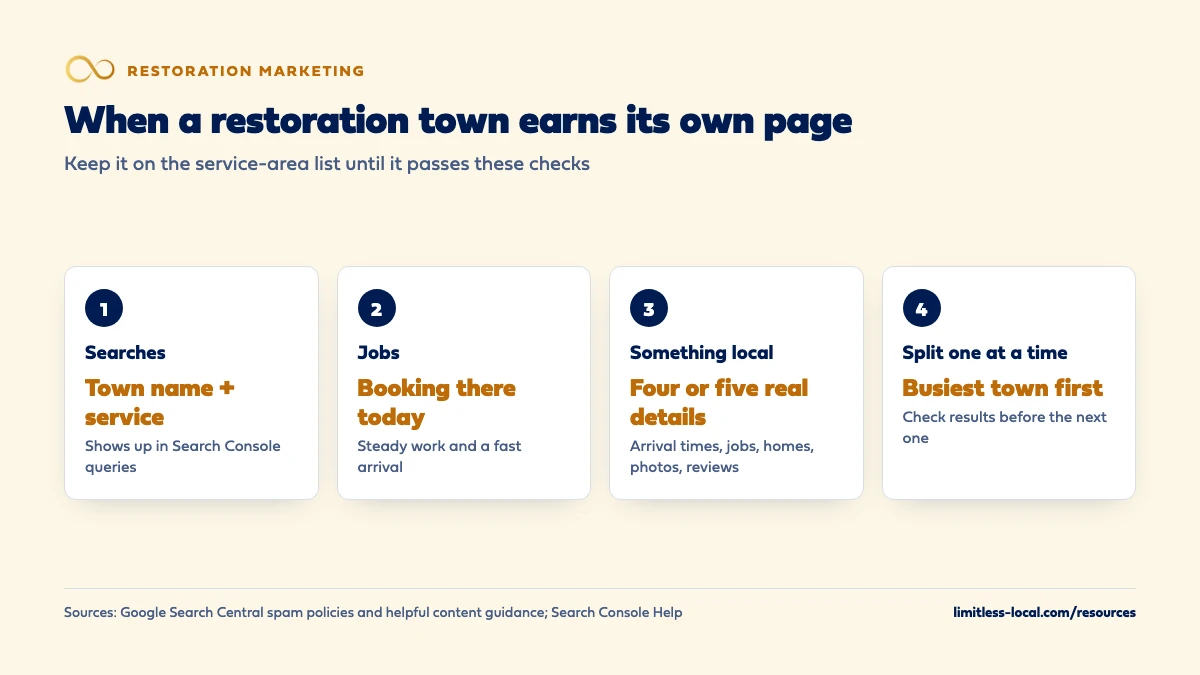
Split a town off your main service-area page when three things are true at once: people search for restoration help with that town’s name, you’re already booking jobs there or can reach it fast, and you have something true and specific to say about working there that the main page can’t hold. Split one or two towns at a time, starting with the one that brings the most calls, and leave the rest listed on the service-area page. If you can only swap the town name, keep the town on the list, because near-identical pages for each town are the pattern Google treats as doorway abuse.
Deciding which towns get pages, and building the ones that earn it, is part of our local SEO work. Essentials, at $3,500 a month, covers one location and includes a content sprint of up to 10 pages; Growth, at $4,500 a month, covers SEO for up to two locations. See how we help restoration companies, read the restoration marketing guide, or browse more restoration marketing questions.
What's the difference between a service-area page and location pages?
A service-area page is one page that names every town you cover, in sentences, with a line or two about how you work across the area: where the crews leave from, how fast you usually arrive, which services you run everywhere. It’s the page your Google profile’s service area and your ad targeting should match.
Location pages come in two kinds, and owners mix them up:
- Town pages: a page for one town you serve from your main shop. No office there, just real work.
- Office pages: a page for a staffed branch, with its own crew and phone number.
This page is mostly about the first kind: when a town on your list deserves its own page. The second kind is a business decision more than a website one, and it’s covered further down.
Why start with one service-area page?
Because a single strong page beats a dozen thin ones. One service-area page lets you describe the whole territory honestly, link to every service page, and keep it updated in one place. When a storm moves your crews around, you edit one page, not fifteen.
It also keeps you clear of the trap. Google’s spam policies list, as doorway abuse, pages targeted at specific regions or cities that funnel users to one page, and substantially similar pages that are closer to search results than a clearly defined, browseable hierarchy. A batch of town pages with the name swapped is both.
Plenty of restoration companies do fine with one service-area page and no town pages at all, because their Maps ranking is driven by their Google profile, reviews and distance, not by page count. Whether five city pages is too few goes into that.
Signal 1: Do people search for restoration help with that town's name?
A town page exists to catch searches like “water damage restoration [town]”. If nobody types that, the page has nothing to catch.
Check two places:
- Search Console. The Performance report shows which queries your site appears for, with impressions, clicks and average position. Filter the queries by the town’s name. If the town shows up with your services attached and your service-area page sits deep in the results for them, that’s a gap a dedicated page could fill.
- Your Google Ads, if you run them. The search terms you’ve paid for show whether people in or around that town search with its name.
No searches with the town’s name doesn’t mean no work there. It may just mean people there search “water damage near me”, which your Google profile and service area answer, not a town page.
Signal 2: Are you already booking jobs there?
Pull last year’s jobs from Jobber, Housecall Pro or ServiceTitan and count them by town. The towns where you already book steady work are the ones you can write about honestly, with real job types, real photos and real arrival times.
If you run Google Ads, the matched locations report shows how your ads did in the locations that matched them. A town with calls and conversions but no page of its own is a strong candidate.
Watch for the opposite too. A town where you get calls but rarely book, because it’s too far for a fast arrival, shouldn’t get a page. A page there brings more of the same calls you can’t take.
Signal 3: Do you have something true to say about that town?
This is the test most town pages fail. Before you build one, write down what you’d put on it that isn’t already on the service-area page:
- How long it takes your crew to get there, day and night
- Jobs you’ve done there, by type: slab leaks, basement flooding, sewer backups
- What’s common in that town’s homes: older galvanized pipes, slab foundations, basements, a flood-prone creek
- Neighborhoods or building types you work in often, such as condos or older rentals
- Photos from local jobs
- Reviews from customers there
If you can fill four or five of those, the town has earned a page. If you can only fill the town name and a sentence about fast response, keep it on the list. Google’s guidance on helpful, people-first content calls out content made primarily to attract visits from search engines as a warning sign, and a page with nothing local on it is exactly that.
Curious what your marketing is actually booking?
Get a free visibility audit — no obligation, no sales pitch.
Signal 4: Does that town need a different answer?
Sometimes the reason to split isn’t searches, it’s that the main page gives the wrong answer for one town. Split it when:
- Response time is different. Your main page promises a fast arrival, but one outlying town takes much longer at night. Its own page can say so honestly.
- The work is different. One town is mostly apartments and commercial buildings, or it’s where nearly all your mold jobs come from.
- A different crew covers it. If a crew lead lives there and handles that side of the county, say so on its page.
- The town has its own seasonal pattern. A riverside town that floods, or a hill town where pipes freeze first.
Any one of these, plus real jobs there, is a better reason to split than a keyword tool showing search volume.
What changes when you open a staffed office in a new area?
Then you’re not splitting a page, you’re adding a location. Google’s guidelines for representing your business allow one Business Profile per location for a service business with separate service areas and separate staff at each location, and say a rented mailing address you don’t operate from, a virtual office, isn’t eligible.
A staffed office gets an office page with its own phone number, linked from its own profile, and the towns it covers move from the main service-area page to that office’s page. Setting up a website and Google profile for a second restoration location walks through the build, and keeping restoration locations from cannibalizing each other covers dividing the towns.
How do I split the first town off without hurting the main page?
- Pick one town, the one that passes all the signals most clearly. Two at most.
- Write the page from your notes, not a template. Lead with how fast you get there and the jobs you do there.
- Keep the town on the service-area page, now as a link to its new page with a sentence of context.
- Link the town page to the services offered there and back to the service-area page. How to structure restoration city and service pages covers the addresses and links.
- Don’t change your Google profile’s service area just because you built a page. The profile should already list the towns you serve.
- Give it time, then check. SEO typically takes 3-6 months to show meaningful organic growth, so judge the page on impressions for the town’s queries first, then on calls and booked jobs.
Only build the next town page once the first one shows it was worth it.
What happens to the towns that stay on the service-area page?
They stay listed in sentences, grouped the way you actually work: “From our shop we cover the north side of the county, including…” They’re still in your Google profile’s service area, which Google’s page on managing service areas allows up to 20 areas by city, postal code or other area, and says the overall area shouldn’t be more than about 2 hours of driving time from where you’re based. They’re still in your ad targeting. Not having a page doesn’t mean you don’t serve them.
For most of those towns, the call comes from Maps or a “near me” search, and Google’s tips to improve your local ranking say local results are mainly based on relevance, distance and popularity. A town page doesn’t change the distance part. Which cities a restoration company should target covers how to pick the full list.
When should a town page be merged back into the service-area page?
Pages aren’t permanent. Merge a town page back when:
- It’s had a fair run and gets almost no impressions for the town’s searches.
- You’ve stopped working there, or a second office now covers it.
- You can’t keep it current: the photos are years old and the jobs listed are ones nobody remembers.
To merge, move anything useful back onto the service-area page and redirect the town page’s address permanently to it. Then update any links that pointed to the old page.
What mistakes do owners make when splitting service areas?
- Splitting every town at once because a plugin or template makes it easy.
- Building pages for towns you want rather than towns you serve today.
- Dropping the town from the service-area page once it has its own page, so the main page no longer describes the whole area.
- Writing a town page that only links to the contact form.
- Putting a fake local address on a town page to look like you have an office there.
- Judging the page in the first month before it’s had time to show up for anything.
Not sure which of these is costing you jobs?
A free visibility audit checks the Google profile, reviews, site and tracking, and shows what to fix first.
What's different about splitting service areas for restoration companies
Arrival time is the local detail that matters most. A homeowner with water coming through the ceiling cares how fast you get there. A town page that says it honestly, day and night, is more useful than any paragraph about the town’s history.
Housing stock changes the work. Older neighborhoods with original plumbing, slab homes, basements and flood-prone streets each produce different jobs. That’s often the most genuine thing to say on a town page.
Storms aren’t a reason to split. A one-off storm in a far town brings a burst of calls, then nothing. Cover it with ads and your storm page, not a permanent town page.
Commercial work clusters. If one town has most of the apartment complexes or office parks you serve, its page can speak to property managers there, which a general service-area page can’t do well.
A worked example: deciding which towns to split
This is a made-up restoration company with one shop and 14 towns on its service-area page, to show the decision, not a benchmark.
- Town A (the largest): 40 jobs last year, the town’s name shows up in Search Console queries next to “water damage”, and the crew can describe the slab-leak problem in its older neighborhoods. Split it.
- Town B: 25 jobs last year and most of the company’s mold work, from older homes along the river. Split it, as the second page.
- Town C: 9 jobs, no searches with its name, nothing different to say. Keep it on the list.
- Town D: lots of calls in the matched locations report but few bookings, because it’s a long drive at night. Keep it on the list, and look at whether ads there are worth it.
- The other ten towns: steady but light. Keep them on the list.
Result: one service-area page that still names all 14 towns, plus two town pages for A and B, each linked from it. The company checks both after six months before building a third.
Frequently asked questions
Can one page cover two small neighboring towns?
Yes, if you really work them as one area and can say real things about both. Name both in the heading and the text, and link the page from the service-area page.
Should my Google profile link to a town page?
No. For a one-office company, link the profile to your homepage or main service-area page. Only a staffed office’s profile should link to its own location page.
Do town pages need a local phone number?
Not if it’s the same team answering. Use your main number. A separate number only makes sense for a staffed office or for tracking calls by page.
Is a town page with a map embed and a list of ZIP codes enough?
No. That’s the same information the service-area page already has. A town page needs local jobs, arrival times and details only that town has.
How many town pages is too many?
There’s no fixed number. The limit is how many towns pass the checks on this page. Once a new page would only swap the name, you’ve reached it.
Should I split towns for ads landing pages too?
Ads can use town-specific landing pages that aren’t in your main menu, but each one still needs to be accurate for that town. For most companies, one strong service landing page with the area named works fine.
Key takeaways
- Start with one service-area page that names every town in plain sentences.
- Split a town only when it has searches, booked jobs and something true to say of its own.
- Split one or two towns at a time, busiest first, and judge them before building more.
- Towns without a page stay on the list, in your Google service area and in your ad targeting.
- A staffed office is a separate decision: its own page and its own Google profile.
Want a second set of eyes on your setup?
We'll look at how you show up locally and where calls are leaking, then send you a plain-English breakdown.
More in this section
- How to structure restoration website city and service pages?
- How many service and city pages does my restoration website need?
- How do I market each restoration location without duplicate work?
- How should a restoration company build city pages that rank?
- When should a restoration company split SEO, ads and reviews budgets?
Sources
- Spam Policies for Google Web Search — Google Search Central
- Creating Helpful, Reliable, People-First Content — Google Search Central
- Performance report (Search results) — Search Console Help
- View matched locations and distance reports — Google Ads Help
- Guidelines for representing your business on Google — Google Business Profile Help
- Manage your service areas for service-area & hybrid businesses — Google Business Profile Help
- Tips to improve your local ranking on Google — Google Business Profile Help