
How many service and city pages does my restoration website need?

- How many service and location pages should a restoration website start with?
- Is there a right number of pages for a restoration website?
- Which service pages does every restoration website need?
- How many city pages should I start with?
- Does my Google service area tell me how many city pages to build?
- When do more city pages stop helping?
- Should I build a page for every service in every city?
- How should service and city pages link together?
- What makes a city page worth having?
- How do I know when to add the next page?
- What changes when I open a second location?
- What's different about page counts for restoration companies
- A worked example: a starting page plan
- Frequently asked questions
- Key takeaways
- More in this section
- Sources
The short version
- One page per service you sell: water, fire and smoke, mold, sewage, and others you really do.
- One page per town you reach fast and can describe with real local detail.
- Don't build every service for every town; most of those pages end up as near-copies.
- Add pages when Search Console and your calls show demand, not to hit a number.
For restoration owners planning a new site or a rebuild who want to know how many pages to build first, and when more pages stop helping.
Get a free visibility audit · Book a growth call
How many service and location pages should a restoration website start with?
Start with one strong page for each service you actually sell, such as water damage, fire and smoke damage, mold remediation and sewage cleanup, plus one page for each town where you respond fast and have something true and specific to say. For most single-location restoration companies, that’s a few service pages and a handful of town pages to start, not hundreds. Add a page when a town or service is bringing searches and calls, and stop when a new page would only swap the city name, because Google’s spam policies treat pages built that way as doorway abuse.
The page plan is worth getting right early, because it decides what every later page builds on. A themed website from us is $3,750, or $3,000 with any Limitless Engine package, and covers up to 25 pages, which is room for a solid starting set plus growth. Essentials also includes a content sprint of up to 10 pages for sites that already exist. The restoration marketing page shows how the site fits with Maps and ads, the restoration marketing guide covers every channel, and there are more restoration marketing questions in the library.
Is there a right number of pages for a restoration website?
No. Google doesn’t reward a site for having a certain number of pages, and in its guide to creating helpful, people-first content it lists producing lots of content on many different topics in hopes that some of it will perform well as a warning sign. More pages don’t mean more calls.
The right number comes from two lists you already have:
- The services you sell and want more of.
- The towns you serve fast enough to win emergency work, and know well enough to write about.
Each item on those lists earns one page. Anything beyond that has to justify itself with real demand and something genuinely different to say. That’s the threshold: a page should exist because a homeowner searching for that service or town would be better off landing on it, not because a tool said you need more.
Which service pages does every restoration website need?
One for each service a homeowner searches for on its own, because each has its own searches, its own questions and often its own urgency:
- Water damage restoration, usually your most important page. How to rank for water damage restoration in your city covers what it should say.
- Fire and smoke damage.
- Mold remediation, written with extra care because it’s a health topic.
- Sewage cleanup, which is its own emergency. See what a sewage cleanup page should say.
Add pages for storm damage, contents cleaning, reconstruction or commercial work only if you really take that work on. Splitting water damage further, into separate pages for burst pipes, basement flooding or appliance leaks, makes sense once the main water page is strong and you have something different to say about each one. If the only difference is the heading, keep it on one page.
How many city pages should I start with?
Fewer than you think. Start with the towns that pass all three of these tests:
- You get there fast. A crew can reach most of the town quickly, day or night.
- You already work there. Your job records show real jobs in that town, or you want more and can serve it.
- You can say something true about it. Where your crew comes from, typical response times, the kinds of homes and problems you see there, and jobs you’ve done nearby.
For most single-location companies, that’s the home town plus the nearest towns where most of the jobs already come from. Your home town is often best served by your main service pages and homepage, with city pages for the towns around it.
How to build each one so it ranks is covered in how a restoration company should build city pages that rank. This page is about how many.
Does my Google service area tell me how many city pages to build?
No, though it’s a useful cross-check. Google lets a service-area business set up to 20 service areas on its Business Profile, by city, postal code or other area, and says the boundaries of your overall area shouldn’t be more than about 2 hours of driving time from where your business is based.
That’s a limit for the profile, not a target for your website. Plenty of restoration companies list towns in their service area that bring a job a year. A town page only earns its place when you can write it well and the town brings, or could bring, steady work.
Do keep the two in line, though. If you have a city page for a town, that town should be in your Google service area, and the hours and response times on the page should match what your profile says.
Curious what your marketing is actually booking?
Get a free visibility audit — no obligation, no sales pitch.
When do more city pages stop helping?
The moment a new page would only swap the city name. Google’s spam policies list having multiple pages targeted at specific regions or cities that funnel users to one page as an example of doorway abuse. The same policies call blocks of text that list the cities a page is trying to rank for keyword stuffing, and creating many pages mainly to manipulate rankings scaled content abuse.
A practical test before you build the next town page: can you write three things about that town that wouldn’t be true of the next town over? A different drive time, a different housing stock, jobs you’ve done there, a partner you work with locally. If you can’t, the page is a copy, and it’s better left unbuilt.
Those near-copies don’t just fail to rank. They make the whole site look thinner, and they cost money to write and keep up.
Should I build a page for every service in every city?
Almost never. The math gets out of hand fast. Five services across six towns is 30 pages, and almost all of them would say the same thing with a different town name, which is exactly the pattern the doorway rules describe.
A better pattern: each service page lists the towns you serve, and each city page lists the services you offer there and links to the service pages. That gives homeowners and Google the full picture with a fraction of the pages.
The exception is a service and town pairing big enough to deserve its own page, such as water damage in your largest city, where you have plenty of local jobs, photos and detail to fill it. Earn that page with real content, and treat it as the exception it is.
How should service and city pages link together?
Think of it like your truck’s shelving: everything has a place, and you can find it fast.
- A services section with one page per service.
- A service areas section with one page per town.
- Links both ways: each city page links to the services you offer there, and each service page links to the towns it covers.
- Your homepage linking to both sections.
Google’s SEO starter guide says most new pages Google finds are found through links, and that good link text tells users and Google what the linked page is about. So link with plain words, like “water damage restoration in Round Rock”, not “click here”.
Keep the menu simple. A homeowner on a phone during an emergency wants the phone number and the service, not a list of every town you’ve ever worked in.
What makes a city page worth having?
Detail that only a company working in that town could write:
- Where your crew comes from and how long it usually takes to get there.
- The kinds of homes you see there, such as older homes with basements or newer slab builds, and the problems that go with them.
- Recent jobs nearby, described without the homeowner’s address or private details, with photos you have permission to use.
- The services you offer in that town, linked to the service pages.
- Reviews from customers in that town, if they’ve agreed to be quoted.
If a page can’t include most of that, the town probably isn’t ready for its own page yet. Mention it on your service area section and come back when you’ve done more work there.
How do I know when to add the next page?
Let your own numbers tell you. In Search Console, the Performance report shows which searches bring up your site and which pages they land on. Signs it’s time for a new page:
- Searches that include a town you serve keep showing up, but they land on your homepage or a different town’s page.
- Your call tracking or job records show steady jobs from a town with no page.
- You add a service, a crew or a property manager contract that brings a new kind of work.
- A service page is getting so long that one part of it, like basement flooding, deserves a page of its own.
Add pages one at a time and give each a few months before judging it. A batch of pages rushed out in a weekend is harder to make good than the same pages built over a year.
What changes when I open a second location?
A second staffed location changes the plan. Google’s guidelines for representing your business allow one profile for each location when the locations have separate service areas and separate staff. The new location can have its own page on your website, and the towns around it get the same three-test treatment as your first location’s towns.
Don’t duplicate your whole service section for the new location. Your service pages can cover both, with each location page explaining which services it handles and how fast it reaches the towns around it. How to market a second restoration location covers the rest.
Whether you start with water, fire or mold for the pages themselves is a separate question about competition in your towns, covered in whether local SEO works faster for water damage than mold or fire.
Not sure which of these is costing you jobs?
A free visibility audit checks the Google profile, reviews, site and tracking, and shows what to fix first.
What's different about page counts for restoration companies
Several distinct services. Water, fire, mold and sewage are separate searches with separate urgency, so a restoration site needs more service pages than a single-service trade.
Emergency response sets your real service area. A town you can reach in an hour on a burst-pipe call is a town worth a page. A town you’d reach in two hours probably isn’t, whatever your profile says.
Mold pages need extra care. Health topics need first-hand detail and government sources, so a thin mold page per town is a bad idea twice over.
Job photos have privacy limits. City pages lean on local jobs, so get permission and leave out addresses and anything that identifies the homeowner.
A worked example: a starting page plan
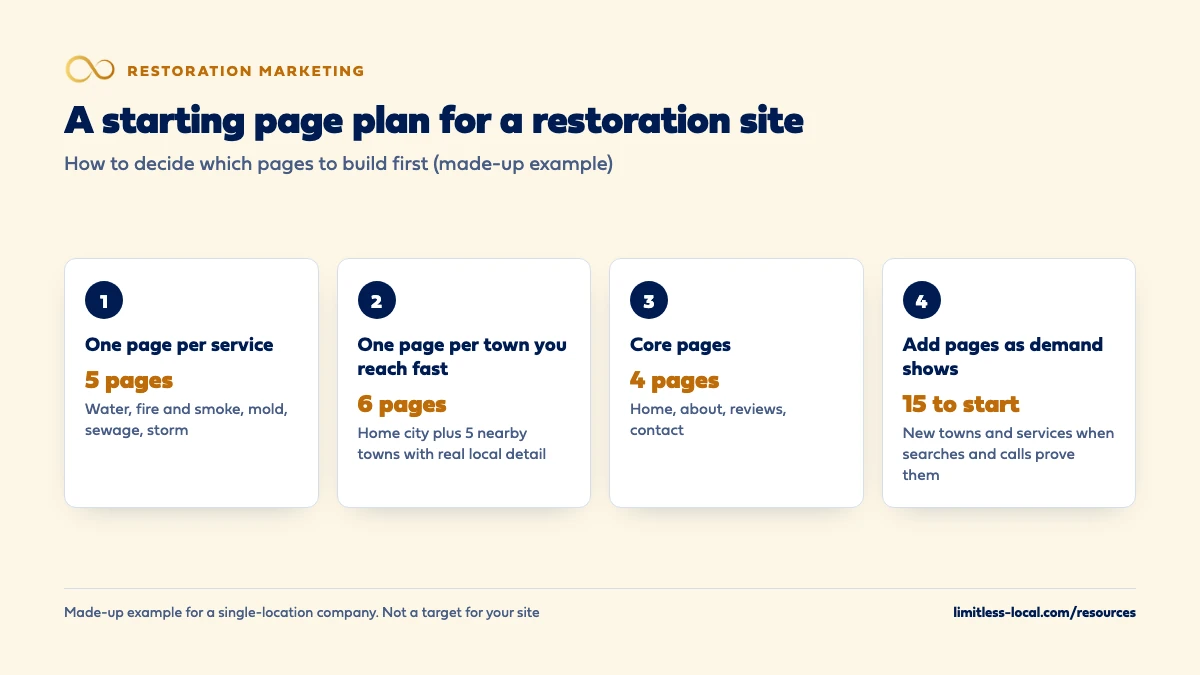
These numbers are made up to show the method, not a target for your site. Say a single-location restoration company does water, fire and smoke, mold, sewage and storm work, and its job records show most jobs come from its home city and 5 nearby towns.
- Service pages: 5, one per service.
- City pages: 6, the home city’s page plus one each for the 5 nearby towns.
- Core pages: 4, the homepage, about, reviews and contact.
That’s 15 pages to start. Building every service for every town instead would mean 30 service-and-town pages on top of the core pages, nearly all of them near-copies.
A year in, Search Console shows a seventh town bringing searches and the call log shows jobs from it, so it gets a page. The company also signs a property management contract, so a commercial services page follows. The site grows because the work did, not because a page count said so.
Frequently asked questions
Do I need a separate page for every town in my Google service area?
No. Build pages for the towns you reach fast and can describe in real detail. The rest can be listed on your service area section until they bring steady work.
Can I use the same city page template and change the town name?
A shared layout is fine. Shared wording isn’t. Each page needs details that are only true of that town, or it’s the near-copy pattern Google’s doorway rules describe.
Should every service have its own page even if I rarely do it?
Only for services you want more of. A page for work you rarely take on can bring calls you’ll turn away.
Do blog posts count toward my service and city pages?
No. Blog posts answer questions and show expertise, but they don’t replace a clear page for each service and town. Link blog posts to the matching service page.
Will more pages help me show up in Google Maps?
Not directly. Google’s local ranking help says local results are mainly based on relevance, distance and popularity. Good service pages help Google understand what you do, but piling up city pages won’t move you into the map results in a town that’s far from your business.
How long should a restoration service page be?
Long enough to answer what a homeowner needs and no longer. Google says it doesn’t have a preferred word count, so write until the page covers the service, your process, your towns and how to reach you.
Key takeaways
- Build one page per service you sell and one per town you reach fast and can describe in real detail.
- For most single-location restoration companies, that’s a few service pages and a handful of town pages to start.
- Stop when a new page would only swap the city name; Google’s spam policies call that doorway abuse.
- Your Google service area is a cross-check, not a page target.
- Add pages one at a time when Search Console and your calls show demand.
Want a second set of eyes on your setup?
We'll look at how you show up locally and where calls are leaking, then send you a plain-English breakdown.
More in this section
- How should a restoration company build city pages that rank?
- How much should a restoration company budget for landing pages?
- What does a restoration lead cost on Local Services Ads?
- How many Google reviews does a restoration company need?
- Which mobile speed fixes does a restoration website need?
Sources
- Creating Helpful, Reliable, People-First Content — Google Search Central
- Spam Policies for Google Web Search — Google Search Central
- Manage your service areas for service-area & hybrid businesses — Google Business Profile Help
- SEO Starter Guide: The Basics — Google Search Central
- Performance report (Search results) — Search Console Help
- Guidelines for representing your business on Google — Google Business Profile Help
- Tips to improve your local ranking on Google — Google Business Profile Help