
What does a restoration lead cost on Local Services Ads?
- How much does a water damage lead cost on Google Local Services Ads in 2026?
- How does Google price a restoration lead on Local Services Ads?
- Is there a typical price for a water damage lead?
- What makes my restoration leads cost more or less?
- Which bid mode should a restoration company use?
- How does my budget limit what I spend in a month?
- Which restoration calls will I be charged for?
- Can I dispute a bad restoration lead and get my money back?
- How do I stop paying for leads my crews can't use?
- Where do I see what I actually paid per lead?
- Is cost per lead the right number to judge for restoration?
- What's different about LSA lead costs for restoration companies
- A worked example: from LSA budget to cost per booked job
- Frequently asked questions
- Key takeaways
- More in this section
- Sources
The short version
- There is no published typical price: an auction sets it, and it varies by market, job type, lead type and bid mode.
- Your budget sets the ceiling: a monthly max you will never pass, after which your ad stops showing.
- Profile quality, including reviews and photos, can mean a better position and a lower cost per lead.
- Leads for job types or areas you don't serve are no longer credited, so tight settings save money.
- Judge LSAs on cost per booked job, not on cost per lead.
For restoration owners trying to work out what Local Services Ads leads will really cost them, why the price moves, and which number to manage.
Get a free visibility audit · Book a growth call
How much does a water damage lead cost on Google Local Services Ads in 2026?
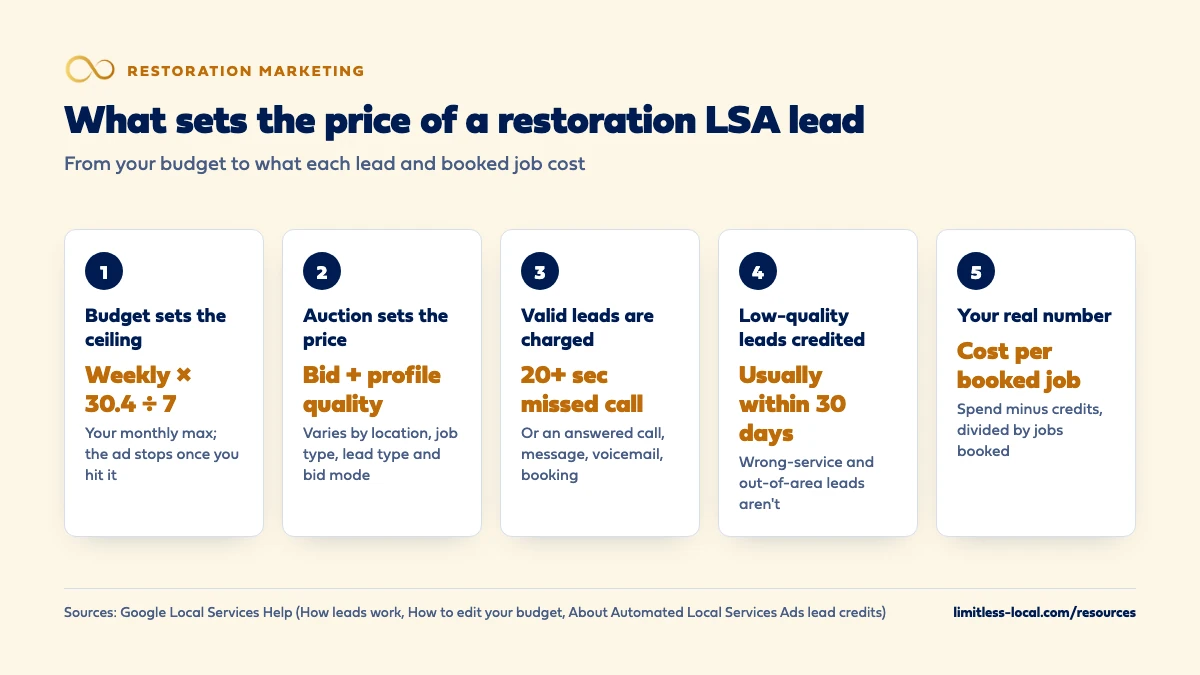
Google doesn’t publish a typical price for a restoration lead on Local Services Ads: each lead is priced in an auction, and Google says the price varies with your location, the job type, the type of lead and your bidding mode. You pay only for valid leads, such as an answered call, a missed call during your listed hours where the caller waits more than 20 seconds, a message, a voicemail or a booking request, and Google credits leads it later judges low quality. Your real number is your own average cost per charged lead, and the one worth managing is what each booked job cost.
That last step is how we look at Local Services Ads for restoration companies: what each booked job cost, not what each lead cost. LSA management is part of our local ads work from the Growth package up. For the wider picture on buying versus generating water damage leads, see the water damage leads guide, and the restoration marketing questions library takes the rest one question at a time.
How does Google price a restoration lead on Local Services Ads?
Through an auction. Google describes a bid as the most you’d pay for a lead, and says that when similar local businesses bid on the same lead, those bids decide what the lead is worth. You only pay when you actually get a lead.
Google lists four things that change the price of a lead: your location, the job type, the type of lead (call, message or booking) and your bidding mode. Every lead you’re charged for counts toward your budget. So two restoration companies in the same metro can pay different amounts for the same kind of water damage call. Sources: How bidding works for Local Services Ads and How leads work.
Is there a typical price for a water damage lead?
Not one that Google publishes. Google’s own answer to “How much does Google Local Services Ads cost?” is that you choose a budget based on the number of new leads you want each week, you can change it whenever you need to, and you pay only when a potential customer contacts you through the ad. It points to a budget calculator on the Local Services Ads homepage rather than quoting a price.
So treat any single national figure for a restoration lead with care. In our judgement, a number like that is at best an average across markets, job types and bid settings that may look nothing like yours. Your own account history, covered below, is the number that counts. Source: Reach Local Customers with Local Service Ads.
What makes my restoration leads cost more or less?
Google names several levers, and most of them are in your hands:
- Profile quality. Google says your rating, number of reviews, average response time, high-quality images and completed verification checks feed profile quality, and that higher quality profiles, including those with images, may rank higher and may also pay lower costs per lead.
- Responsiveness. Missed calls may hurt your responsiveness, which is part of how likely Google thinks your ad is to produce a lead.
- Lead type. Message leads are typically priced lower than the matching phone lead, though Google says that isn’t always so. Message pricing is based on how likely the customer is to book you, including the lead type, the service requested and whether the customer has contacted other Local Services advertisers.
- Bid mode and budget. Covered in the next two sections.
In our judgement, the cheapest lead-cost work for most restoration shops is not touching the bid at all: it’s reviews, real photos of crews and drying equipment, and a phone that gets answered. Optimizing your restoration Google Business Profile covers the reviews and photos side. Sources: About ad rankings and How leads work.
Which bid mode should a restoration company use?
Google offers three bid modes in Local Services Ads:
- Maximize leads (automated, and Google’s recommendation): Google sets your bid to get the most leads for your budget. Google recommends a budget of at least 10 leads per week for this mode.
- Target cost per lead: still automated, with a target you can take from Google or set yourself, which Google describes as around the average you’ll pay.
- Max per lead (manual): you set the most you’d pay for one lead.
Google says it takes about two weeks to see accurate results as the model learns your business, so judge a change after that, not after three days. Once your account moves into Google Ads, manual bidding goes away, and if you had different targets for different service categories in one campaign, Google applies one campaign-level target to all of them; separate campaigns are the way to keep separate targets.
In our judgement, a target cost per lead suits an owner who knows what a lead is worth from their own booked-job numbers. Sources: How bidding works for Local Services Ads and Local Services Ads transition to Performance Max campaigns with pay-per-lead goals.
Curious what your marketing is actually booking?
Get a free visibility audit — no obligation, no sales pitch.
How does my budget limit what I spend in a month?
In the Local Services Ads dashboard you set an average weekly budget. Some weeks you’ll spend less and some weeks more, depending on demand, but you’ll never pass your monthly max, which Google calculates as your average weekly budget times 30.4, divided by 7. Once you hit it, your ad stops showing for the rest of the month unless you raise the budget. If you change the budget mid-month, the new figure decides what you can spend over the days left in that month.
After the move into Google Ads, the weekly budget becomes a daily average budget (the old weekly figure divided by 7), and monthly spend is capped at that daily average times 30.4. Daily spend can run higher on busy days without passing the cap.
For restoration that cap matters most in a freeze or storm week, when a month’s budget can go in days. Why that happens is its own question, covered in why restoration ad costs spike during storms. Sources: How to edit your budget and Local Services Ads transition to Performance Max campaigns with pay-per-lead goals.
Which restoration calls will I be charged for?
Google charges for valid leads: a call you answer or return and speak on; a missed call during your business hours where the caller stays on the line more than 20 seconds; a text or email; a voicemail; or a booking request. A few details change what restoration companies pay:
- Voicemail counts as connected. If a call goes to voicemail or an automated greeting during your business hours, it’s charged once the caller stays on more than 20 seconds, whether or not they leave a message.
- “Business hours” means your Google Business Profile hours. With an ad schedule, unanswered calls are only charged inside both your schedule and those hours.
- Repeat callers. Follow-up calls or messages from the same number or email within 15 days of activity aren’t charged again.
For a company that lists itself as open around the clock, a 3 a.m. call that rolls to voicemail can be a charged lead you never spoke to. How fast to answer emergency calls covers the night-coverage side. Source: How leads work.
Can I dispute a bad restoration lead and get my money back?
Not the way many owners remember. Google now relies on automated credits: leads are checked when the customer first makes contact, invalid or low-quality ones aren’t charged, and charged leads keep being reassessed, with credits for low-quality ones usually applied to your account balance within 30 days. The original charge still shows on your invoice. Each lead is marked Charged, Not charged, In review or Credited.
You can still rate a lead in the feedback survey, and Google says it may occasionally credit leads reported as poor quality there. But Google no longer credits leads marked “job type not serviced” or “geo not serviced”. A homeowner looking for carpet cleaning, or a burst pipe two counties past where your trucks go, is now a cost you carry. Sources: About Automated Local Services Ads lead credits and How leads work.

How do I stop paying for leads my crews can't use?
Google’s own advice for unwanted leads is to refine your service areas, categories and service types, and it warns that narrowing them can reduce lead volume. That’s the trade: fewer leads, but fewer that you pay for and can’t use.
In our judgement, restoration owners should settle it with drive time and job mix, not with whatever the account was set to on day one:
- Draw the area a crew can reach quickly in an emergency, not the area you’d accept on a slow week.
- Switch on only the job types you’ll actually take, since wrong-service leads are no longer credited.
- Pause the campaign when crews are full. In Google Ads you can set it to Paused and switch it back to Enabled when you can take leads again.
If you regularly have more leads than crews, avoiding paying for more leads than your crews can handle goes deeper. Source: How leads work.
Where do I see what I actually paid per lead?
In the Local Services Ads dashboard, the Billing menu in your leads inbox shows what you were charged, and the reporting dashboard shows total spend and leads by channel (message, call and booking). Once your account has moved into Google Ads, three columns do the job: Conversions (the leads you were charged for), Cost (total spend) and Cost / conv. (your average cost per lead). The Leads page keeps each lead’s charge status and lets you download leads into your own CRM.
One warning before the move: Google says your old Local Services Ads performance reports won’t carry over to Google Ads, so download or screenshot them first. Past leads, messages and call recordings do transfer. Sources: How leads work and Local Services Ads transition to Performance Max campaigns with pay-per-lead goals.
Is cost per lead the right number to judge for restoration?
It’s the number Google shows you, but in our judgement it’s not the one to manage. A charged lead can be a homeowner with water spreading under the floor, or someone wanting a job you don’t do.
The number to manage is cost per booked job: spend, minus credits, divided by the jobs those leads turned into. For restoration it’s worth noting the job value next to it, because one large mitigation job can be worth several small ones, and insurance-paid jobs can take a while to close. Mark every lead in your own system (booked, estimate only, wrong service, out of area, spam), and judge over a couple of months.
Tracking which marketing brings in booked restoration jobs covers the setup, and what a good cost per booked job looks like covers how to set your own ceiling.
Talk it through with someone who runs this every day
A 15-minute growth call: your market, your numbers, and what a realistic budget looks like. No pressure.
What's different about LSA lead costs for restoration companies
One category, broad scope. The US Local Services Ads category is Water damage services, which Google describes as professionals who clean and inspect water damage issues such as mold, sewage and paint damage. Google’s category requirements don’t list a separate fire or smoke category, so in practice your LSA lead costs are water damage lead costs. Source: Business screening and verification requirements (United States).
Emergencies at all hours. Because Google treats your Business Profile hours as business hours, the hours you list decide which missed calls and voicemails you can be charged for. In our judgement, list the hours someone can really answer and dispatch, or use an ad schedule that matches them.
Verification feeds the price. Completed verification checks are part of profile quality, which Google says can affect both rank and cost per lead. For water damage services, the checks Google lists (for select users) include background checks, business registration, general liability insurance, state licenses and IICRC certification.
Spiky demand. In our judgement, decide before freeze or storm season whether you’d raise the budget or let the ad stop once the monthly max is hit.
A worked example: from LSA budget to cost per booked job
These numbers are made up to show the math, not a benchmark for any market. Say your account has moved into Google Ads with a weekly budget of $420, so Google sets a daily average budget of $60. Your monthly cap is $60 times 30.4, or $1,824.
In a busy month you hit the cap with 24 charged leads, so Cost / conv. shows $76. Over the next few weeks Google credits 3 of them as low quality, giving $228 back to your balance. Net spend is $1,596 for 21 leads you kept paying for.
Now the part Google can’t see. You mark every lead: 6 became booked jobs, a few were estimates, and the rest were wrong-service or out-of-area calls that Google no longer credits. Your cost per booked job is $1,596 divided by 6, or $266. Whether that’s good depends on what those 6 jobs were worth, which is why job value sits next to the count.
On our side, Local Services Ads management starts at the Growth package ($4,500 a month), which also covers Google Ads management up to $5,000 a month in ad spend. Essentials ($3,500 a month) doesn’t include LSAs. Ad spend is paid to Google separately.
Frequently asked questions
Do message leads cost less than calls?
Usually. Google says message leads are typically priced lower than the matching phone lead, though not always, and their price is based on how likely the customer is to book you.
Will I be charged twice if the same homeowner calls back?
Not within 15 days of activity, if the contact comes from the same phone number or email address. After 15 days with no activity, a new contact can be a new charged lead.
Can I still set a maximum price per lead?
Only until your account moves into Google Ads. Google says manual bidding, such as a maximum cost per lead, isn’t supported there; you can still adjust a target for the campaign.
If I answer a call after it rings for 20 seconds, is it charged automatically?
No. Google says the 20-second rule only applies to missed calls. An answered call is judged on the conversation, and poor-quality, duplicate or invalid ones can be credited.
How long before I can judge a bid change?
Google says it takes about two weeks to see accurate results while the model adjusts, so give a bid or budget change at least that long before reading anything into it.
Key takeaways
- Google publishes no typical restoration lead price; an auction sets it, and it varies by location, job type, lead type and bid mode.
- Your monthly max (weekly budget × 30.4 ÷ 7) caps spend; once you hit it, the ad stops for the month.
- Reviews, photos, verification and answering the phone can lower your cost per lead as well as raise your rank.
- Wrong-service and out-of-area leads are no longer credited, so set job types and areas to the work you’ll take.
- Manage cost per booked job and job value, not cost per lead.
Ready to compare options?
Book a short growth call and we'll walk through the math for your service area, including when we're not the right fit.
More in this section
- Should a restoration company run Google Ads, LSAs or both?
- How should a restoration company run Google Ads for fire damage?
- What is a good cost per booked job for a restoration company?
- How much do missed calls cost a restoration company?
- How should a restoration company market to commercial properties?
Sources
- How leads work — Google Local Services Help
- How bidding works for Local Services Ads — Google Local Services Help
- How to edit your budget — Google Local Services Help
- About ad rankings — Google Local Services Help
- About Automated Local Services Ads lead credits — Google Local Services Help
- Local Services Ads transition to Performance Max campaigns with pay-per-lead goals — Google Ads Help
- Reach Local Customers with Local Service Ads — Google Ads
- Business screening and verification requirements (United States) — Google Local Services Help