
How do I keep marketing steady while hiring restoration techs?

- How do I keep restoration jobs coming in while I hire and train new techs?
- Should I cut my marketing while I'm short on techs?
- How do I figure out how much work my crews can take while I hire?
- Which marketing should keep running no matter what?
- Which marketing should I turn down first?
- Should I lower my ad budget or pause the campaign?
- How do I keep Local Services Ads steady while I hire?
- Should my recruiting ads run alongside my customer ads?
- How do I bring marketing back up as each new tech gets up to speed?
- What should the office do differently while crews are stretched?
- How do I know the marketing stayed steady enough?
- What's different about hiring for a restoration company
- A worked example: trimming the ad budget for one short crew
- Frequently asked questions
- Key takeaways
- More in this section
- Sources
The short version
- Keep the Google profile, reviews, website and referral partners going full speed.
- Lower ad budgets to match current crews; pause only if needed, never remove.
- Keep recruiting ads and budgets separate from customer ads.
- Raise paid spend in steps as each new tech starts running jobs alone.
For restoration owners adding techs or a crew who don’t want to choke off work now or face an empty schedule once the new hires are ready.
Get a free visibility audit · Book a growth call
How do I keep restoration jobs coming in while I hire and train new techs?
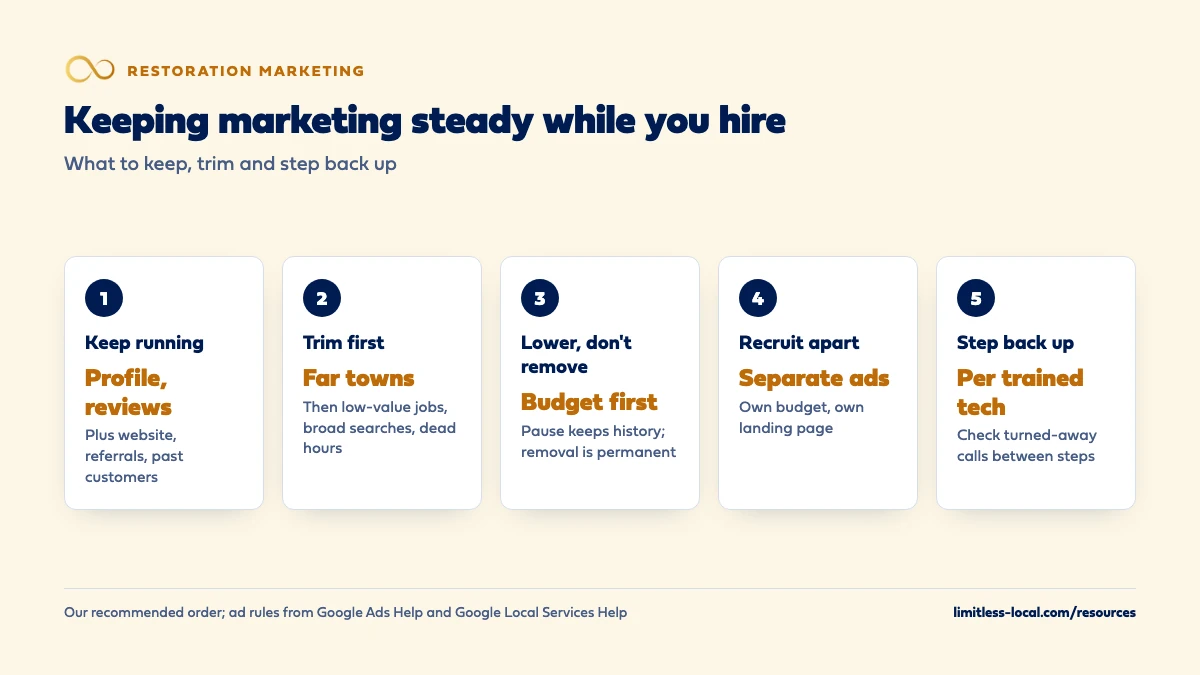
Keep the slow-building channels running at full speed, meaning your Google profile, reviews, website and referral partners, because cutting them leaves a gap months later when the new techs are ready. Turn paid ads down to the jobs your current crews can actually run by lowering budgets, trimming far towns and narrowing hours, instead of removing campaigns. Run recruiting ads separately from customer ads, and raise paid spend in steps as each new tech starts running jobs alone.
That’s how we’d pace it for a client too: steady foundation work, with paid spend matched to the crews you have this week. Our packages cover both sides, and we run them for restoration companies month to month, so the plan can change as your crews do. The restoration marketing guide covers channels and budgets, and the rest of the restoration marketing questions go one question at a time.
Should I cut my marketing while I'm short on techs?
Cut some of it, not all of it, and not all at once. Restoration marketing splits into two kinds. Some channels build slowly and keep paying for months: your Google Business Profile, reviews, your website pages and referral relationships. SEO work typically takes 3-6 months to show meaningful organic growth. Other channels turn on and off within days: Google Ads and Local Services Ads.
If you shut off the slow channels while you hire, the gap shows up months later, right about when the new techs are trained and need work. If you leave the paid channels wide open, you pay for calls nobody can run. The steady approach is to keep the slow channels going at full speed and turn the paid ones down to match the crews you have this week.
How do I figure out how much work my crews can take while I hire?
Count it in jobs, not hours. For water work, the limit is usually how many drying jobs your crews can set up, check and pull equipment from in a week, plus how much drying equipment you own. A crew that is monitoring four drying jobs may have room to set up a fifth but not to start a rebuild.
Write down three numbers for the hiring period, in our view the most useful starting point:
- New jobs per week you can start with the techs you have today.
- Jobs you turned away or delayed last month, from the call log or the office’s notes.
- The week you expect each new hire to run jobs alone, not just ride along.
The first number sets your paid marketing now. The third tells you when to turn it back up. Expect to revise both, because hiring rarely goes on schedule.
Which marketing should keep running no matter what?
The things that compound and cost little to keep going:
- Your Google Business Profile. Keep hours, services and photos current. Google says complete, accurate information makes a business more likely to show up in local results (Google Business Profile Help).
- Reviews. Google says more reviews and positive ratings can help local ranking. Keep asking after every finished job, even in a stretched month.
- Website pages. Content you publish now is what ranks after the new techs start.
- Referral partners. Plumbers and property managers remember who showed up. Tell them honestly if your response time is longer for a few weeks; it’s better than missing their call. Building a referral network covers how to keep those relationships.
- Past customers. Follow-up emails and review requests cost almost nothing and don’t create emergency work you can’t staff.
Which marketing should I turn down first?
Turn down the spend that brings the least valuable or hardest-to-serve work first, and protect the emergency water calls in your core towns:
- Far towns. Jobs at the edge of your area take the most drive time from a short crew.
- Lower-value job types. If a stretched crew has to choose, most restoration owners would rather run the water mitigation job than a small cleanup.
- Broad searches. General searches that bring a mix of jobs, ahead of the specific emergency searches.
- Hours nobody can answer. Ads running at 2 a.m. when the on-call tech is already on a job.
That order is our judgement, not a platform rule, and you can change it to fit what your jobs are actually worth. The settings that do the trimming, from daily caps to schedules and Local Services Ads pauses, are covered in detail in avoiding paying for more leads than you can handle.
Curious what your marketing is actually booking?
Get a free visibility audit — no obligation, no sales pitch.
Should I lower my ad budget or pause the campaign?
Lower the budget first; pause only if you can’t take any paid work for a while; never remove a campaign you might want back.
Google says a change to your average daily budget takes effect right away, and that a decrease may lower spend (Google Ads Help). Budget changes don’t trigger Smart Bidding’s “Learning” status and don’t remove your historical data (Google Ads Help). That makes a budget cut the gentlest way to slow things down.
Pausing is also temporary: Google says a paused campaign stops showing ads and charging, and keeps all its settings and history for when you resume. Removing a campaign is permanent; you can’t resume or restore it (Google Ads Help). One catch when you turn things back on: resuming a campaign doesn’t restart ad groups or keywords you also paused, so you have to turn each of those back on yourself.
How do I keep Local Services Ads steady while I hire?
Google is moving Local Services Ads into Google Ads as Performance Max campaigns with pay-per-lead goals. Once your account has moved, budgets are daily, and you can set the campaign to Paused to stop receiving leads and back to Enabled to resume. Service areas and ad schedules can be changed in Google Ads without touching your Google Business Profile (Google Ads Help).
While you’re short-handed, watch unanswered calls: Google can charge for a missed call during your business hours if the caller stays on the line for more than 20 seconds (Google Local Services Help). If nobody can answer at certain hours this month, narrow the ad schedule to the hours someone can. Avoiding paying for more leads than you can handle covers how the missed-call rule and ad schedules interact.
Google also says that narrowing service areas, categories and service types can bring better-fit leads but may reduce overall lead volume, which is what you want while you hire.
Should my recruiting ads run alongside my customer ads?
Run them, but keep them separate. Job ads and customer ads have different goals, different landing pages and, on Meta, different rules. Meta treats employment ads as a Special Ad Category with limited targeting: you can target by location but not by ZIP code, you can’t exclude locations, and in the US a city target includes a 15-mile radius around the city center (Meta Business Help Center).
Keeping them apart also keeps your numbers honest. If recruiting spend sits in the same budget as customer ads, your cost per booked job looks worse than it is, and you may cut the customer marketing that was working. Send applicants to a careers page or a separate number, so they don’t tie up the line homeowners call with water on the floor.

How do I bring marketing back up as each new tech gets up to speed?
In steps, tied to capacity you can see. When a new tech starts running jobs alone, raise paid spend by roughly the share of capacity they add, then wait a week or two and check calls turned away and cost per booked job before the next step. Turn far towns and lower-value job types back on last.
Two Google rules help you plan. For most campaigns, Google won’t charge more than 2 times your average daily budget in a day, and monthly spend won’t exceed your average daily budget times 30.4 (Google Ads Help). And Google says Smart Bidding performance typically settles toward a new goal over 1 to 2 conversion cycles, so don’t judge a budget increase on its first few days. If you use an ad schedule, Google says the campaign still paces toward the same monthly total (Google Ads Help).
What should the office do differently while crews are stretched?
Answer every call anyway. A homeowner who reaches a person and hears an honest arrival time may wait or call back; one who hits voicemail usually calls the next company. When you truly can’t take a job, say so quickly and, where you have a trusted partner, pass it on. In our view that protects your reviews and your referral relationships better than a slow no-show.
Keep a simple log of every call the office had to turn away or delay. That log is the clearest evidence of when to raise spend again, and of whether the hire is paying off. If nights and weekends are the gap, who should answer calls after hours covers the options.
How do I know the marketing stayed steady enough?
Look at a few numbers every week during the hiring period: booked jobs against the capacity you wrote down, calls turned away or delayed, and cost per booked job. If booked jobs sit near capacity and turned-away calls are low, the marketing is matched to the crews. If you’re turning work away, spend is too high for this week. If crews are idle, it’s too low or the wrong towns and job types are switched off.
Your call tracking should already show which channel each booked job came from; tracking which marketing brings booked jobs walks through the setup, and what a good cost per booked job looks like helps you judge the result.
Not sure which of these is costing you jobs?
A free visibility audit checks the Google profile, reviews, site and tracking, and shows what to fix first.
What's different about hiring for a restoration company
Equipment caps you as much as people. Drying equipment stays on water jobs for days. A new tech without enough air movers and dehumidifiers to run another job doesn’t add as much capacity as the headcount suggests.
Storms ignore your hiring plan. A freeze or storm can flood the phones the week your new hire starts. Decide in advance how you’ll handle a surge, and see handling a storm call surge for the playbook.
Mitigation and rebuild use different people. If you’re hiring for mitigation, the rebuild side may still have room, and the reverse. Throttle the marketing for the side that’s short, not both.
Insurance money comes late. When the insurer pays weeks after the job, hiring and marketing draw on the same cash. A steady, smaller ad budget is easier to carry than one that swings up and down.
A worked example: trimming the ad budget for one short crew
These numbers are made up to show the math, not a benchmark for your market. Say two crews can start about 8 new water jobs a week between them, and one tech has just left, so for the next several weeks you can start about 6. Your Google Ads budget has been $3,000 a month, which at your recent cost per booked job was bringing in roughly the work two full crews could run.
Matching spend to capacity, 6 out of 8 is three-quarters, so the new monthly budget is about $2,250. In Google Ads that’s an average daily budget of about $74, because the monthly cap is the daily average times 30.4. The Google profile, review requests and website work stay exactly as they were. When the new tech is running jobs alone, you go back toward $3,000 in a step or two, checking turned-away calls in between.
If you want a team to run that pacing for you, our Growth package is $4,500 a month and includes Google Ads management for up to $5,000 a month in spend plus Local Services Ads management; ad spend is paid to Google separately. There are no long-term contracts: the standard ask is three months, written into the contract, but we won’t make you stay.
Frequently asked questions
Will pausing Google Ads for a month hurt my campaign when I turn it back on?
Google says pausing keeps all settings and history and you can resume any time. Removing a campaign is the one to avoid, because it can’t be restored.
Does lowering my budget reset Smart Bidding?
No. Google says budget changes take effect in the next auction and don’t trigger “Learning” status or remove historical data.
Should I stop asking for reviews while I'm short-staffed?
No. Google says more reviews and positive ratings can help local ranking, and asking costs nothing. Keep asking after every finished job.
Can I post job openings on my Google Business Profile?
Your profile is where homeowners look for help, so in our view it’s better kept for customers. Run recruiting through a careers page and separate job ads.
Should I turn off Local Services Ads completely while I hire?
Only if you can’t take any paid leads. Otherwise narrow the service area and the ad schedule to what your crews can cover, and pause the campaign only if that’s still too much.
How long should I wait after raising the budget before judging it?
Give it at least a week or two. Google says Smart Bidding typically settles toward a new goal over 1 to 2 conversion cycles.
Key takeaways
- Keep the Google profile, reviews, website and referral partners running; they build the work your new techs will need.
- Match paid spend to the jobs your current crews can start each week.
- Lower budgets before pausing, pause before removing, and never remove a campaign you’ll want back.
- Narrow Local Services Ads schedules and areas to hours and towns someone can actually answer and reach.
- Run recruiting ads separately, and raise customer spend in steps as each new tech runs jobs alone.
Want a second set of eyes on your setup?
We'll look at how you show up locally and where calls are leaking, then send you a plain-English breakdown.
More in this section
- How should a restoration company handle marketing during storm season?
- How do I track which marketing brings in booked restoration jobs?
- Is my restoration marketing agency producing real jobs?
- How should a restoration company market to commercial properties?
- How should a restoration company market to real estate agents?
Sources
- Enable, pause, or remove a campaign — Google Ads Help
- How budget changes take effect — Google Ads Help
- About Smart Bidding learning — Google Ads Help
- About Ad Scheduling — Google Ads Help
- Local Services Ads transition to Performance Max campaigns with pay-per-lead goals — Google Ads Help
- How leads work — Google Local Services Help
- About audiences for housing, employment or financial products and services campaigns — Meta Business Help Center
- Tips to improve your local ranking on Google — Google Business Profile Help