
How should a restoration company build city pages that rank?
- How do I build service area pages for nearby cities without getting flagged as doorway pages?
- What can city pages do for a restoration company, and what can't they?
- Step 1: Which towns should get their own page?
- Step 2: What makes a city page a doorway page?
- Step 3: What should each restoration city page include?
- Step 4: How many city pages should I start with?
- Step 5: How should city pages fit into the site?
- Step 6: How should I title city pages?
- Step 7: Should I set up a Google Business Profile for each city?
- Step 8: How do I know if a city page is working?
- What city page mistakes should a restoration company avoid?
- What's different about city pages for restoration companies
- A worked example: deciding which towns get a page
- Frequently asked questions
- Key takeaways
- More in this section
- Sources
The short version
- Pick towns from your job records and drive times, not from a keyword list.
- Each page needs facts only true for that town; otherwise the town belongs in a sentence, not a page.
- Link city pages to your service pages in a clear, browsable structure.
- City pages help the regular results; they don't replace a real location for the map results.
For restoration owners who want to show up in the towns around them, and want city pages that help rather than pages Google treats as spam.
Get a free visibility audit · Book a growth call
How do I build service area pages for nearby cities without getting flagged as doorway pages?
Build city pages only for towns where you really work and can respond quickly, and make each one say something true and specific about that town: where your crews come from, how fast you can get there, jobs you’ve done nearby and the services you offer there, linked to your main service pages. Pages that only swap the city name, or that funnel visitors to one page, match what Google’s spam policies call doorway abuse. Fewer, genuine city pages inside a clear service-area section beat a page for every postal code.
This is how our website work for restoration companies handles service areas: a few city pages with something real to say, tied to the service pages that do the selling. For where out-of-area leads come from and whether to buy them, see the water damage leads guide; the restoration marketing questions library covers the rest one question at a time.
What can city pages do for a restoration company, and what can't they?
A good city page can help you show up in the regular web results when someone searches for water damage help in a town you serve, and it gives that searcher a reason to call you instead of a company that only mentions the town in a footer.
What it can’t do, in our judgement, is put you in the map results for a town far from your business. Google says local results are mainly based on relevance, distance and popularity, and distance means how far each business is from the person searching. A city page doesn’t change where your business is. For the map side, see getting your restoration company back into the Map Pack. Source: Tips to improve your local ranking on Google.
Step 1: Which towns should get their own page?
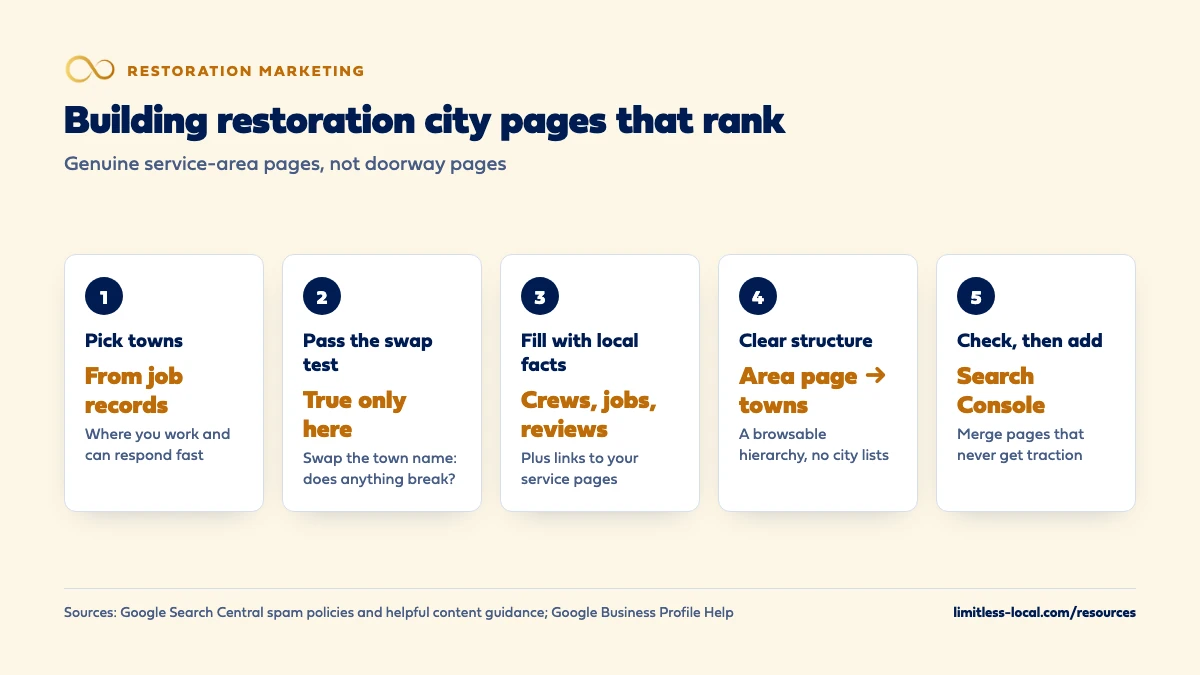
Start from your job records, not a keyword tool. In our judgement, a town earns a page when you’ve done real jobs there, can get a crew there quickly in an emergency, and want more work there. Everything else can be named in sentences on your main service area page.
Google’s Business Profile rules are a useful sanity check on how far is too far. Google lets a service-area business list up to 20 service areas, and says the boundaries of the overall area shouldn’t be more than about 2 hours of driving time from where the business is based, while noting larger areas may suit some businesses. That rule is about your profile, not your website, but in our judgement a city page for a town outside the area you’d list on Google is a page for work you won’t take. Sources: Manage your service areas for service-area & hybrid businesses and Guidelines for representing your business on Google.
Step 2: What makes a city page a doorway page?
Google’s spam policies describe doorway abuse as pages created to rank for specific, similar searches that lead people to intermediate pages less useful than the final destination. Its examples include pages targeted at specific regions or cities that funnel users to one page, and substantially similar pages that are closer to search results than a clearly defined, browsable hierarchy. Its scaled content abuse policy covers generating many pages, with AI tools or otherwise, without adding value for users.
In our judgement, the test is simple: if you swapped the city name for another town, would anything on the page become untrue? If not, it’s a doorway. A real city page has facts that only fit that town. Source: Spam policies for Google web search.
Step 3: What should each restoration city page include?
In our judgement, these are the details that make a page true for one town and useful to someone there:
- Where you come from and how long it takes: which shop or crew covers the town, said honestly, without promising a time you can’t keep at 3 a.m.
- Jobs you’ve done there: short descriptions by neighborhood or building type, never a customer’s address or name without permission.
- What’s local about the work: the housing stock, basements or slabs, flood-prone areas or the commercial buildings you serve there, if you genuinely know them.
- Services available in that town, each linking to your main water damage, sewage, mold or fire page.
- Reviews from customers in that town, with permission.
- Your own photos from local jobs, with no identifiable homes or people.
Google’s people-first questions fit here: does the content show first-hand expertise, and would your audience find it useful if they came straight to you? Photos are their own question; whether job photos help a restoration company rank covers it. Source: Creating helpful, reliable, people-first content.
Curious what your marketing is actually booking?
Get a free visibility audit — no obligation, no sales pitch.
Step 4: How many city pages should I start with?
Fewer than you think. Google’s helpful content guidance lists warning signs including producing lots of content on many topics in the hope that some performs well, and using extensive automation to produce content on many topics. Twenty near-identical town pages written in an afternoon fit that description.
In our judgement, start with the handful of towns where most of your jobs already come from, write those well, and add more only when you have something true to say about the next town. A town you serve but can’t write about yet goes in a plain sentence on the service area page, not in a block of town names, which Google’s spam policies list as keyword stuffing. Sources: Creating helpful, reliable, people-first content and Spam policies for Google web search.
Step 5: How should city pages fit into the site?
Give them a clear home. In our judgement, a structure like this works for most restoration sites:
- A service area page that names every town you cover in sentences and links to each city page.
- City pages at descriptive addresses such as /service-areas/[town]/, each linking to the service pages that apply.
- Service pages (water damage, sewage, mold, fire) that link back to the service area page.
That’s the “clearly defined, browsable hierarchy” Google’s doorway policy contrasts with doorway pages. Google’s starter guide adds that words in a URL can help people judge a result, and that link text tells users and Google what the linked page is about, so link with plain words like “water damage restoration in [town]”. The service pages themselves matter most; what a sewage cleanup page should say is one example. Sources: Spam policies for Google web search and SEO Starter Guide.
Step 6: How should I title city pages?
Google says a good title is unique to the page, clear, concise and accurately describes it, and warns against boilerplate titles that vary by only a single piece of information, as well as keyword stuffing in titles. A set of pages titled “Water Damage Restoration [Town] | Best Water Damage Company [Town]” with only the town changing is the pattern it describes.
In our judgement, let the title follow what’s actually on the page: “Water Damage and Sewage Cleanup in [Town] | [Business Name]” for a town where you do both, and something different where the work is different. Keep the H1 as the plain version of the same thing. Source: Influencing your title links in search results.
Step 7: Should I set up a Google Business Profile for each city?
Not unless you have a real, staffed location there. Google’s guidelines say service-area businesses should have one profile for the central office with a designated service area, can’t list a “virtual” office unless it’s staffed during business hours, and can’t list an office at a co-working space unless it has clear signage, receives customers and is staffed. Separate profiles are allowed for separate locations with separate service areas and separate staff.
So the city page is the honest way to cover a town from your existing location. In our judgement, fake addresses risk the profile you already have and gain little. Optimizing your restoration Google Business Profile covers setting the service area correctly. Source: Guidelines for representing your business on Google.
Step 8: How do I know if a city page is working?
Check it in Google Search Console’s Performance report, grouped by page: it shows which queries a page appears for, its clicks, impressions and average position. Then check your call tracking for calls from that page, and your job records for booked jobs from that town.
Give it time; in our experience SEO typically takes three to six months to show meaningful organic growth. In our judgement, a city page that still shows almost no impressions after that, and no calls, either needs more that’s true about the town or should be merged into the service area page with a redirect. Google’s starter guide suggests redirecting a page that duplicates another to the one that best represents the information. If you use tracking numbers on the site, whether call tracking numbers hurt restoration rankings covers how to set them up. Sources: Performance report (Search results) and SEO Starter Guide.
What city page mistakes should a restoration company avoid?
- Footers or sidebars listing dozens of towns. Google’s spam policies name blocks of text listing cities and regions as keyword stuffing.
- One template, many towns. Pages that differ only by the city name fit Google’s doorway examples.
- Pages for towns you won’t drive to at 2 a.m. They bring calls you turn down.
- Fake local addresses on pages or profiles.
- Response-time promises you can’t keep in every town at every hour.
- Stock photos of disasters or other companies’ crews.
- City pages that never link to a service page, leaving the visitor at a dead end.
In our judgement, each of these costs trust with homeowners as well as with Google. Source: Spam policies for Google web search.
Not sure which of these is costing you jobs?
A free visibility audit checks the Google profile, reviews, site and tracking, and shows what to fix first.
What's different about city pages for restoration companies
Response time is the local fact that matters most. For a homeowner with water on the floor, in our judgement the most useful thing a city page can say is who will come and from where. That’s also the detail most likely to be untrue on a copied page.
Building stock changes the work. Basements, crawl spaces, older plumbing and multi-unit buildings differ from town to town. If you genuinely know those differences, they’re the content that makes a page specific.
Storms are local. In our judgement, a short note on recent storm or freeze work in a town (without customers’ details) is stronger local proof than any amount of generic copy.
Commercial work is often town by town. If you serve property managers or facilities in a particular town, say so on that town’s page.
A worked example: deciding which towns get a page
These numbers are made up to show the method, not a benchmark. Say your Google profile lists 14 towns. You pull last year’s job records: 120 jobs in total, and 72 of them came from just 4 towns. Those 4 towns account for 60% of your jobs, they’re all within a short drive of the shop, and you have jobs, photos and reviews from each.
Those 4 get their own city pages, each linking to your water damage, sewage and mold pages. The other ten towns are named in sentences on the service area page, and one of them gets a page later, once you’ve done enough work there to write about it honestly. Six months on, you check Search Console and your call tracking for each page before adding the next one.
On our side, Essentials ($3,500 a month) includes a content sprint of up to 10 pages, and a themed website build covers up to 25 pages, so there’s room for service pages and a few genuine city pages. We don’t guarantee rankings, and nobody honestly can.
Frequently asked questions
Can I use AI to write city pages?
Google’s scaled content abuse policy covers using generative AI or similar tools to generate many pages without adding value for users. The tool isn’t the issue; pages that add nothing true about the town are.
How long should a city page be?
As long as it takes to say what’s true and useful about that town. Google’s starter guide says content length alone doesn’t matter for ranking.
Should every city page have the same layout?
A consistent layout is fine and helps visitors. In our judgement, the problem is identical content, not an identical template.
Can a city page rank in a town outside my Google service area?
It can appear in regular web results, but in our judgement it’s rarely worth it: you’d be paying in effort for calls you may not want to take.
Do I need a city page for every town in my service area?
No. Name the towns in sentences on a service area page, and give a town its own page only when you have real jobs, reviews or local knowledge to put on it.
Should city pages list a local phone number?
In our judgement, use the same main number your Google profile shows unless you have a real office in that town; a separate tracking setup is a different question with its own rules.
Key takeaways
- Choose towns from job records and drive times, and only build pages you can fill with true local detail.
- Pages that only swap the town name match Google’s doorway and scaled content examples.
- Put city pages in a clear service-area structure that links to your service pages.
- Don’t open Business Profiles for towns without a real, staffed location; cover them with honest city pages.
- Check each page in Search Console and call tracking, and merge pages that never earn traction.
Want a second set of eyes on your setup?
We'll look at how you show up locally and where calls are leaking, then send you a plain-English breakdown.
More in this section
- How do I rank in Google for water damage restoration in my city?
- Do job photos on Google help a restoration company rank?
- How do I optimize my restoration company's Google Business Profile?
- How does a restoration company recover when its reviews drop?
- Do Angi or HomeAdvisor listings help restoration companies rank?
Sources
- Spam policies for Google web search — Google Search Central
- Creating helpful, reliable, people-first content — Google Search Central
- SEO Starter Guide — Google Search Central
- Influencing your title links in search results — Google Search Central
- Tips to improve your local ranking on Google — Google Business Profile Help
- Manage your service areas for service-area & hybrid businesses — Google Business Profile Help
- Guidelines for representing your business on Google — Google Business Profile Help
- Performance report (Search results): Overview and basic setup — Search Console Help