
How do I market each restoration location without duplicate work?
- How does a multi-location restoration company run one marketing system across every branch?
- What's the difference between shared work and duplicate work?
- Step 1: What goes in the playbook every location runs?
- Step 2: How do I manage Google Business Profiles for many locations?
- Step 3: How do I run Google Ads for every location without rebuilding campaigns?
- What about Local Services Ads across several locations?
- Step 4: How do I build location pages without creating duplicate content?
- Step 5: How do I run reviews the same way at every location?
- Step 6: How do I track every location in one system?
- What should each location own locally?
- How do I compare locations fairly?
- What mistakes bring duplicate work back?
- What's different about multi-location marketing for restoration
- A worked example: opening location seven with the playbook
- Frequently asked questions
- Key takeaways
- More in this section
- Sources
The short version
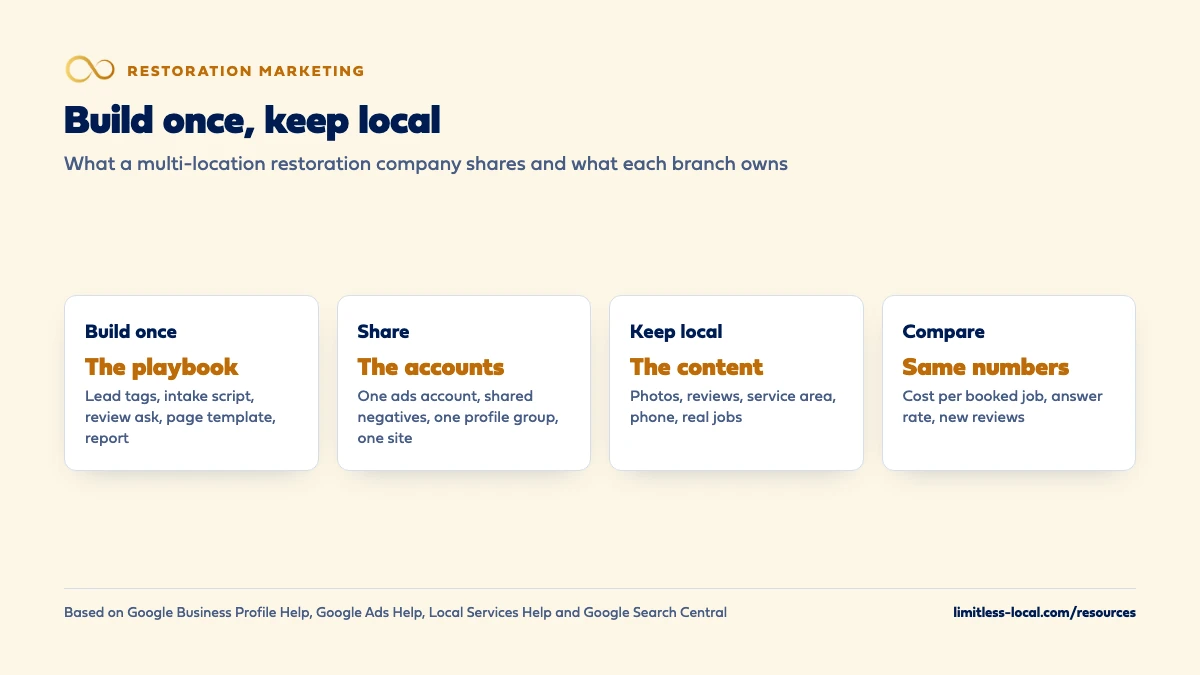
- Write the playbook once: lead tags, intake script, review ask, page template, report.
- Share the accounts: one ads account, shared negatives, one profile group, one website, one tracking account.
- Keep the content local: photos, reviews, service areas, numbers and real jobs per branch.
- Compare locations on the same numbers, starting with cost per booked job.
For restoration owners running several locations and a growing fleet, who are tired of rebuilding the same marketing at every branch.
Get a free visibility audit · Book a growth call
How does a multi-location restoration company run one marketing system across every branch?
Market every restoration location from one playbook: the same account structure, page template, review process, tracking setup and monthly report, with only the local facts changing. Run the shared parts once, like one Google Ads account with a campaign per location and shared negative keyword lists, one Business Profile group updated by spreadsheet, and one website with a page per location. Keep local what has to be local: each branch’s photos, reviews, service area, phone number and job stories. Don’t copy a location page and swap the town name, because Google’s spam policies count near-identical pages aimed at different cities as doorway abuse.
One playbook with each location’s numbers kept separate is how we set up restoration marketing for companies with more than one branch. Growth covers SEO for up to two locations, and Scale covers unlimited multi-location SEO, Local Services Ads across multiple markets and custom attribution and dashboards; the packages page has the details. The restoration marketing guide covers every channel, and the restoration marketing questions library takes the rest one question at a time.
What's the difference between shared work and duplicate work?
Shared work is done once and used everywhere: a campaign structure, a negative keyword list, a page template, a review request process, a report layout. Duplicate work is the same job done again at every branch, usually a little differently each time, by whoever happened to be there.
Most multi-location restoration companies drift into duplication without meaning to. The first branch gets set up carefully. The second copies the first, mostly. By the fifth, each branch has its own phone setup, its own way of asking for reviews and its own idea of what counts as a lead, and the owner can’t compare any of them.
The fix isn’t doing everything centrally. It’s deciding, task by task, what’s built once and what each branch owns. If you’re only now opening a second branch, how to market a second restoration location covers the first step; this page is about running many.
Step 1: What goes in the playbook every location runs?
Write it down once, keep it short, and make every branch use it:
- What counts as a lead and a fixed list of outcome tags: booked, not booked, out of area, wrong service, spam.
- The intake script for the first call, including the address check that catches out-of-area calls.
- The review ask: who asks, when, and with which link.
- Photo standards: what to shoot on every job, with the homeowner’s OK, and where to send it.
- Naming conventions for campaigns, tracking numbers, profiles and pages, so a report can line branches up.
- The location page template and the facts each branch has to supply.
- The monthly report, with the same numbers for every branch.
The playbook is what turns a new location into a checklist instead of a project.
Step 2: How do I manage Google Business Profiles for many locations?
Start with which branches get a profile. Google’s guidelines for representing your business say that if you have different locations for your service business, with separate service areas and separate staff at each one, you’re allowed one profile for each location. A service-area business should have one profile for its central office, and the overall service area shouldn’t extend farther than about 2 hours of driving from where the business is based. A branch that’s just a storage unit or a rented mailbox doesn’t qualify.
Then manage them together:
- Put them in a business group. A business group works like a shared folder for your profiles. Anyone you add as an owner or manager of the group gets access to every current and future profile in it, so nobody shares passwords.
- Give each profile a store code. Store codes are the unique labels that let a spreadsheet update the right location.
- Update by spreadsheet. You can import a spreadsheet to update many profiles at once, such as holiday hours for every branch, and preview the changes before applying them.
Be careful with spreadsheets. Google warns that a spreadsheet app cutting zeros off store codes can create duplicate profiles, and a shifted cell can change many locations at once. Always check the preview.
One more catch: bulk verification needs 10 or more profiles from the same business and isn’t available to service-area businesses. Most restoration companies are service-area businesses, so expect to verify each new profile on its own.
Step 3: How do I run Google Ads for every location without rebuilding campaigns?
Use one Google Ads account with a campaign, or a set of campaigns, per location. Each campaign gets its own budget, its own location targeting and its own reports, so you can fix one branch without touching the others.
The shared parts live at the account level:
- Negative keyword lists. You can build a negative keyword list once and apply it to many campaigns, and when you add a term to the list, the change reaches every campaign that shares it. Jobs, careers, DIY and services you don’t offer go here.
- Account-level negatives apply across all relevant campaigns automatically.
- Conversion tracking set up once, so every branch reports the same way.
New locations start as a copy of a proven campaign, then get their own towns, their own ad text and their own negatives from their own search terms. Raising lead quality across multiple restoration markets covers the per-market tuning in detail.
What about Local Services Ads across several locations?
Watch for overlap. Google’s ad ranking page notes that if your business has multiple locations serving the same geographic area, Local Services will show only the highest-ranking ad for a search. Two branches covering the same suburbs don’t get you twice the exposure there; they just compete with each other.
So draw each branch’s Local Services Ads area around the towns that branch really serves, with as little overlap as you can manage. Use the same job types and the same response standards everywhere, since responsiveness and reviews feed every branch’s ranking.
Curious what your marketing is actually booking?
Get a free visibility audit — no obligation, no sales pitch.
Step 4: How do I build location pages without creating duplicate content?
Share the structure, never the words. Every location page can follow the same template: services, towns served, how to reach the branch, local job write-ups, reviews and the team. What fills it has to be different.
Google’s spam policies describe doorway abuse as pages created to rank for similar searches, and list examples like multiple pages aimed at different cities that funnel people to one page, and substantially similar pages that look more like search results than a real site. A page that’s another branch’s page with the city name swapped is exactly that.
What makes a location page real:
- The branch’s own address or service area, phone number and hours.
- The towns that branch’s crews really reach quickly.
- Write-ups and photos from jobs that branch did.
- Reviews from that branch’s customers.
- Local conditions that shape the work, like freeze-prone pipes, flood zones or older housing.
The same goes for websites: one site with a page per location, not a separate site for each branch. Which cities to target without spam pages covers deciding which towns get their own page.
Step 5: How do I run reviews the same way at every location?
Same process, separate links. Every branch asks the same way at the same point in the job, but each branch uses the review link for its own profile, so reviews land where that branch’s customers will see them.
- The tech or project manager asks at the final walkthrough, with a text or a card carrying the right link.
- Replies follow one standard, written fresh for each review instead of pasted.
- Branch managers reply to routine reviews; anything angry or touching an insurance dispute goes to one person at head office.
- Each branch’s review count and rating go in the monthly report.
A branch that falls behind on reviews shows up in the numbers before it shows up in lost calls.
Step 6: How do I track every location in one system?
One call tracking account, with its own numbers and a label for each location. If one website serves several branches, set the tracking up so each branch’s page shows that branch’s number, and every call lands in the same account already credited to the right location. There’s no need for a separate account per branch. Whether call tracking numbers hurt your restoration rankings covers keeping each branch’s main number consistent while you track.
Then make the job software match. Every lead gets a location label and an outcome tag from the playbook, in ServiceTitan, Housecall Pro, Jobber or whatever you run. When every branch tags the same way, one report can show all of them side by side. Tracking which marketing brings booked restoration jobs covers the channel-by-channel setup.

What should each location own locally?
Centralizing everything is its own mistake. Some work only gets done well by people in the branch:
- Job photos and stories from that branch’s work.
- Review requests at the end of each job.
- Referral partners: the local plumbers, property managers and insurance agents.
- Capacity calls: telling head office when crews are full or have room, so budgets can follow.
- Local changes: a new town, new hours, a new commercial account.
Give each branch manager this short list and a weekly time to send it in. Splitting marketing between in-house staff and an agency covers how this local work fits next to an agency’s.
How do I compare locations fairly?
Use the same few numbers for every branch, for the same months:
- Cost per booked job: each branch’s marketing spend divided by its booked jobs.
- Booked jobs per lead, from the outcome tags.
- Answer rate, so a phone problem isn’t mistaken for a marketing problem.
- New reviews per month.
Weather doesn’t hit every branch at once, so compare each location against its own season where you can, and don’t move budgets on one strange week. Fix the weakest branch first, one change at a time.
What mistakes bring duplicate work back?
- A different agency or freelancer per branch, each with its own accounts and reports.
- A separate ad account per location, so shared lists and tracking have to be rebuilt each time.
- A separate website per branch, which splits your authority and drifts toward doorway territory.
- Branch managers editing profiles on the fly, so the spreadsheet and the live profiles stop matching.
- No naming convention, so nobody can tell which campaign or number belongs to which branch.
Not sure which of these is costing you jobs?
A free visibility audit checks the Google profile, reviews, site and tracking, and shows what to fix first.
What's different about multi-location marketing for restoration
Drive time defines a market. A homeowner with water on the floor wants a crew in the next hour or two, so each branch’s real market is the area its crews reach fast, not the biggest circle on a map.
Weather moves branch by branch. A freeze can swamp one location while another is quiet. Each branch needs its own budget room so a surge in one doesn’t drain the rest.
Branches often win different work. One may live on residential water calls, another on commercial accounts from property managers. The playbook stays the same; the targets and the pages change to fit.
Equipment and crews can move. In a big storm you may send crews from one branch to another. Decide in advance which branch’s profile and numbers those jobs run under, so reporting stays honest.
A worked example: opening location seven with the playbook
This is a made-up example to show how the work splits. A restoration company with six branches opens a seventh.
Reused, with almost no new work:
- The campaign structure, copied from a proven branch, with the shared negative keyword lists and account-level negatives applying automatically.
- The location page template, the intake script, the outcome tags and the review process.
- A new tracking number and website pool from the existing call tracking account.
- A new row in the monthly report.
Built new, because it has to be local:
- The Google Business Profile, added to the business group with its own store code and verified on its own as a service-area business.
- The service area, drawn around towns the new crew reaches fast, with Local Services Ads areas kept clear of the neighboring branch.
- The location page’s content: the crew, the towns, the first jobs and their photos.
- Local referral partners and the first review requests.
Most of the setup is a checklist. The real work goes where it should: into what’s true about the new branch.
Frequently asked questions
Should each restoration location have its own website?
Usually not. One website with a strong page for each location keeps your authority in one place and avoids near-duplicate sites that count as doorway pages.
Can one Google Business Profile cover all my locations?
If each branch has its own staff and its own service area, each is allowed its own profile. A branch without staff, like a storage unit, doesn’t qualify for one.
Should every branch manager have access to every profile?
Not necessarily. Anyone added to a business group can reach every profile in it, so you can add branch managers to their own profile only and keep group access for the people who manage all of them.
Do I need a separate Google Ads account for each location?
No. One account with separate campaigns per location keeps shared negative keyword lists and conversion tracking in one place, while each campaign keeps its own budget and reports.
How do I keep branches from competing in Local Services Ads?
Draw each branch’s service area around the towns it really serves and keep overlap small, since only the highest-ranking ad shows when several of your locations cover the same area.
Key takeaways
- Write one playbook and make every location run it, so a new branch is a checklist.
- Share accounts and lists: one ads account, shared negatives, one profile group, one website, one tracking account.
- Never copy a location page with the town swapped; fill one template with each branch’s real facts.
- Keep Local Services Ads areas from overlapping so your branches don’t compete with each other.
- Compare branches on cost per booked job, answer rate and new reviews, and fix the weakest first.
Want a second set of eyes on your setup?
We'll look at how you show up locally and where calls are leaking, then send you a plain-English breakdown.
More in this section
- How should a restoration company market a second location?
- How do I track which marketing brings in booked restoration jobs?
- How competitive is my local restoration market for marketing?
- How should a restoration company market to commercial properties?
- Best low-budget marketing move for a small restoration company?
Sources
- Guidelines for representing your business on Google — Google Business Profile Help
- Create & manage business groups — Google Business Profile Help
- Import and update Business Profiles in bulk — Google Business Profile Help
- Verify Business Profiles in bulk — Google Business Profile Help
- About negative keyword lists — Google Ads Help
- About ad rankings — Local Services Help
- Spam policies for Google web search — Google Search Central