
What gets an HVAC Google Business Profile suspended?

- Which mistakes get HVAC companies suspended on Google Maps, and how do you avoid them?
- What does a Google Business Profile suspension actually mean?
- Can keywords in my HVAC business name get me suspended?
- What address mistakes get HVAC profiles suspended?
- Can my service area get my profile suspended?
- Can I have more than one profile for my HVAC company?
- What phone number and website rules can trip up an HVAC company?
- Can reviews get my HVAC profile suspended?
- Can my marketing agency get my profile suspended?
- Can categories, hours or my description cause problems?
- What should I do the day my profile gets suspended?
- How do I check my profile so it doesn't get suspended?
- What's different about suspensions for HVAC companies
- A worked example: what a suspension can cost in peak season
- Frequently asked questions
- Key takeaways
- More in this section
- Sources
The short version
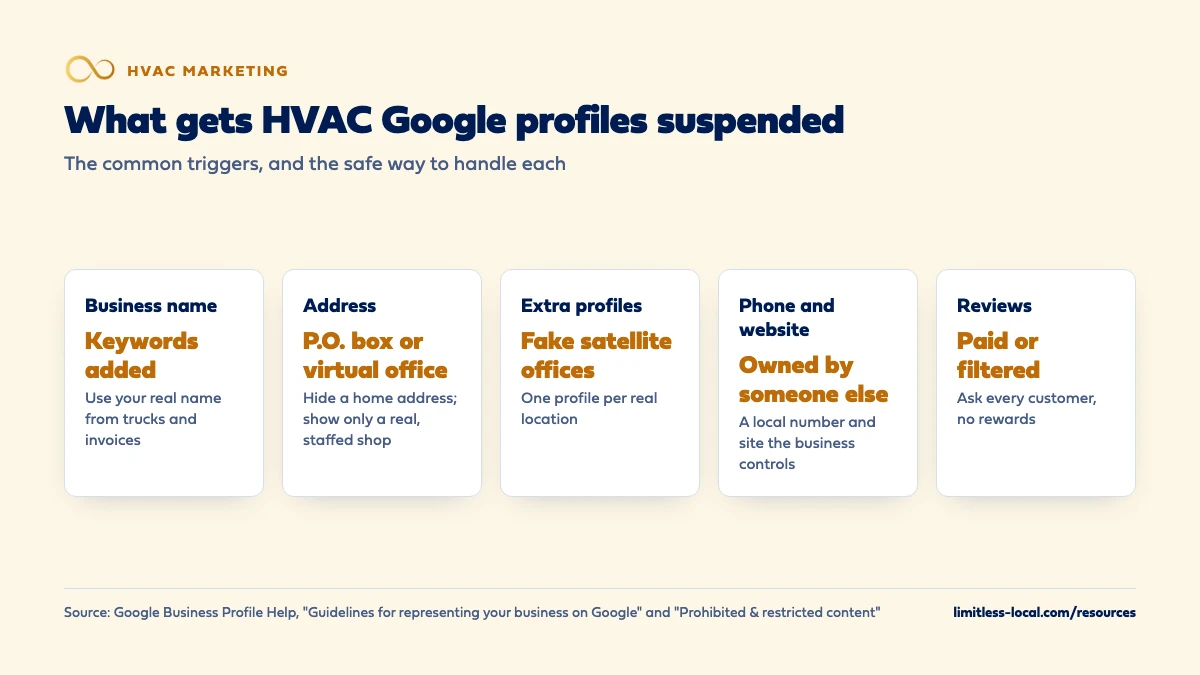
- Use your real business name, exactly as it appears on your trucks and paperwork.
- No P.O. boxes, virtual offices or fake satellite offices; hide a home address.
- One profile per business, with a phone number and website the business controls.
- Never pay or reward customers for reviews; a pattern of violations can suspend every profile on the account.
For HVAC owners who want to keep their Google profile, and the calls it brings, safe from a suspension.
Get a free visibility audit · Book a growth call
Which mistakes get HVAC companies suspended on Google Maps, and how do you avoid them?
An HVAC Google Business Profile usually gets suspended for breaking Google’s rules about who you are and where you are: extra keywords in the business name, a P.O. box or virtual office address, more than one profile for the same business, or a phone number or website that doesn’t belong to the business. Fake or paid reviews and a pattern of policy violations can also get the whole account restricted, which suspends every profile on it. Keep the profile matching your real-world business and you avoid nearly all of it.
Most suspensions start with a shortcut someone took years ago: a keyword in the name, an old address, a duplicate profile nobody remembers making. Business listing cleanup and Google Business Profile management are part of every one of our HVAC marketing packages, and our local SEO work keeps your name, address and phone consistent across 50+ directories. The HVAC marketing guide covers the bigger picture, and the HVAC marketing questions library goes question by question.
What does a Google Business Profile suspension actually mean?
Google says it may suspend or disable profiles that don’t follow its guidelines. In practice, there are a few different things that can happen, and they’re fixed in different places:
- A suspended profile. Your profile breaks a guideline. You fix the problem and appeal through Google’s appeals tool.
- A disabled profile. Google decided your business doesn’t exist at the location you claim.
- A restricted account. Google saw a pattern of policy violations from the Google account that manages your profile. Every profile on that account is suspended, and the account itself has to be reinstated first.
- Rejected edits or removed content. Not a suspension, but a warning sign. A name change, a review or a post gets rejected while the profile stays live.
All of these come back to the same question Google keeps asking: does this profile accurately show a real business that meets customers? The guidelines for representing your business on Google are the rulebook, and Google says following them is how you make sure your profile won’t be suspended.
Can keywords in my HVAC business name get me suspended?
Yes, and it’s one of the most common causes. Google says including unnecessary information in your business name isn’t permitted and could result in suspension. Your name on Google should be the name you actually use on your trucks, your website, your invoices and your signage.
For an HVAC company, that looks like this:
- Fine: “Smith Heating & Air” if that’s your real name.
- Not fine: “Smith Heating & Air – AC Repair Phoenix”, “Smith Heating & Air | Emergency Furnace Repair” or “SMITH HVAC” in all caps.
- Taglines, phone numbers, hours and service lists don’t belong in the name field either.
- Legal terms like LLC and special characters need real-world proof, such as signage, business cards or invoices that show them as part of the name.
And don’t rename the business on Google to sneak a keyword in. Google may reject significant changes to a business name or category, because edits that try to change the nature of a business are often fraudulent. If you genuinely rebrand, change the trucks, the website and the paperwork first, so the new name is real everywhere.
What address mistakes get HVAC profiles suspended?
Most HVAC companies are service-area businesses. You go to the customer; they don’t come to you. Google’s address rules trip up a lot of them:
- P.O. boxes. Profiles with a P.O. box address get suspended, and P.O. boxes or mailboxes at remote locations aren’t acceptable.
- Virtual offices. A rented mailing address you don’t operate from isn’t eligible. A service-area business can’t list a virtual office unless it’s staffed during business hours.
- Co-working spaces. Only allowed if the office has clear signage, receives customers during business hours, and is staffed by your people during those hours.
- A home address shown publicly. If you run the business from home, Google says to clear the address from your profile and show a service area instead.
If Google decides your business doesn’t exist at the location you claim, it disables the profile.
Can my service area get my profile suspended?
Google asks that your address and service area be accurate and precise, and says a service-area business’s overall area shouldn’t extend farther than about 2 hours of driving time from where it’s based, though larger areas may be right for some businesses. A service area that’s wildly bigger than where your trucks really go doesn’t match your real business.
The bigger risk is the workaround owners try when a wide area doesn’t rank in a far-off city: setting up a second profile there. That’s where suspensions happen. How far to stretch your area, and how to choose which towns to list, is covered in how wide your HVAC service area should be on Google Business Profile.
Can I have more than one profile for my HVAC company?
Only if you have more than one real location. Google says there should be one profile per business. A service-area business without a storefront gets one profile. If you have different locations, each with its own service area and its own staff, you can have one profile for each location.
The classic HVAC suspension goes like this: the company is based in one suburb but wants to rank across the metro, so someone creates profiles at a relative’s house, a mailbox store or an empty suite in three other towns. Those are fake locations, and they put every profile at risk.
Duplicates also happen by accident. An old profile from before a rebrand, one a former employee set up, or one Google created from public information can all sit there with your name on them. Find and clean those up before they cause trouble. If you’re opening a real second location, set it up the right way from day one.
Curious what your marketing is actually booking?
Get a free visibility audit — no obligation, no sales pitch.
What phone number and website rules can trip up an HVAC company?
Google’s rules for the phone number and website are short, and they matter:
- The phone number must connect to your business location and be under the business’s direct control.
- Use a local number instead of a central call-center helpline when you can.
- Don’t use numbers or URLs that redirect people to someone other than the actual business, including pages on social media sites.
- Premium-rate numbers aren’t acceptable.
This is where lead-generation setups get HVAC owners in trouble: a number owned by a lead seller, or a website the business doesn’t control, sitting on your profile. Google also says lead generation agents or companies aren’t eligible for a Business Profile at all. If you use a call tracking number, make sure it rings your business and the account is in your name. Whether call tracking hurts HVAC local SEO covers how to set that up safely.
Can reviews get my HVAC profile suspended?
Review problems usually mean removed reviews first, and a suspension when they become a pattern. Google’s prohibited and restricted content policy says businesses shouldn’t:
- Offer incentives, such as payment, discounts or free service, in exchange for a review or for changing or removing a bad one.
- Pay for reviews, directly or in kind.
- Discourage negative reviews or ask only happy customers for reviews.
- Ask staff to collect a certain number of reviews, or to get reviews that mention a specific tech.
- Pressure customers to leave a rating on the spot, or tell them what to write.
The third and fourth points catch a lot of HVAC shops: a tech-of-the-month contest based on review counts, or a text that only goes to customers who rated you five stars in a survey. Google removes reviews like that, and a pattern of policy violations can get your account restricted, which suspends every profile it manages. How to get your techs to ask for Google reviews covers a way to ask every customer without breaking the rules.
Can my marketing agency get my profile suspended?
It can, which is why you want to own your profile. Google calls anyone who manages a profile they don’t own an authorized representative, and lists rules for them: never claim a profile without the owner’s consent, never make false or misleading claims, keep the owner informed, and transfer ownership to the business immediately when asked. Google says failing those rules can lead to a suspension of the profile, the Google account, or both.
Two practical points follow:
- Keep ownership on an account your company controls. Add your office manager or your agency as managers, not owners. A restricted account takes every profile on it down with it, so your profile shouldn’t live in someone else’s account.
- Know what’s being changed. If an agency stuffs keywords in your name or creates extra locations, it’s your profile that gets suspended.
How much control to keep when you hire an agency covers ownership of the rest of your accounts.

Can categories, hours or my description cause problems?
They’re part of the same guidelines, so treat them with the same care:
- Categories: use as few as possible, as specific as possible, and only for what your business is. Don’t use categories as keywords. Which categories to pick for an HVAC company goes through the choices.
- Hours: list your real customer-facing hours. If you say you’re open around the clock, someone should actually answer at 3 a.m.
- Description: no links, no prices or sale offers, and nothing irrelevant to the business.
These are more likely to get an edit rejected than the whole profile suspended, but a profile full of small violations draws attention. Clean ones rarely do.
What should I do the day my profile gets suspended?
- Don’t create a new profile. A new one is a duplicate, and it starts without your reviews.
- Find out why. Google’s appeals tool shows the date, the reason, the policy involved and whether the decision can be appealed.
- Fix the problem first. Make sure the profile follows every guideline before you appeal.
- Gather proof. Google lists business registration, a business license, tax certificates and utility bills as evidence that can help, with the name and address matching the profile. Your state contractor or mechanical license is a natural fit for HVAC.
- Appeal once. Appeals can only be submitted once, and reviews and decisions can take up to 5 business days.
- If your account is restricted, appeal the account first, then the profile.
While you wait, keep calls coming from other channels. The full walk-through, including what to do if the decision goes against you, is in getting your HVAC company back into the Google Map Pack.
How do I check my profile so it doesn't get suspended?
Run this check once a year, and any time someone new gets access to the profile:
- Does the name match your trucks, website and invoices, word for word?
- Is the address hidden if you work from home, and is it a real, staffed location if you show it?
- Is the service area where your trucks actually go?
- Is there only one profile for your business? Search your company name and phone number on Google Maps to check for duplicates.
- Does the phone number ring your business, and do you own the account behind it?
- Is the website yours?
- Are review requests going to every customer, with no rewards attached?
- Is the profile owned by a company account, with everyone else added as a manager?
If you can answer yes to every line, you’ve removed nearly every reason Google gives for a suspension.
Want to see where your company stands?
A free visibility audit shows where you show up on Google, Maps and AI answers, and what it's costing you in calls.
What's different about suspensions for HVAC companies
HVAC is a magnet for lead sellers. High-ticket emergency calls attract lead generators who set up profiles that look like local HVAC companies. Keep yours clearly real: real name, real number, real photos of your trucks and crews.
Most HVAC shops are home-based or have a small shop. That makes the address rules matter more. Hide a home address, and don’t list a mailbox or a desk you rent but never work from.
Metro sprawl tempts owners into fake locations. Big Sunbelt metros make it tempting to “be local” in every suburb. One honest profile with the right service area is safer than several fake offices.
Emergency hours have to be real. If the profile says you’re open around the clock for no-heat and no-cool calls, someone needs to answer the phone at night.
A worked example: what a suspension can cost in peak season
These numbers are made up to show the math, not a benchmark for your market. Say your Google profile brings in 60 calls a month in July, and your office books 40% of them at an average ticket of $450.
- That’s 24 booked jobs a month from the profile, or $10,800 of work.
- If the profile is suspended for two weeks while you fix the problem and wait on an appeal, you lose roughly half of that: about 12 jobs and $5,400.
Compare that with the cost of prevention: an hour a year to check the name, address, number, service area and ownership. Even in a slow month, a suspension usually costs more than the shortcut that caused it was ever worth.
Frequently asked questions
Can a competitor get my HVAC profile suspended?
Anyone can suggest edits or report a profile, but Google suspends profiles for breaking its guidelines. A profile with your real name, a hidden home address or a real shop, and one listing per location gives a report very little to work with.
Will my reviews come back if my profile is reinstated?
Reinstating the existing profile is the way to keep what you’ve built, which is why Google tells you not to create a new profile for the same business.
Can I put "Heating & Air" in my name if it's not my legal name?
Only if it’s the name you really use with customers, on trucks, your website, invoices and signage. Google wants the real-world name as customers know it, not a name built for search.
Is it safe to verify a profile for a new HVAC company run from home?
Yes. A home-based service-area business is allowed one profile. Verify it, then clear the address so it’s hidden and set your service area instead.
How long does a suspension appeal take?
Google says appeal reviews and decisions can take up to 5 business days, and the decision comes by email. Submit once, with your evidence attached.
Key takeaways
- Most HVAC suspensions come from the name, the address, extra profiles or a phone number the business doesn’t control.
- Use your real-world name, hide a home address, and keep one profile per real location.
- Paid, rewarded or filtered reviews get removed, and a pattern of violations can suspend every profile on the account.
- Keep ownership on a company account and add your agency and staff as managers.
- If you’re suspended, don’t create a new profile: fix the problem, gather proof and appeal once.
Not sure what's working right now?
Start with a free visibility audit: rankings, Google profile, reviews and tracking, checked against your service area.
More in this section
- Which Google Business Profile categories should my HVAC company pick?
- How do I optimize my HVAC Google Business Profile for more calls?
- How wide should my HVAC service area be on Google Business Profile?
- Why are other HVAC companies ranking above me on Google?
- What happens if competitors click on my HVAC Google Ads?
Sources
- Guidelines for representing your business on Google — Google Business Profile Help
- Overview of Google Business Profile policies — Google Business Profile Help
- Business eligibility and ownership guidelines — Google Business Profile Help
- Prohibited & restricted content — Google Business Profile Help
- Fix suspended or disabled profiles — Google Business Profile Help
- Appeal Business Profile content & profile restrictions — Google Business Profile Help