
Which Google Business Profile categories should my HVAC company pick?

- What primary and secondary Google categories should an HVAC contractor use?
- What's the difference between a primary and an additional category?
- Which primary category should an HVAC company pick?
- Which additional categories make sense for an HVAC company?
- Should I add a category for every service my HVAC company offers?
- Can I pick categories just to show up for more searches?
- Will changing my primary category hurt my ranking?
- How do I change my Google Business Profile categories?
- Why does Google keep changing my category back?
- Do my Google categories control my Local Services Ads?
- Should a second HVAC location use the same categories?
- How do I know if my categories are working?
- What's different about Google categories for HVAC companies
- A worked example: cleaning up an overloaded category list
- Frequently asked questions
- Key takeaways
- More in this section
- Sources
The short version
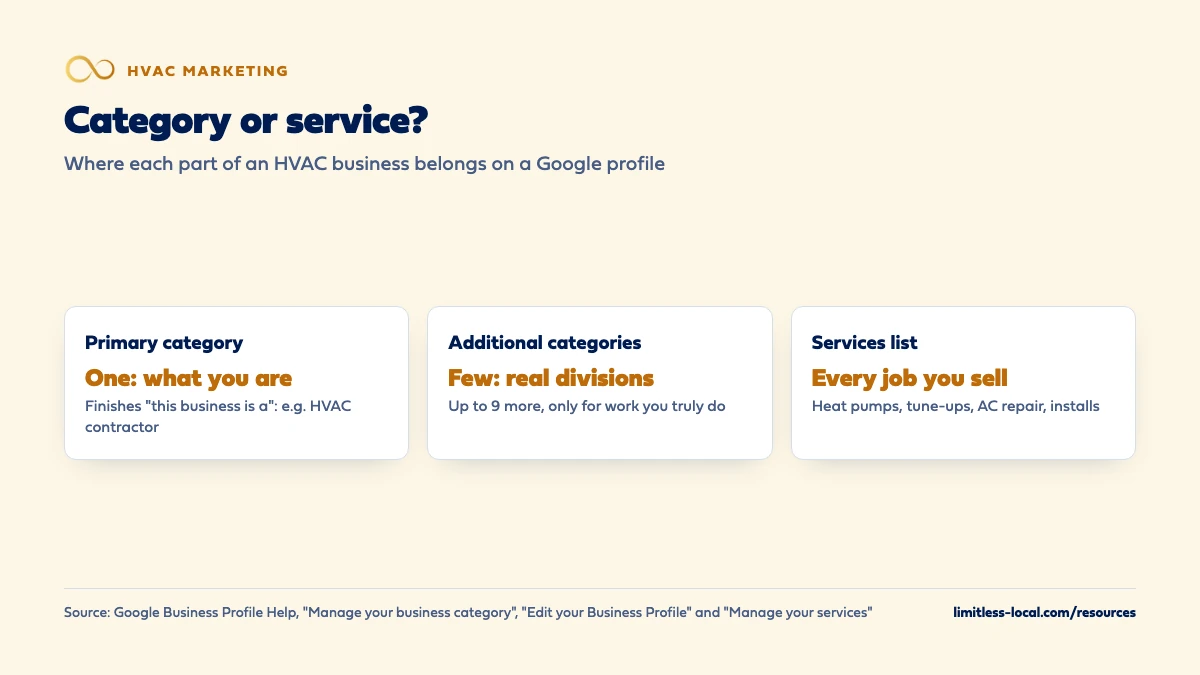
- Primary category: the one that finishes "this business is a" for your core work.
- Additional categories: only real parts of the business, as few as possible.
- Individual jobs like AC repair or heat pump installs belong in the services list.
- Category changes can trigger re-verification and take time to review, so change one at a time.
For HVAC owners setting up or cleaning up their Google profile who want the category choice done right once.
Get a free visibility audit · Book a growth call
What primary and secondary Google categories should an HVAC contractor use?
Pick one primary category that describes your core business the way Google’s test puts it, “this business is a”, which for most HVAC companies means an HVAC, air conditioning or heating contractor category; check the exact names in Google’s live category list. Then add a few additional categories only for real parts of the business, such as a repair service you actively sell or a true duct cleaning or plumbing division, and leave the rest of your work to the services list. Google says categories affect your local ranking, and changing them can trigger a request to verify again, so choose deliberately and change one thing at a time.
Categories are a small setting with an outsized effect, which is why they’re one of the first things we check in the Google Business Profile management that’s part of our local SEO work for HVAC companies. The HVAC marketing guide covers how the profile fits with the rest of your marketing, and the HVAC marketing questions library takes the rest one question at a time.
What's the difference between a primary and an additional category?
Your primary category is the one that best describes your business, and it’s whichever category sits in the first field. You can then select up to 9 more as additional categories. Google says the categories you select affect your local ranking, and that they help connect you with customers searching for what you do.
Google also fills in the general picture for you. Its guidelines say that when you pick a specific category, Google implicitly includes the more general categories it belongs to, so you can skip any category that seems redundant with a more specific one you already chose. Its example is a golf resort, which brings in resort hotel, hotel and golf course without adding them. Sources: Edit your Business Profile, Manage your business category and Guidelines for representing your business on Google.
Which primary category should an HVAC company pick?
Use Google’s test: the category should finish the sentence “This business is a”, not “this business has a”. Google asks you to choose the most specific category that still represents your main business, from its list; you can’t create your own, and if the exact one isn’t there, you pick a more general one.
When we look at the categories HVAC companies use on their profiles in Maps, the primary categories that come up most are along the lines of HVAC contractor, Air conditioning contractor and Heating contractor. Google’s list changes, so type “HVAC”, “air conditioning” and “heating” into the category box and see what it offers. In our judgement:
- If you do heating and cooling about equally, an HVAC contractor category describes the whole business.
- If you work in a hot market where most of your jobs are cooling, an air conditioning category may describe you better.
- If you’re mostly heating in a cold market, the same logic points to a heating category.
Pick the one that matches your work, not the one you think gets more searches. Sources: Guidelines for representing your business on Google and Manage your business category.
Which additional categories make sense for an HVAC company?
Google says to use as few categories as possible and to add additional ones for real departments or parts of the business, not for every product or service. Its example is a grocery store with a bakery and deli: grocery store is primary, bakery and deli are additional.
For HVAC, that usually means a short list. The category names below are ones we’ve seen on HVAC profiles in Maps, not a list Google publishes, so confirm the exact wording in the category box. In our judgement, these are the ones worth considering, each only if it’s true:
- The other side of heating and cooling, such as an air conditioning or heating contractor category, if your primary is the other one.
- Repair-service categories, such as air conditioning repair or furnace repair service, if repair calls are a core part of what you sell.
- Air duct cleaning service, only if you run it as a real line of work with your own crews.
- Plumber or electrician, only if you have a licensed division doing that work, not because a tech can swap a water heater now and then.
- Mechanical contractor, if commercial mechanical work is a real part of the business.
Anything beyond that probably belongs in the services list. Source: Manage your business category.
Should I add a category for every service my HVAC company offers?
No. Google’s guidelines say categories should describe the business as a whole, not list every service it offers, and its category help says not to select a category for every product or service. Heat pump installs, mini-splits, thermostats, indoor air quality and maintenance plans belong in your services list.
The services list does the job categories can’t. Google says that when a local customer searches for a service you offer, that service may be highlighted on your profile, and Maps users can see your full list. The services editor suggests options for your business type, lets you add custom services, and lets you group services under each of your categories with a short description. Keep custom names clean: Google automatically rejects names with prices, phone numbers, personal information or gibberish. The rest of the profile setup is in optimizing your HVAC Google profile. Sources: Guidelines for representing your business on Google and Manage your services on your Business Profile.
Can I pick categories just to show up for more searches?
Google says not to. Its rules: don’t use categories solely as keywords or to describe features of your business, and don’t use categories that belong to other businesses nearby or related to yours. Adding plumber, electrician, appliance repair and generator shop to an HVAC profile that doesn’t do that work is exactly what those rules describe.
It also tends not to work the way owners hope. Google’s guidelines say it can detect category information from your website and from mentions of your business across the web. In our judgement, a category your website and the rest of the web don’t support gives Google a mixed signal rather than more reach, and it sends you calls for work you don’t want. Sources: Edit your Business Profile and Guidelines for representing your business on Google.
Curious what your marketing is actually booking?
Get a free visibility audit — no obligation, no sales pitch.
Will changing my primary category hurt my ranking?
It can change it, in either direction, because Google says categories affect local ranking. There are also two practical risks worth planning around:
- Re-verification. Google says adding or editing a category may mean you’re asked to verify your business again.
- Review time. Edits to a verified profile are reviewed before they go live. Google says that usually takes up to 10 minutes but can take up to 30 days, and an edit may not be approved if Google can’t confirm it’s accurate.
So change the primary category once, deliberately, and leave everything else alone until it’s accepted. If you change the category, the name and the service area in one sitting and your calls drop, you won’t know which change did it. If you’ve already dropped out of Maps after an edit, getting back into the Map Pack walks through what to check. Sources: Manage your business category and Understand what happens to your Business Profile edits.
How do I change my Google Business Profile categories?
- Go to your Business Profile and select Edit profile.
- Next to Business category, select Edit.
- In Primary category, start typing and choose a category from the list that appears.
- To add another, select Add another category and choose from the list again.
- Select Save, then check back for the edit’s status: Accepted, Pending or Not approved.
Do it from the Google Account that owns the profile, not a former employee’s or an old agency’s. Before you start, write down your current categories, so you can put them back if a change doesn’t work out. That last step is our advice, not Google’s. Sources: Manage your business category and Understand what happens to your Business Profile edits.
Why does Google keep changing my category back?
Google gathers information about businesses from other sources, such as user reports and licensed content, and may update your profile if those sources say your info is wrong or outdated. In the profile editor, anything Google changed shows in blue, with a notification at the top of the page. For some suggested edits, you get an email or notice and have 4 days to accept or reject; if you don’t respond, Google may publish the change when other public information, such as your website, supports it.
The fix is to make the rest of the web agree with the category you chose. If your website’s homepage talks mostly about plumbing and your profile says HVAC contractor, that’s the mismatch to fix first, in our view. Then correct the category, reject any suggested edits you disagree with, and keep an eye on notifications for a few weeks. Source: Understand Google updates on your Business Profile.

Do my Google categories control my Local Services Ads?
Not directly. In Local Services Ads, you set your industries and job types in the ads account itself, and adding a new industry sends you back to business verification for that industry. Google also opts advertisers into their industry’s general category searches by default, such as “plumber near me” in its own example (for you, searches like “HVAC near me”), which you can turn off with the broad search setting if you only want leads for specific job types.
So check both places. A profile that says HVAC contractor with an LSA account that has half the job types switched off will show up very differently in Maps and in the ads. Whether the ads are worth running at all is covered in whether LSAs are worth it for HVAC. Source: Edit your industries, service areas, and job types.
Should a second HVAC location use the same categories?
For the primary category, yes. Google says all locations of a business must share a primary category, the one that best represents the business. Additional categories can differ if the locations really do different work, for example if only one branch has a duct cleaning crew.
Whether the second location qualifies for its own profile in the first place is its own question, covered in marketing a second HVAC location. Sources: Edit your Business Profile and Guidelines for representing your business on Google.
How do I know if my categories are working?
Look at the Searches list in your profile’s Performance report. Google says it shows the search terms people used to find your business, updated at the start of each month, and that you can’t manage those terms directly. If the list is full of the jobs you want, such as “AC repair”, “furnace replacement” or “HVAC company”, your categories and services are pointing the right way. If it’s full of searches for work you don’t do, they aren’t.
Google notes that performance data includes activity from both organic results and Google Ads, so account for ad changes when you compare months. Compare the same months year to year where you can, because heating and cooling seasons move these numbers more than any setting does. Source: Understand your Business Profile performance & insights.
Not sure which of these is costing you jobs?
A free visibility audit checks the Google profile, reviews, site and tracking, and shows what to fix first.
What's different about Google categories for HVAC companies
Don’t swap categories with the seasons. It’s tempting to lead with a heating category in winter and a cooling one in summer. In our judgement it isn’t worth it: each change can trigger re-verification and a review that may take weeks, which is the last thing you want going into a rush. Pick the category that describes the whole year.
Residential and commercial. If commercial mechanical work is a real division, an additional category can reflect it. If you do the occasional light commercial rooftop unit, leave it to the services list.
Add-on trades. Many HVAC companies add plumbing, electrical or duct cleaning over time. Add the category when the division is real, licensed and staffed, and make sure your website has pages for it, so Google sees the same story in both places.
Heat pumps and mini-splits. These are some of the jobs owners most want more of, and they’re usually services, not categories. List them in the services editor with a short description of what you install.
A worked example: cleaning up an overloaded category list
This is an illustration with made-up details, not a real client. Say an HVAC company’s profile has Air conditioning repair service as its primary category and nine additional categories, including plumber, electrician, generator shop and appliance repair, none of which it does. Its Searches list shows a lot of searches for water heaters and generators, and the office spends time turning those calls away.
The cleanup: HVAC contractor as the primary category, because the company does heating and cooling about equally. Four additional categories that are true: air conditioning contractor, heating contractor, air conditioning repair service and furnace repair service. Everything else, from heat pump installs to maintenance plans, goes into the services list with short descriptions. The change is made once, and nothing else on the profile is touched until it’s accepted.
Then the check: compare the Searches list for the same month a year apart and count how many terms are for jobs the company actually sells. That’s the measure, not a promise of a ranking change. Google Business Profile management, including categories and services, is part of our Essentials package at $3,500 a month; a free visibility audit is a good place to review your own categories.
Frequently asked questions
Can I create my own category, like "Heat pump installer"?
No. Google says you can’t create your own category; choose from its list, and if the exact one isn’t there, pick a more general one. Put specific jobs in the services list. Source: Manage your business category.
Does the order of my additional categories matter?
Google only says the category in the first field is your primary category. It doesn’t describe any ranking order among the additional ones.
Do competitors' categories tell me what to pick?
They show you what’s available in Google’s list for your trade, which is useful. Copy the idea, not the list: if a competitor has categories for work you don’t do, those are wrong for you, and possibly for them.
Will adding more categories get my profile suspended?
Google doesn’t say extra categories alone cause suspension, but its guidelines ask for as few categories as possible and none used as keywords. Staying inside those rules is the safer habit. Source: Guidelines for representing your business on Google.
Can I appeal if Google rejects my category change?
Google says you might be able to appeal a rejected business information edit, and links to its appeals process from the edits help page. Check the edit status first, and make sure your website supports the category before you appeal. Source: Understand what happens to your Business Profile edits.
Key takeaways
- Your primary category should finish “this business is a” for your core work; for most shops that’s an HVAC, air conditioning or heating contractor category.
- Use as few additional categories as possible, and only for real parts of the business.
- Specific jobs like heat pump installs and maintenance plans belong in the services list.
- Category changes can trigger re-verification and take up to 30 days to review, so change one thing at a time.
- Check the Searches list in your Performance report to see whether your categories bring the searches you want.
Want a second set of eyes on your setup?
We'll look at how you show up locally and where calls are leaking, then send you a plain-English breakdown.
More in this section
- How do I optimize my HVAC Google Business Profile for more calls?
- Which HVAC services should I advertise first?
- Are Google Local Services Ads worth it for an HVAC company?
- Do Google Ads work for a brand-new HVAC company?
- Should my HVAC company start with LSAs, Google Ads or SEO?
Sources
- Manage your business category — Google Business Profile Help
- Guidelines for representing your business on Google — Google Business Profile Help
- Edit your Business Profile — Google Business Profile Help
- Manage your services on your Business Profile — Google Business Profile Help
- Understand what happens to your Business Profile edits — Google Business Profile Help
- Understand Google updates on your Business Profile — Google Business Profile Help
- Edit your industries, service areas, and job types — Google Local Services Help
- Understand your Business Profile performance & insights — Google Business Profile Help