
How do I market a second HVAC location?

- How should an HVAC company market a second shop or branch office?
- Does my second HVAC location qualify for its own Google Business Profile?
- What should I fix on my first location before opening the second?
- Should the second location show an address or a service area?
- What should the second location's Google profile be named and categorized?
- How do I keep the two locations from competing with each other?
- What does the second location need on my website?
- Should the second location have its own phone number?
- How do I get reviews for a brand-new location?
- How should I set up Google Ads and Local Services Ads for two locations?
- How much should I spend marketing the second location?
- How will I know if the second location is paying off?
- What's different about a second location for HVAC companies
- A worked example: judging two branches on cost per booked job
- Frequently asked questions
- Key takeaways
- More in this section
- Sources
The short version
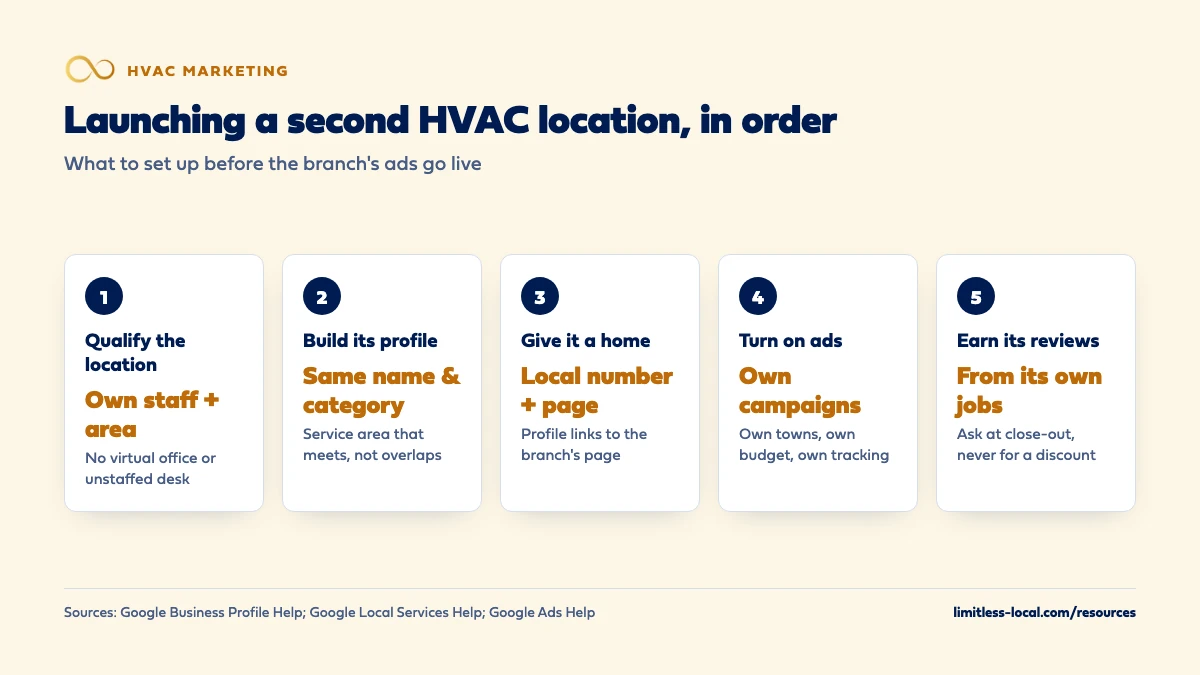
- One Google profile per real location, each with its own staff and service area. No virtual offices.
- Keep the same business name and primary category on both profiles.
- Give each branch its own local number, location page and tracking.
- Lean on ads for calls while the new profile earns reviews and map visibility.
For HVAC owners opening a real second shop or branch, with its own crew, who want it booking jobs without stepping on the first location.
Get a free visibility audit · Book a growth call
How should an HVAC company market a second shop or branch office?
Start by making sure the second location qualifies for its own Google Business Profile: Google allows a separate profile for each location that has its own staff and its own service area, but not for a virtual office or a co-working desk nobody staffs. Give the branch its own local phone number, its own page on your website and a service area that meets the first location’s instead of copying it. Then split your ads and tracking by location so you can see what each branch books, and build the new profile’s reviews from jobs that branch actually runs.
Keeping each branch’s numbers separate is how we’d set up marketing for an HVAC company with more than one location. Our Growth package covers SEO for up to 2 locations, along with Google Ads and Local Services Ads management, and Scale is built as a custom plan for companies with more locations than that; the package breakdown shows what each tier includes, and our HVAC marketing page shows how it fits together. For what the overall budget should look like, the HVAC marketing cost guide covers it, and the rest of the HVAC marketing questions library goes question by question.
Does my second HVAC location qualify for its own Google Business Profile?
It does if it’s a real branch. Google’s guidelines for representing your business say a service business with different locations, separate service areas and separate staff at each location, is allowed one profile for each location. That is the test: people who work out of that location and an area that location serves.
The same guidelines rule out the shortcuts:
- A rented mailing address you don’t operate out of is a virtual office, and it isn’t eligible for a profile.
- A service-area business can’t list a virtual office unless that office is staffed during business hours.
- A desk in a co-working space only counts if it has clear signage, receives customers during business hours and is staffed by your own people during those hours.
- P.O. boxes and mailboxes at remote locations aren’t acceptable addresses.
If the second location is really a parking spot for one truck and a forwarding address, the honest move is to grow the first location’s service area instead and save the second profile for when you have a crew and an office there. Breaking these rules puts the profile at risk of suspension, and Google says so on the same page.
What should I fix on my first location before opening the second?
Whatever is wrong on the first profile tends to get copied onto the second. Before you build anything new, make sure the first location’s business name, phone number and service area are correct on Google and the main directories, and that there’s only one profile for it. Google treats multiple profiles at the same address as possible duplicates, and its duplicate profiles page says a profile marked as a duplicate won’t show on Search or Maps.
Fixing your name, address and phone walks through the cleanup. Doing it now saves you from untangling two sets of mismatched listings later.
Should the second location show an address or a service area?
Most HVAC branches go to the customer, so most should be set up as service-area profiles: you enter the real address to verify, then hide it and show the towns or zip codes the branch serves. Google’s help page on managing service areas says you can list up to 20 service areas, that you can’t draw the area as a radius, and that the whole area shouldn’t run more than about 2 hours of driving from where the location is based.
Show the address only if customers can actually come to the branch. Google calls that a hybrid business, and its guidelines say the location should be staffed by your team and able to receive customers during its stated hours. Its guidelines also say any business showing its address should keep permanent signage with the business name at that address. A shop with a counter where homeowners pick up filters or drop off a thermostat might qualify. A warehouse with a locked door doesn’t.
What should the second location's Google profile be named and categorized?
The same as the first, in almost every case. Google’s chain rules say all locations of a business in the same country must use the same name, unless some locations consistently use a different name on their storefront, website or stationery. The same page lists what never belongs in a business name: taglines, service keywords, phone numbers and added location details such as a highway exit. “Northside Heating & Air, AC Repair Near You” is the kind of name Google says could get a profile suspended.
Categories follow the same logic. Google’s profile editing help says all locations of a business must share a primary category, so if the first location is set up as an HVAC contractor, the branch should be too. Pick additional categories for the work that branch really does, not for every service the company offers.
How do I keep the two locations from competing with each other?
Draw the service areas so they meet instead of overlap. If both profiles claim the same towns, you split your own visibility and confuse customers about which branch to call. Paid ads have a hard version of this rule: Google’s Local Services ad rankings page says that when a business has multiple locations serving the same geographic area, only its highest-ranking ad shows for a search. Two locations bidding on the same town don’t get you two spots.
A simple split is to give each branch the towns its trucks reach fastest and make the dispatch rule match the map, so a call from a border town goes to whichever crew is closer. Deciding which cities and zip codes to target covers how to choose the towns worth the drive.
Curious what your marketing is actually booking?
Get a free visibility audit — no obligation, no sales pitch.
What does the second location need on my website?
Its own page. Google’s guidelines ask for a phone number or a website that represents the individual business location, so link each profile to the page for its own branch instead of sending both to your homepage. A good location page has the branch’s address or service area, its phone number, the services that crew handles, the towns it covers and photos of that crew and its trucks.
What the page should not be is your first location’s page with the town name swapped. In our view, pages that differ only by a city name are the most common way location pages go wrong, and building city pages that don’t look like spam covers what makes a location page worth ranking. One website for both branches is normal; two separate websites usually just split the effort.
Should the second location have its own phone number?
Yes. Google’s guidelines ask for a phone number that connects to the individual location, and a local number over a central call center line whenever possible. The number must be under the direct control of the business, and Google lets you add up to 2 more numbers to a profile beyond the main one.
A separate number does two jobs. Homeowners in the new area see a local number, and you can tell which branch’s marketing made the phone ring. It doesn’t mean you need a second office staff: both numbers can ring the same dispatcher, as long as someone answers them during the hours on each profile. If you use call tracking, the tracking numbers should be ones you own, and the same rules about listing them apply to both branches.
How do I get reviews for a brand-new location?
From that branch’s own jobs. A new profile starts without reviews. Google’s help pages describe reviews being combined only when two profiles for the same business are merged, and a real branch isn’t a duplicate, so as far as we can tell there’s no way to carry the first location’s reviews over. Google’s tips to get more reviews suggest the obvious, sending customers a Google review link or QR code and replying to the reviews you get, and they’re clear about the limit: offering a discount, a free filter or anything else in exchange for a review counts as fake content.
Make asking part of the branch’s job close-out from the first week, while the crew is still at the house or right after the invoice goes out. Getting your techs to ask for reviews covers how to make it a habit instead of an afterthought.
How should I set up Google Ads and Local Services Ads for two locations?
Ads are how a new branch gets calls while its profile is still earning reviews, because paid campaigns can start producing leads within days and organic visibility takes longer to build. Give each branch its own campaigns, its own budget and its own towns. Google Ads lets you target ads to geographic locations by city, postal code or a radius around a location, and Google’s help page notes that very small target areas may show your ads only now and then or not at all.
For Local Services Ads, the overlap rule from above applies: if both locations cover the same area, only one ad shows, so set each location’s service areas to its own towns. Keep each branch’s job types to the work that crew actually takes on, so you’re not paying for leads it can’t run.
How much should I spend marketing the second location?
Budget it like a new market, not like a copy of the first one. The first location has years of reviews, links and word of mouth behind it; the branch has none of that yet. That usually means a bigger share of its early budget goes to paid ads, because ads can bring calls within days of launch, while SEO typically takes 3 to 6 months to show meaningful organic growth. As the new profile builds reviews and the location page starts ranking, you can shift some of that money back.
Plan the branch’s budget as its own line, so a slow month at one location doesn’t quietly eat the other’s.
How will I know if the second location is paying off?
Track every call, form and booked job by branch from the first day. That means a separate phone number per location on its profile and location page, separate ad campaigns, and a lead source in ServiceTitan, Housecall Pro or Jobber that records which branch the job came from. Then compare the two locations on cost per booked job, not on calls or clicks.
A new branch will look expensive for its first few months, because it’s paying full price for every job while the first location gets free calls from reviews and repeat customers. Judge it on the trend. Tracking whether your marketing pays off covers the setup.
Not sure which of these is costing you jobs?
A free visibility audit checks the Google profile, reviews, site and tracking, and shows what to fix first.
What's different about a second location for HVAC companies
Peak season tests the branch first. The first heat wave or cold snap brings more calls than a new crew may be able to run. Decide ahead of time whether overflow from the branch’s area goes to the first location’s techs or gets booked out, and make the ads match, so you’re not paying for calls you can’t get to.
Emergency calls don’t respect the map. A no-heat call at night from a border town should go to whichever crew can get there, regardless of which profile it came through. Set the after-hours routing for both numbers before you turn the branch’s ads on.
Maintenance agreements can seed the new area. If you already have agreement customers who live in the branch’s towns, moving them to the new crew gives it booked work, and review requests, from week one. In our experience that’s a faster start than relying on new calls alone.
If the branch is in a city where your company has no name yet, marketing in a new city covers starting from zero.
A worked example: judging two branches on cost per booked job
These numbers are made up to show the math, not a benchmark for your market. Say the first location’s ads spend $2,400 in a month and book 24 jobs: $100 per booked job. The new branch’s ads spend $1,200 and book 8 jobs: $150 per booked job. Looked at together, that’s $3,600 for 32 jobs, about $113 each, which hides the fact that the branch costs half again as much per job.
That gap is normal in the first months, and it’s the number to watch shrink as the branch earns reviews and its location page starts to rank. If it doesn’t shrink, the problem is usually in the service area, the job types or how the branch’s calls are answered, and you can only see that because the numbers were split.
For the management side: our Growth package is $4,500 a month and covers SEO for up to 2 locations, Google Ads management up to $5,000 a month in ad spend and Local Services Ads management. Ad spend is paid to Google separately. A company opening a third location or more would look at Scale, which is priced as a custom plan.
Frequently asked questions
Can I move reviews from my first location to the new one?
Not as far as we can tell. The only case Google’s help pages describe for combining reviews is merging two duplicate profiles of the same business, and a separate branch isn’t a duplicate, so plan on the new location earning its own.
Can both locations share one website?
Yes, and that’s usually the better setup. Give each branch its own location page and link each Google profile to its own branch’s page, not the homepage.
Can I put the town name in the second location's Google business name?
Only if that’s how the branch is actually named on its signage and paperwork. Google’s chain rules say every location uses the same name unless the real-world name consistently differs, and added location details aren’t allowed in the name.
How long does it take to verify the new location?
Google’s verification help says reviews take up to 5 business days after you complete the steps, and most postcard codes arrive within 14 days. Don’t edit the name, address or category while you wait, or the code won’t work.
What if I'm moving my shop instead of opening a second one?
Then don’t create a new profile. Google says to update the existing profile with the new address, and you’ll need to verify the business again at the new location.
Key takeaways
- A second Google profile needs a real location with its own staff and service area; virtual offices don’t qualify.
- Use the same business name and primary category on both profiles.
- Give each branch its own local number and website page, and link each profile to its own page.
- Draw service areas that meet instead of overlap; overlapping Local Services Ads show only one of your ads.
- Split ads, tracking and budgets by branch, and judge each on cost per booked job.
Want a second set of eyes on your setup?
We'll look at how you show up locally and where calls are leaking, then send you a plain-English breakdown.
More in this section
- How should a commercial HVAC company market itself?
- How do I market my HVAC company in a new city where nobody knows us?
- What should I do with the marketing after buying an HVAC business?
- What's the simplest marketing setup for a small HVAC company?
- Should I market more before or after hiring another HVAC tech?
Sources
- Guidelines for representing your business on Google — Google Business Profile Help
- Manage your service areas for service-area & hybrid businesses — Google Business Profile Help
- Edit your Business Profile — Google Business Profile Help
- Resolve duplicate profiles & ownership issues — Google Business Profile Help
- Verify your business on Google — Google Business Profile Help
- Tips to get more reviews — Google Business Profile Help
- About ad rankings — Google Local Services Help
- Target ads to geographic locations — Google Ads Help