
What should I do with the marketing after buying an HVAC business?

- What should a new owner do with an HVAC company's marketing after the sale closes?
- What should I do first with the marketing after buying an HVAC company?
- Which marketing accounts should I make sure I get in the deal?
- How do I take over the business's Google Business Profile?
- What if the seller or their old agency won't hand over the Google profile?
- Should I keep the old company name or rebrand?
- How do I take over the Google Ads and Local Services Ads accounts?
- What should I do with the website and domain?
- What should I do with the old phone numbers?
- How do I protect the reviews that came with the business?
- When should I start changing the marketing itself?
- Should I keep the seller's marketing agency?
- What's different about buying an HVAC company's marketing
- A worked example: setting the baseline before you change anything
- Frequently asked questions
- Key takeaways
- More in this section
- Sources
The short version
- Get added as an owner of the Google profile, then have the seller transfer primary ownership.
- Get admin access to Google Ads and unlink any old agency that controls the account.
- Put the domain, website, phone numbers and software logins in your name.
- Measure before you change: rebrands and site moves come after you know what's working.
For owners who just bought an HVAC company, or are about to, and need to take control of its Google profile, ad accounts, website and phone numbers without breaking what already brings in calls.
Get a free visibility audit · Book a growth call
What should a new owner do with an HVAC company's marketing after the sale closes?
Take control of the accounts before you change anything: have the seller add you as an owner of the Google Business Profile and then transfer primary ownership to you, which Google says keeps the profile’s reviews and other info, and get admin access to the Google Ads account, the website, the domain and the phone numbers. Keep the name, numbers and campaigns running while you measure what they book for a month or so. Only then decide on a rebrand, because a real name change can mean closing the old Google profile and starting a new one, while a minor change can be made on the existing profile.
That order of operations is how we’d approach an HVAC company that just changed hands: get the accounts in the owner’s name, set up tracking, then decide what to change. It’s the same foundation-first approach behind our HVAC marketing work, where tracking, follow-up and a clean online presence come before turning up lead flow. If the purchase means you’re now picking or replacing an agency, the guide to choosing an HVAC marketing agency covers what to insist on, and the rest of the HVAC marketing questions library goes question by question.
What should I do first with the marketing after buying an HVAC company?
Get control, then leave things alone for a while. The first job is making sure every account that brings in calls is in your name and that the seller, and anyone working for the seller, can’t change or delete it. The second is resisting the urge to rebrand, rebuild the website and swap agencies in the same month. If calls drop after three changes at once, you won’t know which one caused it.
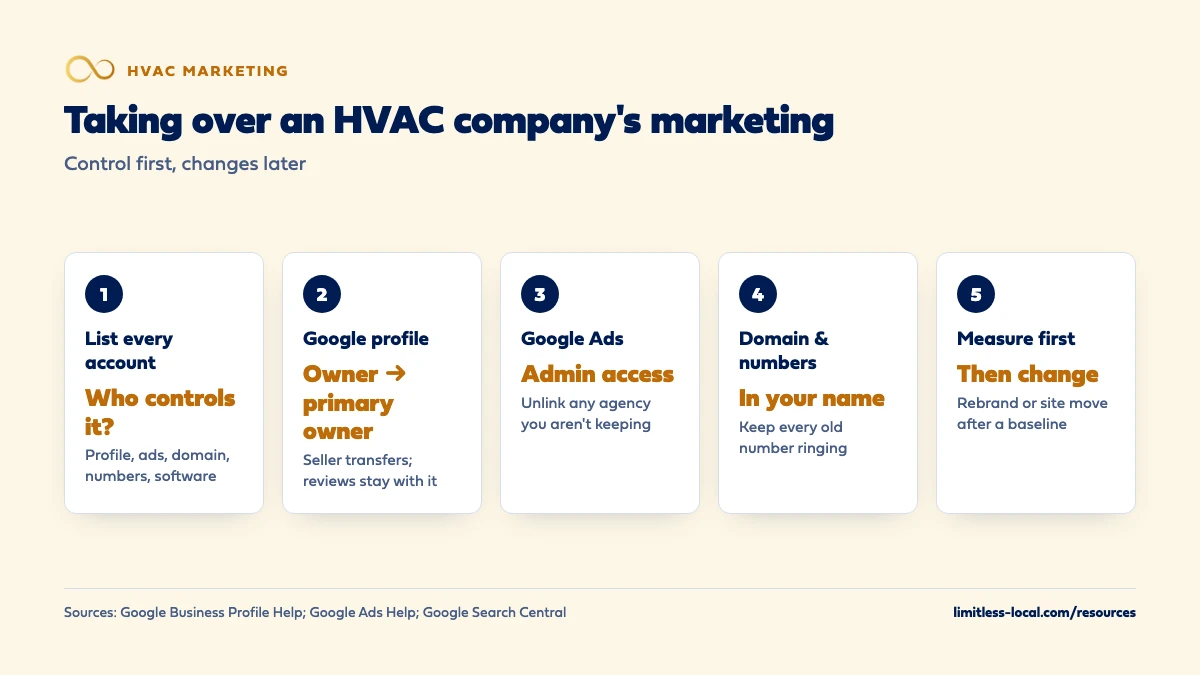
A sensible order:
- List every marketing account and who controls it today.
- Take over the Google Business Profile, the Google Ads account and the domain first, because those are the hardest to replace.
- Make sure every phone number keeps ringing someone who answers.
- Measure what the current marketing books for a month or so.
- Then decide what to keep, fix or replace.
Which marketing accounts should I make sure I get in the deal?
Ideally the purchase agreement lists them, with the seller’s help transferring each one. Most HVAC companies have more of these than the owner remembers:
- Google Business Profile, one per location.
- Google Ads, which is where Local Services Ads are moving, starting with select HVAC advertisers in August 2026.
- The domain name at its registrar, and the website’s hosting and admin login.
- Google Search Console and Google Analytics for the website.
- Phone numbers: the main line, any call tracking numbers and the account they live in.
- Field-service software like ServiceTitan, Housecall Pro or Jobber, with the customer list and maintenance agreement records.
- Facebook, Yelp, Bing Places, Apple Business and any directory or manufacturer dealer listings.
- Email and text lists, and whatever sends review requests.
Anything set up under the seller’s personal email or a former agency’s account is a risk until it’s moved.
How do I take over the business's Google Business Profile?
The clean way takes two steps, and the seller has to do both. First, the seller adds you as an owner under Business Profile settings, People and access. Second, the seller makes you the primary owner. Google’s page on transferring primary ownership is direct about why the second step matters: if you’re transferring ownership of your business, transfer primary ownership to the new owner, because that keeps all of the business info, like reviews.
A few rules from Google’s owners and managers page and its transfer page that trip up sales:
- A profile can have several owners but only one primary owner, and only the primary owner can hand that role over.
- The primary owner can’t remove themselves until they’ve transferred primary ownership to someone else.
- A new owner or manager has to wait 7 days before they can remove other owners, transfer primary ownership or delete the profile.
So plan for a week between being added and cleaning out the old users. Once the week is up, remove the seller, former employees and any agency you aren’t keeping.
What if the seller or their old agency won't hand over the Google profile?
Google has a process for this. On its request ownership page, a storefront or hybrid business searches for the business at business.google.com/add, selects Request Access and fills out the form. The current owner gets an email and has 3 days to respond. If they approve, you can manage the profile. If they deny it, you can appeal or suggest an edit. If they don’t respond, you may get the option to claim the profile, though Google says you won’t always get that option.
Most HVAC companies are service-area businesses with no storefront, and Google handles those differently: you contact Business Profile support and choose Transfer ownership of listing. Either way, don’t create a second profile for the same business to get around the problem. Google’s guidelines say there should be only one profile per business, because more than one can cause problems with how the business shows on Maps and Search.
Should I keep the old company name or rebrand?
Weigh it carefully, because the name homeowners already know, and the reviews attached to it, are part of what you paid for. Google’s guidelines draw a clear line:
- A minor change, where the proper nouns and the services in the name stay the same and the business category doesn’t change, can be made on the existing profile. Changing the name across multiple locations can also qualify.
- A bigger change makes it a new business in Google’s eyes. You mark the existing profile closed and create a new one under the new name.
Read that second option for what it means in practice. Google’s rebranding rule doesn’t say what happens to the reviews, but nothing in it moves them to the new profile, so our judgement is to plan on the new profile starting without the old one’s reviews. Even a name change made on the existing profile can trigger checks. Google’s profile editing help says you might need to verify the business again after changing its name, and once Local Services Ads have moved into Google Ads, a significant name change triggers a review during which the campaign may pause, which Google says typically takes 24 to 48 hours.
If you do rebrand, the name then has to change everywhere else too. Fixing your name, address and phone online covers the directory cleanup.
Curious what your marketing is actually booking?
Get a free visibility audit — no obligation, no sales pitch.
How do I take over the Google Ads and Local Services Ads accounts?
Take over the existing account instead of opening a new one, so you keep its history. Have the seller give your Google account admin access, then remove anyone who shouldn’t keep it. Local Services Ads are moving into Google Ads as Performance Max campaigns with pay-per-lead goals, and Google’s transition page says past lead history, including contact details, messages and older call recordings, carries over to the new Leads page. Campaign performance reports don’t, so download or screenshot them while the old dashboard is still there.
Watch for an agency’s manager account. Google’s page on manager account ownership says a manager account can be made the owner of a client account, with full administrative access. Users on the client account can’t transfer that ownership, but they can always unlink the manager account, and after that the client account can give ownership to a different manager. If you’re keeping the agency, leave it. If you’re not, get admin access on the account itself first, then unlink.
Move the billing to your own payment method on day one, so the seller’s card isn’t funding your ads and nobody can stop them by cancelling it.
What should I do with the website and domain?
Get the domain registered to you at the registrar, and get admin access to the website, its hosting and Google Search Console. Then leave the site where it is until you’ve decided on the name. Google’s site move guidance explains what happens if you do move it to a new domain:
- Permanent redirects from the old URLs to the new ones don’t cost you link credit.
- Rankings can fluctuate while Google recrawls, and for a medium-sized site it can take a few weeks or more for the new URLs to replace the old ones.
- Change one thing at a time. If you’re moving to a new domain, changing the website platform and redesigning, Google recommends doing them one after another, not together.
- Time the move for a lower-traffic period if your traffic is seasonal.
For an HVAC company, that last point means the shoulder season, not the week of the first heat wave.
What should I do with the old phone numbers?
Keep every one of them ringing. The main number is on the trucks, the invoices, the fridge magnets and dozens of directory listings, and repeat customers will dial it for years. Google’s guidelines also say the number on your profile must be under the direct control of the business, so make sure the lines are moved into your company’s name, not left on the seller’s personal account.
Call tracking numbers deserve a check of their own. If they sit in a former agency’s account, they can stop working the day that agency is cancelled. Get them moved into an account you control, or replaced on your listings before the old ones are shut off.

How do I protect the reviews that came with the business?
Transfer primary ownership instead of starting a new profile, and keep the profile’s name within Google’s rules for a minor change if you can. Both keep you on the existing profile, which is where the reviews you bought live. Then start replying to new reviews as the new owner, and keep the review requests going from week one, because a change of hands is when service slips and the first bad review shows up.
How much those reviews are worth to your call volume is covered in how much reviews affect HVAC calls.
When should I start changing the marketing itself?
Once you can measure it. Put tracking on every number and form, tie calls to booked jobs in your field-service software, and give it a month or so. That baseline tells you what the seller’s marketing was actually producing, and it’s the number every change gets judged against. Tracking whether your marketing is paying off covers the setup.
Then change the slow things and the fast things on their own schedules. Ads can produce calls within days of a change, so they’re the place to fix waste early. SEO typically takes 3 to 6 months to show meaningful growth, so a website rebuild or a rebrand should be planned for the long haul, not as a fix for a slow month.
Should I keep the seller's marketing agency?
Not automatically, and not by default either. Keep it if it can show you what its work booked in jobs and revenue, and if it’s willing to put every account in your name. Replace it if it can’t do either. Knowing whether your agency is getting results lists what to ask for.
If you’re folding the business you bought into your existing company as a branch, the question becomes how to run two locations side by side, which marketing a second HVAC location covers.
Not sure which of these is costing you jobs?
A free visibility audit checks the Google profile, reviews, site and tracking, and shows what to fix first.
What's different about buying an HVAC company's marketing
The customer list is the most valuable marketing asset. Maintenance agreement customers and past repair customers are booked work you don’t pay to find. Make sure the field-service software, and the right to contact those customers, transfers with the business, and send them a short note from the new owner before peak season.
Timing around the season matters. Taking over accounts can happen any time, but anything that might dip calls for a few weeks, like a site move or a rebrand, belongs in spring or fall, not in the middle of a heat wave or the first cold snap.
Old promises live in old ads. Coupons, financing offers and warranty language in the seller’s ads and on the website now speak for you. Read them in the first week and pull anything you won’t honor.
A worked example: setting the baseline before you change anything
These numbers are made up to show the math, not a benchmark for your market. Say the seller’s Google Ads spent $3,000 last month, and once you tie calls to jobs in your software, 20 of those calls became booked jobs. That’s $150 per booked job. That number, not the seller’s description of the marketing, is what you’re buying, and it’s what every change you make gets judged against.
If a month after a change the same spend books more jobs, the change worked. Change three things in one month and you won’t know which one to undo.
For a single-location HVAC company, our Essentials package is $3,500 a month and includes business listing cleanup, Google Business Profile management and Google Ads management up to $2,500 a month in ad spend, with ad spend paid to Google separately. If the purchase gives you two locations, Growth covers SEO for up to 2 locations. Onboarding takes your team about 2 to 3 hours, and we don’t guarantee rankings, lead counts or revenue.
Frequently asked questions
Can I just create a new Google profile for the business I bought?
Not while the old one exists. Google’s guidelines allow one profile per business, so take over the existing profile through a primary ownership transfer or an ownership request instead.
How long before I can fully manage the Google profile after the transfer?
Seven days. Google makes new owners and managers wait 7 days before they can remove other users, transfer primary ownership or delete the profile.
Do I have to verify the Google profile again after buying the business?
Google’s pages on transferring ownership don’t mention re-verifying after a primary ownership transfer, though they don’t rule it out either. Google does say you might need to verify again if you change the business name, and that you must if you move the business to a new address.
Will my Local Services Ads stop if I change the business name?
They can pause briefly. Google says significant changes to the business name, storefront address or primary category need review, and the campaign may pause while that happens, typically for 24 to 48 hours.
Can the seller's old agency keep control of our Google Ads account?
Only if you let it. Users on the client account can always unlink a manager account that owns it, and then give ownership to a different manager or keep it in-house.
Key takeaways
- Get control of the accounts first; change the marketing after you’ve measured what it books.
- Take over the Google profile by being added as an owner and then made primary owner, which keeps the reviews.
- A real name change can mean closing the old Google profile and starting over, so rebrand deliberately.
- Get admin access to Google Ads, move billing to your card and unlink any agency you aren’t keeping.
- Keep every old phone number ringing, and save site moves and rebrands for the shoulder season.
Want a second set of eyes on your setup?
We'll look at how you show up locally and where calls are leaking, then send you a plain-English breakdown.
More in this section
- How do I market a second HVAC location?
- Should I market more before or after hiring another HVAC tech?
- What's the simplest marketing setup for a small HVAC company?
- How should a commercial HVAC company market itself?
- How much time should an HVAC owner spend on marketing each week?
Sources
- Transfer primary ownership of a Business Profile — Google Business Profile Help
- Manage your Business Profile owners & managers — Google Business Profile Help
- Request ownership of a Business Profile — Google Business Profile Help
- Guidelines for representing your business on Google — Google Business Profile Help
- Edit your Business Profile — Google Business Profile Help
- Manager Accounts (MCC): About ownership of client accounts — Google Ads Help
- Local Services Ads transition to Performance Max campaigns with pay-per-lead goals — Google Ads Help
- Site Moves and Migrations — Google Search Central