
How do I track whether my HVAC marketing is paying off?

- How can I tell which HVAC marketing actually brings in booked jobs?
- What does "paying off" actually mean for an HVAC company?
- How do I track phone calls from each marketing channel?
- Can I put a tracking number on my Google Business Profile without messing up my main number?
- How do I track web form requests and online bookings?
- What are UTM tags, and where should an HVAC company use them?
- How do I mark leads as booked or sold in ServiceTitan, Housecall Pro or Jobber?
- Who should enter the lead source, and when?
- Can I send booked jobs back to Google Ads?
- Which numbers should I watch every month?
- How do I run a simple monthly marketing review?
- How long before the numbers mean something?
- What's different about tracking marketing for HVAC companies
- A worked example: two channels, and which one is really cheaper
- Frequently asked questions
- Key takeaways
- More in this section
- Sources
The short version
- Give each channel its own tracking number, and tag the links you control with UTM parameters.
- Keep your main business number on your Google profile as an additional number, and keep it the same everywhere else.
- Record a lead source on every customer, estimate and job in your field software.
- Once a month, work out cost per booked job for each channel and make one decision from it.
For HVAC owners who are spending on ads, SEO or Local Services Ads and want to see, channel by channel, which ones turn into booked jobs.
Get a free visibility audit · Book a growth call
How can I tell which HVAC marketing actually brings in booked jobs?
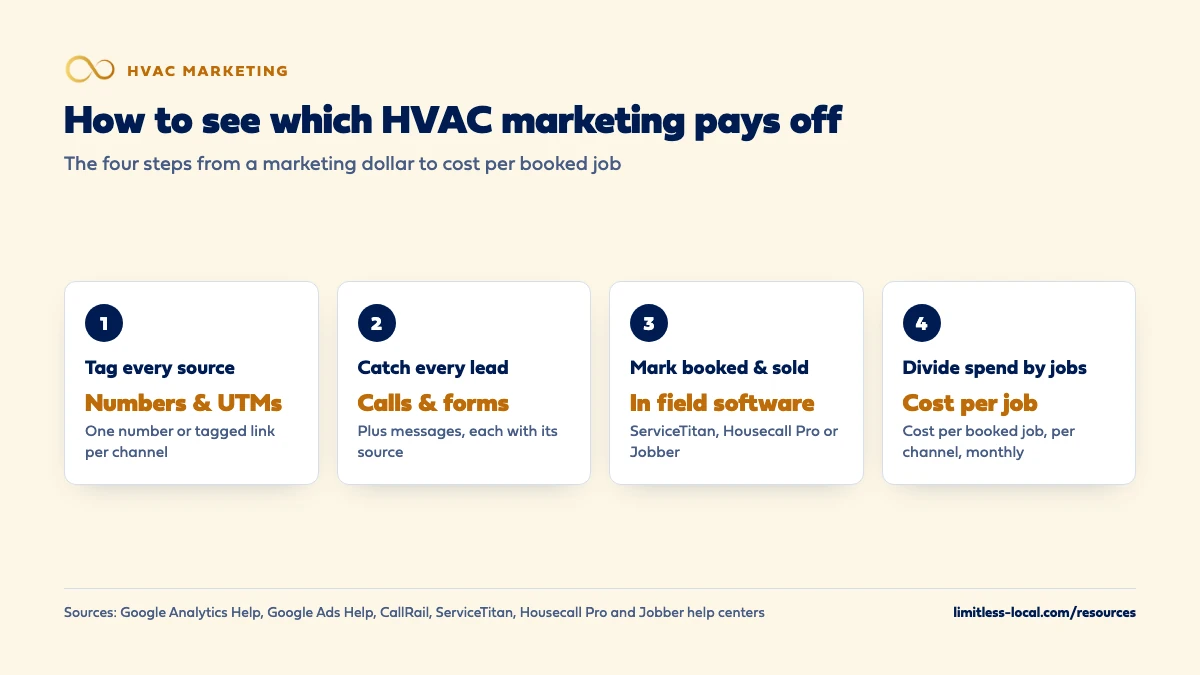
Give every marketing channel its own way to be counted: a call tracking number for each source, tracked web forms, and UTM tags on the links you control. Then make sure every call and form request lands in your field software, such as ServiceTitan, Housecall Pro or Jobber, with its lead source attached, and mark it when it books and when it sells. Once a month, divide what each channel cost by the booked jobs it produced, and compare that with what those jobs brought in.
This is how we report to the HVAC companies we work with: call tracking, web and form tracking and a monthly report come in every package, so the conversation is about booked jobs and what they cost, not clicks. You can see what each tier includes on our packages page and how it applies to heating and cooling shops on our HVAC marketing page. If you want the case for judging marketing by cost per booked job in the first place, the HVAC marketing cost guide lays it out, and the rest of the HVAC marketing questions library goes question by question.
What does "paying off" actually mean for an HVAC company?
Marketing is paying off when the booked jobs it produces bring in more than it costs, after the cost of doing the work. Calls, clicks and form fills are steps along the way, not the result. A month with plenty of calls can still lose money if most of them were price shoppers, wrong-service calls or customers you already had.
So tracking comes down to following each customer through four points: where they found you, how they reached you (call, form, message), whether the job was booked, and what it sold for. The HVAC marketing cost guide explains why cost per booked job is the number to judge by. This page is about the setup that lets you actually see it.
How do I track phone calls from each marketing channel?
Calls are most of the business for most HVAC companies, so start here. Call tracking gives each source its own phone number that rings through to your shop, and records which number was dialed. There are two common setups:
- One number per source. A fixed number for each thing you can’t tag with a link: the truck wrap, yard signs, mailers, a radio spot, your Google Business Profile.
- A swapping number on your website. A script on your site shows each visitor a number tied to how they arrived (Google Ads, organic search, your Google profile, Facebook), so a call from the website is still credited to the right channel.
If you run Google Ads, Google can track calls on its own. Google Ads call conversion tracking can count calls made straight from your ads and calls to a Google forwarding number shown on your website after someone clicked an ad, and you set a minimum call length so short hang-ups don’t count. ServiceTitan gives similar advice for its own tracking numbers: attach a unique tracking number to each campaign if you want accurate return-on-investment numbers for it.
Whatever tool you use, the number has to ring somewhere that gets answered. Call tracking also shows you missed calls by source, which is often the first useful thing it reveals.
Can I put a tracking number on my Google Business Profile without messing up my main number?
Yes, if you set it up the way the call tracking providers describe. CallRail’s own help docs say its Google Business Profile integration swaps the primary phone number on your profile for a tracking number and sets your actual business number as a secondary number, to keep your name, address and phone consistent. Google lets a Business Profile list additional numbers alongside the primary one.
Google’s own rules for that phone number are short. Its guidelines for representing your business say the number must connect to your business location and be under your direct control, you should use a local number instead of a central call-center line whenever possible, numbers that refer callers to some other business aren’t allowed, and premium-rate numbers aren’t acceptable. A tracking number you own that rings your office meets that.
A few things go wrong often enough to plan for:
- Listing tools can overwrite it. CallRail warns that directory services that sync your listing can replace the tracking number, which breaks the tracking.
- Changes take a while to show. CallRail says a new number can take up to three days to appear in search results, and usually shows on Maps sooner.
- Cancelling needs cleanup. If you stop call tracking, you have to remove the tracking number from the profile yourself. Calls to a tracking number left on the listing won’t reach your business.
Keep your main number everywhere else: your website’s base number, directories, invoices, the truck. In our view that’s the safest way to keep your listings consistent, and fixing your name, address and phone covers the cleanup if they’ve drifted. For the rest of the profile, see getting more calls from your Google profile.
How do I track web form requests and online bookings?
Forms and online bookings are easier to track than calls, because they leave a written record. The goal is that every request arrives with where it came from attached, and lands in the same place your calls do.
- Count each submission. Send form fills to a thank-you page or fire a conversion event when one is submitted, so Google Ads and Google Analytics record it.
- Capture the source with the request. Most form tools can pass the visitor’s UTM tags or referring channel into hidden fields, so the source travels with the lead instead of living only in an analytics report.
- Get it into your field software. Whether a form creates the customer automatically or your office keys it in, it should end up as a customer, estimate or job with a lead source. Housecall Pro, for example, tags some sources automatically, including bookings made through its own website booking tool.
Treat chat and text messages the same way. If a channel can reach you, it needs a way to be counted.
What are UTM tags, and where should an HVAC company use them?
UTM tags are short labels added to the end of a link that tell Google Analytics where a visitor came from. Google’s help page on UTM parameters says to always include three of them: utm_source (the referrer, like google or a newsletter), utm_medium (the type of channel, like cpc or email) and utm_campaign (the promotion). Visits from tagged links then show up in the Traffic acquisition report.
A tagged link for your Google profile’s website button might look like this:
https://www.yoursite.com/?utm_source=google&utm_medium=organic&utm_campaign=gbp-listing
Use them on any link you control: the website button on your Google Business Profile, Facebook and Instagram posts, email newsletters, and QR codes on mailers or door hangers. Google’s advice is to keep the names consistent and lowercase, because the values are case-sensitive: Google and google are reported as two different sources. Write your naming down once and reuse it.
Curious what your marketing is actually booking?
Get a free visibility audit — no obligation, no sales pitch.
How do I mark leads as booked or sold in ServiceTitan, Housecall Pro or Jobber?
This is the step that turns tracking into an answer, and it lives in the software you already run the business on. Each of the big three has a place for it:
- ServiceTitan uses marketing campaigns. With its phone integration, calls to a campaign’s tracking number are credited automatically, and your call takers can attach a campaign to any call on the booking screen, which carries it onto the job. ServiceTitan recommends setting up campaigns for all incoming business, including referrals and repeat customers.
- Housecall Pro has a Lead Source field on customers, estimates and jobs. Its reports can show jobs by lead source and estimate conversion by lead source.
- Jobber has a Lead Source Report that counts, for each source, how many leads got a request, a quote, a job and an invoice, plus the value of the first invoice tied to that lead.
Booked and sold come from the job itself: a scheduled job is booked, an invoiced one is sold. What breaks this is a blank lead source field, so the habit matters more than the software.
Who should enter the lead source, and when?
Whoever books the job, at the moment they book it. That’s usually your office or call takers, and it takes a few seconds if the choices are a short, fixed list (Google Ads, LSAs, Google profile, website, referral, repeat customer, truck or yard sign, mailer). Long lists get skipped.
Call tracking fills in most of it for you, but it’s worth asking “how did you hear about us?” as a backup. In our experience, customers’ answers are loose: “Google” can mean an ad, a Maps listing or an LSA, so treat the answer as a hint and let the tracking number decide where you can.
Then check for blanks every week, not every quarter. A missing source on a big replacement job can change which channel looks like it’s working. If calls are being booked late or not at all, that’s a follow-up problem as much as a tracking one, and how fast you respond to leads is worth a look.
Can I send booked jobs back to Google Ads?
Yes, and if Google Ads is a big line on your budget, it’s worth doing. Out of the box, Google Ads counts a call or form as a conversion. It doesn’t know which of those became a full-system replacement and which were a wrong number.
Google offers two ways to close that gap. Its call conversion import lets you count calls as conversions only when they led to a sale, and include the value of that sale. Its offline conversion imports let you send back sales that happened after an ad click or call, so they show up next to your other results. Google now recommends starting with enhanced conversions for leads, which uses details from your lead form, such as an email address, to match sales back to the ad.
Many field software and call tracking tools can send this data to Google Ads for you, so ask your provider before building anything by hand.

Which numbers should I watch every month?
A handful, per channel. More than that and the report becomes something nobody reads.
- Spend. Ad spend plus any management fees or software for that channel.
- Leads. Calls (first-time callers, answered and missed), forms and messages.
- Booked jobs. Leads that turned into a scheduled job or estimate.
- Sold revenue. What those jobs were invoiced for.
- Cost per booked job. Spend divided by booked jobs.
- Close rate on estimates, if you sell replacements. A channel that books lots of estimates that never close isn’t doing the job.
Cost per lead is useful for spotting problems early, but don’t make decisions on it alone. A channel with cheap leads can still be your most expensive way to book a job, which the worked example below shows.
How do I run a simple monthly marketing review?
Set aside an hour in the first week of the month and go through the same steps every time:
- Pull spend for each channel from the invoices and ad accounts.
- Pull leads by source from your call tracking and form reports.
- Pull booked jobs and revenue by source from ServiceTitan, Housecall Pro or Jobber.
- Fix the blanks. Find jobs with no lead source and fill them in from the call records.
- Do the math: cost per booked job and revenue per channel.
- Listen to a few calls from your weakest channel. Recordings often explain a bad number faster than a report does.
- Make one decision. Move budget, fix a settings problem, or change a follow-up step. Write it down so next month you can see whether it helped.
If the numbers say something is wrong but you can’t tell where, figuring out which part is broken walks through it. If you pay an agency, this is the same review to hold them to, and judging whether your agency delivers covers what to ask for.
How long before the numbers mean something?
It depends on the channel. Ads can start producing calls within days of launch, so a month of ad data tells you something. SEO typically takes 3-6 months to show meaningful growth, so judging it on the first month or two will make it look worse than it is. How long HVAC SEO takes covers that ramp.
Small numbers also swing a lot. In our view, when a channel books only a few jobs a month, one large replacement can make it look great and one slow month can make it look broken, so look at a rolling three months before cutting anything.
Not sure which of these is costing you jobs?
A free visibility audit checks the Google profile, reviews, site and tracking, and shows what to fix first.
What's different about tracking marketing for HVAC companies
Seasons distort month-over-month comparisons. The first heat wave or cold snap floods the phones no matter what your marketing did. Where you have the history, compare a month with the same month last year, not just with last month.
Repair and replacement belong in separate columns. A repair call and a full-system replacement are worth very different amounts, and replacement estimates can take longer to close. Track them separately, or a channel that books a few big installs will look worse than one that books lots of small service calls.
Maintenance members and repeat customers aren’t new marketing. When an existing customer calls the number on last year’s sticker, give that its own source. Otherwise your marketing gets credit for work it didn’t win.
Emergency calls come after hours. No-heat and no-cool calls at night are often your most valuable leads. Call tracking shows missed calls by time of day, so you can see what an unanswered phone is costing you.
A worked example: two channels, and which one is really cheaper
These numbers are made up to show the math, not a benchmark for your market. Start with the way we explain it to owners: say a channel sends you 10 leads for $1,500, and 3 of them turn into jobs. Each booked job cost you $500.
Now add a second channel. It costs $1,200 a month and sends 20 leads, and only 2 of them book.
- Channel A: $1,500 spend, 10 leads, 3 booked jobs. $150 per lead, $500 per booked job.
- Channel B: $1,200 spend, 20 leads, 2 booked jobs. $60 per lead, $600 per booked job.
Judged by cost per lead, Channel B looks more than twice as good. Judged by cost per booked job, Channel A is cheaper. Without the booked-job step in your field software, you’d have moved money the wrong way.
If you pay for management, count that fee as spend too. Our Essentials package, for example, is $3,500 a month, and ad spend is paid to Google separately, so both belong in the math when you judge what we produce.
Frequently asked questions
Will a call tracking number on my Google profile hurt my ranking?
Google doesn’t say either way. Its guidelines require that the number connects to your business and is under your direct control. CallRail, which sells call tracking, says its setup doesn’t risk your search position and keeps your real number on the profile as an additional number.
Do I need a separate phone number for every channel?
Only for channels you want to judge separately. A swapping number on your website covers website visitors by source, so the separate fixed numbers are mainly for offline things like truck wraps, mailers and your Google profile.
What happens to my tracking number if I cancel call tracking?
Remove it from your Google profile and anywhere else it’s listed first. CallRail notes the listing may not update on its own, and calls to a tracking number left on a listing won’t reach your business.
Can I just ask customers how they heard about us?
Ask, but use it as a backup. Customers often say “Google” whether they came from an ad, Maps or an LSA, so a tracking number is a more reliable record of the channel.
Does Google Analytics track phone calls?
Not by itself. Analytics shows which sources sent visits to your website, using UTM tags among other things; counting the calls takes call tracking or Google Ads call conversions.
Should repeat customers count as marketing leads?
Give them their own source. ServiceTitan recommends separate campaigns for referrals and repeat business, which keeps returning customers from making a paid channel look better than it is.
Key takeaways
- Give each channel its own tracking number or tagged link, so every call and form arrives with its source.
- On your Google profile, use the tracking number as primary and keep your main number as an additional one.
- Record a lead source on every customer, estimate and job in ServiceTitan, Housecall Pro or Jobber.
- Judge channels on cost per booked job and revenue, not cost per lead.
- Run the same one-hour review every month and make one decision from it.
Want a second set of eyes on your setup?
We'll look at how you show up locally and where calls are leaking, then send you a plain-English breakdown.
More in this section
- How do I know if my HVAC marketing agency is getting results?
- How competitive is HVAC marketing in my area, and how do I check?
- How do I tell if my HVAC ads, website or follow-up is the problem?
- What happens to my HVAC calls if I stop marketing?
- How do I set up email marketing for my HVAC company?
Sources
- URL builders: Collect campaign data with custom URLs — Google Analytics Help
- About phone call conversion tracking — Google Ads Help
- About offline conversion imports — Google Ads Help
- Guidelines for representing your business on Google — Google Business Profile Help
- Google Business Profile integration — CallRail Help Center
- Add marketing campaigns in ServiceTitan — ServiceTitan Help
- How to Use Lead Sources — Housecall Pro Help Center
- Lead Source Report — Jobber Help Center