
How do I tell if my HVAC ads, website or follow-up is the problem?

- How can I find out whether my HVAC ads, website or follow-up is losing me jobs?
- Where do HVAC leads usually get lost?
- Are enough people seeing my HVAC company on Google?
- Are the right people clicking and calling?
- Is my website losing people after they click?
- Is anyone actually answering when people call?
- Are calls turning into estimates and service appointments?
- Are estimates turning into booked jobs?
- Are booked jobs turning into paid invoices?
- How do I run this check in one afternoon?
- What should I fix first if more than one stage looks bad?
- What's different for HVAC companies
- A worked example: finding the leak in one month of HVAC leads
- Frequently asked questions
- Key takeaways
- More in this section
- Sources
The short version
- Check the stages in order: seen, clicked or called, reached a person, estimate, booked, paid.
- Use one number per stage, and fix the first stage where it drops sharply.
- Listen to call recordings and call your own number after hours before changing your ads.
- Judge every channel by cost per paid job, not cost per lead.
For HVAC owners whose phone has gone quiet, or whose ad spend isn’t showing up as booked jobs, and who want to know where the leak is before changing anything.
Get a free visibility audit · Book a growth call
How can I find out whether my HVAC ads, website or follow-up is losing me jobs?
Walk the path a customer takes, in order: did they see you, click or call, reach a person, get an estimate, book, and pay. Check one number at each stage, and the first place it drops sharply is your problem. Few impressions or clicks point to your ads or Google presence, clicks that don’t become calls or forms point to your website, and calls that don’t become booked jobs point to your follow-up. Most of these checks take an afternoon with Google Ads, Search Console, your Business Profile and a handful of call recordings.
That stage-by-stage order is how we work for the HVAC companies we serve: tracking, follow-up and a clean Google presence come first, then lead flow from local SEO and ads, then monthly tuning based on calls, leads and revenue. If you’d rather not run the check yourself, the next step is a free visibility audit, and we’ll recommend a budget from what it finds; the packages page shows what each plan includes. For the wider picture, see our HVAC marketing services, the HVAC lead generation guide, and the rest of the HVAC marketing questions library.
Where do HVAC leads usually get lost?
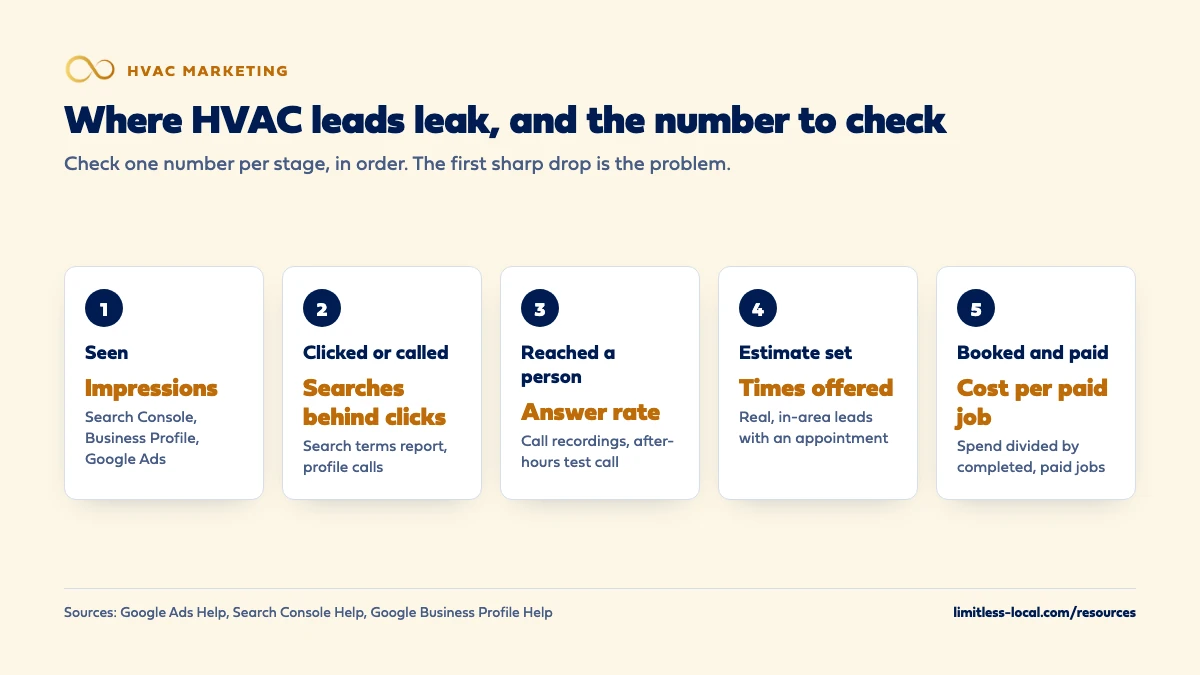
Every job you book passes through the same six stages: a homeowner sees you on Google, clicks or calls, reaches a person, gets an estimate or a service appointment, books, and pays. A drop at any stage feels the same from the owner’s chair. The phone seems quiet, the schedule has gaps, and the easiest thing to blame is the ads.
The way to find the real leak is to check one number per stage, in order, for the same date range:
- Seen: impressions in Search Console, your Google Business Profile and Google Ads.
- Clicked or called: clicks, calls and form fills, and the searches that produced them.
- Reached a person: the share of calls someone actually answered.
- Estimate or appointment: the share of real, in-area leads that got a time on the schedule.
- Booked: the share of estimates that turned into sold jobs.
- Paid: what each completed, paid job cost you in marketing.
In our experience, the first stage where the number falls off sharply is the one to fix, because every stage after it can only work with what makes it through. Ads and Google presence live in the first two stages, the website sits between clicking and calling, and follow-up covers everything after the phone rings.
Are enough people seeing my HVAC company on Google?
The number to check: impressions. Search Console’s Performance report shows how many times your site appeared in Google Search results, plus clicks, click-through rate and average position, and its default view covers the past three months. Your Business Profile Performance page shows views on Search and Maps and the search terms people used to find you. In Google Ads, impressions show how often your ads appeared at all.
What bad looks like: impressions that stay flat or fall while it’s peak season, or impressions that come almost entirely from people searching your company name. Open the Queries tab in Search Console. If the list is your business name and little else, homeowners who don’t already know you aren’t finding you.
The most common fix: for Maps, the right categories, services and service area on your profile; tightening up your Business Profile covers that list. For the regular results, service and city pages that match what homeowners actually search. Organic visibility builds over months, so check how long HVAC SEO takes before judging it on a single month.
Are the right people clicking and calling?
The number to check: clicks and calls, matched to the searches behind them. In Google Ads, the search terms report lists the actual searches that triggered your ads and which of your keywords matched each one. On your Business Profile, Calls counts taps on your call button and Website clicks counts taps on your link.
What bad looks like: plenty of clicks, but from searches like HVAC jobs, HVAC school, window unit prices, or a town your trucks don’t go to. Each of those clicks costs the same as a good one. The other warning sign is a low click-through rate on searches you do want, which means your ad or listing shows up but loses to the one next to it.
The most common fix: Google’s own advice is to add irrelevant search terms as negative keywords and adjust match types, so your ads stop showing for work you don’t do. Our HVAC lead generation guide explains why junk leads happen in general: shared leads, broad targeting and service areas drawn too wide. The search terms report shows you exactly which searches your money went to last month, which is the fastest way to see whether that’s what is happening to you.
Is my website losing people after they click?
The number to check: the share of website visitors who call or send a form. In Google Ads that is conversions divided by clicks, as long as you count both calls to the number on your website and taps on that number on mobile. Google Ads supports both as phone call conversions.
What bad looks like: lots of clicks, very few calls or forms. When you see that, check three things. First, speed on a phone. Run your homepage and your main ad landing page through PageSpeed Insights and read the mobile field data, which reflects real visitors over the previous 28 days. PageSpeed Insights rates loading as Good when the main content appears within 2.5 seconds and Poor past 4 seconds, and rates the response to a tap as Good at 200 milliseconds or less. Second, the phone number: it should sit near the top of the page and start a call when tapped. Third, the form: submit it yourself and see where the lead lands and how long it takes anyone to notice.
The most common fix: lighter pages (smaller images, fewer add-ons), a tap-to-call number and a short form at the top of the mobile page, and form leads that go somewhere a person checks all day, like a text to the office phone, rather than an inbox nobody opens until Monday.
Curious what your marketing is actually booking?
Get a free visibility audit — no obligation, no sales pitch.
Is anyone actually answering when people call?
The number to check: the share of calls a person answered. With call reporting turned on, Google Ads shows each call’s start time, duration and whether it connected, plus the caller’s number for calls over 15 seconds. For Local Services Ads, your leads inbox lets you play back phone lead recordings in the US.
What bad looks like: calls that ring out, very short calls that end in voicemail, and clusters of missed calls at lunch, after closing time and on weekends. Then call your own number after hours from a phone your office won’t recognize, and listen to exactly what a homeowner with no heat at night hears.
The most common fix: routing that rolls to a second person before voicemail, an on-call rotation or answering service after hours, and a text back to every missed call. Answering is only half of it; how fast to respond sets the standard for the rest.
Are calls turning into estimates and service appointments?
The number to check: of the real calls, the share that ended with a time on the schedule. A real call is a homeowner in your area asking for work you do. You will probably have to count this one by hand from recordings or your call log, because the ad platforms don’t know what was said or whether a time was offered.
What bad looks like: calls where nobody offers a time, where the caller gets a price over the phone and says they’ll think about it, or where it ends with “we’ll call you back” and nobody does. Count the calls that weren’t real, too: wrong service, out of area, existing customers, sales pitches. If those make up a big share, the problem is back at the clicking stage, not in your office.
The most common fix: a short call script that ends every real call by offering two specific times, and a rule that callbacks happen the same day. This is coaching, not ad spend, and it tends to be the cheapest fix on the list.
Are estimates turning into booked jobs?
The number to check: close rate. That is sold jobs divided by estimates given, tracked separately for repairs and system replacements. If you run ServiceTitan, Housecall Pro or Jobber, the estimate status there is where this number lives, as long as your techs and comfort advisors mark each estimate sold or lost.
What bad looks like: replacement estimates that go out and never get a follow-up, or follow-up that stops after one unanswered call. A homeowner weighing a new system is often comparing several quotes, and the company that stays in touch politely has an edge.
The most common fix: a follow-up schedule for every open estimate (a call or text within a couple of days, then again the following week) and reminders before every appointment. An HVAC client got 47% more booked estimates from speed to lead, automated reminders and better follow-up. That is one client’s past result, not a forecast for your shop, and it came from changes across response and follow-up together, not from close rate alone.
Are booked jobs turning into paid invoices?
The number to check: marketing cost per paid job. Take what you spent on marketing in a month and divide it by the jobs that were completed and paid. It settles most arguments about which channel works, because every leak above it is already baked in.
What bad looks like: booked jobs that cancel or no-show, or a cost per paid job you can’t work out at all because leads live in one system and invoices in another.
The most common fix: a confirmation and reminder before every appointment, and a simple way to tag each job with the lead source that produced it. Tracking whether your marketing pays off walks through how to connect calls and forms to booked and paid jobs.
How do I run this check in one afternoon?
- Listen to 10 call recordings from the last two weeks, spread across mornings, evenings and weekends. For each one, note three things: real lead or not, answered by a person or not, time offered or not.
- Call your own number after hours from a phone your office doesn’t know. Count the rings and write down what happens.
- Submit your own web form from your phone, then time how long it takes for someone to get back to you.
- Check Search Console impressions for the last three months and scan the Queries tab for the searches you actually want to show up for.
- Open the search terms report in Google Ads for the last 30 days and mark every search you’d never want to pay for.
- Run PageSpeed Insights on your main landing page and read the mobile results.
- Pull last month’s counts from your field software: leads, estimates, sold jobs, paid jobs, and what you spent.
Write the results down in stage order. The first stage with a bad result is where you start.
What should I fix first if more than one stage looks bad?
Our rule of thumb is to fix the phone and follow-up before touching the ad budget. Those fixes are cheap, they work on leads you’re already paying for, and raising spend into a phone that rings out only buys more missed calls. Next comes wasted clicks, then the website, then visibility, which is usually the slowest to move.
Change one stage at a time and give each change a few weeks, so you can tell what actually moved the numbers. If an agency runs your ads or SEO, these are the same numbers to ask them for; judging whether your agency is getting results covers what a useful report should include.
Not sure which of these is costing you jobs?
A free visibility audit checks the Google profile, reviews, site and tracking, and shows what to fix first.
What's different for HVAC companies
Peak season hides leaks. In the first heat wave the phone rings no matter what, and missed calls spike at exactly the moment demand is highest. Run this check once in a shoulder season, when the numbers are calmer, and again in peak, when answering is under the most strain.
Two funnels, not one. A repair call usually books on the phone. A replacement goes through an in-home estimate and a longer decision. Mixing them together hides a weak close rate on the jobs that matter most to your revenue, so track them separately.
Existing customers inflate lead counts. Maintenance-plan members calling to schedule a tune-up show up as calls from your ads and profile. Pull them out before you calculate anything, or your answer rate and cost per job will look better than they are.
Emergencies arrive after hours. No-heat and no-cool calls come in at night and on weekends, which is exactly when most shops have the weakest coverage. That is the first place to test with your own after-hours call.
A worked example: finding the leak in one month of HVAC leads
These numbers are made up to show the math, not a benchmark for your market. Say you spent $3,600 on ads last month and the calls and forms broke down like this:
- 140 calls and form fills came in.
- 98 reached a person, so 42 rang out, hit voicemail or sat in an inbox. That’s a 70% answer rate.
- Of those 98, 60 were real: in your area, for work you do. The other 38 were wrong service, out of area or existing customers.
- 36 got an estimate or a service appointment.
- 18 booked.
- 16 were completed and paid.
Cost per booked job is $3,600 divided by 18, or $200. Cost per paid job is $3,600 divided by 16, or $225. The biggest single loss is the 42 contacts nobody reached, and the next is the 38 that were never real leads. Raising the budget fixes neither: the first is a phone problem and the second is a search terms problem. In this example, the website and the close rate would be the last things to touch.
Frequently asked questions
How many call recordings do I need to listen to?
Ten is enough to spot a pattern if they’re spread across different days and times. One bad call is an anecdote; the same miss on four or five calls is a process problem.
Does Google Ads record calls from my ads?
In the US and Canada, call recording is now on by default for calls through a Google forwarding number from call ads, call assets and your website, unless you turned it off. Calls from location assets aren’t recorded, and callers hear a short message saying the call is recorded.
Can I listen to my Local Services Ads calls?
Yes, in the US. Google records inbound calls to the forwarding number on your ad, and you can play phone lead recordings back from your leads inbox.
Do my Business Profile numbers include ad activity?
Yes. Google says Business Profile performance data includes views, searches and actions from both organic results and Google Ads, so don’t read a jump in profile calls as an SEO win without checking whether your ads changed too.
How long should I wait after a fix before judging it?
Long enough to see a normal run of calls. In Google Ads, Smart Bidding needs a 7-14 day learning phase, and frequent changes to budgets, targets or conversion goals reset it.
What if every stage looks fine but the schedule is still thin?
Then the problem is volume, not a leak. You need more people seeing you, through more ad budget, more service areas or more organic visibility, and that is the one case where spending more is the right first move.
Key takeaways
- Check the stages in order: seen, clicked or called, reached a person, estimate, booked, paid.
- One number per stage is enough; the first sharp drop tells you where to start.
- Missed calls and paid clicks on searches you don’t serve are common leaks, and more ad spend fixes neither.
- Listen to call recordings, call your own number after hours and submit your own form before changing your ads.
- Judge every channel by cost per paid job, not cost per lead.
Want a second set of eyes on your setup?
We'll look at how you show up locally and where calls are leaking, then send you a plain-English breakdown.
More in this section
- How do I track whether my HVAC marketing is paying off?
- How do I know if my HVAC marketing agency is getting results?
- Should I fix my HVAC website and reviews before paying for ads?
- Which HVAC services should I advertise first?
- How do I get HVAC calls without paying for ads?
Sources
- About the search terms report — Google Ads Help
- About call reporting — Google Ads Help
- Manage your call recording settings and eligibility — Google Ads Help
- About conversion measurement — Google Ads Help
- Performance report (Search results): Overview and basic settings — Search Console Help
- Understand your Business Profile performance & insights — Google Business Profile Help
- About PageSpeed Insights — Google for Developers
- Manage leads and jobs — Google Local Services Help