
How do I set up email marketing for my HVAC company?

- What's the simplest way to start email marketing for an HVAC company?
- Is email marketing worth it for an HVAC company?
- What do I need before I send the first email?
- Who can I email, and where should the list come from?
- Which emails should an HVAC company set up first?
- What should a seasonal tune-up email say?
- What does the CAN-SPAM Act require from an HVAC company?
- Do appointment reminders and invoices follow the same rules?
- How do I keep HVAC emails out of the spam folder?
- Can I send these offers by text instead?
- How do I tell whether email is booking jobs?
- What's different about email for HVAC companies
- A worked example: what one tune-up email can book
- Frequently asked questions
- Key takeaways
- More in this section
- Sources
The short version
- Use the customer list you already have; don't buy one.
- Send from your own domain, with SPF and DKIM set up.
- Automate first: lead confirmation, job reminder, thank-you, seasonal tune-up, win-back.
- Every marketing email needs your address and an opt-out you honor within 10 business days.
For HVAC owners who have a list of past customers and leads sitting in their field software and want it to book jobs, without landing in spam or breaking the email rules.
Get a free visibility audit · Book a growth call
What's the simplest way to start email marketing for an HVAC company?
Start with the customer list already in your field-service software, send from an email tool set up on your own business domain, and build a few automatic emails before any newsletter: a confirmation for new leads, a reminder before each job, a thank-you after it, and tune-up reminders before cooling and heating season. Every marketing email has to follow the CAN-SPAM Act, which means an honest sender and subject line, your physical mailing address, and a clear way to opt out that you honor within 10 business days. Judge it by the jobs it books, not by how many people open it.
Email is one of the cheapest ways to bring back a customer you’ve already paid to win, and we judge it the same way as every other channel: by the booked jobs it produces. Every one of our HVAC marketing packages includes an email welcome flow so new leads hear back right away, and automated follow-up on estimates and unclosed jobs is available as an add-on. The HVAC lead generation guide shows where your past-customer list fits next to the paid channels, and the rest of the HVAC marketing questions library goes question by question.
Is email marketing worth it for an HVAC company?
For bringing back people who already know you, yes. For finding brand-new customers, not really. Email doesn’t put you in front of a homeowner who has never heard of you; Google, Maps and ads do that. What email does well is keep you in touch with past customers, plan members and leads who asked for a quote, so they book with you instead of searching again. That’s why the past-customer list shows up on the list of HVAC leads you control.
It’s also cheap: most field-service software already includes email campaigns. The return depends on how big and how clean your list is.
What do I need before I send the first email?
- A list. Every customer and lead with an email address, ideally in the field-service software you already use, so the list updates itself as jobs are booked.
- A sending tool. ServiceTitan, Housecall Pro and Jobber all have built-in email campaigns, and standalone email tools work too. Built-in tools have one advantage: they can send based on job history, such as “completed a tune-up” or “hasn’t booked in a while”.
- An address on your own domain. Send from something like office@yourcompany.com, not a free personal inbox.
- Email authentication. Gmail requires every sender to set up SPF or DKIM for their sending domain, and recommends setting up SPF, DKIM and DMARC. If you use an email tool, Google says to check that it authenticates your domain’s email with SPF and DKIM. Your web or IT person can usually do this in an afternoon.
- Your mailing address and an unsubscribe link ready for the footer, for the reasons covered further down.
Who can I email, and where should the list come from?
Email the people who gave you their address: customers, plan members and leads who requested a quote or service. The FTC describes the CAN-SPAM Act as a law that gives recipients the right to have you stop emailing them, and it notes you don’t need plan members’ consent to send them marketing emails, though they can still opt out. Gmail goes further for deliverability: it says to send email only to people who want to get messages from you and to make sure recipients opt in, because spam reports lower your domain’s reputation over time.
Don’t buy a list of homeowners in your area. Strangers who never asked to hear from you are the people most likely to mark you as spam, which in our judgement can hurt delivery of the emails your real customers want, like appointment reminders. A smaller list of people who know you will book more jobs than a bigger one that doesn’t.
Which emails should an HVAC company set up first?
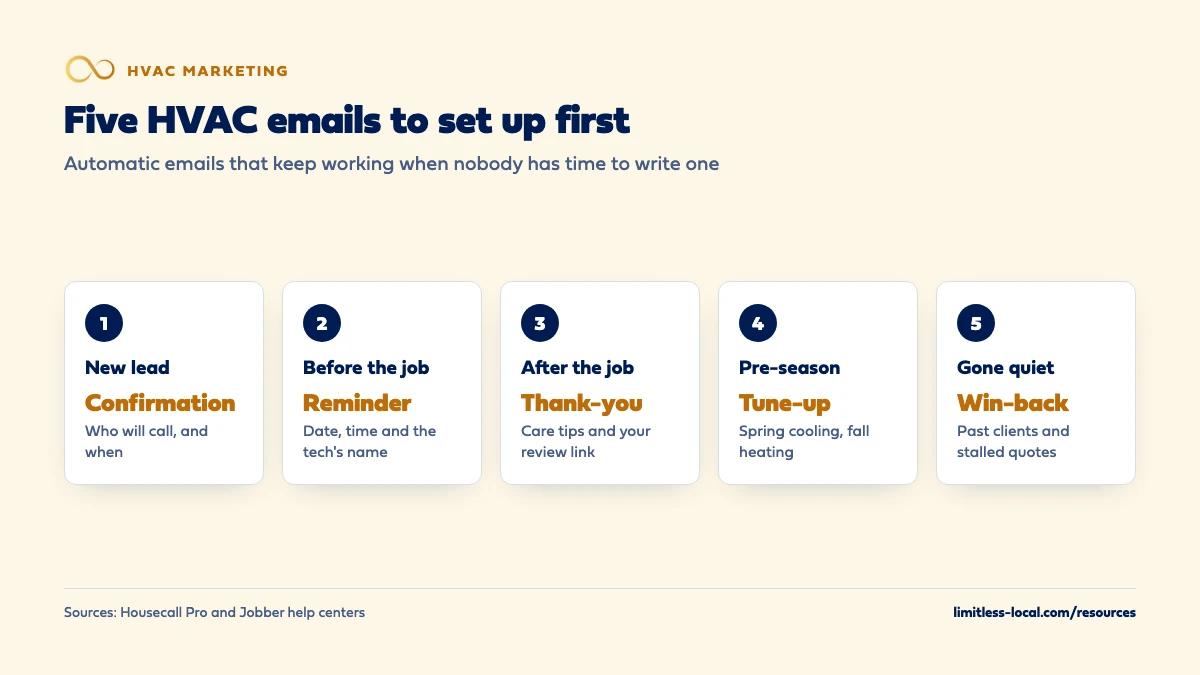
Automatic emails first, one-off campaigns later. Automatic emails go out on their own when something happens, so they keep working in the weeks nobody has time to write a newsletter.
- New-lead confirmation. The moment a form comes in: we got your request, here’s who will call and when. It doesn’t replace a callback; how fast to respond to new leads covers that part.
- Job reminder. Housecall Pro’s email automation, for example, can send a reminder a set number of days before a job starts, filled in with the date, time, address and the tech’s name.
- Thank-you after the job. Housecall Pro suggests a post-job email that thanks the customer, summarizes the work and shares tips on maintaining their system. It’s a natural place for your review link or a maintenance plan offer.
- Seasonal tune-up reminders, one before cooling season and one before heating season.
- Win-back emails. Jobber’s suggested automated campaigns are a good model: one that re-engages past clients who haven’t booked in a while, and one that reconnects with leads whose quotes didn’t turn into jobs.
Curious what your marketing is actually booking?
Get a free visibility audit — no obligation, no sales pitch.
What should a seasonal tune-up email say?
One reason to read it, one thing to do, and an easy way to do it. Something like this:
- Subject: “Time to book your AC tune-up before summer”
- Body: a short note that the busy season is coming, what the tune-up covers, and that booking early gets a better choice of times.
- One action: a booking link or your phone number, near the top.
- Footer: your company name, mailing address and an unsubscribe link.
Send it before the season starts, not during the first heat wave, when your schedule is already full and the email can only create calls you can’t take. Plan members get a version that tells them their included visit is due.
What does the CAN-SPAM Act require from an HVAC company?
The FTC’s CAN-SPAM compliance guide applies to every commercial email, not just bulk mail, and the FTC’s own example of an email that must comply is a message to former customers announcing a new product line. For an HVAC shop, that’s your tune-up specials and seasonal offers. The main requirements:
- Honest header information. The From, To, Reply-To and routing information, including the sending domain and email address, must be accurate and identify your business.
- An honest subject line that reflects what’s in the email.
- Disclose that it’s an ad. The law gives you a lot of leeway in how, but it has to be clear.
- Your valid physical postal address, which can be a street address or a registered PO box or private mailbox.
- A clear way to opt out, such as a reply address or an unsubscribe link, that keeps working for at least 30 days after you send.
- Honor opt-outs within 10 business days, without charging a fee or asking for more than an email address.
- Watch anyone who sends for you. If you hire a company to run your email, you can’t contract away your own responsibility to follow the law.
The stakes are real: the FTC says each separate email that violates the law can bring penalties of up to $53,088. This is general guidance, not legal advice; if you’re unsure about a specific message, ask your attorney.
Do appointment reminders and invoices follow the same rules?
Mostly not. The FTC sorts email by its primary purpose. Messages that confirm a transaction the customer already agreed to, give warranty or safety information about something they bought, or tell them about a change to their membership or account are transactional or relationship messages. Those only have to avoid false or misleading routing information and are exempt from most of the other rules.
The catch is mixing. If the subject line would make a reasonable person think the email is an ad, or the transactional part isn’t mainly at the beginning, the FTC treats the whole email as commercial. So an appointment reminder that leads with a duct-cleaning special is a marketing email and needs the full CAN-SPAM treatment. Keep reminders about the appointment, and send offers separately. ServiceTitan builds the same split into its tools: campaigns are set up as either marketing or transactional at the first step.
How do I keep HVAC emails out of the spam folder?
Gmail publishes its sender requirements, and they’re a good checklist for any inbox:
- Authenticate your domain with SPF or DKIM (both, plus DMARC, is better).
- Keep spam complaints low. Gmail requires senders to keep the spam rate reported in its Postmaster Tools below 0.3%.
- Make unsubscribing easy. Gmail says letting people opt out can improve open rates and sending efficiency. Bulk senders, those sending more than five thousand messages a day to Gmail accounts, must also support one-click unsubscribe; few HVAC shops send that much, but many email tools add it anyway.
- Clean the list. Gmail suggests periodically confirming recipients still want your emails and considering unsubscribing people who never open them.
Your sending tool matters here too. Housecall Pro, for example, notes that internet providers such as Google and Yahoo issue sender reputation scores that affect whether your emails get delivered, and it limits how many campaign messages each plan can send.
Can I send these offers by text instead?
You can, but texting has stricter rules than email, so set it up deliberately. The FCC’s consumer guide says its rules ban autodialed text messages to a mobile phone unless the owner gave prior consent, that commercial texts require written consent, and that people can opt out of robotexts at any time and in any reasonable way. Housecall Pro’s campaign tool also lists the Telephone Consumer Protection Act (TCPA) among the rules that govern text messages and only sends marketing messages between 8 a.m. and 9 p.m. in the recipient’s local time.
The practical version: collect written permission for marketing texts (a checkbox on your booking form, for example), keep promotions to people who gave it, and stop the moment someone replies STOP. Replying to a customer about their own appointment is a different situation from sending a tune-up special. This is general guidance, not legal advice; your texting provider and attorney can tell you exactly what’s required.
How do I tell whether email is booking jobs?
Opens and clicks tell you whether people saw the email. Booked jobs tell you whether it worked. To connect the two:
- Give each campaign its own phone number or booking link. ServiceTitan’s campaign builder lets you assign a tracking number to each campaign, and notes that a manually entered number won’t track revenue to the campaign.
- Tag the jobs. Mark bookings that came from an email with “Email” as the lead source, so you can count jobs and revenue per send.
- Compare against a normal week. If tune-up bookings jump the week the reminder goes out, that’s your answer, even if attribution isn’t perfect.
Then put email next to your other channels in the same report. Tracking whether your marketing is paying off covers the setup. Email to past customers is one part of a bigger repeat-business plan, along with maintenance plans and referrals, which getting more repeat customers and referrals walks through.
Not sure which of these is costing you jobs?
A free visibility audit checks the Google profile, reviews, site and tracking, and shows what to fix first.
What's different about email for HVAC companies
The weather sets the calendar. Your two best sends of the year are the weeks before cooling season and before heating season. Once a heat wave or cold snap hits, the phone rings on its own; a promotion then mostly creates calls you can’t take.
Equipment history is your best segment. Field-service tools can target customers by the work done on past jobs. Jobber, for instance, can filter a campaign by the services used on a client’s visits. That lets you send a replacement-planning note to owners of older systems, and a tune-up reminder to everyone else, instead of one email for all.
Replacement quotes need a longer runway. A repair is booked or lost in a day. A system replacement can sit for weeks while the homeowner compares quotes. A follow-up email for quotes that went quiet earns its place here, but Jobber notes that its pending-quote campaign may overlap with quote follow-ups you already have scheduled, and suggests spacing them out.
Slow months are when email earns its keep. When the phones are quiet, your list is the fastest way to fill the schedule. Keeping calls coming in during slow months covers the other levers.
A worked example: what one tune-up email can book
These numbers are made up to show the math, not a benchmark for your market. Say your field software holds 800 past customers with a working email address, and you send one spring tune-up reminder two weeks before cooling season. If 3% of them book, that’s 24 tune-ups on the calendar from an email you wrote once, sent from software you already pay for. Each of those visits is also a chance to sell a maintenance plan or find a needed repair.
The list does the heavy lifting. Half the list means half the bookings, which is why getting every customer’s email into your system at booking time matters more than how the email looks. On our side, the Essentials package ($3,500 a month) includes a 3-email welcome flow so new leads hear back right away, Growth ($4,500 a month) includes a 5-email flow, and Scale adds custom welcome flows and follow-up sequences.
Frequently asked questions
How often should an HVAC company email past customers?
Often enough to stay familiar, not so often they unsubscribe. A send tied to each season plus the automatic job emails is enough for most shops; add more only when you have a real reason, like new financing or a rebate.
Can I send marketing emails from a free Gmail address?
It’s a poor idea. Gmail’s sender guidelines say not to impersonate Gmail From: headers, and email sent from your own domain with SPF and DKIM set up is less likely to be marked as spam.
Can I email people who got a quote but didn't book?
Yes, and it’s one of the more useful emails to automate. If it promotes your services, it’s a commercial email and needs your mailing address and an opt-out like any other.
Do maintenance plan members get to unsubscribe?
From marketing emails, yes. The FTC says members don’t lose the right to opt out of marketing emails because they’re members. Emails about their plan itself, such as a change to its terms, count as relationship messages.
Who is responsible if a marketing company sends emails for me?
You both can be. The FTC says you can’t contract away your responsibility under CAN-SPAM, and both the company promoted in the email and the company that sends it may be held legally responsible.
Do I need a monthly newsletter?
No. Automatic job emails and well-timed seasonal reminders do most of the work. A newsletter is worth it only if you’ll keep it useful and on schedule.
Key takeaways
- Email brings back customers you already have; it doesn’t replace the channels that find new ones.
- Send from your own domain with SPF and DKIM set up, to people who gave you their address.
- Set up automatic emails first: lead confirmation, job reminder, thank-you, seasonal tune-up and win-back.
- Marketing emails need an honest subject, your mailing address and an opt-out honored within 10 business days.
- Measure email by booked jobs and revenue, using a tracking number or tagged lead source per campaign.
Want a second set of eyes on your setup?
We'll look at how you show up locally and where calls are leaking, then send you a plain-English breakdown.
More in this section
- What's the simplest marketing setup for a small HVAC company?
- How do I market a second HVAC location?
- How should a commercial HVAC company market itself?
- How do I track whether my HVAC marketing is paying off?
- What should I look for in a CRM for my HVAC company?
Sources
- CAN-SPAM Act: A Compliance Guide for Business — Federal Trade Commission
- Email sender guidelines — Gmail Help
- Stop Unwanted Robocalls and Texts — Federal Communications Commission
- Automated Email Campaigns Overview and FAQ — Housecall Pro Help Center
- Campaigns: Overview and FAQ — Housecall Pro Help Center
- Campaigns | Marketing Tools — Jobber Help Center
- Create campaigns — ServiceTitan Help