
What should I look for in a CRM for my HVAC company?

- How do I choose a CRM that helps my HVAC company stop losing leads?
- Do I need a separate CRM if I already use ServiceTitan, Housecall Pro or Jobber?
- Does it put every lead in one place?
- Can I see where every lead stands?
- Does it track where each lead came from, all the way to revenue?
- Will it follow up on leads and estimates automatically?
- Does it connect to my call tracking, website and ads?
- Will my office and techs actually use it?
- Can it handle repeat customers and maintenance plans?
- Which plan do I actually need?
- Can I get my data out if I leave?
- What's different about a CRM for HVAC companies
- A worked example: what lead source tracking shows you
- Frequently asked questions
- Key takeaways
- More in this section
- Sources
The short version
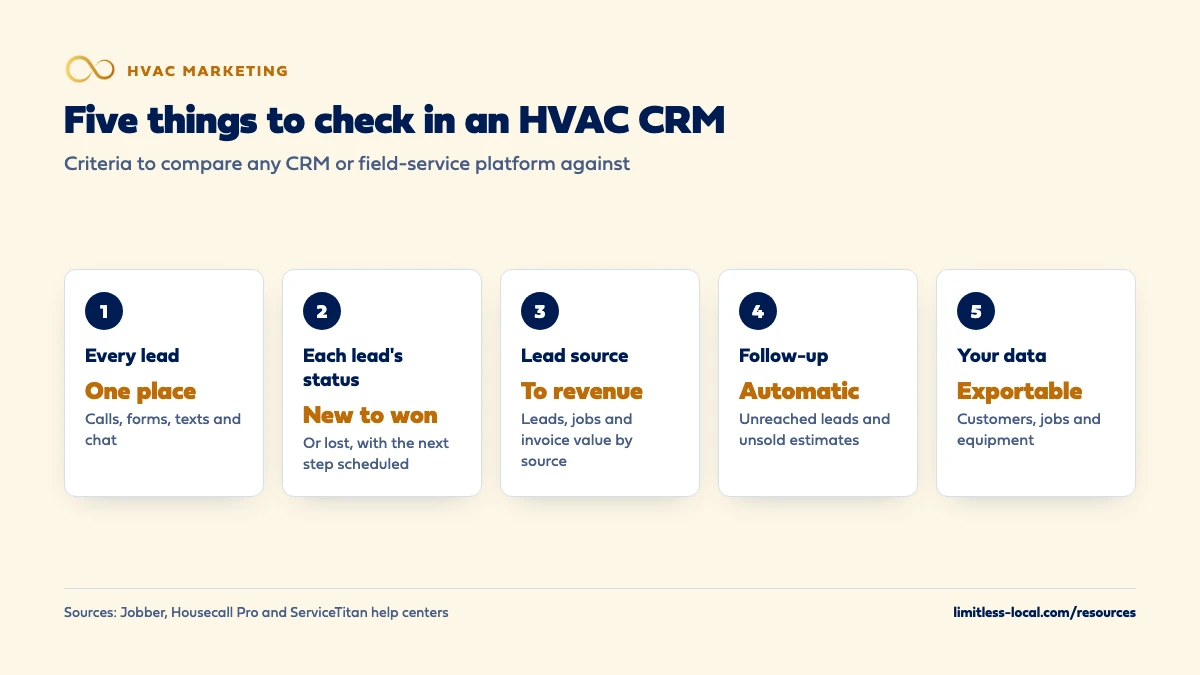
- Every lead in one place, tagged with where it came from.
- A clear status for each lead, from new to won or lost.
- Automatic follow-up on leads and estimates that haven't booked.
- Reports that tie each lead source to booked jobs and revenue.
- A plan that includes those features, and a way to export your data.
For HVAC owners choosing or replacing the system that tracks leads and customers. This is a checklist of what to look for, not a ranking of products.
Get a free visibility audit · Book a growth call
How do I choose a CRM that helps my HVAC company stop losing leads?
Look for a CRM that puts every lead (calls, web forms, texts and chat) in one place with its source attached, shows where each lead stands until it books or is lost, and follows up automatically on leads and unsold estimates. It should be part of, or connect cleanly to, the field-service software you schedule and invoice in, so you can see which marketing sources turned into booked jobs and revenue, not just leads. Before you sign, make sure your office and techs will actually use it, that the plan you’re buying includes the features you need, and that you can export your customer list if you ever leave.
That’s the same test we’d apply for you: can the system show what each booked job cost, by source? Every one of our HVAC marketing packages includes call tracking, form and chat lead tracking and source tagging, and a lead tracking dashboard and unified messaging are automation add-ons that plug into any tier. An HVAC client got 47% more booked estimates from speed to lead, automated reminders and better follow-up; that’s a past result for one client, not a forecast for yours. The HVAC lead generation guide covers where leads come from in the first place, and the rest of the HVAC marketing questions library goes question by question.
Do I need a separate CRM if I already use ServiceTitan, Housecall Pro or Jobber?
Often, no. A CRM (customer relationship management system) tracks leads and customers; field-service software runs scheduling, dispatch and invoicing. Most HVAC field-service platforms now include a good share of CRM features, so the first step is to check what you already pay for:
- Jobber labels people as leads until they become clients, which happens when a job is created, an invoice is sent or a quote is approved, and has a lead source field on every client.
- Housecall Pro has a Pipeline with boards for leads, estimates and jobs.
- ServiceTitan lets CSRs capture a lead from a call and work it from a Follow Up screen, where they can schedule the next follow-up, convert the lead to a job or dismiss it.
A separate CRM can make sense if your leads come in through channels your field software can’t see, or if you need sales or marketing features it doesn’t have. In our judgement, the bigger risk is the opposite: two systems that don’t talk, with leads in one and booked jobs in the other, so nobody can tell which marketing worked.
Does it put every lead in one place?
This is the first test, because a lead that lives only in someone’s cell phone or a separate inbox is a lead nobody follows up on. Calls, web forms, text messages, website chat, Google Business Profile messages and Local Services Ads leads should all end up in the same list, attached to a customer record.
Ask exactly how each channel gets in. Some tools capture leads for you; others only organize what someone enters. Housecall Pro, for example, says plainly that its Pipeline leads board doesn’t create leads; it helps you view and organize them in one place. In ServiceTitan, capturing a lead from a call depends on your team setting up call reasons classified as leads. Neither is a flaw, but you need to know which steps are automatic and which depend on a CSR clicking the right button on a busy day.
How fast those leads then get answered is its own standard, covered in how fast an HVAC company should respond to new leads. The CRM’s job is to make sure none of them sit unseen.
Can I see where every lead stands?
A good CRM answers “what happened to that lead?” in one click. Look for clear statuses and a way to schedule the next step.
Housecall Pro’s leads board, for instance, is organized into six columns: New Lead, First Contact, Second Contact, Third Contact, Won and Lost, and it suggests updating statuses regularly so leads don’t fall through the cracks. ServiceTitan’s Follow Up screen lets a CSR add notes, schedule a follow-up date, convert the lead to a job or dismiss it, and dismissed leads can be restored later.
Whatever tool you choose, the test is the same: could your office manager pull up every open lead from last week and say who was reached, who wasn’t and what’s next? If the answer takes a spreadsheet and three apps, keep looking.
Does it track where each lead came from, all the way to revenue?
This is the feature that tells you whether your marketing works, and it’s the one most often set up halfway. You want three things:
- A lead source on every lead. Jobber’s lead source field comes with options like Referral, Google and Facebook, lets you add your own, and can fill itself in from UTM tags on your request form links.
- Automatic source tracking for calls. In our judgement, calls are most HVAC leads, and nobody should have to ask every caller how they found you. ServiceTitan notes that phone integration is required to automatically track the source of incoming leads, and that CSRs can also attach a marketing campaign to a call by hand.
- A report from source to revenue. Jobber’s lead source report shows, for each source, how many leads came in, how many got a quote, a job and an invoice, and the value of the first invoice.
With those in place, you can compare channels on cost per booked job instead of cost per lead. Tracking whether your marketing is paying off covers the full setup.
Curious what your marketing is actually booking?
Get a free visibility audit — no obligation, no sales pitch.
Will it follow up on leads and estimates automatically?
Follow-up is where a CRM pays for itself, because it does the reminding nobody has time for. Look for automatic follow-up on two things: new leads you haven’t reached, and estimates the customer hasn’t answered.
Jobber’s automations, for example, can send up to two automatic reminders by email or text about quotes still awaiting a response, sent the same way the original quote went, and can archive old requests that never turned into a quote or job so the pipeline stays clean. Check how much control you have over timing and wording, and whether follow-ups stop on their own once the customer books.
Also check which plan includes it. Jobber, for instance, offers quote follow-ups on its Connect plan and up. The CRM should run the sequence you’ve decided on, not the other way around. If leads are coming in and jobs aren’t, figuring out whether follow-up is the problem is worth doing before you buy anything.
Does it connect to my call tracking, website and ads?
Every system that touches a lead should either feed the CRM or be part of it. Otherwise someone retypes leads, and retyped leads lose their source.
- Call tracking. Some call-tracking tools send call data straight into field software. CallRail’s ServiceTitan integration, for example, sends tracked calls into ServiceTitan and matches them to existing contacts or creates new ones, along with source details such as UTM parameters and ad click IDs. Read the requirements: CallRail lists a ServiceTitan Marketing Pro Ads package as one of them.
- Your website forms. Forms should land in the CRM with their source, not in an email inbox.
- Chat and texting tools. If you add website chat, its leads should land in the same place. Whether AI chatbots bring in leads covers that decision.
In a demo, ask the vendor to show a test call and a test form arriving in the system with the source filled in. Seeing it beats a list of logos on an integrations page.
Will my office and techs actually use it?
The best CRM on paper is worthless if the office works around it. Things to check:
- The office’s daily screen. Can a CSR see new leads, today’s follow-ups and the schedule without hunting through menus?
- The tech’s phone. Techs should see the customer’s history and equipment on the job, and be able to sell a maintenance plan or create an estimate from the driveway.
- Permissions. Decide who can see pricing, edit customers or export the list.
- Training and support. Ask who sets it up, who trains your team, and what support looks like in July when something breaks.
The best test is a trial with real work. Run a couple of weeks of actual leads through it, with the people who’ll use it every day, and ask them what slowed them down.

Can it handle repeat customers and maintenance plans?
For an HVAC company, a CRM isn’t only about new leads. A large part of the value is in customers you’ve already served: maintenance plan members, seasonal tune-up reminders and past customers who haven’t booked in a while.
Check whether it can store each customer’s equipment and service history, manage maintenance plans or memberships and their renewals, and send seasonal campaigns to groups like “no visit in a year” or “plan member, tune-up due”. Those features are what make getting more repeat customers and referrals and email marketing to past customers practical instead of a spreadsheet project.
Which plan do I actually need?
Many of the features on this list sit on higher plans, so the plan matters as much as the product. Jobber, for example, says lead management is available on select plans, the lead source field on its Grow, Connect and Core plans, and quote follow-ups on Connect and up. Some platforms sell marketing features as separate packages, as the CallRail requirement above shows.
Write down the five or six features you need from this page, then ask each vendor which plan includes every one of them and what it costs per user or per location. Compare that total, not the starting price on the pricing page.
Can I get my data out if I leave?
Your customer list is one of the most valuable things your business owns. Before you sign, find out how to get it out. Jobber, for instance, lets admin users export the client list as a CSV or vCard file, including contact information, property addresses, tags and custom fields, with CSV exports handled up to 1500 rows at a time.
Ask every vendor the same questions: can I export customers, jobs, invoices and equipment records myself, in a standard format, at any time? Is there a fee? What happens to the data if I cancel? A vendor that’s vague about this is telling you something.
Not sure which of these is costing you jobs?
A free visibility audit checks the Google profile, reviews, site and tracking, and shows what to fix first.
What's different about a CRM for HVAC companies
Peak season tests the system. The first heat wave can bring more leads in a day than a normal week. A CRM that’s fine at ten leads a day and falls apart at fifty costs you the busiest, most profitable days of the year. Ask how others your size use it in July.
Repairs and replacements move at different speeds. A repair lead is won or lost in an hour. A replacement estimate can take weeks of follow-up while the homeowner compares quotes and financing. The CRM needs both a fast lead queue and an estimate pipeline with follow-up reminders.
Equipment history drives the next sale. Knowing what’s installed in each home, how old it is and what’s been repaired is what lets a tech recommend a replacement honestly and lets you send the right seasonal message.
Memberships are recurring revenue. If you sell maintenance plans, renewals and included visits need to be tracked in the same system, not in a separate spreadsheet that drifts out of date.
A worked example: what lead source tracking shows you
These numbers are made up to show the math, not a benchmark for your market. Say your lead source report for last quarter shows Google Ads brought 40 leads and 10 booked jobs, and referrals brought 12 leads and 9 booked jobs. If you spent $3,000 on Google Ads that quarter, each ads job cost $300. The referral jobs cost close to nothing to book.
Without source tracking, all you’d see is 52 leads and a feeling about which ones were good. With it, you can decide whether to spend more on ads, put more effort into referrals, or both, based on booked jobs instead of guesses. That comparison is only possible if every lead gets a source and every job is connected to the lead it came from.
Frequently asked questions
Is a CRM the same as field service management software?
Not quite. A CRM tracks leads and customer relationships; field service management software runs scheduling, dispatch and invoicing. Platforms built for the trades, such as ServiceTitan, Housecall Pro and Jobber, combine both to different degrees.
What's the most important report a CRM should give me?
Booked jobs and revenue by lead source. Lead counts alone can make a weak channel look good; jobs and revenue show what’s actually paying.
Should my marketing agency have access to my CRM?
Access to lead sources and booked jobs, yes, so the agency is judged on jobs rather than clicks. Keep ownership of the account and the data in your company’s name.
Can a CRM text leads automatically?
Many can, such as Jobber’s quote follow-ups, which go out by text if the quote was sent by text. Follow-ups about a quote the customer asked for are different from marketing texts, which have stricter consent rules; our email marketing page covers the basics.
When is the best time to switch CRMs?
In a shoulder season, not the week before peak. Moving customers, open estimates and memberships takes attention, and you don’t want your team learning a new system during a heat wave.
Should techs use the CRM too?
Yes, at least on their phones. Techs who can see a customer’s history and equipment on the job give better recommendations, and they’re often the ones selling maintenance plans and creating estimates.
Key takeaways
- Check what your field-service software already does before buying a separate CRM.
- Every lead should land in one place with its source, from calls, forms, texts and chat.
- Look for clear lead statuses and automatic follow-up on leads and unsold estimates.
- The report that matters is booked jobs and revenue by lead source.
- Confirm which plan includes the features you need, and how to export your data before you sign.
Want a second set of eyes on your setup?
We'll look at how you show up locally and where calls are leaking, then send you a plain-English breakdown.
More in this section
- What is the best website platform for an HVAC company?
- How do I set up email marketing for my HVAC company?
- What should I look for in an HVAC marketing agency contract?
- What pages should an HVAC company website have?
- What's the simplest marketing setup for a small HVAC company?
Sources
- Lead Management — Jobber Help Center
- Lead Source Report — Jobber Help Center
- Automations — Jobber Help Center
- Export Client Information — Jobber Help Center
- Getting Started with Pipeline — Housecall Pro Help Center
- Add marketing campaigns in ServiceTitan — ServiceTitan Help
- Use the Follow Up screen to find and view captured leads — ServiceTitan Help
- ServiceTitan integration — CallRail Help Center