
How do I keep HVAC calls coming in during slow months?
- How do I fill my HVAC schedule during the slow spring and fall shoulder seasons?
- Why do HVAC calls drop in spring and fall?
- Step 1: When should I start planning for the slow season?
- Step 2: How do I fill the schedule with tune-ups?
- Step 3: Who should I contact first?
- Step 4: What rules apply to emailing past customers?
- Step 5: Should I pause my ads in the slow months?
- Step 6: What should my ads push when repair calls are slow?
- Step 7: How do I use my Google Business Profile in the slow season?
- Step 8: What should I work on while the phones are quiet?
- Should I discount to fill slow weeks?
- How do I know if the slow-season plan worked?
- What's different about slow months for HVAC companies
- A worked example: what a past-customer list can do in a slow month
- Frequently asked questions
- Key takeaways
- More in this section
- Sources
The short version
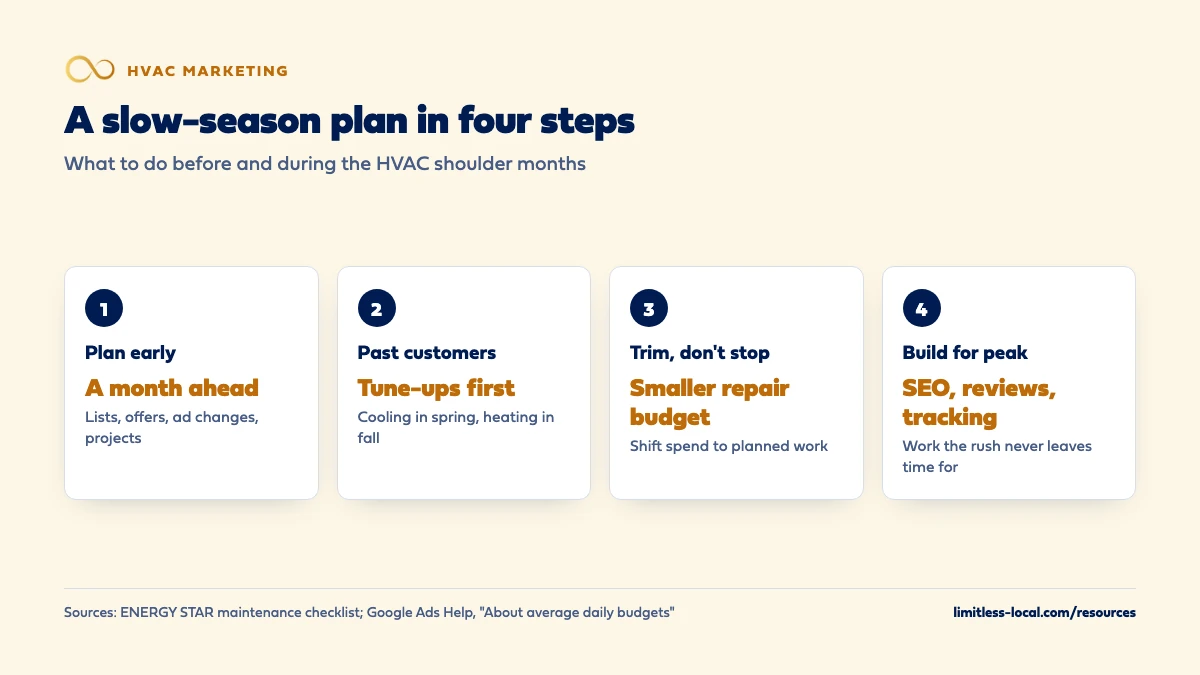
- Build the slow-season plan a month or more before the shoulder season starts.
- Past customers and plan members come first: spring and fall tune-ups are what ENERGY STAR tells them to book.
- Trim ad budgets instead of switching everything off, and point ads at planned work.
- Use the quiet weeks for the work that pays off at the next peak: SEO, reviews, tracking and training.
For HVAC owners who watch the phone go quiet between the summer rush and the first cold snap, and want a plan instead of a guess.
Get a free visibility audit · Book a growth call
How do I fill my HVAC schedule during the slow spring and fall shoulder seasons?
Plan the slow months before they arrive instead of waiting for the phone to go quiet. Book spring and fall tune-ups with past customers and maintenance plan members, since ENERGY STAR itself tells homeowners to have the cooling system checked in spring and the heating system in fall. Keep search ads running on a smaller budget for the repair calls that still come in, and use the quiet weeks to push planned work like replacements and upgrades. Past customers are usually the cheapest calls to win in a slow month, so reach them first.
Most of a slow-season plan is follow-up: reminders that go out on time, past customers who hear from you before a competitor, and estimates that don’t go cold. That’s what our follow-up automation is built for, alongside the ads and Google profile work in our HVAC marketing packages. For every lead source in one place, see the HVAC lead generation guide, and the rest of the HVAC marketing questions library goes question by question.
Why do HVAC calls drop in spring and fall?
Because most HVAC demand follows the weather. When it’s mild, systems aren’t working hard, fewer of them break, and the homeowners who do have a problem often put it off. The summer and winter rushes are breakdown-driven; the shoulder months aren’t.
The same calendar is also the opportunity. ENERGY STAR tells homeowners to have a contractor do annual pre-season check-ups, and says that because contractors get busy once summer and winter come, it’s best to check the cooling system in the spring and the heating system in the fall (ENERGY STAR maintenance checklist). In other words, the slow months are exactly when a federal program tells your customers to call you. The work is making sure they call you.
Step 1: When should I start planning for the slow season?
In our judgement, a month or more before it starts, while the phones are still busy. Waiting until the schedule is empty means the first reminders go out after the quiet has already cost you a few weeks.
A one-page plan is enough. Write down:
- Who you’ll contact: plan members due for a visit, past repair customers, open estimates, and customers your techs flagged as replacement candidates.
- What you’ll offer: a tune-up, a maintenance plan, a replacement consultation, an upgrade.
- How you’ll reach them: email, phone calls from the office, texts where you have consent, Google posts and remarketing ads.
- What changes in your ads: which campaigns get trimmed and which get pushed.
- What you’ll build: the pages, reviews and tracking you never have time for in peak season.
Step 2: How do I fill the schedule with tune-ups?
Sell the tune-up for what it is: the check-up ENERGY STAR tells homeowners to get before each season. Its checklist gives you plain language for what the visit includes: checking thermostat settings, tightening electrical connections, lubricating moving parts, checking the condensate drain and system controls, plus coil cleaning and a refrigerant check for cooling and gas connections, burner and heat exchanger checks for heating (ENERGY STAR maintenance checklist). Listing the work makes the offer concrete.
ENERGY STAR even suggests homeowners plan their check-ups around the clock changes in spring and fall, which gives you two natural reminder dates every year. A reminder that lands the week the clocks change is in step with advice the homeowner may have already heard.
Tune-ups also feed the rest of the year. A tech on a maintenance visit sees the worn part or the aging system, which can become a repair this month or a replacement conversation later. Getting more repeat customers and referrals covers how to turn those visits into ongoing work.
Step 3: Who should I contact first?
Start with the people who already know you, in roughly this order:
- Maintenance plan members due for a visit. They’ve already paid; booking them early fills your calendar and keeps them renewing.
- Open estimates from the last few months, especially replacements that stalled when peak season got busy.
- Replacement candidates your techs flagged on repair calls.
- Past repair customers who aren’t on a plan.
- New homeowners and cold audiences last, because they cost the most to reach.
In our view, a phone call from the office still beats an email for the first three groups: they’re warm, the list is short, and a real conversation books more visits than a promo. Emails and texts carry the rest.
Step 4: What rules apply to emailing past customers?
Marketing email to past customers falls under the federal CAN-SPAM Act. The law requires a clear and conspicuous notice that the message is an advertisement (unless the person gave prior affirmative consent to get it), a working way to opt out that keeps working for at least thirty days after you send, your valid physical postal address, and honest header information and subject lines. Once someone opts out, you have 10 business days to stop emailing them (15 U.S.C. § 7704).
The part that catches HVAC companies out is the mixed message. Under the FTC’s CAN-SPAM Rule, an email that combines a promotion with transactional or relationship content counts as commercial if a reader would take the subject line as promoting something, or if the transactional part doesn’t appear at the beginning of the body (CAN-SPAM Rule, 16 CFR Part 316). So a spring tune-up email to plan members that leads with this month’s offer is, in our reading, a marketing email that needs the opt-out and address, even though they’re members. Texting has its own consent rules, so check them before you text a marketing offer. Most email tools add the unsubscribe link and address footer for you once they’re set up.
Curious what your marketing is actually booking?
Get a free visibility audit — no obligation, no sales pitch.
Step 5: Should I pause my ads in the slow months?
In our judgement, trim them rather than switching everything off. Repair calls slow down in the shoulder months but rarely stop, and a mild week can turn hot or cold with little warning.
Google Ads gives you both options. Pausing a campaign is temporary: it stops the ads and the charges, and the settings and history are kept. When you resume, though, any ad groups or keywords you paused separately have to be turned back on too (Enable, pause, or remove a campaign). Lowering the average daily budget keeps the campaign running at a smaller size; Google spends more on days it expects more clicks and conversions and less on others, so some days run over the average and some under (About average daily budgets).
A practical setup: keep the core repair campaign on, at a budget sized to the calls you can still expect, and move the rest of the money to planned work, covered next.
Step 6: What should my ads push when repair calls are slow?
Planned work, because that’s what homeowners can be talked into on a mild day. In our view the shoulder months suit:
- Replacements. A homeowner putting off a new system may be glad to hear install dates are open now instead of during the next heat wave. Marketing replacements differently from repairs covers the separate campaign and page they need.
- Tune-ups and maintenance plans, aimed at your service area and past customers.
- Upgrades such as heat pumps, thermostats or indoor air quality work.
Remarketing fits here too. Meta lets you upload a customer list, matched to Facebook and Instagram profiles, so past customers can see your tune-up offer in their feed (About customer list custom audiences). Whether Facebook ads work for HVAC covers where that fits and where it doesn’t.
Step 7: How do I use my Google Business Profile in the slow season?
Use posts, specifically offers. Google lets you post updates, offers and events to your Business Profile, and they show on Search and Maps. An offer post requires a title, dates and time and adds a “View Offer” button automatically; you can also add a coupon code, a link and terms. You can schedule posts ahead, set them to repeat weekly or monthly, and posts older than six months are archived unless they have a date range (Create & manage posts on your Business Profile).
So a fall tune-up offer can be written once in August, scheduled for the week the weather turns, and given an end date. One caution from Google: a post with a phone number in the description may be rejected if the number can’t be verified as connected to your business, so let the profile’s own call button do that job. The rest of the profile matters as much as the posts; optimizing your Google profile for calls covers it.

Step 8: What should I work on while the phones are quiet?
The work that pays off at the next peak, and that never gets done during one:
- SEO and your website. SEO typically takes 3 to 6 months to show meaningful growth, so pages started in a spring shoulder season can be pulling their weight by the next heating season. How long HVAC SEO takes explains the ramp.
- Reviews. Tune-up customers are relaxed, happy customers. Ask every one of them.
- Tracking. Check that every ad and listing has a tracked number and that booked jobs are tagged by source before the rush hides the gaps.
- Call handling. Listen to a handful of peak-season call recordings with your office team while there’s time to talk about them.
Should I discount to fill slow weeks?
Carefully, in our judgement. A modest tune-up price or a free add-on can fill a quiet week, but deep discounts tend to attract people shopping on price, and the ones you train to wait for a sale wait for it every year. Priority scheduling, a maintenance plan with real perks, or an open install date before the rush gives homeowners a reason to book now without cutting your price.
Whatever you offer, give it an end date. A slow-season offer that runs all year stops being an offer.
How do I know if the slow-season plan worked?
Compare the shoulder months with the same months last year, and look past the call count. The questions that matter: how many jobs booked, from which source, and what each one cost. Tune-ups that turned into repairs, and maintenance visits that turned into replacement estimates, belong in the count too, because that’s where much of the slow-season value shows up later.
This only works if leads are tagged by source and job type from the start. Tracking whether your marketing pays off covers the setup.
Not sure which of these is costing you jobs?
A free visibility audit checks the Google profile, reviews, site and tracking, and shows what to fix first.
What's different about slow months for HVAC companies
You get two slow seasons, not one. Most trades have one quiet stretch; HVAC usually has a spring and a fall shoulder, each with its own tune-up (cooling in spring, heating in fall). Plan both, with different messages.
The weather can end a slow month overnight. An early hot week in spring or a cold snap in fall brings the calls back fast. Keep the repair campaign running at a smaller budget so you can turn it up the same day instead of rebuilding it.
Idle techs cost money and morale. In our judgement, a full slow-season schedule is as much about keeping good techs busy and paid as it is about revenue, which is one more reason to book maintenance visits before the quiet weeks arrive.
A worked example: what a past-customer list can do in a slow month
These numbers are made up to show the math, not a benchmark for your market. Say you have 600 past customers who aren’t on a maintenance plan, and you contact all of them before the spring shoulder season with an email, a follow-up email and calls from the office to anyone who opens.
- If 1 in 20 books a tune-up, that’s 30 tune-ups on a schedule that would otherwise have gaps.
- If a few of those visits turn up a repair, and one turns into a replacement estimate, the list has paid for itself several times over in jobs you didn’t have to buy clicks for.
The cost is mostly office time and an email tool, which is why past customers usually come before ads in a slow-season plan.
On our side, Google Business Profile posts are part of both Essentials ($3,500 a month, one post a week) and Growth ($4,500 a month, three a week), and Growth adds Meta remarketing to past customers and site visitors. Automated reminders, unified messaging and other follow-up tools are automation add-ons that plug into any tier, priced on the discovery call. A free visibility audit is the simplest way to see where your slow months are leaking calls.
Frequently asked questions
Do tune-up reminder emails to maintenance plan members need an unsubscribe link?
If it promotes an offer, treat it as marketing. Under the FTC’s CAN-SPAM Rule, an email that mixes a promotion with appointment or account details is commercial if the subject line reads as a promotion or the account details don’t come first. A plain appointment confirmation is different.
Can I schedule Google Business Profile posts ahead of time?
Yes. When you create a post you can turn on scheduling and pick a publish date and time, or set it to repeat weekly, monthly or on a custom schedule.
Can I put my phone number in a Google Business Profile post?
It’s better not to. Google says a post with a phone number in its description might be rejected if the number can’t be verified as connected to your business.
Will my ads start right away when I resume a paused campaign?
Not necessarily. Resuming only turns the campaign back on; any ad groups or keywords you paused separately have to be enabled as well before ads show.
Does ENERGY STAR say how often a system should be serviced?
It recommends annual pre-season check-ups by a contractor: the cooling system in spring and the heating system in fall. It also tells homeowners to inspect, clean or change air filters once a month themselves.
Key takeaways
- Plan the slow season a month or more ahead, while the phones are still busy.
- Past customers and plan members come first; ENERGY STAR tells them to book spring and fall check-ups.
- Marketing email to past customers and members must follow CAN-SPAM, including a working opt-out.
- Trim ad budgets rather than pausing everything, and point the rest at replacements and planned work.
- Use Google offer posts with end dates, and spend quiet weeks on SEO, reviews and tracking.
Want a second set of eyes on your setup?
We'll look at how you show up locally and where calls are leaking, then send you a plain-English breakdown.
More in this section
- How do I get HVAC calls without paying for ads?
- How should my HVAC office handle incoming calls from new customers?
- How long does HVAC SEO take to bring in calls?
- What percentage of calls should my HVAC office be booking?
- How should an HVAC company scale up ads for peak season?
Sources
- Maintenance Checklist — ENERGY STAR
- Create & manage posts on your Business Profile — Google Business Profile Help
- 15 U.S. Code § 7704 – Other protections for users of commercial electronic mail — Legal Information Institute, Cornell Law School
- 16 CFR Part 316 — CAN-SPAM Rule — Electronic Code of Federal Regulations
- Enable, pause, or remove a campaign — Google Ads Help
- About average daily budgets — Google Ads Help
- About customer list custom audiences — Meta Business Help Center