
How long does it take an HVAC lead to turn into a booked job?
- How many days does it usually take to book a job from an HVAC lead, repair versus replacement?
- Why does it depend so much on the kind of call?
- How quickly should a repair call turn into a booked job?
- How long do replacement leads take to become booked jobs?
- What slows HVAC leads down on our end?
- How do I measure how long my leads take to book?
- Why do last month's numbers keep changing after the month ends?
- How long should my Google Ads conversion window be for replacements?
- When should I stop following up on a lead that hasn't booked?
- Does shortening the time to book actually win more jobs?
- How long should I wait before judging a new HVAC marketing channel?
- What's different about HVAC sales cycles
- A worked example: why a replacement month looks worse at first
- Frequently asked questions
- Key takeaways
- More in this section
- Sources
The short version
- Repair calls usually book on the first call or not at all.
- Replacement leads book an estimate fast, then can take days or weeks to sign.
- Measure lead-to-booked time from your own software, split by job type.
- Late signings make last month's cost per job look worse than it really was.
For HVAC owners trying to figure out how long to wait on a lead before calling it lost, and why last month’s numbers keep changing after the month is over.
Get a free visibility audit · Book a growth call
How many days does it usually take to book a job from an HVAC lead, repair versus replacement?
It depends on the job. A repair or no-heat, no-cool call is usually booked or lost on the first call, often for the same day or the next. A replacement lead runs on two clocks: the in-home estimate is usually booked within a day or two, but the signed job can take days or weeks while the homeowner compares quotes, sorts out financing and talks it over. Measure your own number by job type, from the date a lead came in to the date it was booked, and judge replacement marketing on a longer window than repair marketing.
That lag is why we look at booked jobs over a long enough window before calling a campaign good or bad, and why follow-up matters as much as the first call. Speed to lead, reminders and estimate follow-up are what our follow-up automation handles, and it plugs into any of our HVAC marketing packages. The HVAC lead generation guide covers getting leads that actually book, and the rest of the HVAC marketing questions library goes question by question.
Why does it depend so much on the kind of call?
Because an HVAC company really runs three sales cycles under one phone number, and in our judgement they move at very different speeds:
- Repairs and emergencies. The system quit and the homeowner wants someone today. They call, maybe a second company if you don’t pick up, and book whoever offers a time first. The whole cycle is minutes long.
- Maintenance and tune-ups. Nothing is broken, so there’s no rush. These usually book within a few days, often around a reminder or a seasonal offer.
- Replacements. A large purchase with a longer decision. The first step, getting you into the house for an estimate, books quickly. The second step, the homeowner signing, is where the days and weeks go.
Mixing all three into one average gives you a number that describes none of them. A shop whose calls are mostly repairs will look fast; a shop pushing replacements will look slow, even if both are doing everything right. Before you measure anything, split your leads by job type. If your ads and pages already treat the two differently, marketing replacements differently from repairs covers the rest of that split.
How quickly should a repair call turn into a booked job?
On the call. A repair caller who hangs up without a time on the schedule is, in our experience, usually gone, because the next company on the list is one tap away. So for repairs the useful question isn’t how many days it took, it’s what share of real repair calls ended with a booked appointment, and how fast someone reached the leads that came in by form, text or missed call.
Two things decide that. First, response time: a form or missed call that waits an hour is often already booked elsewhere. How fast to respond to new leads sets the standard for every channel, including after hours. Second, what happens on the call: whether the person answering offers a specific time, and whether there’s a time to offer. If the first opening is three days out, that’s a capacity problem, not a sales problem, and no amount of follow-up fixes it.
How long do replacement leads take to become booked jobs?
Think of it as two clocks, and track both:
- Lead to estimate appointment. This should look like a repair: hours, a day or two at most. A homeowner asking about a new system is often getting several companies out, and the ones who show up first set the terms of the comparison.
- Estimate to signed job. This is the long one. The homeowner may be waiting on other quotes, checking financing, looking at rebates, or deciding whether to nurse the old system through one more season. In our judgement, a few days to a few weeks is normal, and an emergency replacement (the system died in July) moves much faster than a planned one.
What you offer changes the second clock too. An industry survey of more than a thousand contractors by the Air Conditioning Contractors of America (ACCA) and Farmington Consulting Group, reported by ACHR News on February 10, 2026, found contractors closing 43% of install jobs on average, with close rates higher for contractors who offered four or more options and for those who offered financing (ACHR News). Whether a job closes and how long it takes are related: a homeowner who can see a monthly payment and pick from clear options has less left to go away and think about. What counts as a good close rate, and how to measure yours, is covered in a good close rate for replacement estimates.
What slows HVAC leads down on our end?
Some of the delay is the homeowner. A surprising amount is usually the shop. The common ones we see:
- A slow first touch. Forms and missed calls that sit until someone gets back from a job.
- No time offered. The call ends with “we’ll call you back to set something up” instead of a time on the calendar.
- A late estimate. The comfort advisor gets to the house, then the written estimate goes out days later. The homeowner has someone else’s quote in hand by then.
- One follow-up, then silence. The estimate goes out, one call goes unanswered, and nobody tries again. A lead that wasn’t ready this week gets marked lost when it was only slow.
- A full schedule. The lead is ready but the first install date is weeks out. That’s a good problem, but it still costs jobs if the homeowner can’t wait.
Every one of these shows up as a longer lead-to-booked time, and only the last one is about demand. The rest are process, which is the good news: they’re fixable without spending another dollar on marketing.
Curious what your marketing is actually booking?
Get a free visibility audit — no obligation, no sales pitch.
How do I measure how long my leads take to book?
Use the dates your software already keeps. The method is the same everywhere: for each lead, subtract the date it came in from the date it booked (or for replacements, the date the estimate went out from the date it was signed), then look at the typical number by job type and lead source.
- Jobber. The quotes report can be exported to a spreadsheet with a Sent date and a Converted date for every quote, and filtered by salesperson (Jobber Help Center). The gap between those two columns is your estimate-to-signed time.
- Housecall Pro. Lead conversion reports can be grouped by date, employee or lead source, and show open, won and lost counts; estimate reports can be filtered by lead source, job type and outcome (Housecall Pro Help Center).
- ServiceTitan. In our experience, a custom report that pulls the lead date and the sold date for each job gets you the same gap.
Use the middle value (the median) rather than the average. One replacement that signs four months later can drag an average far past what’s typical. And keep repair and replacement separate, for the reason above.
Why do last month's numbers keep changing after the month ends?
Because jobs sign after the month they started in. A replacement lead from the last week of March may not sign until mid-April, so March looks weak when you first run the report and better a month later. Software and ad platforms handle this in ways that can mislead you if you don’t know about them:
- Jobber measures quote conversion as quotes converted in a period against quotes sent in that period, and notes that the rate can come out above 100% for that reason (Jobber Help Center). A month with lots of old quotes signing can look better than it was.
- Google Ads reports conversions by query date, so, in Google’s words, you may not always see the most updated conversion numbers, and cost per acquisition can look inflated for recent days until the late conversions are counted (Google Ads Help).
The practical rule: don’t judge a month’s replacement results the day the month ends. Look at it again once your typical estimate-to-signed time has passed, and compare like with like, this March against last March, both measured the same number of weeks later.
How long should my Google Ads conversion window be for replacements?
Long enough to catch the jobs that sign late. A conversion window is how long after an ad click Google Ads will still record a conversion from it. For Search campaigns the default is 30 days, and you can set it anywhere from 1 to 90 days depending on the conversion source; Google says the setting is ideal for businesses whose buying cycle doesn’t fit the default 30-day window (About conversion windows). Google’s time lag report, under attribution reports, shows how long your conversions actually take, which tells you how long the window needs to be.
The catch for HVAC is that a signed replacement happens at the kitchen table, not on your website. To get it into Google Ads at all, you need offline conversion imports: Google gives each ad click an ID called a GCLID, you save it with the lead, and when that person signs, you send the ID back with the details of the sale (About offline conversion imports). Without that, Google is optimizing for calls and forms, not for the replacements that pay the bills. Tracking whether your marketing pays off covers connecting calls and forms to booked and paid jobs.
When should I stop following up on a lead that hasn't booked?
Later than most shops do. For repair leads, a short, fast sequence over about a week covers it, and the cadence is laid out in how fast to respond to new leads. For replacement estimates, our rule of thumb is to keep the estimate open and in follow-up until it expires or the homeowner tells you they went another way, not until one call goes unanswered.
Even then, the lead isn’t worthless. A homeowner who decided to limp the old system through another summer is a replacement lead next spring. Move them to your maintenance or seasonal list instead of deleting them, and mark the estimate lost with a reason (price, went with someone else, decided to repair, no response), so you can see where the time and the jobs are going.
Does shortening the time to book actually win more jobs?
It can, mostly by keeping you in the running while the homeowner decides. The fastest gains are usually the dull ones: answer fast, send the written estimate the same day, follow up on a schedule, and remind people before appointments so they don’t fall through. One HVAC client of ours got 47% more booked estimates from speed to lead, automated reminders and better follow-up. That’s one client’s past result, not a forecast for your shop, but it shows where the time goes.
What doesn’t help is pressure. Pushing a homeowner to sign today to beat a deadline you made up may shorten the cycle on paper and cost you the reviews and referrals that bring in the next replacement.
How long should I wait before judging a new HVAC marketing channel?
At least as long as your typical lead-to-booked time, plus enough leads to see a pattern. For a repair-heavy campaign, that can be a few weeks, because the bookings happen on the call. For a replacement campaign, wait until the leads from your first full month have had time to sign before you decide it isn’t working. Cutting a replacement campaign three weeks in often means cutting it just before its jobs show up.
The same lag applies when you’re deciding whether to change your budget. When to raise, lower or pause ad spend walks through those decisions using cost per booked job.
Talk it through with someone who runs this every day
A 15-minute growth call: your market, your numbers, and what a realistic budget looks like. No pressure.
What's different about HVAC sales cycles
Weather speeds everything up. In the first heat wave or cold snap, repairs book in minutes and some of them turn into replacement estimates the same afternoon, because the system that died is fifteen years old. A replacement decided under a no-cooling deadline moves far faster than one planned in April.
Shoulder seasons slow decisions down. A homeowner who’s thinking about a new system in a mild month has time to shop, so expect longer estimate-to-signed times and plan follow-up to match.
Repairs feed replacements. Many replacement leads start as a repair call where the tech flags an old system. Record the date of that first repair visit, too, or your replacement cycle will look shorter than it really is and your repair marketing won’t get credit for the jobs it started.
A worked example: why a replacement month looks worse at first
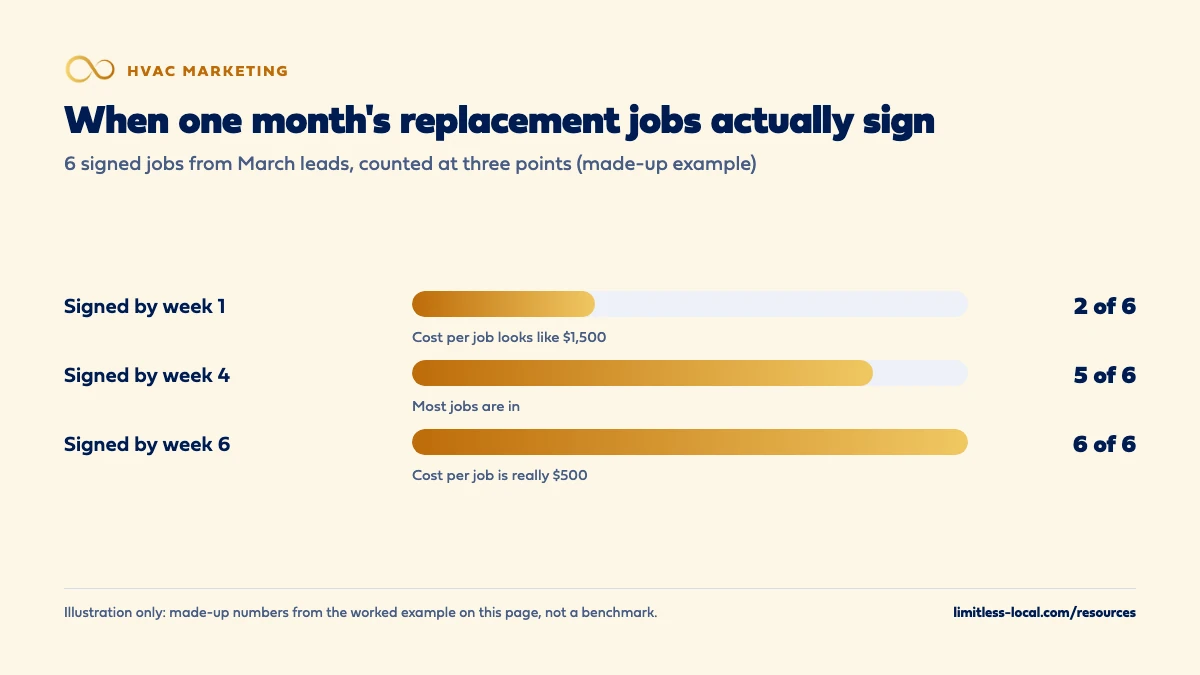
These numbers are made up to show the math, not a benchmark for your market. Say you spent $3,000 on replacement ads in March. They brought in 20 replacement leads, 14 of them booked an in-home estimate within two days, and over the following weeks 6 of those homeowners signed:
- By the end of week 1: 2 signed.
- By week 4: 5 signed.
- By week 6: all 6 signed.
If you check on March 31, you might count only the jobs that signed within the week, and your cost per sold replacement looks like $3,000 divided by 2, or $1,500. Check again in mid-May and it’s $3,000 divided by 6, or $500. Same campaign, same month, a number three times better, just from waiting until the late signings came in.
Most owners would cut a campaign at $1,500 a job and keep one at $500. That’s why the measurement window matters as much as the number.
Frequently asked questions
Should I count a booked estimate as a booked job?
Track it, but keep it separate. A booked replacement estimate is a step, not a sale. The difference between a click, a lead and a booked job lays out where each number sits.
Is the average or the median better for lead-to-booked time?
The median. A handful of replacements that sign months later can drag an average far past what’s typical, while the median shows what usually happens.
Can Google Ads count a replacement that signs weeks after the click?
Yes, if it falls inside your conversion window and you send it back to Google Ads. Signed jobs happen offline, so that means saving the click ID with the lead and importing the sale later.
What's the longest conversion window Google Ads allows?
For Search and Display campaigns, up to 90 days, depending on the conversion source. The default for Search is 30 days unless you change it.
Do maintenance leads need follow-up too?
Yes, but lighter. They’re rarely urgent, so a reminder and an easy way to pick a time usually does it. They’re also where many future replacement leads come from, so it pays to log them properly.
Should I time follow-up differently in peak season?
Faster, not slower. In a heat wave the homeowner who doesn’t hear back within the hour has usually booked someone else, and replacement decisions made under a broken system move in days rather than weeks.
Key takeaways
- Repairs book on the first call; replacements book an estimate fast and sign over days or weeks.
- Split lead-to-booked time by job type, or the average describes none of your jobs.
- Use the dates in Jobber, Housecall Pro or ServiceTitan, and look at the median.
- Late signings make a month look worse at first, so recheck it once your typical cycle has passed.
- Set your Google Ads conversion window and offline imports to catch replacements that sign late.
Ready to compare options?
Book a short growth call and we'll walk through the math for your service area, including when we're not the right fit.
More in this section
- How fast should an HVAC company respond to new leads?
- What's the difference between a click, a lead and a booked HVAC job?
- How long does HVAC SEO take to bring in calls?
- What percentage of calls should my HVAC office be booking?
- How many booked calls does my HVAC company need to hit its goal?
Sources
- About conversion windows — Google Ads Help
- About conversion lag reporting — Google Ads Help
- About offline conversion imports — Google Ads Help
- Quotes Report — Jobber Help Center
- Conversion Rate Reporting — Housecall Pro Help Center
- Survey Reveals Strategies to Boost HVAC Close Rates by Double Digits — ACHR News