
How many jobs a month should marketing produce before more budget?

- How many booked jobs should my electrical marketing bring in before I spend more?
- Why isn't there one magic number of jobs?
- What has to be true before I raise the budget?
- How many booked jobs before I can trust the numbers?
- How do I know each booked job is profitable?
- How do I tell if more budget will actually buy more jobs?
- Can my crews handle more jobs?
- How much should I raise it at a time?
- What if the jobs come in but cost too much each?
- What if a channel brings few jobs but they're big ones?
- Should I judge SEO by the same threshold?
- How do I track booked jobs by channel?
- What's different for electrical contractors
- A worked example: is this channel ready for more money?
- Frequently asked questions
- Key takeaways
- More in this section
- Sources
The short version
- Proven: enough booked jobs, over a couple of months, to trust the numbers.
- Profitable: cost per booked job comfortably under what a job is worth.
- Room to buy: your ads are losing impressions to budget, not to rank.
- Room to work: your crews can take more jobs without slowing down.
For electrical contractors deciding whether a channel has earned a bigger budget, and what proof to look for before turning the spend up.
Get a free visibility audit · Book a growth call
How many booked jobs should my electrical marketing bring in before I spend more?
There’s no single job count, because the threshold depends on your job values, margins and how many jobs your crews can take. Raise the budget when a channel has a couple of months and at least a dozen or so booked jobs behind it, when its cost per booked job is comfortably under what a job is worth to you, and when there’s room on the schedule. If Google Ads also shows you losing impressions to budget, more money will usually buy more of the same jobs; if any of those checks fail, fix that first.
Proving a channel before scaling it is how we run budgets too: every package includes call tracking, form and chat tracking, source tagging and a monthly report with a cost-per-lead breakdown, so you can see what each booked job cost before you spend more. Our packages page shows what each tier covers, including Essentials with Google Ads up to $2,500 a month in spend and Growth up to $5,000, and ad spend is paid to Google separately. Our electrical contractor marketing page explains how we work with electrical shops, and the rest of the electrical marketing questions library goes question by question.
Why isn't there one magic number of jobs?
Because a booked job means very different things in different shops. Twenty small service calls a month might barely cover a channel’s cost for one electrician, while four panel upgrades a month could make the same channel the best money you spend. The right threshold depends on:
- What a job is worth after labor and materials.
- What you’re spending on the channel, ad spend and management together.
- How many jobs your crews can take without pushing customers weeks out.
- How steady the numbers are. A few lucky weeks aren’t proof.
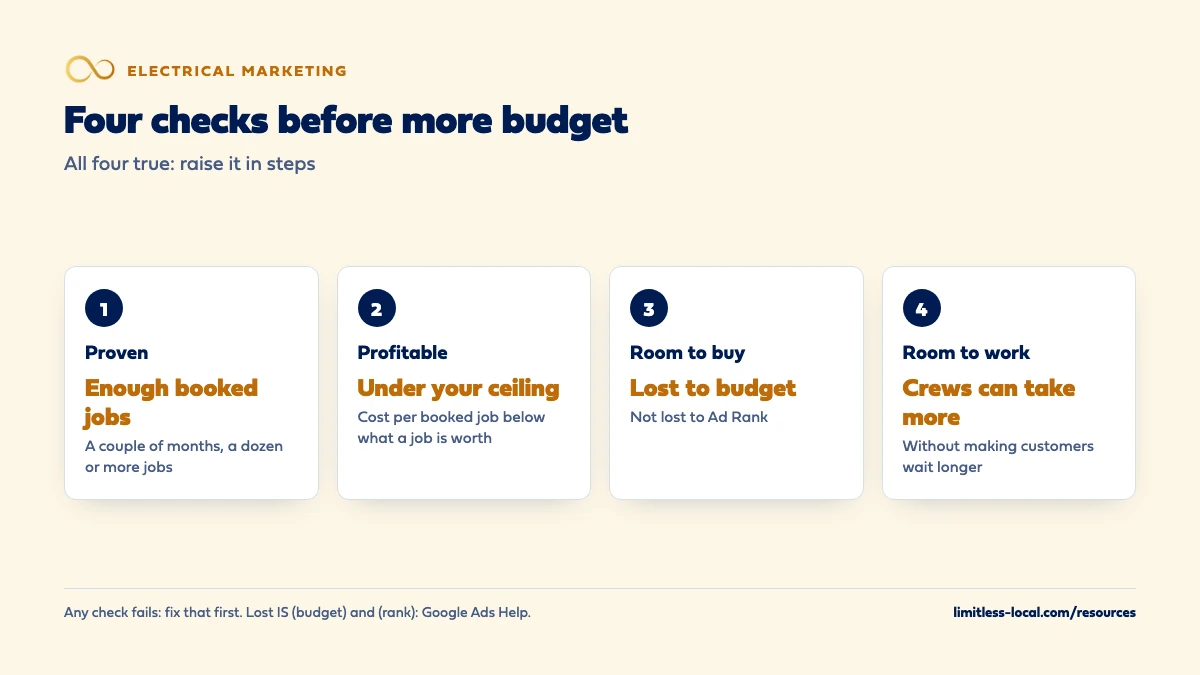
So instead of a job count, use four checks. When all four are true, more budget is usually a good bet.
What has to be true before I raise the budget?
- Proven. The channel has booked enough jobs, over enough time, that you trust what each job cost.
- Profitable. Its cost per booked job is comfortably below the most you can afford to pay for a job.
- Room to buy. There are more searches and leads available at a similar price. In Google Ads, that shows up as impressions lost to budget.
- Room to work. Your crews can take more jobs without slowing response times or stretching the schedule.
Miss the first and you’re guessing. Miss the second and you’ll scale a loss. Miss the third and the extra money won’t buy much. Miss the fourth and you’ll pay for leads you can’t serve.
How many booked jobs before I can trust the numbers?
Enough that one big job or one bad week can’t swing the result. For most electrical shops, that means at least a couple of months of data and a dozen or more booked jobs from the channel before you judge its cost per job. With bigger, less frequent jobs like generators or rewires, give it longer, because each job moves the average a lot.
Give automated bidding time, too. Google’s page on Smart Bidding learning says the “Learning” status never lasts more than 7 days, but performance typically settles toward a new goal within 1 to 2 conversion cycles, depending on conversion volume, the length of the conversion cycle and how restrictive your settings are. Judge a campaign on settled months, not the weeks right after a big change.
How do I know each booked job is profitable?
Work out a ceiling for each kind of job: take the gross profit on a typical job (the invoice minus labor, materials and other job costs), and decide what share of it you’re willing to spend to win the job. A channel whose cost per booked job sits well below that ceiling is ready for more money. One that’s at or above it isn’t, no matter how many jobs it brings.
Do this separately for service calls and for bigger work like panel upgrades, EV chargers and generators, because one blended number hides a lot. What a good cost per booked job is for electrical marketing walks through the ceiling math.
How do I tell if more budget will actually buy more jobs?
Check whether the channel is short on money or short on reach. In Google Ads, impression share data includes Search lost IS (budget), the percentage of time your ads weren’t shown because the budget ran out, and Search lost IS (rank), the time they weren’t shown because of poor Ad Rank. Lost to budget means more money can buy more of the same traffic. Lost to rank means more money won’t fix it; better ads, landing pages or bids will.
If your campaign uses Maximize conversions, Google doesn’t recommend the lost IS (budget) column, because that strategy is designed to spend the full daily budget, and points you to the budget simulator instead.
Local Services Ads give a simpler signal: Google’s page on how leads work says that once you reach your monthly max, your ad won’t appear for the rest of the month unless you adjust your budget. If that keeps happening in the middle of the month and the leads are booking at a good cost, the channel is asking for more.
Curious what your marketing is actually booking?
Get a free visibility audit — no obligation, no sales pitch.
Can my crews handle more jobs?
This check gets skipped the most. If you’re already booked out further than you’d like, more marketing mostly buys longer waits, and homeowners who wait call someone else. Emergency callers won’t wait at all.
Before raising the budget, look at how many days out you’re booked, how quickly new leads get a call back, and whether your office can handle more calls. If the answer is “we’re stretched”, you’re deciding about growth, not about budget. How to change your marketing to grow versus stay busy covers that decision.
How much should I raise it at a time?
In steps, not leaps. Raise the budget, hold it for a few weeks, check cost per booked job, then decide on the next step. Bigger jumps make it hard to tell whether results changed because of the money or because of the season.
Know how Google spends a change. Google’s page on how budget changes take effect says a new average daily budget starts affecting your ads right away, that on a given day most campaigns are never charged more than 2 times the highest average daily budget set that day, and that monthly spend is capped at the average daily budget times 30.4. Budget changes also don’t put Smart Bidding back into “Learning” status. For how to size the monthly number in the first place, how much an electrician should spend on Google Ads each month works it out backward from jobs.
What if the jobs come in but cost too much each?
Fix the cost before adding money, because a bigger budget multiplies whatever you’re losing per job. The usual places to look, in order:
- Junk and wrong-fit leads. Searches, towns or job types that never turn into work.
- Missed and slow calls. Good leads that go to voicemail or get a callback the next day.
- Weak follow-up on quotes. Estimates that were never chased.
- The landing page. Visitors who don’t call or fill in the form.
Often the cheapest improvement is sorting out what’s junk and what’s a real job before you spend another dollar. How electricians tell a junk lead from a real job gives you a simple screen.

What if a channel brings few jobs but they're big ones?
Then count profit, not jobs. A channel that books three panel upgrades and a generator a month can beat one that books twenty small service calls, even though the job count looks worse. Compare channels on gross profit per marketing dollar, and make sure your tracking records the job type and invoice value, not just “booked.”
Expect these channels to need more patience, though. With fewer, bigger jobs, it takes longer to collect enough results to trust the average, so give them more months before you judge.
Should I judge SEO by the same threshold?
Not in the first months. Ads can generate leads within days of launch, but SEO typically takes 3-6 months to show meaningful organic growth, so an SEO budget judged on booked jobs in month two will always look bad.
Early on, judge SEO on the signs that come before jobs: more calls and website clicks from your Google profile, service pages starting to show for the jobs you want, and more searches finding you. Once those turn into booked jobs, hold SEO to the same four checks as any other channel.
How do I track booked jobs by channel?
Three pieces make the numbers trustworthy:
- Call tracking numbers for each channel, so calls are tagged automatically instead of by memory.
- A lead source on every job in your field software. Housecall Pro’s ROI table, for example, tracks which lead sources generate customers, jobs and revenue.
- Booked jobs sent back to Google Ads where you can. With offline conversion imports, you can measure what happens after your ad results in a click or call, such as a sale over the phone, and Google recommends enhanced conversions for leads if you’re starting fresh.
Tracking which electrical marketing brings real jobs covers the setup step by step.
Not sure which of these is costing you jobs?
A free visibility audit checks the Google profile, reviews, site and tracking, and shows what to fix first.
What's different for electrical contractors
Job values swing widely. An electrician’s month can mix small service calls with panel upgrades, EV chargers, generators and rewires. Set separate ceilings and judge channels by job type, or the big jobs will hide a channel that only brings small ones.
Storms distort the numbers. A storm can flood one month with generator and repair calls. Don’t raise the budget on the back of one storm month; compare like months, or take the storm weeks out.
Emergency work punishes overbooking. If you scale ads for no-power and urgent calls while the schedule is full, you’ll pay for leads that go to the next electrician who can come today.
Builder work isn’t a marketing result. Keep builder and general contractor jobs out of your channel numbers unless a channel actually brought them in, or your cost per booked job will look better than it is.
A worked example: is this channel ready for more money?
These numbers are made up to show the math, not a benchmark. Say your Google Ads campaign has spent $2,000 a month for three months, $6,000 in total, and booked 36 jobs. That’s about $167 per booked job.
- Proven: 36 booked jobs over three months is enough to trust the average.
- Profitable: your typical job leaves $600 in gross profit and you’re willing to spend 40% of it to win a job, so your ceiling is $240. At $167, you’re well under it.
- Room to buy: Search lost IS (budget) is 25%, so the ads miss a real share of searches because the money runs out.
- Room to work: you’re booked about a week out and could take more.
All four checks pass, so raise the budget one step, say 20% to $2,400 a month, hold it for a few weeks and see whether cost per booked job stays under $240. If it does, take the next step. If it climbs toward the ceiling, stop and fix before going further.
Frequently asked questions
Should I raise the budget if the channel is profitable but my crews are full?
Not yet. More leads into a full schedule mostly means longer waits and lost customers. Decide whether you’re hiring first, then raise the budget slightly ahead of the new capacity.
Is cost per lead enough to decide?
No. Cost per lead ignores how many leads book and what the jobs are worth. Use cost per booked job, by job type.
Should I raise every channel at the same time?
No. Raise the one that passes all four checks, one step at a time, so you can see what the extra money did.
What if Google Ads recommends a higher budget?
Treat it as a sign there’s more traffic available, not as proof it’ll be profitable. Run your own four checks before accepting it.
How often should I review the budget?
Monthly for paid channels, with a bigger look every quarter. Compare like months so seasonal swings don’t fool you.
Can I lower the budget if results drop after a raise?
Yes. Budget changes take effect right away. If cost per booked job climbs past your ceiling after a step up, step back down and look at what changed.
Key takeaways
- There’s no universal job count; use four checks: proven, profitable, room to buy and room to work.
- Give a channel a couple of months and a dozen or more booked jobs before judging it.
- Lost impressions to budget means more money can buy more; lost to rank means it won’t.
- Fix a high cost per booked job before scaling, because more budget multiplies losses too.
- Raise budgets in steps and judge SEO on its own, slower timeline.
Want a second set of eyes on your setup?
We'll look at how you show up locally and where calls are leaking, then send you a plain-English breakdown.
More in this section
- What should electricians include in their monthly marketing budget?
- How much should an electrical contractor spend on marketing?
- What is a good cost per booked job for electrical marketing?
- How many hours a week does DIY electrical marketing take?
- How many jobs a month does an electrician need to hit a revenue goal?
Sources
- About Smart Bidding learning — Google Ads Help
- Get impression share data — Google Ads Help
- About Maximize conversions bidding — Google Ads Help
- How budget changes take effect — Google Ads Help
- How leads work — Local Services Help
- About offline conversion imports — Google Ads Help
- Marketing Dashboard: ROI Table — Housecall Pro Help Center