
Can AI tools show an electrician which leads are worth the ad spend?

- Which AI tools help an electrician see where the best leads come from, so less ad money gets wasted?
- What can AI actually tell me about my electrical leads?
- Which AI tools can do this for an electrician?
- How does Google Ads use AI to judge my calls?
- What should I tell the AI to look for on electrical calls?
- How do I turn AI call tags into ad-spend decisions?
- Can AI tell me which leads turned into paid jobs?
- How do I send booked jobs back to Google so it finds better leads?
- What about form fills, chats and Local Services Ads leads?
- Where do AI call tools get it wrong?
- What should I check every month?
- What's different for electricians
- A worked example: what AI sorting changes
- Frequently asked questions
- Key takeaways
- More in this section
- Sources
The short version
- AI call tools transcribe, summarize and tag calls so you can see which ones were real job requests.
- Tie every call to its source, then compare campaigns on real leads, not raw calls.
- AI can't tell which leads became paid jobs; your field software can.
- Send booked and sold jobs back to Google Ads so its bidding learns what a good lead looks like.
- Spot-check the AI's calls every week before you move money.
For electrical contractors paying for ads who want AI call tools to sort real job requests from noise, and to show which spend actually books work.
Get a free visibility audit · Book a growth call
Which AI tools help an electrician see where the best leads come from, so less ad money gets wasted?
Yes, partly. AI call tools can transcribe and summarize every call, sort real job requests from spam, wrong numbers and DIY questions, and tie each call to the ad, keyword or listing it came from, which shows where ad money is buying real work. What they can’t see is whether the job got booked and paid; that comes from marking booked and sold jobs in your field software and sending those results back to Google Ads. Let AI do the sorting, then judge every campaign on cost per booked job.
Every one of our ads management packages includes call tracking with recording and transcription, form and chat lead tracking, source tagging and a monthly report with a cost-per-lead breakdown, plus a real-time dashboard, so the sorting described here is part of the work. Essentials is $3,500 a month and Growth, at $4,500 a month, adds Local Services Ads management and advanced attribution. Ad spend isn’t included. Our electrical contractor marketing page explains how we work with electrical shops, and the electrical marketing questions library goes question by question.
What can AI actually tell me about my electrical leads?
More than a call count, less than a profit report. Pointed at your recorded calls, AI tools can:
- Turn every call into text, so you can skim a week of calls in minutes instead of listening to each one.
- Summarize what the caller wanted: a panel upgrade quote, a dead circuit, an EV charger install, or a vendor pitch.
- Flag words you care about, such as a job type, a town name or a price question.
- Sort calls by intent, separating people ready to book from robocalls, misdials and people asking how to fix it themselves.
Put that next to the source of each call and you can see which ads, keywords and listings bring real job requests and which bring noise.
What AI can’t see is what happened after the call: whether the tech went out, whether the quote sold and what the job was worth. So AI answers the first half of the question (is this a real lead?) and your field software answers the second (did it pay?).
Which AI tools can do this for an electrician?
You probably need one of these, not all of them:
- Call tracking with AI features. CallRail’s help page on AI features lists transcripts, call summaries, call sentiment, keyword spotting and self-reported attribution among the options you can switch on. Call recording has to be on for the tracking numbers you want transcribed.
- Google Ads’ own call scoring. If most of your paid calls come from Google search ads, Google now uses AI on recorded calls to decide which ones count as leads. More on that below.
- The AI and reporting in your field software. ServiceTitan, Housecall Pro and Jobber each tie calls and requests to jobs, which is where the booked-and-sold answer lives.
Start with what you already pay for. If your call tracking has transcripts and you haven’t switched them on, that’s the cheapest place to begin. Whether you need call tracking numbers covers the setup if you don’t have them yet, and which AI tools are worth an electrician’s time covers the wider list beyond lead tracking.
How does Google Ads use AI to judge my calls?
Google used to count a call as a conversion mostly by how long it lasted. Its page on AI-qualified call leads explains the change: with call recording on, Google AI evaluates the recordings and only qualified calls count as conversions. It looks for signals of intent, such as a caller asking about specific services, scheduling a consultation or showing they’re ready to buy, and it filters out robocalls, spam calls and misdials that used to pass the duration test. Your call details reports show a short AI-written summary of each call and hashtags for what happened on it.
A few things to know before you rely on it:
- Recording is on by default unless you turned it off before. If a call can’t be recorded, Google falls back to call duration.
- Only some calls qualify. Calls to call ads, call assets or from website visits are eligible, through a Google forwarding number. Calls from location assets aren’t recorded.
- Callers hear a short message at the start of the call saying it’s being recorded for quality purposes.
- It’s only available when both phone numbers are in the United States or Canada.
This helps Google’s bidding stop chasing junk calls. It still only knows a call sounded like a real lead, not that you got the job.
What should I tell the AI to look for on electrical calls?
AI sorting is only as good as your definition of a real lead. Write it down before you switch anything on. For most residential electrical shops, a real lead is a homeowner or property manager, in a town you serve, asking for work you do. Then set keyword flags around it:
- Job types you want more of: “panel upgrade,” “service upgrade,” “EV charger,” “generator,” “rewire,” “knob and tube.”
- Urgent service words: “no power,” “breaker keeps tripping,” “outlet stopped working,” “burning smell.”
- Not-a-lead signals: “are you hiring,” vendor and software pitches, “how do I,” and work you don’t take on.
- Your town names, plus the towns just outside your area, so you can see when ads are pulling calls from too far away.
- Price questions, flagged but not thrown out. A homeowner asking what a panel upgrade costs is often a good lead who needs a clear answer.
Review the list after a month; the words homeowners actually use belong in your ads and service pages too.
Curious what your marketing is actually booking?
Get a free visibility audit — no obligation, no sales pitch.
How do I turn AI call tags into ad-spend decisions?
Once a week, or every two weeks if call volume is low, pull calls by source and campaign and look at three things:
- Share of real leads by campaign. A campaign where most calls are spam, DIY questions or out-of-area homeowners is buying noise, even if its cost per call looks cheap.
- The search terms behind the bad calls. If “electrician salary” or “how to wire an outlet” keeps showing up, add them as negative keywords. The negative keywords electricians should add first gives a starting list.
- Good calls that didn’t book. If the AI tagged a call as a real panel upgrade request and nobody booked it, that’s an office or callback problem, not an ad problem. More ad spend won’t fix it.
Then move money in small steps. Shift budget from the campaign with the worst cost per booked job toward the one with the best, give it a few weeks of tracked results, and check again. Don’t cut a campaign on one bad week of calls.
Can AI tell me which leads turned into paid jobs?
Not on its own. The call recording ends when the caller hangs up. Whether the job was booked, sold and paid lives in ServiceTitan, Housecall Pro, Jobber or whatever you run the business on, so that’s where the source has to land.
That only works if the software is set up to tell real calls from noise. ServiceTitan’s guide to call classifications sorts calls into booked, unbooked, abandoned, excused and not a lead, and warns that if you don’t set up call reasons first, any call longer than a minute is classified as a lead and your marketing reports may be unreliable. Whatever software you use, the same rule applies: someone has to mark each call or request with its source and outcome, every time.
How to track which electrical marketing brings in real jobs shows that setup step by step. AI makes the tagging faster, but it doesn’t replace it.
How do I send booked jobs back to Google so it finds better leads?
Google Ads only learns from what you tell it. If it thinks every qualified call is equally good, it will bid for more calls like the cheapest ones. Google’s page on offline conversion imports explains that you can measure what happens after an ad click or call leads to a sale at your office or over the phone, and it recommends starting with enhanced conversions for leads, which matches sales back to ads using details like the customer’s email address.
For an electrician, that means telling Google which clicks and calls became booked or sold jobs, ideally with the job value. Once it can see that panel upgrade calls turn into bigger invoices than outlet repairs, its bidding has a reason to chase more of them.
Ask your field software or call tracking provider whether they can send this to Google Ads for you. Without it, Google Ads keeps optimizing for calls instead of jobs.
What about form fills, chats and Local Services Ads leads?
Calls get most of the AI attention, but they aren’t your only leads:
- Web forms and chats. Tag every form and chat with the page and source it came from. Read them the same way you read call summaries: real request, junk or out of area.
- Local Services Ads. These already have a layer of lead checking built in. Google’s page on how leads work says leads judged invalid or low quality aren’t charged, charged leads are reassessed over time and may be credited automatically if found to be low quality, and you can flag a poor lead in its feedback survey. Still mark each one booked or not in your own software, because a valid lead isn’t the same as a booked job.
Put every lead type in the same monthly view. If Local Services Ads leads book more often than search ad calls, that’s a reason to shift budget between them.
Where do AI call tools get it wrong?
Often enough that you shouldn’t let them make money decisions alone:
- Bad audio. A caller on speaker in a truck or a noisy job site can produce a garbled transcript. Transcription accuracy depends on call quality, and the CallRail transcripts above only cover English conversations.
- Short but valuable calls. “Can you come today, I have no power” is a great lead in very few words.
- Price shoppers who buy. A homeowner who opens with price can still book once they hear a clear answer.
- Repeat customers. A past customer calling the number off an ad looks like a new lead unless someone marks it.
- Calls answered badly. If the call went to voicemail or the caller hung up on hold, the AI may tag the lead as weak when the problem was the answering.
Spot-check ten or so calls a week against what the AI said. If it keeps making the same mistake, change the rules.
What should I check every month?
One short report, by channel and by campaign:
- Spend, ads plus any tools and fees.
- Calls and forms, the raw count.
- Real leads, after the AI sorting and your spot-checks.
- Booked jobs and sold jobs, from your field software.
- Cost per booked job, spend divided by booked jobs.
The gap between calls and real leads tells you about ad targeting. The gap between real leads and booked jobs tells you about the phone and the office. Watch your close rates by source too, and whether a 50 percent close rate on service calls is realistic helps you read them.
Not sure which of these is costing you jobs?
A free visibility audit checks the Google profile, reviews, site and tracking, and shows what to fix first.
What's different for electricians
Job values swing widely. An outlet repair and a panel upgrade can sound the same on an AI summary (“homeowner, needs electrical work”) and be worth very different amounts. Tag the job type, not just whether the call was real.
Emergency calls are short. “Power’s out in half the house” calls are quick and urgent. Make sure your AI rules don’t mark short calls as weak.
DIY and job-seeker calls are common. Electrical keywords pull people asking how to do the work themselves and people looking for apprentice jobs. Those are the first patterns to catch and turn into negative keywords.
Builder and commercial calls need their own tag. A general contractor asking for a bid is a different kind of lead from a homeowner. Keep them separate so they don’t blur your residential numbers.
A worked example: what AI sorting changes
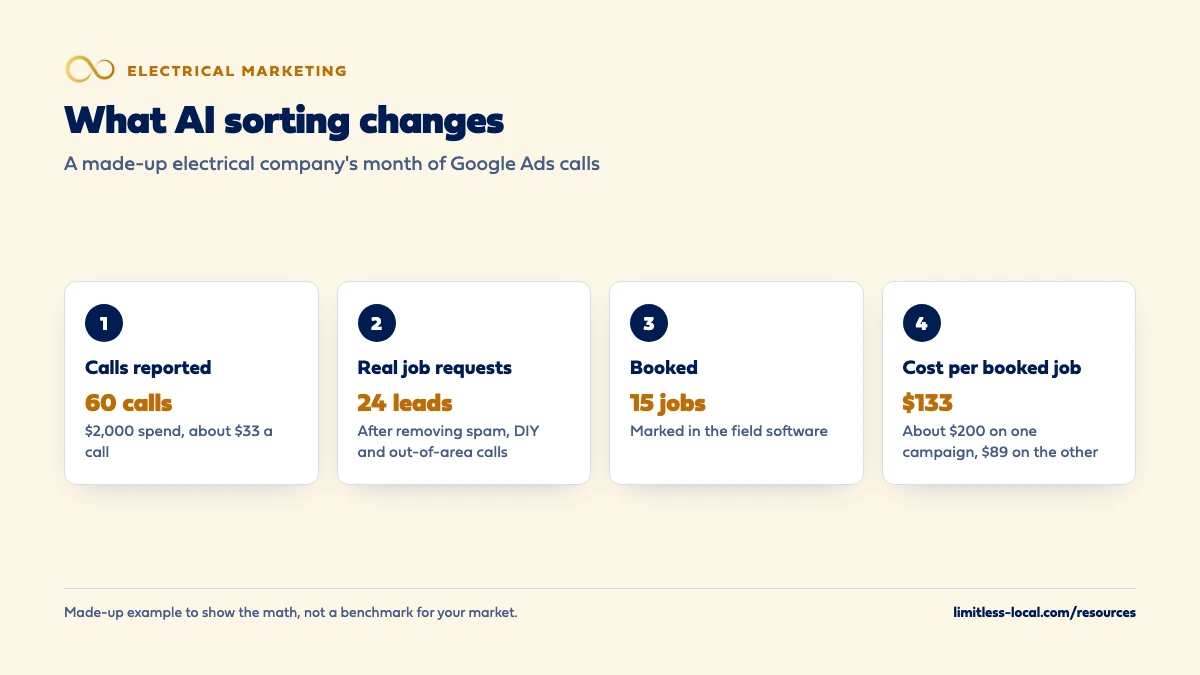
These numbers are made up to show the math, not a benchmark. Say an electrical company spends $2,000 a month on two Google Ads campaigns, and Google reports 60 calls. On raw calls, that’s about $33 a call, which looks fine.
The AI summaries, checked by the owner, sort those calls:
- 20 are spam, wrong numbers, vendors or job seekers.
- 16 are DIY questions, work the shop doesn’t do or towns it doesn’t serve.
- 24 are real job requests, and 15 of those book.
Cost per booked job is $2,000 divided by 15, or about $133. Now split it by campaign:
- “Electrician near me” campaign: $1,200, 38 calls, 11 real leads, 6 booked jobs, about $200 per booked job.
- Panel upgrade campaign: $800, 22 calls, 13 real leads, 9 booked jobs, about $89 per booked job.
On raw calls, the first campaign looked like the winner because it brought in more. Sorted and tied to booked jobs, the panel campaign books work at less than half the cost, and its jobs are bigger. The owner moves budget toward it in small steps and adds the DIY search terms from the first campaign as negative keywords.
Frequently asked questions
Do I need AI call analysis if I'm a one-truck electrician?
Not right away. If you answer every call yourself, you already know which ones were real. It earns its place once someone else answers the phone or you run more than one paid source.
Will callers know their call is being recorded?
With Google Ads call recording, yes: callers hear a short automated message at the start saying the call is recorded for quality purposes. Google also says that by using recording you acknowledge you’ve told your own staff who answer those calls.
Will AI call scoring lower my Google Ads costs?
Not directly. It changes what Google counts as a lead, so its bidding stops chasing junk calls. Lower cost per booked job comes from acting on what it shows you: cutting bad search terms and moving budget to the campaigns that book.
Can AI tell me which leads will close before I call them back?
It can flag urgency and job type, which helps you call the best ones back first. It can’t promise a close; how fast and how well you follow up still decides most of that.
Does AI call tracking work for Facebook and Instagram ads?
Yes, if those ads use their own tracking number or send people to a page with one. The AI reads the call the same way; the tracking number tells it the source.
Key takeaways
- AI call tools turn calls into text, summaries and tags, so you can see which ones were real job requests.
- Write down what a real lead means for your shop before you set the AI rules.
- AI shows lead quality; your field software shows booked and sold jobs. You need both.
- Send booked jobs back to Google Ads so its bidding chases jobs, not just calls.
- Spot-check the AI weekly and move budget in small steps based on cost per booked job.
Want a second set of eyes on your setup?
We'll look at how you show up locally and where calls are leaking, then send you a plain-English breakdown.
More in this section
- Which AI tools are worth electricians' time for more leads?
- How can an electrician use AI to create ads that bring in leads?
- What Google Ads campaigns work best for electricians?
- Can an electrician get enough leads without paid ads?
- Should electricians use LSAs, Search Ads or lead sites?
Sources
- AI features — CallRail Help Center
- About AI-qualified call leads — Google Ads Help
- Manage your call recording settings and eligibility — Google Ads Help
- Understand call classifications — ServiceTitan Help
- About offline conversion imports — Google Ads Help
- How leads work — Google Local Services Help