
Which AI tools are worth electricians’ time for more leads?

- Which AI tools actually help an electrical shop book more jobs in 2026?
- How should an electrician decide if an AI tool is worth the time?
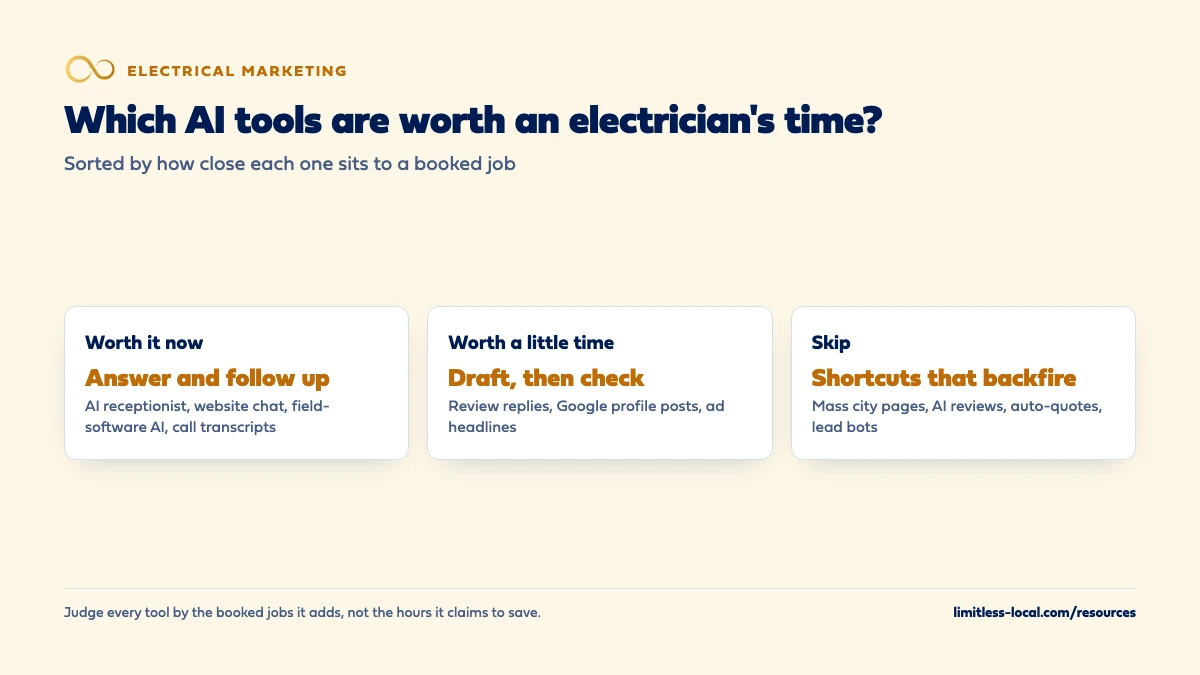
- Worth it now: AI that answers calls when nobody can
- Worth it now: AI chat on your website
- Worth it now: the AI already inside your field software
- Worth it now: call recordings and transcripts
- Worth a little time: AI writing help, with a person checking
- Worth a look: the AI inside Google Ads
- Which AI tools should an electrician skip?
- What should AI never do on its own for an electrical business?
- How do I know if an AI tool is paying off?
- What's different about AI tools for electricians
- A worked example: is an after-hours AI receptionist worth it?
- Frequently asked questions
- Key takeaways
- More in this section
- Sources
The short version
- Start with AI that answers calls and chats you'd otherwise miss.
- Use the AI already inside your field software before buying anything new.
- Let AI draft review replies, posts and ad text, and have a person check it.
- Skip mass-made city pages, AI reviews and anything that quotes or diagnoses on its own.
For electrical shop owners who keep hearing about AI and want a short list of what’s worth setting up, what needs a human check, and what to skip.
Get a free visibility audit · Book a growth call
Which AI tools actually help an electrical shop book more jobs in 2026?
The AI tools worth an electrician’s time are the ones that catch leads you’d otherwise lose: an AI receptionist or website chat for after-hours and overflow calls, the AI built into field software like Jobber, Housecall Pro or ServiceTitan, and call recordings with transcripts that show which calls booked. AI writing help is worth a little time for review replies, Google profile posts and ad headlines, as long as a person checks every line before it goes out. Skip anything that mass-produces city pages, writes reviews or promises leads on autopilot, and judge every tool by the booked jobs it adds, not the hours it claims to save.
That’s the same test we put every tool through: does it turn more calls, chats and forms into booked jobs, and can you see it in the numbers? AI website chat and after-hours answering are automation add-ons that plug into any of our packages, and every package includes call tracking with recording and transcription, so you can hear which calls booked. Our local ads work covers Google Ads and Local Services Ads, and our electrical contractor marketing page shows how it all fits an electrical shop. The rest of the electrical marketing questions library goes question by question.
How should an electrician decide if an AI tool is worth the time?
Ask one question of every tool: does it touch a lead you’d otherwise lose, or free up time you’d spend booking jobs? If the answer is neither, it’s a toy, however clever the demo looks.
Then check three practical things:
- Where the lead goes. A tool that answers a call but leaves the details in a separate app nobody opens hasn’t saved the job. It should land in the same place your other leads do.
- Who checks it. Every AI tool needs an owner on your side, even if that’s ten minutes on a Monday reading what it did.
- How you’ll judge it. Decide before you start what a win looks like: more after-hours calls answered, more quotes followed up, more booked jobs from the same ad budget.
The SBA’s guidance on using AI in a small business says to start small, and notes that many AI tools offer basic services for free or at a lower cost, so you can test whether they add value before committing. That’s the right pace for a shop that’s busy running jobs. Add one tool, give it a month, look at the numbers, then decide on the next one.
Worth it now: AI that answers calls when nobody can
For most electrical shops the biggest leak isn’t marketing, it’s the phone. Calls come in while the owner is in an attic or a crawlspace, and after 5 p.m. they roll to voicemail. An AI receptionist answers those calls, takes the caller’s details and sends you a summary.
The field software companies now build this in. Housecall Pro’s CSR AI, for example, answers business calls, summarizes them and notes how urgent each one is, and its settings let you decide whether it can book jobs and estimates onto your calendar, reschedule or cancel appointments, and set escalation rules for when a caller needs more than it can give.
Those settings are where an electrician has to be careful. Routine work, like an outlet install or a quote visit for a panel upgrade, can be booked or queued. Anything that sounds dangerous, like sparks, a burning smell or a warm panel, has to reach a person right away. Whether to use an AI receptionist for after-hours calls walks through which calls it can handle and which it can’t.
Worth it now: AI chat on your website
A homeowner planning an EV charger or a generator often browses your site at 10 at night. AI chat can answer the basics, like which towns you cover and whether you do that job, and collect a name, number and job type so someone can call back in the morning.
It earns its keep when it captures details you’d otherwise lose and hands them straight to whoever books jobs. It costs you jobs when it guesses at prices, promises a time slot you don’t have, or traps someone in a loop when they just want a phone number. Keep the phone number visible, keep the chat’s answers short and factual, and read the transcripts weekly for the first month.
Whether a website chatbot should book estimates goes deeper on what to let it schedule and what to leave as a message.
Worth it now: the AI already inside your field software
Before you pay for a new AI tool, open the software you already run jobs in. A lot of it now has AI built in, and it already knows your customers, quotes and invoices.
Jobber AI is one example. It’s available on all of Jobber’s plans, and admin users can use voice in the mobile app to create quotes, send invoices and check schedules hands-free, or use chat to ask questions about clients, quotes, jobs, invoices and employees and to draft emails and marketing content. ServiceTitan and Housecall Pro have their own versions, and they change often, so check what your plan includes today.
For leads, the useful parts are usually the boring ones: automatic quote follow-up, reminders before appointments, and quick answers to questions like which jobs from last month never got invoiced. Following up on electrical quotes automatically covers how to set that up so panel upgrade and EV charger quotes don’t go cold.
Curious what your marketing is actually booking?
Get a free visibility audit — no obligation, no sales pitch.
Worth it now: call recordings and transcripts
Call tracking with recording and transcription isn’t flashy, but it’s one of the most useful places AI shows up for an owner. Instead of listening to every call, you can skim transcripts and see which calls asked for a real job, which were price shoppers or wrong numbers, and which were good calls that never got booked.
That last group is the one to watch. A good call that didn’t book is usually a training or callback problem, not a marketing problem, and no amount of extra ad spend fixes it. Transcripts also show you the words homeowners actually use, like “breaker keeps tripping” or “need a charger for my new car”, which is exactly what belongs in your ads and service pages.
Tag each call with its source and whether it booked, and you can tell which marketing brings in jobs and which brings in noise.
Worth a little time: AI writing help, with a person checking
AI is good at first drafts. Owners use it to draft replies to Google reviews, weekly Google Business Profile posts, ad headlines, job descriptions and the first pass of a service page. That can turn an hour of staring at a blank screen into ten minutes of editing.
The catch is accuracy. OpenAI’s own help page, Does ChatGPT tell the truth?, says it can produce incorrect or misleading answers, sometimes while sounding confident, and recommends using it as a first draft and verifying important information. For an electrician, that means checking anything it says about codes, permits, licensing, prices, warranties or what you’ll do on a job. If the draft says you offer same-day service and you don’t, that’s now your promise.
Give it real material to work from: the job, the town, what you found and what you fixed. Generic prompts produce generic posts. Whether AI can write social posts for an electrical business and using AI to create ads that bring in leads show how to feed it the right details.
Worth a look: the AI inside Google Ads
If you run Google Ads, the AI is already in there. Google’s help page on building a Performance Max asset group with generative AI explains that Google can read your website and generate headlines, descriptions and long headlines, and suggest images, including newly generated ones. Using it is optional, and you can review everything it creates and discard what doesn’t match your business. Google also calls generative AI experimental technology that may display inaccurate content.
So treat it like any other draft. Read every headline before it runs. Strike anything that names work you don’t do, towns you don’t serve or promises your crews can’t keep. And watch the search terms and the calls, not just the click numbers, because an ad that brings in clicks for the wrong jobs is costing you money.
Which AI tools should an electrician skip?
- Tools that pump out dozens of near-identical city or service pages. Google’s guidance on AI-generated content says using automation, including AI, to generate content mainly to manipulate search rankings violates its spam policies. A page for every town with the name swapped in is that kind of content, whoever writes it.
- Anything that writes or buys reviews. The FTC’s final rule on fake reviews covers reviews from people who don’t exist, such as AI-generated fake reviews, and bars businesses from creating or selling them, or buying them when they knew or should have known they were fake. Getting more real reviews is a process problem, not an AI problem.
- Bots that promise leads on autopilot. Mass cold messages and comment spam don’t book electrical work in your towns, and they can tie your name to spam.
- AI that quotes or diagnoses on its own. A chat or phone bot giving a price for a panel swap, or telling someone a flickering light is nothing to worry about, is a liability, not a lead tool.
What should AI never do on its own for an electrical business?
Some jobs stay with a person no matter how good the tool is:
- Safety calls. Sparks, smoke, a burning smell, a hot outlet or panel. These go to a live person every time.
- Prices and scope. AI can collect the details for a quote. A person sets the price.
- Code, permit and license claims. Rules vary by state and city, and a confident wrong answer is worse than no answer.
- Anything sent under your name without review. Review replies, posts and emails all go out as you.
Also watch what you feed in. Keep customer payment details, gate codes, alarm codes and anything else sensitive out of free AI tools. Treat the AI like a new hire on day one: useful, fast, and not yet trusted with the keys.
How do I know if an AI tool is paying off?
Write down your starting numbers before you switch anything on, then compare after a month:
- For answering tools: after-hours and overflow calls answered, and how many of those became booked jobs.
- For follow-up tools: quotes followed up, and the share of quotes that turned into jobs.
- For writing tools: hours saved each week, and whether the posts, replies or ads did any better.
- For ad AI: cost per booked job, not cost per click.
If a tool can’t show a change in booked jobs or real hours saved after a fair trial, turn it off. Subscriptions pile up fast, and a stack of half-set-up tools is worse than one that works. Tracking which marketing brings in real jobs sets up the numbers you’ll need.
Want to see where your company stands?
A free visibility audit shows where you show up on Google, Maps and AI answers, and what it's costing you in calls.
What's different about AI tools for electricians
Safety calls change the rules. A plumber’s after-hours leak is urgent; an electrician’s burning smell can be dangerous. Any AI that answers your phone or chat needs a clear list of words and situations that go straight to a person.
Job types are worth very different amounts. A service call, a panel upgrade, an EV charger, a generator and a commercial bid each need different questions at intake. Set up the AI to ask what the job is and tag it, so the right person calls back and your reports show which work it’s bringing in.
Licensing and permits vary by state. AI writing tools love to sound authoritative about code. Keep them away from specific code, permit or licensing claims unless you’ve checked every word.
Commercial and builder work runs on relationships. AI can help draft a bid email, but it won’t win a general contractor’s trust. That part stays with you.
A worked example: is an after-hours AI receptionist worth it?
These numbers are made up to show the math, not a benchmark or a forecast for your shop. Say your call log shows 12 after-hours calls a month going to voicemail, and only a few of those people ever call back.
- With an AI receptionist answering, say 5 of those 12 turn into booked service calls.
- At an average ticket of $450, that’s 5 times $450, or $2,250 a month in work you weren’t getting.
Now compare that with what the tool costs each month and the time someone spends reading its summaries and calling people back. If the booked work clearly beats both, keep it. If most of those calls turn out to be existing customers or junk, the tool may still be useful, but it isn’t a lead tool, and the math should say so.
Frequently asked questions
Is a free AI chatbot good enough to start with?
For drafting posts, review replies and ad ideas, often yes. Many AI tools offer basic versions for free or at a lower cost, so test one before paying for more. Keep customer details and anything sensitive out of free tools.
Do I have to tell customers they're talking to AI?
There are currently no federal or state laws requiring businesses to disclose AI use in general, but it’s becoming an expected best practice. A short line like “You’re chatting with our virtual assistant” costs nothing and avoids surprises.
Will AI-written pages hurt my Google rankings?
Not because AI wrote them. Google rewards helpful, original content however it’s produced, and treats content made mainly to manipulate rankings as spam. Using AI for website content without hurting SEO covers the safe way to do it.
Can AI reply to my Google reviews for me?
It can draft the replies, and that saves time. Read each one before posting, mention the actual job where you can, and never let any tool write reviews themselves.
Should an AI receptionist book jobs straight onto my schedule?
For routine work with clear time slots, it can. Start with it taking messages, then let it book once you trust how it handles your job types, and keep cancellations and safety calls with a person.
Is AI going to replace my office manager?
Not for most shops. AI is best as overflow and after-hours cover and as a drafting tool. The person who knows your crews, your customers and your schedule is still the one who turns a call into a booked job.
Key takeaways
- The AI worth your time first is the AI that answers calls and chats you’d otherwise miss.
- Check the AI inside Jobber, Housecall Pro or ServiceTitan before buying another tool.
- AI drafts are fine for review replies, posts and ad text, but a person checks every line.
- Skip mass-made city pages, AI-written reviews and tools that quote or diagnose on their own.
- Keep safety calls, prices and code questions with a person, every time.
- Give each tool a month and keep it only if booked jobs or real hours saved go up.
Not sure what's working right now?
Start with a free visibility audit: rankings, Google profile, reviews and tracking, checked against your service area.
More in this section
- How can an electrician use AI to create ads that bring in leads?
- Can an electrician use AI for job photos and portfolio descriptions?
- Should an electrician use an AI receptionist for after-hours calls?
- Is social media worth it for getting electrical leads?
- What tools and software does an electrician need to DIY marketing?
Sources
- Manage your business: marketing and sales — U.S. Small Business Administration
- CSR AI Overview — Housecall Pro Help Center
- Jobber AI Voice and Chat (Beta) — Jobber Help Center
- Does ChatGPT tell the truth? — OpenAI Help Center
- How to build a Performance Max asset group using generative AI — Google Ads Help
- Google Search's guidance about AI-generated content — Google Search Central
- Federal Trade Commission Announces Final Rule Banning Fake Reviews and Testimonials — Federal Trade Commission