
When should a pool builder ask for a review during the build?
- At what stage of a pool build should you ask the customer for a Google review?
- What's the right point in a pool build to ask for a review?
- Why not ask mid-build, when the customer is excited?
- What should happen at each stage of the build to set up the ask?
- How do I automate the review request for a pool build?
- Should the review request wait for the final payment?
- How many reminders should go out, and when?
- Does my software send every customer to Google?
- When should I ask on a renovation or a phased job?
- Should a person ask, or should the software?
- What if the build had problems when it's time to ask?
- What's different about review timing for pool builders
- A worked example: where three triggers would fire on one build
- Frequently asked questions
- Key takeaways
- More in this section
- Sources
The short version
- Ask at the startup or handover walkthrough, or at the reveal for a renovation.
- Use the earlier stages to set up the ask, not to make it.
- Tie automated requests to the final stage; default triggers can fire after the first visit or wait for the last payment.
- Send one or two reminders, then stop, and ask every customer the same way.
For pool builders deciding where the review ask belongs in a build that runs for months, and how to automate it without it firing at the wrong stage.
Get a free visibility audit · Book a growth call
At what stage of a pool build should you ask the customer for a Google review?
Not during the build itself: ask at the end, at the startup or handover walkthrough for a new pool and at the reveal for a renovation, when the customer can judge the finished work. Mid-build, the customer is living with a torn-up yard and a schedule, and asking only when things happen to be going well edges toward the selective asking Google’s policy doesn’t allow. What the earlier stages are for is setting up the ask: tell the customer at signing that you’ll ask at the end, and set your job software so the request goes out when the final stage is marked done, not after the first visit or a partial payment.
Getting the ask to fire at the right stage is the kind of setup our automation work covers: review requests, reminders and follow-up wired to the moments that matter in your build. Review response and basic review generation are in our Essentials package ($3,500 a month), Growth ($4,500 a month) adds advanced review generation, and automated review requests are part of our custom Scale package; see how our automation works. It sits alongside the ads, SEO and website work on our pool builder marketing page, and the rest of the pool builder marketing questions library takes the other questions one at a time.
What's the right point in a pool build to ask for a review?
The end, once the customer can see and use what they paid for. Google sets no timing rule, so this is our judgement by job type:
- New pool builds. At the startup or handover walkthrough, once the pool is full, the equipment is running and the customer has been shown how it all works.
- Renovations and resurfacing. At the reveal, when the new finish or tile is filled and the before is still fresh in their mind.
- Add-on phases. If a spa, outdoor kitchen or lighting package is scheduled weeks after the pool, ask at the end of the pool itself rather than holding the request for the last add-on.
The rest of the review routine, who asks and what to say, is covered in getting more Google reviews. This page is about the timing across the build and how to make the software follow it.
Why not ask mid-build, when the customer is excited?
Because the excitement after the design meeting or the first day of digging is about what the pool will be, not what it is. In our judgement, a mid-build ask has three problems:
- The customer is reviewing half a job. A review written after the dig can’t say anything about the finish, the startup or how you handled the inspection that slipped.
- The build can still go sideways. Weather, permits and change orders all land after the dig. A glowing early review followed by a rough finish leaves a customer who feels their review is now wrong. Customers can change a review later, and Google updates its date when they do.
- It drifts toward selective asking. If the ask happens whenever a job “feels good”, it ends up going to the customers whose builds are going smoothly. Google’s policy doesn’t allow businesses to selectively ask for positive reviews.
One fixed point at the end, for every customer, avoids all three. Sources: Prohibited & restricted content and Manage customer reviews.
What should happen at each stage of the build to set up the ask?
The build isn’t the time to ask, but it’s where the ask gets easy or hard. Our recommended sequence:
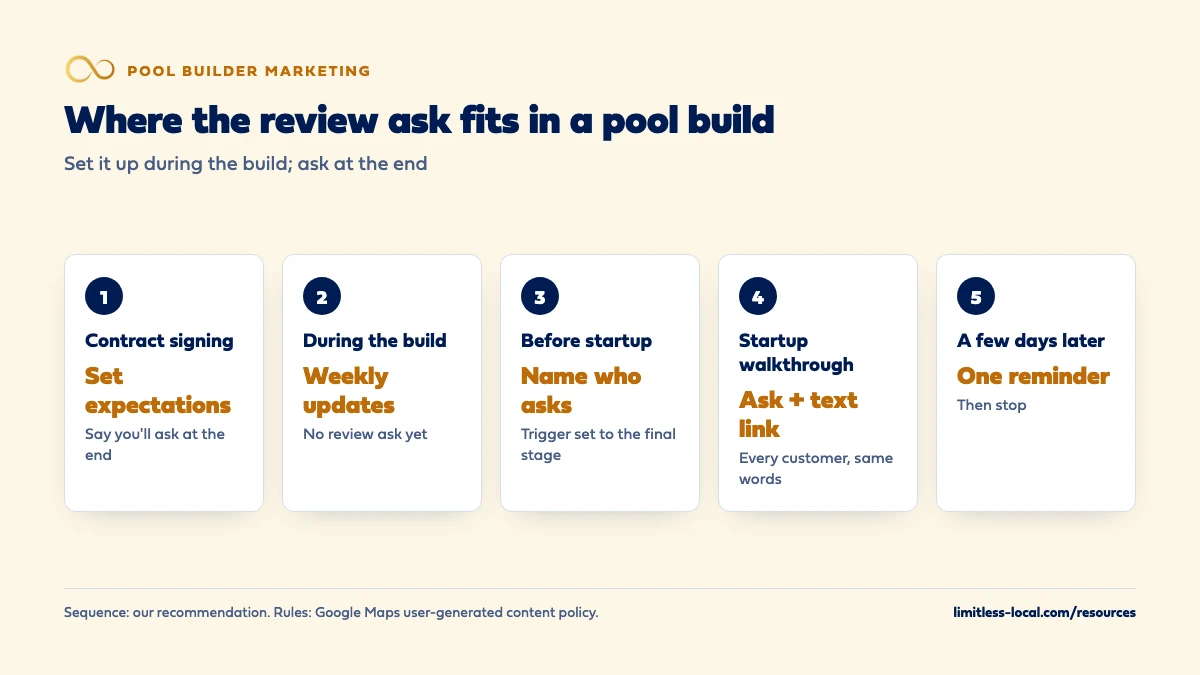
- At contract signing. Tell the customer you’ll ask for an honest review when the pool is done. Confirm the mobile number and email you’ll text and send it to.
- During the build. Keep the weekly update going, especially through permits and inspections. That’s what customers remember and write about later.
- Before startup. Name the person who will ask at the walkthrough and put the ask on the handover checklist.
- At the startup walkthrough. Ask in person, then text the review link while you’re still there so it’s on their phone.
- A few days later. One reminder, then stop.
For what to say at the walkthrough without steering the content, see what customers can mention in reviews.
How do I automate the review request for a pool build?
Tie the request to one event that only happens at the end of the build. Most job software can send a review request automatically, but the default triggers assume a short service call:
- Jobber can send its review request when a job closes, when a visit is completed or when an invoice is paid. With the visit trigger, you set how many completed visits come before the ask, so a pool job with many scheduled visits needs that number set, or the job closed, at startup.
- Housecall Pro sends review requests by default when a job is marked finished, or optionally when the job is paid. For jobs split into segments, it describes how to send the request after the first segment or the last one, using a job tag to exclude the others.
For a pool build, the safest trigger in our judgement is the one your team marks at startup or handover: closing the job, finishing the final segment, or a dedicated startup visit. Then check one live job end to end before trusting it. Sources: Jobber: Reviews and Housecall Pro: Reviews FAQs.
Curious what your marketing is actually booking?
Get a free visibility audit — no obligation, no sales pitch.
Should the review request wait for the final payment?
Only if the final payment lands at handover. Both platforms describe a payment trigger that waits for the job to be fully paid: Jobber says that with partial payments, the client won’t get the request until the invoice balance is zero, and Housecall Pro says that for jobs with multiple invoices, the request goes out when the job is fully paid. For a pool build paid in draws, that’s the last draw.
If your last draw comes at startup, a payment trigger works. If it waits on a punch list that can take weeks, the request lands long after the walkthrough, when the moment has passed. In our judgement, the walkthrough is the better anchor in that case.
Whatever you choose, keep the review and the payment separate in what you say. Never suggest that a review settles the final balance or that the balance waits on a review; Google’s policy doesn’t allow discounts or other incentives for reviews. Sources: Jobber: Reviews, Housecall Pro: Reviews FAQs and Prohibited & restricted content.
How many reminders should go out, and when?
One or two, then stop. Jobber’s built-in review requests send up to two follow-ups if the client doesn’t click the link: by default, the first 3 days later and the second 5 days later. Jobber also sends only one review request to a given client every six months, and it flags clients whose names match an existing Google review so you don’t ask twice.
For a pool customer, in our judgement, one reminder a few days after the walkthrough catches most of the people who meant to and forgot. A second is fine if it’s polite. More than that starts to feel like pressure. If you use software reminders, make sure nobody on the team is also sending manual ones; Jobber’s own help page suggests turning off its older job follow-ups so you’re not doubling up on review asks. Source: Jobber: Reviews.
Does my software send every customer to Google?
Not always, so check. Housecall Pro says that by default it sends customers with a Gmail address straight to Google and splits the rest between your Facebook page and reviews collected for your website, unless you set the distribution differently. Its help page says customers without a Google email can’t leave a Google review.
Google’s own help page says something different: customers must be signed into a Google Account to leave a review, but they can set one up with a non-Gmail email address. For a pool builder with a few dozen handovers a year, sending most customers somewhere other than Google can cost a big share of your possible Google reviews. In our judgement, check where your requests are going and decide on purpose. Sources: Housecall Pro: Reviews FAQs and Tips to get more reviews.
When should I ask on a renovation or a phased job?
At the point the customer sees the main result. For a resurfacing or retile, that’s the refill and reveal. For a remodel that adds features over several visits, it’s when the pool is back in use, not when the last light is wired.
Phased jobs are where automation misfires most. Housecall Pro’s segments let you pick the first or the final segment as the trigger, and Jobber’s visit trigger counts completed visits, so a phased job set up like a one-day service call can send the request after phase one. In our judgement, decide the trigger when you set up the job in your software, not at the end. If the same customer comes back next season for a new phase, Jobber’s six-month limit and existing-review flag help keep you from asking a customer who already reviewed.
Should a person ask, or should the software?
Both, with different jobs. The person who ran the build, or the owner, asks in person at the walkthrough; that’s what makes the request feel personal. The software sends the link and handles the reminder, so the ask doesn’t depend on anyone remembering. Google suggests sharing your review link or QR code in thank-you emails and on receipts, and says you can send requests by email, WhatsApp message or Facebook post too.
What doesn’t work, in our judgement, is the software alone, firing an anonymous text after a months-long build. And what isn’t allowed is the person standing over the customer while they type: Google’s policy says businesses shouldn’t require or pressure customers to leave reviews on the premises. Ask, send the link and move on to the rest of the walkthrough. Sources: Create a Google link or QR code to request reviews and Prohibited & restricted content.
What if the build had problems when it's time to ask?
Fix what you can first, then ask the same way you ask everyone. The fixed trigger doesn’t mean skipping customers whose builds went badly; Google’s policy doesn’t allow asking only the happy ones. It means the request goes to every customer at the same stage.
If a punch-list item is still open at startup, in our judgement it’s reasonable to finish it before the walkthrough ask, as long as that’s how you handle every job and not a way to screen out unhappy customers. If a critical review does come in, reply calmly and explain what you can and can’t control; responding to negative pool reviews covers how.
Talk it through with someone who runs this every day
A 15-minute growth call: your market, your numbers, and what a realistic budget looks like. No pressure.
What's different about review timing for pool builders
The job is months long, with many visits. Default review triggers are built for jobs that start and finish in a day. A pool build can have many visits and several invoices, so a trigger that counts visits or waits for full payment needs to be set on purpose.
Payment comes in draws. If the final draw waits on a punch list, a payment trigger lands weeks after the walkthrough. If it comes at startup, it lines up.
Some pools finish out of season. A pool handed over in late fall may not get much use for months. In our judgement, ask at handover anyway: the customer is reviewing the build, the crew and the communication, and those are fresh now. The first summer of swimming can’t be reviewed yet, and waiting for it means most customers are never asked.
Customers stay in your pipeline. Pool customers often come back for a spa, a cover or a renovation years later. Asking once at the right moment, rather than at every visit, keeps the relationship clean for the next job; keeping in touch between jobs is covered in following up over a long sales cycle.
A worked example: where three triggers would fire on one build
These numbers are made up to show the timing, not a benchmark. Picture a new gunite pool set up in job software as one job with 24 scheduled visits, from layout to startup, over about 14 weeks. It’s billed in four draws, and the last draw is due when the punch list is complete, about 3 weeks after startup.
- Visit trigger left at 1 visit: the request goes out after the layout or dig visit in week 1. The customer has a hole in the yard and nothing to review.
- Payment trigger: the request waits for the fourth draw, about 17 weeks in (14 + 3). The walkthrough was 3 weeks ago, and the moment has passed.
- Job closed at startup: the request goes out the day of the walkthrough, minutes after the in-person ask, with one reminder a few days later.
Same job, same software, three very different asks. The fix takes a few minutes at job setup, and it’s the difference between a request that arrives with the finished pool and one that arrives at the wrong stage. Whether the change worked shows up in your review count over a season; tracking what produces signed contracts covers keeping that kind of number alongside your leads.
Frequently asked questions
Can I ask for a review after the design consultation, before the customer signs?
We wouldn’t. The customer hasn’t had the experience you’d want reviewed, and Google’s policy is about reviews that reflect a genuine experience. Ask the customers who built with you, at the end.
Is it okay to ask at the final walkthrough if the customer hasn't paid the last draw yet?
Yes, as long as the review and the payment stay separate. Never link the two in what you say, and never offer anything off the balance for a review.
Should the review text come from my business number or the project manager's phone?
In our judgement, from a number the customer already knows from the build, so the link doesn’t look like spam. Whatever you use, keep the message short and include only the review link.
What if a customer reviews us mid-build on their own?
That’s their choice and fine. Thank them in a reply, and don’t send them the automated request at the end; Jobber, for one, flags clients whose names match an existing Google review.
How long after handover is too late to ask?
There’s no rule. In our judgement, the first few days are best, and customers who were never asked can still get one note in the slow season, covered in getting more Google reviews.
Key takeaways
- Ask at the end: the startup or handover walkthrough for a new pool, the reveal for a renovation.
- Use contract signing and the build itself to set up the ask, not to make it.
- Set automated triggers on purpose; visit and payment triggers built for one-day jobs can fire too early or too late on a pool build.
- Send one or two reminders, then stop, and check that requests actually point customers to Google.
- Ask every customer at the same stage; never tie the review to the final payment.
Ready to compare options?
Book a short growth call and we'll walk through the math for your service area, including when we're not the right fit.
More in this section
- How do pool builders turn design consultations into signed contracts?
- How do pool builders qualify leads before the design consultation?
- How fast should a pool builder respond to a new lead?
- How should a pool builder respond to negative Google reviews?
- Should a pool builder pause marketing when the schedule is full?
Sources
- Prohibited & restricted content — Maps User Generated Content Policy Help
- Manage customer reviews — Google Business Profile Help
- Tips to get more reviews — Google Business Profile Help
- Create a Google link or QR code to request reviews — Google Business Profile Help
- Reviews | Marketing Tools — Jobber Help Center
- Reviews FAQs — Housecall Pro Help Center