
Should an electrician use an AI receptionist for after-hours calls?
- Is an AI answering tool worth it for an electrical contractor's after-hours calls?
- What does an AI receptionist actually do on an after-hours call?
- Which after-hours electrical calls can it handle on its own?
- Which after-hours calls should always go to a person?
- Is an AI receptionist better than voicemail or a missed-call text?
- AI receptionist, answering service or on-call electrician: which should I use?
- What should I let it book, and what should only be a message?
- Should it answer price questions?
- How does after-hours answering affect my Local Services Ads?
- How do I connect it to the phone number I already use?
- Should the AI tell callers it's a machine, and can it call people back?
- How do I know if it's paying off?
- What's different about after-hours calls for electricians
- A worked example: what after-hours answering can be worth
- Frequently asked questions
- Key takeaways
- More in this section
- Sources
The short version
- It answers, takes details and can book routine work when nobody else is picking up.
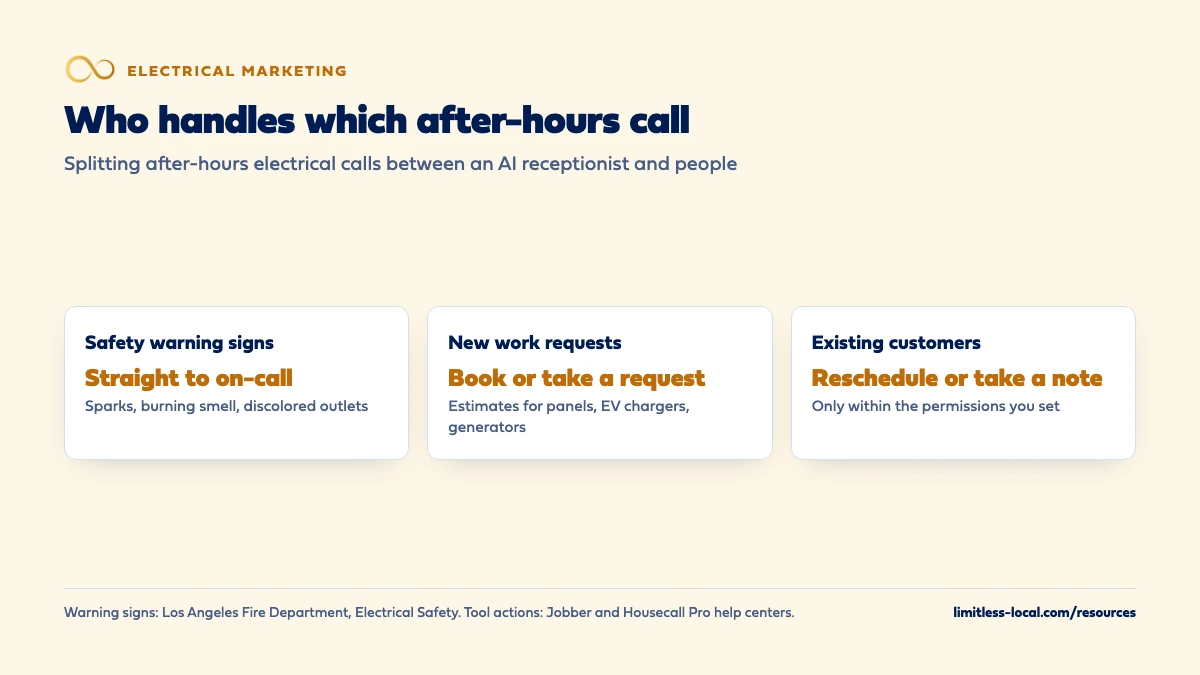
- Calls about sparks, burning smells or discolored outlets go to an on-call person, not a script.
- Keep it from quoting prices or diagnosing problems over the phone.
- Judge it by booked jobs, and listen to the recordings for the first few weeks.
For electrical contractors whose after-hours calls ring out or go to voicemail, deciding whether an AI receptionist should pick up, and what it should never be left to handle alone.
Get a free visibility audit · Book a growth call
Is an AI answering tool worth it for an electrical contractor's after-hours calls?
An AI receptionist is worth using after hours if your calls now ring out or go to voicemail, because it can answer every call, take the caller’s details, book routine work into your schedule and send you a summary. It shouldn’t be the last stop for anything that sounds dangerous: calls about sparks, a burning smell or discolored outlets need to reach an on-call electrician right away, so set the tool to escalate those, not to diagnose or quote. Judge it by the after-hours jobs it books, checked against the call recordings and your schedule.
That split is how we’d set it up: the tool handles routine calls, people handle the risky ones, and every call is tracked to a booked job or a dead end. After-hours answering and AI website chat are automation add-ons that plug into any tier of our electrical contractor marketing, and their pricing is shared on the discovery call. The rest of the electrical marketing questions library goes question by question.
What does an AI receptionist actually do on an after-hours call?
It answers the phone in a natural-sounding voice, talks with the caller, and acts on what it hears within limits you set. Jobber and Housecall Pro both sell one. Jobber’s Receptionist answers calls and texts around the clock, uses the business details, policies and services you enter to answer questions, and can schedule jobs, take work requests or create a follow-up task for your team. Housecall Pro’s CSR AI answers calls using your business settings, summarizes each one with the caller’s details and urgency, and notifies you after the call.
Jobber keeps a summary, recording and transcript of each conversation. It also says its Receptionist can take more than one call at the same time, which matters on the night a storm knocks out power across your service area and the phone lights up.
Which after-hours electrical calls can it handle on its own?
In our judgement, the calls an AI receptionist handles well are the ones where the caller mostly needs to be heard, booked and told when you’ll call back:
- New work requests. A homeowner pricing a panel upgrade, an EV charger or a standby generator at 9 p.m. is planning, not panicking. Booking the estimate visit or taking a detailed request is exactly what the tool is built for, and those are often the bigger tickets. More on winning that work is in getting more panel upgrade and EV charger jobs.
- Existing appointments. Both tools can be allowed to reschedule or cancel appointments, or only to take a note.
- Basic questions. Service area, hours, whether you do commercial work, how to request an estimate. Its answers are only as good as the information you give it.
Which after-hours calls should always go to a person?
Anything that might be a hazard. The Los Angeles Fire Department’s electrical safety guidance tells residents that if they see flickering lights, tripped breakers, discolored outlets, sparks, or a burning smell from appliances or outlets, they should contact a qualified electrician immediately. A caller describing any of those is not someone to book for Thursday. Put each of those words on your escalation list.
Both tools support this. Jobber’s escalation policy listens for trigger terms you choose (its examples are “emergency”, “speak to a manager” and “urgent”) and either transfers the call to your escalation contact or texts them a transcript snippet with a link to call back. Housecall Pro’s CSR AI forwards emergency calls to the number you pick or sends you a text alert, and its help page says emergency handling is always on, so the setting only changes how you’re notified.
Our recommendation goes further than the software: write the script for those calls yourself, and for anything that sounds like smoke or fire, have it tell the caller to call 911 first. Send a person anyone who asks for one, too.
Is an AI receptionist better than voicemail or a missed-call text?
For most shops, yes, because voicemail and a text-back only work if the caller does the work. A missed-call text is still worth having as a backstop, but it has gaps. CallRail’s automated response for missed calls sends a text to someone whose call you missed, yet it can’t reach a landline or any number that can’t receive texts, it doesn’t fire if the caller hangs up before 15 seconds, toll-free numbers can’t send the texts, and you have to register for text messaging compliance before using it.
An AI receptionist has a conversation instead. It asks what the caller needs and where, then books it or hands it to you with the details filled in. If a voicemail is the most a caller can get from you after five o’clock, it’s our judgement that many of them will simply try the next number. Closing those gaps during the day is covered in stopping your company from missing calls.
AI receptionist, answering service or on-call electrician: which should I use?
They do different jobs, and many shops combine them.
- An on-call electrician is the only option that can judge a hazard and roll a truck, and the most expensive way to answer a quote request.
- A human answering service can calm a nervous caller and follow a script, but in our judgement it usually takes messages rather than booking into your schedule, unless you pay for a service that works inside your software.
- An AI receptionist answers instantly, books routine work directly and costs less per call, but it can be wrong, and it can’t make a judgement call.
The software is starting to blend these. During your company hours, Housecall Pro lets CSR AI forward calls it can’t handle to its human HCP Assist agents for note-taking, and with a separate HCP Assist subscription those agents can also book appointments and review pricing. A setup that works for many electrical shops, in our judgement: AI answers first, hazards and commercial emergencies go straight to the on-call phone, and everything else is booked or queued for the morning.
Curious what your marketing is actually booking?
Get a free visibility audit — no obligation, no sales pitch.
What should I let it book, and what should only be a message?
Start narrow. Jobber lets you choose which actions the Receptionist takes automatically; for anything you switch off, it asks before acting. When it books directly, it follows your online booking settings to decide which team members to schedule and which services can be booked. Housecall Pro has the same kind of permission list: book jobs and estimates, reschedule, cancel.
A sensible first setup, in our view:
- Let it book estimate visits and small service calls into daytime slots you’ve opened for online booking.
- Let it take a request for commercial work, larger projects and anything outside your normal service area, so a person reviews it before a truck is committed.
- Never let it promise a same-night visit. That’s the on-call electrician’s decision.
Then make sure the morning starts with the overnight list. Jobber puts the follow-up tasks from after-hours calls on the next day’s schedule; somebody has to work them first thing. How fast that callback needs to happen is covered in how fast your office needs to answer.
Should it answer price questions?
Only with numbers you’d stand behind in writing. Housecall Pro lets you define how CSR AI handles pricing questions, and Jobber’s Receptionist answers from the policies and services you enter, so what it says about money is up to you.
Be careful, because a tool’s mistake is still your mistake. In Moffatt v. Air Canada, a British Columbia tribunal found the airline liable after its website chatbot gave a customer wrong information about a fare discount, and rejected the argument that the chatbot was responsible for its own actions. That was a Canadian website chatbot, not a US phone tool, but the lesson carries over: customers will hold you to what your AI says. This is general information, not legal advice.
For electrical work, our recommendation is that the tool can state a published trip or diagnostic fee if you have one, and otherwise says the price depends on what the electrician finds and offers to book the visit. No quotes on a panel upgrade or a rewire over the phone, from a person or a machine.
How does after-hours answering affect my Local Services Ads?
It depends on the hours you’ve told Google you’re open. Google’s page on how Local Services Ads leads work counts a missed call during your business hours as a charged lead if the caller stays on the line for more than 20 seconds. If your listed hours run into the evening and nobody answers, you can pay for those calls.
Responsiveness also affects where you show up. Google’s page about ad rankings says missed calls may hurt your responsiveness, and that turning on message and booking leads gives customers more ways to reach you, especially on nights and weekends when you can’t answer. The same page says a call that goes to voicemail or an automated greeting during your business hours is treated as connected and charged if the caller stays on the line for more than 20 seconds, so expect calls your AI answers in those hours to be charged as leads too. Whether LSAs make sense for you at all is covered in whether Local Services Ads are worth it for electricians.
How do I connect it to the phone number I already use?
Usually by forwarding. Jobber’s Receptionist needs a Jobber dedicated phone number, but its help page says you can forward your existing business number to it, either through Google Voice or through your phone carrier, since most carriers let you forward calls after a set number of rings or outside business hours.
Two details catch people out. First, Jobber says your escalation contact’s number has to be different from your business number or the transfer won’t work, so the on-call phone needs its own line. Second, if you use call tracking numbers for your ads and your Google profile, decide whether those forward to the AI after hours too, or the calls you’re paying the most for may still ring out. What those numbers do is covered in whether you need call tracking numbers.
Should the AI tell callers it's a machine, and can it call people back?
We’d have it say so. Both tools let you edit the greeting, so a line like “you’ve reached our after-hours assistant” costs nothing, and in our judgement callers who find out halfway through trust the call less.
Calling people back is a different question. The FCC ruled in February 2024 that calls made with AI-generated voices count as “artificial” under the Telephone Consumer Protection Act, the federal law that governs robocalls. That ruling is about calls placed to consumers, not calls the AI answers, but if you want any tool to place outbound calls in an AI voice, check the consent rules with someone qualified first. This page isn’t legal advice.
How do I know if it's paying off?
Count booked jobs, not answered calls. Jobber’s Receptionist dashboard shows outcomes (jobs, requests and tasks it created) and tags every conversation, and Housecall Pro’s CSR AI dashboard shows how many calls and chats it handled, how many turned into booked jobs and the revenue tied to those bookings.
For the first few weeks, also listen to a handful of recordings every morning. Check that it escalated every call it should have, said nothing about price or safety you wouldn’t say, and didn’t lose callers by misunderstanding them. After that, compare the after-hours jobs it booked against what the tool costs. The same cost-per-booked-job math you’d use on any channel, laid out in tracking which marketing brings in real jobs, works here too.
Not sure which of these is costing you jobs?
A free visibility audit checks the Google profile, reviews, site and tracking, and shows what to fix first.
What's different about after-hours calls for electricians
Some calls are safety calls. An HVAC company’s worst night call is a family without heat. An electrician’s can be a burning smell behind a wall. So the escalation list matters more than the booking features: write it first, and test it by calling in with each trigger word.
Outages bring call spikes. When a storm takes down power across a neighborhood, many people can call at once. A tool that handles several calls at the same time keeps the line open, and the script should say what you do and don’t handle during a utility outage.
Planning calls are worth more than they sound. Homeowners researching a panel upgrade, EV charger or generator after work aren’t urgent, but they’re often larger tickets, and in our judgement the calls an AI receptionist books best.
Commercial customers expect a person. Route commercial accounts you know straight to the on-call line.
A worked example: what after-hours answering can be worth
These numbers are made up to show the math, not a benchmark for your market. Say your shop gets 24 calls a month after hours. Today, 8 of those callers leave a voicemail and the other 16 hang up. From the voicemails, you book 3 jobs the next morning.
With an AI receptionist answering, say it has a real conversation with 18 callers (the rest are spam or hang up on it), 11 of those end with a booking or a request, and 7 turn into jobs. That’s 4 more jobs than before. At an average of $400 a job, that’s $1,600 a month in work you weren’t getting.
Now set that against the cost side. Vendors price these tools differently and change their pricing, so get the current price at your real after-hours call volume and compare it with the extra work booked. After-hours answering is also one of our automation add-ons if you’d rather have it set up and tracked with the rest of your marketing.
Frequently asked questions
Can an AI receptionist handle more than one call at once?
Jobber says its Receptionist can handle concurrent calls, so a rush of calls during an outage doesn’t send people to a busy signal.
Do I need a new phone number for an AI receptionist?
Not one customers see. Jobber needs a dedicated number behind the scenes, but you can forward your existing number to it.
What happens when it doesn't know the answer?
Jobber says its Receptionist can direct the caller to contact you directly, and you can read the transcript and add the missing information to your business profile so it answers better next time.
Should I use it during business hours too?
You can; Jobber lets you switch it on and off. Start with after hours, where it replaces voicemail rather than a person.
Will an AI receptionist work if I use ServiceTitan or other software?
Jobber and Housecall Pro build theirs into their own scheduling. With any other tool, ask whether calls land in your schedule as requests or bookings, or only arrive as emails someone has to retype.
Key takeaways
- An AI receptionist beats voicemail after hours because it books the caller instead of hoping they wait.
- Escalate safety calls (sparks, burning smells, discolored outlets) to an on-call electrician, and write that list before switching it on.
- Let it book estimates and small service calls; keep commercial work, quotes and same-night promises with people.
- On Local Services Ads, missed calls in your listed hours can be charged and may hurt your ranking.
- Judge it by booked jobs and listen to recordings every morning for the first few weeks.
Want a second set of eyes on your setup?
We'll look at how you show up locally and where calls are leaking, then send you a plain-English breakdown.
More in this section
- How fast should my office answer electrical calls before I lose them?
- What should an electrician's website have to get more calls?
- Should an electrician market battery backup and solar tie-in work?
- How do I follow up on electrical quotes automatically?
- Do I need call tracking numbers for my electrical business?
Sources
- Receptionist–powered by Jobber AI — Jobber Help Center
- CSR AI Overview — Housecall Pro Help Center
- Automated responses for missed calls — CallRail Help Center
- How leads work — Google Local Services Help
- About ad rankings — Google Local Services Help
- Electrical Safety — Los Angeles Fire Department
- BC Tribunal Confirms Companies Remain Liable for Information Provided by AI Chatbot — American Bar Association, Business Law Today
- FCC Makes AI-Generated Voices in Robocalls Illegal — Federal Communications Commission