
Which mobile speed fixes does a restoration website need?
- Which mobile speed and tap-to-call fixes does a restoration website need to load fast and pass Google's checks?
- Which pages should I check first on a phone?
- How do I measure my site's speed on phones?
- What do the Core Web Vitals numbers mean?
- How do I fix slow images on a restoration site?
- Why does my site feel slow to respond when people tap?
- How do I stop the page jumping while it loads?
- What makes tap-to-call work properly?
- Do my forms need fixing for phones?
- What does mobile-first indexing mean for my site?
- How much does mobile speed matter for rankings?
- In what order should I make these fixes?
- What's different about mobile fixes for restoration websites
- A worked example: what a faster page does to cost per call
- Frequently asked questions
- Key takeaways
- More in this section
- Sources
The short version
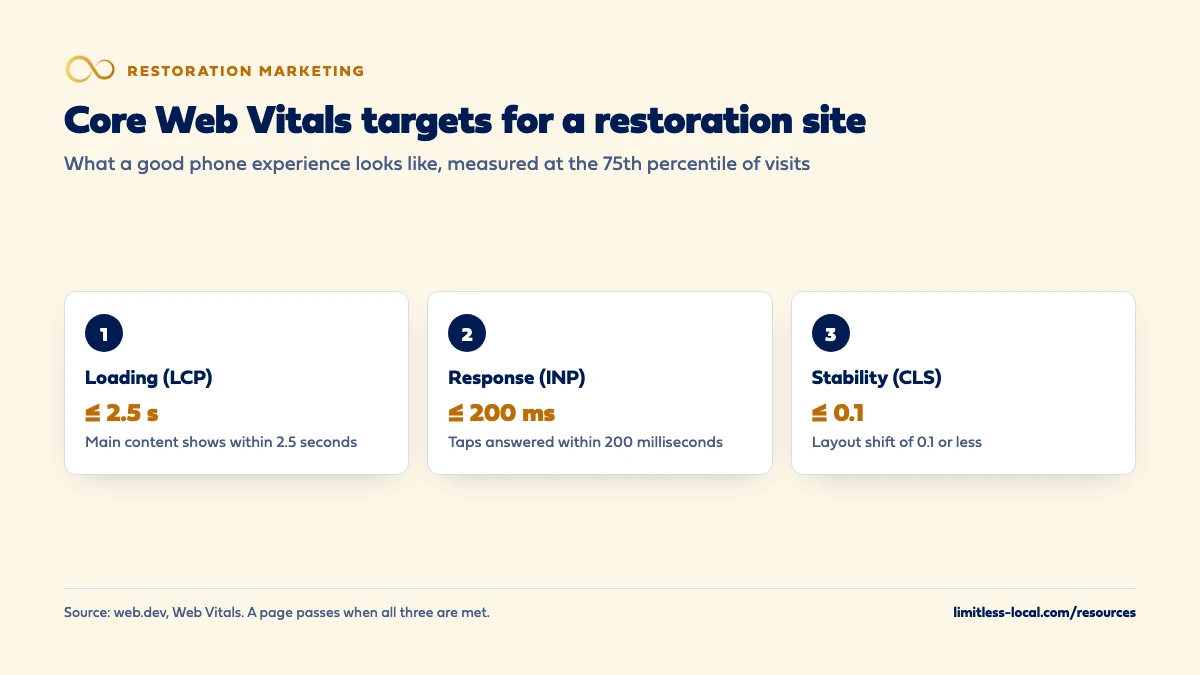
- Targets: main content within 2.5 seconds, taps answered within 200 milliseconds, layout shift 0.1 or less.
- Images are usually the first fix; then scripts, plugins and widgets.
- Make the phone number a real tap-to-call link with a large tap area on every page.
- Keep the same content on mobile as on desktop; Google ranks the mobile version.
For restoration owners whose site looks fine on the office computer but whose emergency callers are on a phone, in a wet basement, on a weak signal.
Get a free visibility audit · Book a growth call
Which mobile speed and tap-to-call fixes does a restoration website need to load fast and pass Google's checks?
A restoration website needs five technical fixes to work on phones: images sized and compressed with the main image loading first, fewer scripts and plugins so taps respond quickly, a layout that doesn’t jump while loading, a phone number that is a real tap-to-call link with a large tap area on every page, and the same content on mobile as on desktop. Google’s Core Web Vitals give the targets: the main content should load within 2.5 seconds, taps should respond within 200 milliseconds, and layout shift should stay at 0.1 or less. Check real-visitor data in PageSpeed Insights or Search Console, fix the slowest money pages first, and recheck after each change.
A fast, tappable site matters because the emergency caller is on a phone, and a page that stalls sends that job to the next company. Fast loading, mobile-first design and click-to-call buttons are built into the sites in our website service for restoration companies. The restoration marketing guide covers where the website fits among your channels, and the restoration marketing questions library takes the rest one question at a time.
Which pages should I check first on a phone?
Start with the pages that cost you money when they fail: the pages your Google Ads send people to, your water damage page, your homepage and the service pages that bring most calls. A slow blog post is a smaller problem than a slow emergency water page.
Open each one on your own phone, off Wi-Fi, and ask three questions: does the main content appear quickly, can you tap the phone number with your thumb on the first try, and does anything jump around while it loads? If the answer to any is no, that page goes on the list.
This page covers the technical side. If the site loads fine but the wording doesn’t persuade, the live page on clicks that don’t turn into calls covers the content side, and what a restoration landing page should include covers ad landing pages.
How do I measure my site's speed on phones?
Use Google’s free tools, and know which numbers to trust. Google’s page About PageSpeed Insights says PageSpeed Insights shows both lab data, a simulated page load that’s useful for debugging, and field data from real visitors over the previous 28-day period. Field data is what your real customers experienced; lab data helps you find the cause.
For the whole site, the Core Web Vitals report in Google Search Console groups your URLs as Poor, Need improvement or Good, separately for mobile and desktop, based on real-world usage data. Google notes that URLs without enough data are left out of the report, which is common for small local sites. If yours is missing, rely on the lab test and your own phone.
What do the Core Web Vitals numbers mean?
Three numbers, each measuring something a homeowner would notice. From web.dev’s Web Vitals page:
- Largest Contentful Paint (LCP) measures loading. For a good experience, it should occur within 2.5 seconds of the page starting to load.
- Interaction to Next Paint (INP) measures how fast the page responds to a tap. It should be 200 milliseconds or less.
- Cumulative Layout Shift (CLS) measures how much the page jumps around. It should be 0.1 or less.
web.dev says to measure at the 75th percentile of page loads, split by mobile and desktop, and that a page passes if it meets all three at that level. In plain terms: three out of four phone visits should be fast, responsive and stable, not just your visit on office Wi-Fi.
How do I fix slow images on a restoration site?
Images are usually the first fix on restoration sites, in our judgement, because they’re full of large job photos, before-and-after galleries and big hero banners. Google’s own mobile landing page tips suggest reducing image sizes, shortening videos and removing unnecessary features. In practice:
- Resize each photo to the largest size it’s shown at, rather than uploading straight from a phone camera.
- Compress and use a modern format such as WebP.
- Load the first image right away. web.dev’s lazy loading guide says to always eager-load images visible when the page first loads, especially the image that counts as the largest content.
- Lazy-load the rest, such as gallery photos further down the page.
- Swap autoplay hero videos for a still photo on phones.
The hero image is often the element that sets your LCP, so a huge banner photo can fail the 2.5-second target on its own.
Why does my site feel slow to respond when people tap?
Usually too much JavaScript, in our judgement. Restoration sites tend to collect add-ons over the years: a chat widget, a review slider, two or three tracking tags, a page builder, a pop-up tool and an old plugin nobody remembers installing. Each one can delay the page’s response to a tap, which is what INP measures.
- List every plugin and script and remove what you don’t use.
- Keep one tag manager rather than tags pasted into the theme in several places.
- Delay non-essential widgets, such as chat, until the visitor scrolls or after the page has loaded.
- Avoid heavy sliders and animations on emergency pages.
Remove one item at a time and retest, so you know which change helped and don’t break call tracking or form delivery by accident.
Curious what your marketing is actually booking?
Get a free visibility audit — no obligation, no sales pitch.
How do I stop the page jumping while it loads?
Layout shift is when the page moves after it starts showing, so the visitor taps the wrong thing. Common causes on restoration sites, in our judgement: images without set dimensions, banners or alert bars that drop in at the top, web fonts that swap late, and cookie or offer pop-ups that push content down.
Fixes are mostly simple: give every image and video its width and height, reserve space for any banner, and keep pop-ups off emergency pages. Google’s page experience guidance asks whether pages avoid intrusive interstitials, the pop-ups that cover content. On a phone, a pop-up that hides the phone number is the worst place to put one.
What makes tap-to-call work properly?
This is the fix that turns a visit into a call, and it’s often broken in small ways. In our judgement, check each of these on every page:
- The number is a real link, coded as a phone link, not plain text or part of an image.
- The tap area is big enough. web.dev’s Accessible tap targets page recommends a minimum touch target of around 48 device independent pixels, which it says is about the size of a finger pad.
- It’s visible without scrolling, ideally in a header or bar that stays on screen.
- The tracking number swaps correctly. If you use call tracking that swaps numbers on the page, tap the number on a phone and make sure the link dials the swapped number, not the old one.
- Nothing covers it, including chat bubbles and cookie banners.
If the call does go through, someone has to answer it fast; how fast to answer emergency calls covers that side.
Do my forms need fixing for phones?
Usually, in our judgement. Long forms are hard to finish with a thumb in a wet basement. Keep emergency forms short: name, phone, town or ZIP, and what happened. Make each field bring up the right keyboard (numbers for phone and ZIP), let the phone’s autofill fill name and phone, and show a clear confirmation after sending.
Then test that the form actually arrives. Send one from your phone, off Wi-Fi, and check that it reaches the inbox or CRM you think it does. A form that looks fine but delivers nowhere is a common restoration website problem, and no speed fix will catch it.
What does mobile-first indexing mean for my site?
It means Google looks at your site the way a phone does. Google’s page on mobile-first indexing best practices says Google uses the mobile version of a site’s content for indexing and ranking. Three points from that page matter for restoration sites:
- Same content on mobile and desktop. If your mobile theme hides service descriptions, city lists or FAQs to save space, Google may not see them.
- Don’t hide primary content behind taps. Google says it won’t load content that requires user interactions such as swiping, clicking or typing to load.
- Same alt text and robots tags on mobile as desktop.
Most modern responsive themes serve one version to every device, which avoids most of this. Older sites with a separate mobile version are where it goes wrong.
How much does mobile speed matter for rankings?
Some, but less than content. Google’s page experience page says Core Web Vitals are used by its ranking systems, but also that Google always seeks to show the most relevant content, even if the page experience is sub-par. It adds that where lots of helpful content is available, a great page experience can contribute to success.
In our judgement, the bigger payoff for a restoration company is calls, not rank. A page that ranks but stalls on a phone loses the emergency caller to the next result. Fix speed because it books jobs, and expect any ranking help to be a bonus.
In what order should I make these fixes?
In our judgement, this order fixes the most calls fastest:
- Tap-to-call and forms on every money page. Cheap, quick and directly tied to calls.
- Images on the ad landing pages and top service pages.
- Plugins and scripts across the site.
- Layout shift and pop-ups.
- Mobile content parity if your theme hides content on phones.
Retest in PageSpeed Insights after each step. Because field data covers the previous 28 days, a change takes about four weeks to show fully there, so judge the lab score and your own phone first, then the field data a month later. If your site has city pages, check those too; building city pages covers what they should contain.
Not sure which of these is costing you jobs?
A free visibility audit checks the Google profile, reviews, site and tracking, and shows what to fix first.
What's different about mobile fixes for restoration websites
The visitor is in an emergency. Someone with water coming through a ceiling isn’t browsing. They want a number to tap. A page that loads slowly or hides the number loses the job, in our judgement, faster than in planned trades.
Signal is often bad. Basements, storm-hit neighborhoods and crawl spaces are where people search from. A page that only works on good Wi-Fi doesn’t work for your callers.
Photo-heavy by nature. Before-and-after galleries are good proof, but they’re also the heaviest thing on most restoration sites. Keep them, and size them properly.
Paid traffic lands here. Emergency restoration clicks are expensive, so every slow ad landing page wastes real money.
A worked example: what a faster page does to cost per call
These numbers are made up to show the math, not a benchmark for your market. Say your emergency water landing page gets 300 ad clicks a month at $15 each, so $4,500 in spend, and 15 of those visitors call. That’s $300 per call.
After fixing the hero image, the tap-to-call bar and a pop-up that covered the number, the same clicks bring 20 calls. Cost per call drops to $4,500 ÷ 20, or $225, with no change to the ads. If one in three of those calls books, that’s more booked jobs from the same budget.
Judge it by booked jobs, not just calls. If you’re planning a new site, our themed website is $3,750, or $3,000 with any monthly package, and it’s built mobile-first.
Frequently asked questions
Is a PageSpeed Insights score of 100 necessary?
No. The score is a lab measure for debugging. What matters is whether real visitors get a fast, stable page and can tap to call. A site that passes Core Web Vitals and books calls is doing its job.
Will switching hosts fix a slow site?
Sometimes, if the server is slow to respond. But heavy images and scripts are more common causes, in our judgement, and they follow you to a new host. Fix those first.
Should I use AMP or a separate mobile site?
In our judgement, no. A single responsive site that serves the same content to every device avoids most mobile-first indexing problems.
How do I test my site like a phone on my computer?
Chrome’s DevTools has a device mode that simulates mobile screens and can throttle the network. It’s a first check, not a replacement for testing on a real phone off Wi-Fi.
Does a slow site raise my Google Ads costs?
It can, in our judgement. Google Ads rates how useful your landing page is to people who click, and a page that frustrates visitors can drag that rating down. It certainly wastes clicks that don’t call.
Do I need HTTPS?
Yes. Google’s page experience guidance asks whether pages are served over HTTPS, and browsers warn visitors about sites that aren’t.
Key takeaways
- Targets: LCP within 2.5 seconds, INP 200 milliseconds or less, CLS 0.1 or less, at the 75th percentile of visits.
- Fix tap-to-call and forms first, then images, then scripts and plugins.
- Load the first image right away and lazy-load the rest.
- Keep the same content on mobile as on desktop; Google indexes the mobile version.
- Judge every fix by calls and booked jobs, with rankings as a bonus.
Want a second set of eyes on your setup?
We'll look at how you show up locally and where calls are leaking, then send you a plain-English breakdown.
More in this section
- How should a restoration company build city pages that rank?
- How fast does a restoration company need to answer emergency calls?
- Why is my restoration website getting clicks but no calls?
- Should my restoration website explain the insurance claims process?
- Which restoration citations and directories are the ones that matter?
Sources
- Web Vitals — web.dev
- About PageSpeed Insights — Google for Developers
- Core Web Vitals report — Search Console Help
- Understanding page experience in Google Search results — Google Search Central
- Mobile site and mobile-first indexing best practices — Google Search Central
- Accessible tap targets — web.dev
- Browser-level image lazy loading for the web — web.dev
- 5 things to consider when optimizing your mobile landing page — Google Business