
How should an HVAC company scale up ads for peak season?

- How do I ramp up HVAC ads before a heat wave or cold snap?
- When should an HVAC company start scaling up ads for peak season?
- Step 1: Can my office and crews handle more calls?
- Step 2: How much should I raise the budget, and when?
- Step 3: Should I use a campaign total budget for a seasonal push?
- Step 4: Do I need seasonality adjustments in Google Ads?
- Step 5: Which services should get the extra peak-season money?
- Step 6: How do I handle after-hours calls during a heat wave?
- Step 7: How do I keep peak-season spend from running away?
- How do I know the peak-season ramp-up is working?
- When should I scale HVAC ads back after peak season?
- What's different about peak season for HVAC companies
- A worked example: raising the budget ahead of a forecast heat wave
- Frequently asked questions
- Key takeaways
- More in this section
- Sources
The short version
- Capacity first: answered phones and open slots decide what extra ad money is worth.
- Raise budgets before the forecast, not mid-rush; the change applies right away.
- Put the extra spend on the seasonal services: cooling repair in summer, heating repair in winter.
- Set spend alerts and an after-hours plan, then scale back as cost per booked job climbs.
For HVAC owners getting ready for the summer rush or the first cold snap who want more calls without the budget, the phones or the crews falling behind.
Get a free visibility audit · Book a growth call
How do I ramp up HVAC ads before a heat wave or cold snap?
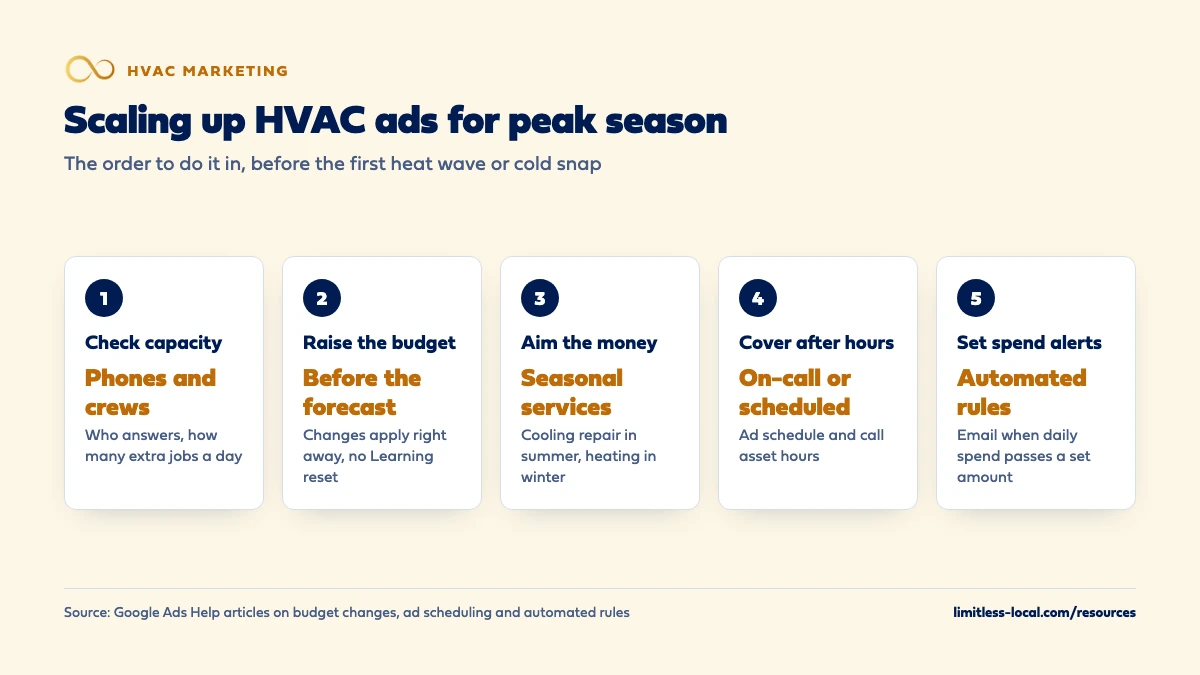
An HVAC company should scale up ads for peak season in a set order: make sure the office and crews can handle more calls, raise budgets a few days before the forecast heat wave or cold snap instead of in the middle of it, point the extra money at the services that book that season, and make sure someone answers the calls the ads bring after hours. In Google Ads, budget increases apply right away without triggering a new learning period, a campaign total budget can cap a new campaign’s spend over a 3- to 90-day push, and seasonality adjustments are meant only for short spikes. Scale back the same way once cost per booked job starts climbing or the schedule fills.
Google Ads management is part of our local ads work in every one of our HVAC marketing packages, and ad spend is paid to Google separately. For how a seasonal ad budget fits your total marketing spend, see what an HVAC company should spend on marketing, and the rest of the HVAC marketing questions library goes question by question.
When should an HVAC company start scaling up ads for peak season?
Before the first heat wave or cold snap, not during it. Two things tell you roughly when your peaks start: your own call history from last year, week by week, and Keyword Planner. Its average monthly searches can be viewed for a month range you choose, and Google notes that search volume moves with seasonality and current events (About Keyword Planner forecasts). Run your main repair keywords for your service area across the last year and you’ll see when searches climb.
In our judgement, the planning work (capacity, campaigns, call handling) belongs a few weeks before that climb, and the budget increase belongs a few days before a forecast you trust. Building campaigns while the phones are already ringing is how settings get rushed and calls get missed.
Step 1: Can my office and crews handle more calls?
Check this before touching the budget, because ad money only turns into booked jobs if someone answers and someone can run the job. Go through it plainly:
- Phones. Who answers during the day, who answers at night and on weekends, and what happens when two calls come in at once.
- Crews. How many extra jobs a day you can run, counting the techs you’ll have, not the ones you’re still hiring.
- Callbacks. A rule for missed calls and web forms, such as a callback within minutes, written down for whoever is on the phones.
- Booking. How full the schedule can get before a new customer would wait longer than they’ll accept.
If the office is the weak spot, fix it first. How your office should handle incoming calls covers the call side, and in peak season a better booking rate can be worth as much as a bigger budget.
Step 2: How much should I raise the budget, and when?
Size it with the same math you use all year, rerun with peak-season numbers: booked jobs you can take on, your booking rate, your click-to-call rate and what clicks cost now. How much to spend on Google Ads walks through that formula.
Then time it. Google applies a budget change right away. For the rest of that month you won’t pay more than what you’ve already spent plus the new daily budget times the calendar days left, and on the day you change it the daily cap is two times the highest budget you set that day (How budget changes take effect). Budget changes also never trigger Google’s “Learning” status, according to Google (About Smart Bidding learning). So there’s no penalty for raising the budget the day a heat wave is forecast instead of waiting until it arrives.
Step 3: Should I use a campaign total budget for a seasonal push?
Sometimes. A campaign total budget lets you set a fixed amount for a set period of 3 to 90 days, and Google spreads the spend to try to use it by the end date. You’ll never be charged more than the total, and unlike an average daily budget there’s no daily spending limit, so the system may spend more on some days and less on others (About campaign total budgets).
The limits matter. It’s only available when you create a new campaign; an existing campaign can’t switch from a daily budget to a total budget, and you can’t change the budget type after creation. Google also advises keeping edits to a minimum once it’s running, because changing the end date or the amount can lead to uneven spend.
In our judgement, that makes it a fit for a planned, time-boxed push, such as a pre-season tune-up offer with a fixed amount you’re willing to spend, and a poor fit for your always-on repair campaign, which already has history and a daily budget you can raise.
Curious what your marketing is actually booking?
Get a free visibility audit — no obligation, no sales pitch.
Step 4: Do I need seasonality adjustments in Google Ads?
Probably not for a whole summer. Google describes seasonality adjustments as an advanced tool to tell Smart Bidding about an expected change in conversion rates for a future event. It says to use them only if you expect major changes, because Smart Bidding already manages seasonal events, that they’re ideal for short events of 1 to 7 days, and that they may not work as well over longer periods such as more than 14 days at a time. Among other campaign types, they’re available for Search campaigns using Target CPA or Target ROAS and for Performance Max (About seasonality adjustments).
In our judgement, for an HVAC company a short, sharp event, like a forecast three-day heat wave where you expect far more calls than usual to book, is the kind of case they were built for. A season that runs for months isn’t. Use them sparingly, and only on campaigns where bidding is tied to the conversions you care about.
Step 5: Which services should get the extra peak-season money?
The ones people search for in that season and that your crews can run quickly. In our judgement, that usually means cooling repair in summer and heating repair in winter first, because those calls are urgent and often book the same day. Replacement campaigns can earn a bigger share too, since breakdowns in a heat wave are when many owners of old systems start asking about a new one, but replacements take estimates and follow-up, so give them a longer window to show results.
If repair and replacement are in separate campaigns, each with its own budget, you can raise one without the other. Which HVAC services to advertise first ranks services by margin, demand and capacity.
Step 6: How do I handle after-hours calls during a heat wave?
Decide this before you raise spend, because no-cool calls don’t stop at 6 p.m. If you have an on-call tech or an answering service that books jobs, keep ads running at night; those can be some of the most valuable calls of the season. If nobody answers at night, two settings help:
- Ad schedule. Campaigns show ads all day by default; an ad schedule limits them to the days and hours you choose, or raises and lowers bids for certain times. Google notes that campaigns using ad schedules still pace toward a monthly spend of 30.4 times the average daily budget (About Ad Scheduling), so turning days off doesn’t cut the month’s spend on its own.
- Call asset hours. You can set your call asset’s number to appear only on the days and hours your business is answering phone calls (About call assets), while the ad itself keeps running for people who’d rather fill in a form.
Whatever you choose, someone needs to work the overnight forms first thing in the morning. How fast to respond to new leads covers why the first callback matters.

Step 7: How do I keep peak-season spend from running away?
Set alerts before the rush, so a busy week doesn’t surprise you. Google’s automated rules can email you when a campaign has spent more than a set amount by a set time of day, raise the budget on your busiest days of the week and set it back afterward, or pause a campaign once it has spent a set amount for the month (Common ways to use automated rules).
In our judgement, the most useful one for peak season is the daily spend alert, because it puts a person in the loop: when the alert lands, you check whether the schedule can take more calls before deciding to raise the budget further or hold it.
How do I know the peak-season ramp-up is working?
Watch three numbers, at three speeds:
- Daily: calls answered and calls missed. In a rush, a missed call is the most expensive thing in the account.
- Weekly: cost per booked job, by service, against the limit you set for each one.
- Weekly: how far out the schedule is booked. When it runs past what customers will wait for, more spend stops helping.
If cost per booked job is under your limit and the schedule has room, keep going or add more. If either one breaks, when to raise, lower or pause ad spend has the rules for which way to move.
When should I scale HVAC ads back after peak season?
When the signals that justified the ramp-up reverse: cost per booked job rising, the schedule opening up because demand is easing, and the forecast cooling off (or warming up, after a cold snap). Lower the budgets you raised rather than removing campaigns, so they keep their history for next season, and keep the seasonal campaign paused, not deleted, until you need it again.
Scaling back doesn’t mean going quiet. Shoulder months are when maintenance plans and replacement estimates can still book. Keeping calls coming in during slow months covers that side of the year.
Not sure which of these is costing you jobs?
A free visibility audit checks the Google profile, reviews, site and tracking, and shows what to fix first.
What's different about peak season for HVAC companies
Two peaks, not one. Summer brings cooling calls and winter brings heating calls, with different keywords, different services and often different techs. Set up both campaigns ahead of time so you’re raising a budget in the rush, not building a campaign.
Weather sets the date, not the calendar. The first real heat wave can land weeks earlier or later than last year. Plan the ramp around the forecast, with the work done in advance so the change on the day is a budget number.
Install crews fill slower than service techs. A repair call can be booked and run the same day. A replacement needs an estimate, a decision and an install slot, so the extra replacement demand from a heat wave may land in your schedule weeks later. Budget the two separately.
A worked example: raising the budget ahead of a forecast heat wave
These numbers are made up to show the math, not a benchmark for your market. Your repair campaign runs at an average daily budget of $70, so its normal monthly limit is $70 times 30.4, or $2,128. On the morning of the 15th in a thirty-day month, a heat wave is forecast for the 18th. The campaign has spent $980 so far, and there are 16 days left counting today.
You’ve checked the schedule and lined up an extra on-call tech, so you raise the daily budget to $140. Using Google’s rule, the most the campaign can bill this month is now $980 plus $140 times 16, or $3,220. On any single day from here, it can spend up to $280.
Alongside it, you launch a separate 10-day pre-season tune-up campaign with a campaign total budget of $1,000. Google aims to spend roughly $100 a day, with no daily cap, and won’t charge more than the $1,000 total. When the heat breaks and cost per booked job starts to climb, you set the repair budget back to $70. Planning your own numbers this way is what a free visibility audit is for.
Frequently asked questions
How far ahead of summer should I set up HVAC ad campaigns?
In our judgement, a few weeks before searches climb in your area, so the campaigns, tracking and call handling are tested before the rush and the change on the day is only a budget number.
Can I switch my existing campaign to a campaign total budget for the summer?
No. Google says campaign total budgets are only available for new campaigns, and an existing campaign can’t switch from an average daily budget.
Will raising my budget during a heat wave make Google spend it all at once?
Not all at once. For most campaigns, a single day can spend up to two times the average daily budget, and the month is capped by what you’ve spent plus the new daily budget times the days left.
Should I lower my bids during peak season to stretch the budget?
In our judgement, not by default. In a rush you want to show for urgent repair searches; if the budget is tight, narrow the keywords or areas before cutting bids so far that you stop showing.
Do I need different ads for summer and winter?
Yes, in our judgement. Cooling and heating calls use different words and different services, so separate ads, and usually separate campaigns, keep the message matched to what people search.
Key takeaways
- Check phones and crews before raising spend; capacity decides what extra ad money is worth.
- Raise budgets a few days before the forecast; Google applies the change right away without a Learning reset.
- Use a campaign total budget only for a new, time-boxed push of 3 to 90 days.
- Seasonality adjustments are for short spikes of a week or less, not a whole season.
- Plan after-hours coverage, set spend alerts, and scale back as cost per booked job climbs.
Want a second set of eyes on your setup?
We'll look at how you show up locally and where calls are leaking, then send you a plain-English breakdown.
More in this section
- When should I raise, lower or pause my HVAC ad spend?
- How should a commercial HVAC company market itself?
- How do I keep HVAC calls coming in during slow months?
- How do I get HVAC calls without paying for ads?
- Which HVAC services should I advertise first?
Sources
- How budget changes take effect — Google Ads Help
- About Smart Bidding learning — Google Ads Help
- About campaign total budgets — Google Ads Help
- About seasonality adjustments — Google Ads Help
- About Ad Scheduling — Google Ads Help
- About call assets — Google Ads Help
- Common ways to use automated rules — Google Ads Help
- About Keyword Planner forecasts — Google Ads Help