
How do I find which keywords homeowners search for roofing?
- How can a roofer find the exact words homeowners in their area type into Google?
- Where do I find the real searches homeowners use?
- Step 1: Which jobs and towns should my list start from?
- Step 2: What does Google Search Console show a roofer?
- Step 3: What does my Google Business Profile show?
- Step 4: What do Google Ads search terms tell me?
- Step 5: How do I use Keyword Planner for roofing?
- Step 6: What do autocomplete and "People also ask" reveal?
- Step 7: How do local competitors' websites help?
- Step 8: Does Google Trends help a roofer?
- Step 9: How do I sort the list into keywords worth using?
- How often should a roofer redo keyword research?
- What's different about keyword research for roofing
- A worked example: one afternoon of keyword research
- Frequently asked questions
- Key takeaways
- More in this section
- Sources
The short version
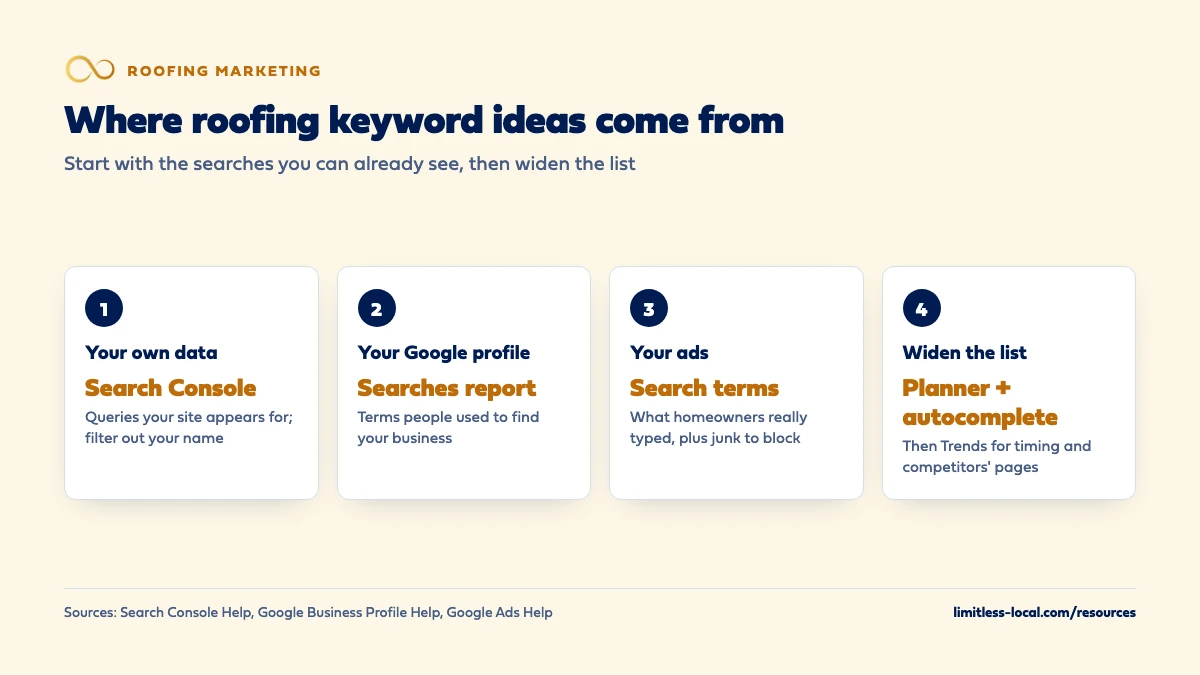
- Start with your own data: Search Console, your Google profile and your ads' search terms.
- Widen the list with Keyword Planner, autocomplete and competitor pages.
- Use Google Trends for seasons and storm spikes, not for volumes.
- Sort every term by the job it brings, then check it with a real search.
For roofing owners who want to see the real searches in their own market, with free tools, before paying anyone to guess.
Get a free visibility audit · Book a growth call
How can a roofer find the exact words homeowners in their area type into Google?
Start with the searches you can already see: the queries in Google Search Console that show your website, the search terms in your Google Business Profile performance report, and, if you run Google Ads, the search terms report showing exactly what homeowners typed before your ads appeared. Then widen the list with Google’s Keyword Planner set to your service area, Google’s autocomplete and “People also ask” questions, Google Trends for seasonal swings, and the services and towns local roofing competitors build pages for. Finish by sorting the words into the jobs you want, checking each with a real search, and dropping do-it-yourself, supply and job-seeker terms.
Keyword research is where the content and ads work in our Limitless Engine packages starts. Essentials includes a content sprint of up to 10 pages and 2 blog posts a month, built around the searches homeowners in your towns actually use, and Google Ads that get trimmed against the real search terms every month. For how that fits a roofing business, see our roofing marketing page and whether SEO is worth it for roofers, or browse the rest of the roofing marketing questions library.
Where do I find the real searches homeowners use?
There are two kinds of keyword data, and you want both:
- Searches you already appear for. Your website, your Google profile and your ads each record the words people used before they found you. This is the most reliable data you’ll ever get, because it comes from homeowners in your own market.
- Searches you could appear for. Tools like Keyword Planner, autocomplete and Google Trends show what people search more broadly, including words you don’t show up for yet.
Start with the first kind. It costs nothing, it’s specific to your towns, and it shows you the gap between what homeowners type and what your site talks about. Then use the second kind to fill in what’s missing.
This page is the method for finding the words. If you want to know which ones are worth targeting once you have them, which keywords a roofing company should target for local leads covers that.
Step 1: Which jobs and towns should my list start from?
Before you open any tool, write down two short lists:
- The jobs you want more of, in the words a homeowner would use. “Roof leak repair,” “new roof,” “hail damage roof inspection,” “metal roof installation.” Not the words you use on the job, like tear-off, re-deck or drip edge.
- The towns, suburbs and neighborhoods where you want those jobs, starting with the ones closest to your shop.
These are your seed words. Every tool below works better when you feed it real job names and real places. They also keep you honest: if a tool shows a big search you don’t want, like gutter cleaning when you only do roofs, you’ll notice it’s off your list.
Ask your office manager or whoever answers the phone what homeowners say when they call. “My roof is leaking” and “I need someone to look at storm damage” are keyword research too.
Step 2: What does Google Search Console show a roofer?
If your website is set up in Google Search Console, its Performance report shows the queries your site appeared for in Google, with clicks, impressions and average position. The default view covers the past three months.
How to read it for keyword research:
- Open the Queries tab and sort by impressions. These are words homeowners typed where your site showed up, even if they didn’t click.
- Separate your company name. Searches for your business name tell you about your reputation, not about new customers. Search Console added a branded queries filter so you can look at non-branded searches on their own.
- Look for queries with impressions but few clicks. Those often point to a search where you show up on a weak page, or deep in the results.
- Check the Pages tab to see which page showed for each query. A leak repair search landing on your homepage means you need a leak repair page.
If you’ve never set up Search Console, do that first. It’s free and it starts collecting data from the day it’s verified.
Step 3: What does my Google Business Profile show?
Your Google Business Profile has its own performance report, and one of its metrics is searches: the search terms people used to find your business. The data covers views, searches and actions from both regular search results and Google Ads.
For a roofer, this list tends to look different from Search Console. It’s heavy on short, local searches like “roofer near me” or “roofing company,” plus your business name. That’s useful in itself:
- It tells you which job words people use when they’re looking for a company, not information.
- It shows whether your profile appears for the services you want, or only for your name.
- It hints at which services to add to your profile and which words to use in your business description and posts.
You can’t directly choose which searches your profile appears for. You can make it more likely by listing your services, picking accurate categories and keeping your profile complete.
Step 4: What do Google Ads search terms tell me?
If you run Google Ads, the search terms report is the closest thing to reading over homeowners’ shoulders. It shows the actual searches that triggered your ads, and how each one performed. The difference matters: a keyword is what you add to your campaign; a search term is what the person really typed.
Go through it once a month and sort what you find:
- New job words homeowners use that you weren’t targeting, like a specific roof type or a town you hadn’t listed.
- Junk to block, like roofing jobs, shingles for sale or how-to searches. Add those as negative keywords.
- Ideas for pages and ads, in the homeowners’ own words.
Some low-volume search terms are left out of the report for privacy, so it never shows every search. The negative keywords a roofer should add to Google Ads lists the usual junk to block.
Curious what your marketing is actually booking?
Get a free visibility audit — no obligation, no sales pitch.
Step 5: How do I use Keyword Planner for roofing?
Google’s Keyword Planner suggests keywords related to your business and estimates how many searches they get each month and what they cost to target. It lives inside Google Ads, and you need to finish your account setup, including billing information, to use “Get ideas for new keywords”; you don’t have to run ads.
Two ways to start:
- Start with keywords. Enter your seed job words from Step 1, separated by commas.
- Start with a website. Enter a local competitor’s site, or one of their service pages, and Keyword Planner looks for keywords related to the content on it.
Then set the location to your service area instead of the whole country, so the estimates reflect your market. Treat the numbers as estimates, not promises: real results depend on things like your bid, budget, ad quality and location targeting.
One caution for smaller markets: a search with a tiny volume estimate in one town can still bring a high-ticket roof. Don’t drop a real job search just because the number is small.
Step 6: What do autocomplete and "People also ask" reveal?
Type the start of a roofing search into Google and watch the suggestions. Autocomplete predictions reflect real searches, and the system weighs the language of the search, the location it comes from, trending interest and your own past searches.
That last part matters. Your own searches skew the suggestions, so:
- Use a private browser window, signed out.
- Search from inside your service area, or add a town name.
- Try each job word followed by letters of the alphabet, or by “near,” “cost,” “vs” and “how long.”
Then look at the “People also ask” box on the results page for your main searches. Those questions, like how long a roof replacement takes or whether to repair or replace, are the ones worth answering on your service pages.
Autocomplete doesn’t show the most common searches in order, and some predictions are filtered out, so use it for wording and ideas, not for volume.
Step 7: How do local competitors' websites help?
The roofers who already rank in your towns have done some of this work for you. Look at three or four of them:
- Their service menu. Which roofing jobs get their own page? A competitor with separate pages for leak repair, hail damage and metal roofs is telling you those searches matter in your market.
- Their town pages. Which towns do they build pages for, and are those pages real or copies?
- Their page titles. The words in the title of a page that ranks well often match how homeowners search.
- What’s missing. A job you do well that nobody in town has a good page for is an opening.
Run their best service pages through Keyword Planner’s website option from Step 5 to see the related searches. Don’t copy their pages. Use them to see which searches exist, then write your own pages from your own jobs.
Step 8: Does Google Trends help a roofer?
Yes, for timing, not for volume. Google Trends uses a sample of real Google searches and scales interest from 0 to 100 relative to all searches in that place and time, so it shows when a search rises and falls, not how many people made it. Searches with low volume show as zero.
For a roofer, that’s useful for:
- Seasons. See when “roof repair” or “roof replacement” interest climbs in your state or metro, and plan ads and content ahead of it.
- Storm spikes. Interest in hail or storm damage jumps after weather events, which tells you how quickly searches come and go.
- Word choice. Compare two ways of saying the same thing, like “new roof” and “roof replacement,” to see which homeowners in your area lean toward.
Trends isn’t a perfect mirror of search activity and adds a little noise to protect privacy, so read it for direction and use your own data for decisions.
Step 9: How do I sort the list into keywords worth using?
By now you’ll have a long, messy list. Sort it into groups:
- Group by job. Put leak repair searches together, replacement searches together, storm damage searches together, and so on.
- Mark the intent. Ready to hire (“roof leak repair near me”), researching (“how long does a roof last”), or not a customer (“roofing jobs,” “how to patch a roof,” “shingles for sale”).
- Search each main term yourself. If the first results are roofing companies and a map, homeowners searching it want a roofer. If they’re DIY articles or stores, think twice.
- Give each job group one home: one page on your website, one service on your Google profile and one ad group.
Ready-to-hire terms go on service pages and into ads; researching questions go into the content on those pages. Which search terms a roofing company should target for the jobs it wants shows how to turn the groups into pages and ad groups.
How often should a roofer redo keyword research?
Less often than you’d think for the big picture, more often for the details:
- Monthly: the Google Ads search terms report, for new job words and junk to block.
- Quarterly: the Search Console queries and your Google profile searches, to spot new searches and pages that need work.
- Before each season: Google Trends, to time ads and content.
- When you add a service or a town: a fresh pass through Steps 1 to 7 for that job or place.
Then close the loop: match the searches and pages to the leads they produced, and the leads to signed roofs. How a roofer sees which searches and pages bring leads walks through connecting those reports.
Not sure which of these is costing you jobs?
A free visibility audit checks the Google profile, reviews, site and tracking, and shows what to fix first.
What's different about keyword research for roofing
Homeowners don’t talk like roofers. They search “roof leaking in ceiling” and “new roof cost,” not flashing repair or underlayment. Your list has to be in their words.
Storms rewrite the list overnight. After hail or high wind, storm and inspection searches spike in specific towns and fade within weeks. Have storm pages ready instead of chasing the spike.
Roof types are regional. Tile, metal, shake and shingle searches vary by market. Check what homeowners in your area actually ask for before you build pages for roofs nobody there wants.
A lot of roofing searches aren’t customers. Job seekers, do-it-yourselfers and people shopping for materials search the same words. Sorting them out early saves real money in ads.
A worked example: one afternoon of keyword research
This roofer is made up to show the process. The site has a homepage, a services page and a contact page. In Search Console, the queries tab shows impressions for “roof leak repair” plus a nearby town name, landing on the homepage, with almost no clicks. The Google profile’s searches are mostly “roofer near me” and the company name. The Google Ads search terms include “metal roof cost,” “roofing jobs hiring” and “shingles for sale.”
Keyword Planner, set to the roofer’s county, shows steady searches for leak repair and roof replacement, small but real numbers for metal roofing, and very little for the technical words the roofer uses on estimates. Autocomplete adds “roof leak repair cost” and “roof leaking after rain.”
The result: a new leak repair page, a metal roofing page answering the cost question, leak repair and metal roofing added as services on the Google profile, and “jobs,” “hiring” and “for sale” added as negative keywords. None of it cost anything but time.
Frequently asked questions
Do I need a paid SEO tool to find roofing keywords?
No. Search Console, your Google profile’s performance report, the Google Ads search terms report, Keyword Planner, autocomplete and Google Trends are free and cover most of what a local roofer needs.
Why does Keyword Planner show almost no searches for my town?
Small towns have small numbers, and some searches don’t include a town at all. Check the estimate for your whole service area, and don’t drop a real job search just because the number is low.
Should I include "near me" in my roofing keywords?
You don’t need to write “near me” into your pages. Focus on the job and your towns, and keep your Google profile complete so you can show up when homeowners search that way.
How do I find what homeowners ask before they call a roofer?
Look at the “People also ask” box on your main searches, the question-style queries in Search Console, and the questions your office hears on the phone every week.
Can ChatGPT find roofing keywords for me?
It can help you brainstorm wording, but it doesn’t show real search data for your market. Check every idea against Search Console, Keyword Planner or your ad search terms before you build a page around it.
Key takeaways
- Start with the searches you already appear for: Search Console, your Google profile and your ads’ search terms.
- Filter out your company name so you see the searches that bring new customers.
- Use Keyword Planner set to your service area, plus competitors’ sites, to widen the list.
- Use autocomplete for wording, Trends for timing, and neither for volume.
- Sort every term by job and intent, give each job one page, and recheck ad search terms monthly.
Want a second set of eyes on your setup?
We'll look at how you show up locally and where calls are leaking, then send you a plain-English breakdown.
More in this section
- Which search terms should a roofing company target for jobs it wants?
- Which keywords should a roofing company target for local leads?
- Do homeowners click paid ads or organic results for roofers?
- Which negative keywords should a roofer add to Google Ads?
- Which roofing companies get the best results from SEO versus ads?
Sources
- Performance report (Search results) — Search Console Help
- Introducing the branded queries filter in Search Console — Google Search Central Blog
- Understand your Business Profile performance & insights — Google Business Profile Help
- About the search terms report — Google Ads Help
- Use Keyword Planner — Google Ads Help
- How Google autocomplete predictions work — Google Search Help
- FAQ about Google Trends data — Google Trends Help