
How can a roofer launch a second location on a small budget?
- What's the cheapest order to market a new roofing location without starving the first one?
- Do I need a second location, or just a bigger service area?
- Step 1: How do I check the new market before committing money?
- Step 2: What should the new location have before I spend anything?
- Step 3: What should the new location's web page say?
- Step 4: How does a new location get its first reviews?
- Step 5: Should the new location run ads right away?
- Step 6: How do I split a small budget between two locations?
- Should the new location run Local Services Ads too?
- What can wait until the second location pays for itself?
- How do I know the second location is working?
- When should I pull back on the second location?
- What's different about a second location for roofers
- A worked example: a $2,000 budget across two locations
- Frequently asked questions
- Key takeaways
- More in this section
- Sources
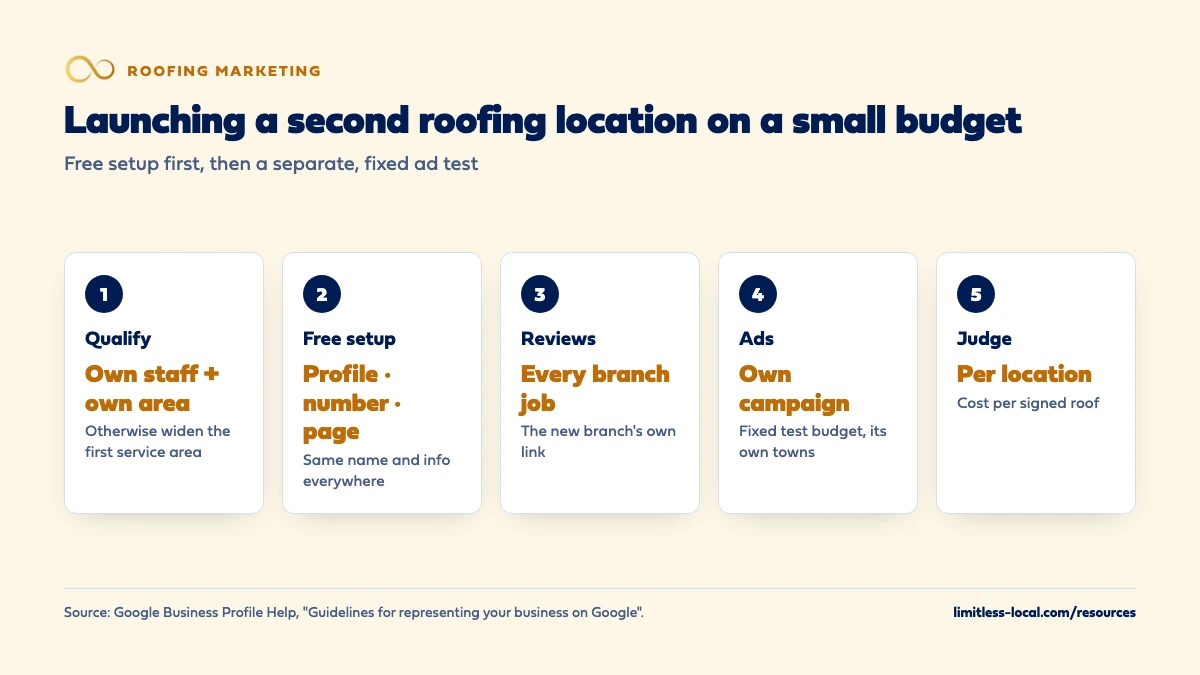
The short version
- Qualify first: separate staff and a separate service area, or it isn't a second location to Google.
- Free setup before paid: profile, local number, location page, reviews.
- Give the new branch its own ad campaign and a fixed test budget.
- Track it separately and judge it on cost per signed roof.
For roofing owners opening a second branch with real crews and a real office, who need it booking jobs without draining the marketing that keeps the first location busy.
Get a free visibility audit · Book a growth call
What's the cheapest order to market a new roofing location without starving the first one?
Do the free work first and spend in one place at a time: confirm the new location qualifies for its own Google Business Profile, set it up with a local phone number and its own page on your website, and start collecting reviews from every job that branch runs. Then give it a separate Google Ads campaign with its own small, fixed budget and its own target towns, so it can bring calls while the profile and page build up, and the first location’s proven budget stays untouched. Judge it on cost per signed roof for that location alone, and add channels only once it pays.
Running marketing for more than one location is how our packages are scoped: Essentials covers one location, Growth covers SEO for up to two, and Scale handles as many as you need. Ad spend is paid to Google directly and isn’t included in any package. See how it works for roofers on our roofing marketing page, read the roofing marketing guide for the channels themselves, or browse more roofing marketing questions.
Do I need a second location, or just a bigger service area?
Settle this before you spend a dollar, because it changes the whole plan. Google’s guidelines for Business Profiles give a service business one profile per location only when each location has separate service areas and separate staff. A rented mailbox or virtual office in a town you’d like more work in doesn’t count.
The same guidelines say a profile’s service area shouldn’t reach farther than about 2 hours of driving time from where the business is based. So if the new town is within that drive and you’re dispatching the same crews from the same yard, you don’t have a second location yet. Add the town to your existing service area, build a strong page for it, and collect reviews from jobs there. That’s cheaper and it doesn’t put your main profile at risk.
If you really are opening a branch with its own crew lead, crews or office staff, keep reading. Setting up Google Maps for a second roofing location covers the profile setup step by step; this page covers the order and the money.
Step 1: How do I check the new market before committing money?
Spend an afternoon, not a budget. Search the way a homeowner there would, from the new town: “roof replacement,” “roof repair near me,” “roofer” plus the town name. Note who shows up in the map pack, how many reviews they have, and whether the ads at the top are local roofers or big-city outfits.
Then open Google’s Keyword Planner inside a Google Ads account, set the location to the new towns, and look at the forecast for your main roofing keywords. Google says the forecast shows the clicks and cost you might get for a budget, and that real results depend on your bids, budget, ad quality and targeting, so use it as a rough starting number.
You’re looking for two answers: is there enough search demand to keep a crew busy, and can you afford to compete for it? How competitive roofing marketing is in your city goes deeper into reading the competition.
Step 2: What should the new location have before I spend anything?
Most of the setup is free. Do all of it before you run a single ad, because every paid click will land on it:
- Its own Google Business Profile, under the same business name and category as your first location, verified, with the new branch’s service area.
- A local phone number that rings at the new branch, or at least is answered by someone who knows its schedule. It also lets you tell the two locations’ calls apart.
- Its own page on your website, linked from the new profile.
- The same name, address and phone everywhere the new branch is listed. Making your roofing company’s info match every listing covers the cleanup.
- Tracking that tags each lead with its location, so you never have to guess which branch a job came from.
Consistency pays. A roofing client of ours got 3x map pack visibility in its target towns; better presence and consistent info across the web increased inbound calls.
Step 3: What should the new location's web page say?
Something only that branch can say. Google’s spam policies name pages targeted at specific cities or regions that funnel visitors to one page as an example of doorway abuse, so a copy of your main page with the town name swapped won’t do much and can hurt.
Give the page:
- The branch’s address (if it receives customers), phone number and hours.
- The towns it serves, written for people, not as a long list for search engines.
- Photos of roofs that branch has done, even if there are only a few at first.
- Who runs it: the branch manager or crew lead, and how long they’ve roofed in the area.
- Reviews from customers in those towns as they come in.
- One clear next step: call or book an inspection.
One strong page beats ten thin town pages. How many city pages a roofing website needs covers when to add more.
Step 4: How does a new location get its first reviews?
A new profile starts at zero, and the roofers it competes with may have years of reviews. You can’t move reviews over from your first location, so the new branch earns its own from the first job.
Google lets you create a review link or QR code from the profile, and suggests putting it on receipts and in thank-you emails. Make sure crews and office staff send the new branch’s link for that branch’s jobs, not the old one by habit. Google also says offering discounts or freebies for reviews counts as fake engagement and is strictly prohibited, so ask, don’t pay.
Ask at the final walkthrough, text the link the same day, and follow up once. Getting more reviews after a roof replacement lays out the timing that works.
Curious what your marketing is actually booking?
Get a free visibility audit — no obligation, no sales pitch.
Step 5: Should the new location run ads right away?
Yes, if the setup above is done, because ads are the only part that works fast. Ads can bring calls within days of launch, while SEO typically takes 3 to 6 months to show meaningful organic growth. A new profile with few reviews and a new page with no history won’t fill a crew’s schedule on its own in the first months.
Set it up as its own campaign, not as extra towns added to your first location’s campaign:
- Its own budget. Google sets budgets per campaign. If both locations share one, the busier, better-known branch tends to soak up the money and the new one gets scraps.
- Its own locations. Target only the new branch’s towns, and keep them out of the first campaign so the two don’t bid against each other.
- Its own phone number and landing page, so calls ring at the right branch and you can count them.
- The jobs you most want. On a small budget, aim at replacement searches before small repairs.
Google spends unevenly through the month: it may spend up to two times your average daily budget on a busy day, but no more than 30.4 times it in a month for most campaigns, according to its help page on average daily budgets.
Step 6: How do I split a small budget between two locations?
Don’t split it evenly. Your first location’s ads are the ones you already know sign roofs. Leave that budget alone, or trim it only where your tracking shows waste. Fund the new location from a fixed test amount you can afford to lose, decided in advance, with a review date.
That keeps one bad month at the new branch from hurting the business that pays the bills. When the new location has a cost per signed roof you’re happy with, grow its budget from its own results.
If the money has to come from somewhere, take it from the channels that can wait: brand-building, social posts with no clear return, mailers to towns you won’t serve from the new branch. Never take it from the follow-up that turns calls into inspections.
Should the new location run Local Services Ads too?
Usually later. Local Services Ads let you set service areas by county, city or ZIP code, which suits a branch. But Google’s help on how Local Services Ads rank lists your rating and number of reviews as part of profile quality, and a brand-new branch with a handful of reviews starts behind roofers who’ve worked those towns for years.
Watch the overlap too. Google says that if a business has multiple locations serving the same area, it shows only the highest-ranking ad for a search. Two branches covering the same towns don’t get you two spots, so keep each branch’s service areas to its own towns.
Start with search ads, build reviews, and add Local Services Ads once the branch’s profile has some reviews behind it.
What can wait until the second location pays for itself?
Plenty. On a small budget, these come after the branch is signing roofs:
- A full SEO program for the new towns. Start with the one good page and the profile; expand once you know which towns sign.
- Facebook and Instagram ads. Remarketing to site visitors only works once the new page has visitors.
- Truck wraps, yard signs and mailers. Useful in a new area, but put the first dollars where you can count the calls.
- Extra town pages. Add them as you finish real jobs in those towns.
Yard signs at the branch’s first jobs are the exception: they cost little and the neighbors see them while the crew is still on the roof.
How do I know the second location is working?
Track it as its own business. With separate phone numbers, a separate ad campaign and leads tagged by location, you can see for each branch how many calls came in, how many became inspections and estimates, and how many signed. Google Ads also has a matched locations report that shows how your ads did in the locations that triggered them, which helps you spot towns that bring clicks but no work.
Judge the branch on cost per signed roof, not on how busy it felt. A roofing lead can take weeks to sign, so give the test at least a few months. Tracking which leads turn into signed jobs covers the setup.
When should I pull back on the second location?
Pull back if, after the review date, the branch is still signing roofs at a cost the job’s gross profit can’t carry, or if the calls are coming but the crew can’t get to them in time. In the first case, check the basics before cutting: are calls answered, are inspections booked fast, does the page give homeowners a reason to choose you? In the second, the marketing is ahead of the crew, and the answer is to slow spend until hiring catches up.
Even then, keep the profile, the page and the review habit going. They cost little and keep building while the ad budget rests.
Not sure which of these is costing you jobs?
A free visibility audit checks the Google profile, reviews, site and tracking, and shows what to fix first.
What's different about a second location for roofers
Storm towns tempt owners into mailbox listings. After hail hits a town an hour away, a quick address there feels like the way into the work. Google doesn’t allow a profile for a virtual office or a mailbox, and a duplicate or ineligible profile can be suspended. Serve storm towns from your real locations instead.
Out-of-town roofers start behind. Homeowners in a new area know the local roofers and may be wary of a name they’ve never seen. Real photos of roofs the branch has done in their town, and a local person to call, do more than any discount.
Crews come first. A second location is only real if it has someone running jobs there. Market ahead of crew capacity and you’ll pay for leads you can’t inspect in time.
A worked example: a $2,000 budget across two locations
These numbers are made up to show the math, not a benchmark for your market. Say your marketing budget is $2,000 a month. Your first location’s Google Ads already sign roofs at a cost you’re happy with, so $1,400 stays there, untouched.
The new branch gets a fixed $600 a month in its own campaign. In Google Ads that’s an average daily budget of about $20, because $600 ÷ 30.4 ≈ $19.74. You set a review date three months out, so the test costs $1,800 in ad spend.
If the branch signs two roofs from those ads in that time, its cost per signed roof is $1,800 ÷ 2 = $900. Compare that with the gross profit on those two jobs. If $900 is comfortably below it, grow the branch’s budget. If it’s close, fix the follow-up and the page before adding money. If no roofs signed, you’ve learned that for $1,800, not for your first location’s budget.
A free visibility audit checks whether your tracking can tell the two locations’ leads apart.
Frequently asked questions
Can I use my first location's reviews for the new branch?
No. Each Business Profile has its own reviews, so the new branch starts at zero. Your website can still show reviews from both, as long as they’re real and clearly labeled.
Should the second location have its own website?
Usually not. A strong page for the branch on your main site builds on the trust your site has already earned, and it’s one less site to pay for and keep up.
Can both locations share one phone number?
They can, but you lose the easiest way to tell their calls apart and route them. A local number for each branch also matches what homeowners expect from a local roofer.
How far apart should two roofing locations be?
Far enough that their service areas don’t overlap much. Google says a profile’s service area shouldn’t extend farther than about 2 hours of driving from where the business is based, so a branch makes sense where the first location can’t reach well.
Do I need a storefront for the second location?
No. A roofing branch can be a service-area business that hides its address, as long as it really operates from there with its own staff. It just can’t be a virtual office or a rented mailbox.
How long before a second location brings in steady work?
Ads can bring calls within days, while the profile and page build over months. Plan on several months before you judge the branch, and use what to expect in the first 90 days as a guide.
Key takeaways
- A second location needs its own staff and its own service area; otherwise widen the first one.
- Do the free setup first: profile, local number, a real location page and consistent listings.
- Give the new branch its own ad campaign and a fixed test budget, and leave the first location’s proven spend alone.
- Build reviews from the first job, with the new branch’s own review link.
- Track each location separately and judge it on cost per signed roof.
Want a second set of eyes on your setup?
We'll look at how you show up locally and where calls are leaking, then send you a plain-English breakdown.
More in this section
- How does a roofer run a profitable business with marketing?
- What can a roofer do this month to get more leads without waste?
- What should a roofer do when a new competitor opens nearby?
- How many extra jobs must a roofer book to cover marketing cost?
- How does a roofer get high-intent customers in their local area?
Sources
- Guidelines for representing your business on Google — Google Business Profile Help
- Use Keyword Planner — Google Ads Help
- Spam Policies for Google Web Search — Google Search Central
- Create a Google link or QR code to request reviews — Google Business Profile Help
- About average daily budgets — Google Ads Help
- Edit your industries, service areas, and job types — Local Services Help
- About ad rankings — Local Services Help
- View matched locations and distance reports — Google Ads Help