
What is booked job tracking for a restoration company?

- What does booked job tracking mean for a water, fire and mold restoration company?
- What does booked job tracking actually track?
- What counts as a booked job for a restoration company?
- How is booked job tracking different from call tracking?
- How do I tie each lead to its marketing source?
- Should the source live on the customer or on the job?
- How do I tie a booked job to revenue when the insurer pays weeks later?
- What numbers come out of booked job tracking?
- What does a big pile of jobs with no lead source mean?
- Can booked jobs be sent back to Google Ads?
- What mistakes break booked job tracking?
- What's different about booked job tracking for restoration
- A worked example: cost per lead versus cost per booked job
- Frequently asked questions
- Key takeaways
- More in this section
- Sources
The short version
- It follows each lead from its source to a booked job, an invoice and the money collected.
- Call tracking tells you which source rang the phone; booked job tracking tells you which calls became work.
- The source has to live on the job record in your job software, not just in an ad report.
- The numbers it produces are booking rate, cost per booked job and revenue per marketing dollar.
For restoration owners who hear “track your booked jobs” from every marketer and want to know exactly what it means and how to set it up.
Get a free visibility audit · Book a growth call
What does booked job tracking mean for a water, fire and mold restoration company?
Booked job tracking means recording, for every lead, whether it became a booked job, which marketing source it came from and what the job was worth. For a restoration company, that chain runs from the first call or form, through the signed work authorization, to the invoice and the payment that may arrive weeks later from an insurer. It’s what lets you see cost per booked job and revenue by channel, so you judge marketing on work it produced instead of clicks or calls.
Booked jobs are the number we report on in restoration marketing. Every package includes reporting and attribution: call tracking with recording and transcription, form and chat lead tracking, source tagging, a monthly report with a cost-per-lead breakdown and a real-time dashboard. Our local ads page shows how that tracking sits under Google Ads and Local Services Ads. The restoration marketing guide covers every channel, and the restoration marketing questions library goes one question at a time.
What does booked job tracking actually track?
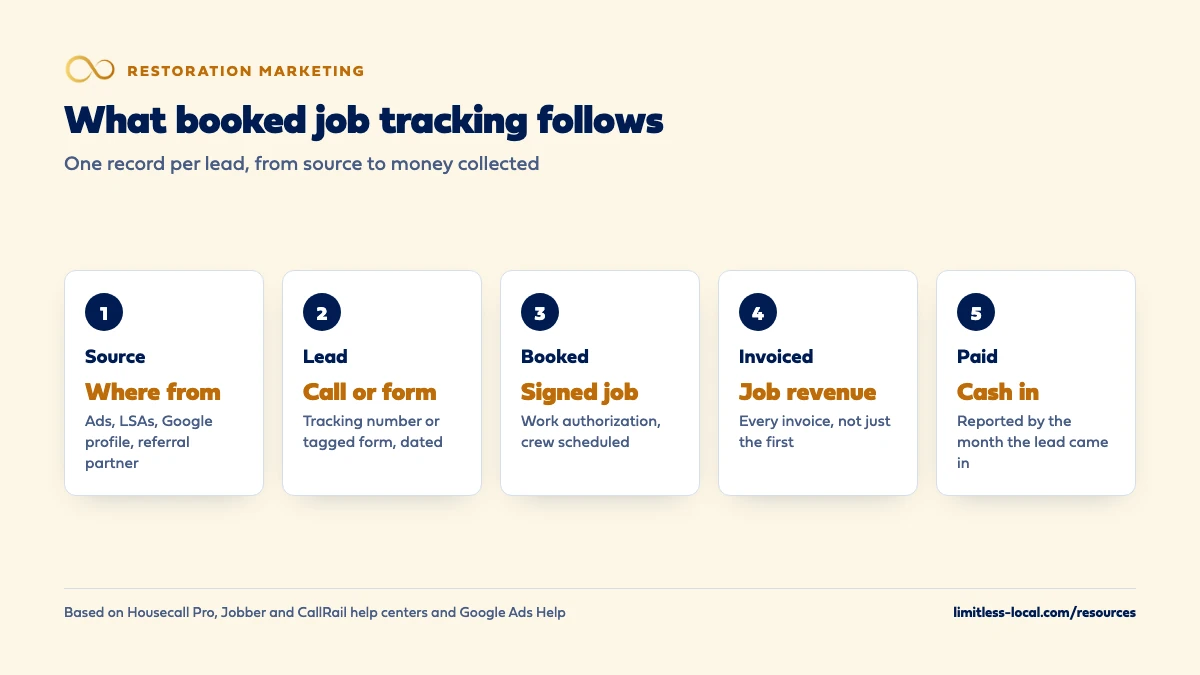
Five things, attached to one record for each lead:
- Source. Where the lead came from: Google Ads, Local Services Ads, your Google profile, organic search, a plumber referral, a property manager, a truck wrap.
- Lead. The call, form, chat or text itself, with the date it came in.
- Booked. Whether it became a job you were hired to do, and when.
- Invoiced. What the job was billed for.
- Paid. What you actually collected, and when.
Most owners already have pieces of this. The ad platform knows about clicks, the phone system knows about calls, the job software knows about jobs, and accounting knows about payments. Booked job tracking is the thread that ties them together so you can read the whole chain for any lead, or add it up by source.
What counts as a booked job for a restoration company?
Pick one definition and use it everywhere. For most restoration companies, a booked job means the customer has signed a work authorization and a crew is scheduled or already on site. A free inspection or a phone estimate isn’t a booked job yet; it’s a step on the way.
Restoration adds one wrinkle: one lead can become more than one job. A water loss might start as an emergency mitigation job and turn into a rebuild later, sometimes billed separately. Decide up front whether you count that as one booked job with two invoices or two jobs from one lead, and stick with it, so the numbers mean the same thing every month.
What a restoration company should count as a real conversion draws the line between leads and booked jobs in more detail.
How is booked job tracking different from call tracking?
Call tracking answers which source rang the phone. CallRail’s source tracking basics describe the idea: a unique tracking phone number for each marketing campaign, each forwarding to your main business line, so every call arrives labeled with where it came from.
Booked job tracking answers the next question: which of those calls became work, and what was it worth. Call tracking is one of its inputs, not a replacement for it. A channel can ring the phone all day with wrong-service calls and job seekers; only the booked job record shows that.
If you’re weighing what call tracking should cost, see how much a restoration company should spend on call tracking.
How do I tie each lead to its marketing source?
- Calls: a separate tracking number for each channel you pay for, plus your Google profile.
- Forms and chats: forms that record which page and channel the visitor came from, sent straight into your job software.
- Referrals: a named source for each referral partner, such as each plumber or property management company, not one big “referral” bucket.
- Backup question: “How did you find us?” on every call, for the leads tracking can’t label, like a neighbor who saw your truck.
Then make the source a required field on the record. Housecall Pro’s guide to lead sources describes a Lead Source field that tracks where customers found the business, which can be set on customers, jobs and estimates; Jobber, ServiceTitan and most job software have their own version.
Curious what your marketing is actually booking?
Get a free visibility audit — no obligation, no sales pitch.
Should the source live on the customer or on the job?
Both, and restoration is a trade where the difference matters. Housecall Pro’s Marketing Dashboard ROI Table shows why: one view groups new customers by the lead source on the customer record, which suits measuring how you win new customers; the other uses the lead source on each job, estimate or lead, which picks up repeat work too.
A homeowner who calls once is easy either way. A property manager who sends you eight jobs a year isn’t. If the source only lives on the customer, every one of those jobs gets credited to whatever brought that manager in years ago. Put the source on every job so repeat and referral work is counted where it really came from.
How do I tie a booked job to revenue when the insurer pays weeks later?
Keep the source on the job and fill in the money as it lands: the estimate when you write it, the invoiced amount when you bill, and the amount paid when it’s collected. Report each channel by the month its leads came in, not the month the checks arrived, or a strong month of leads will look like a dead one until the payments catch up.
The Housecall Pro ROI table above can show earnings either way: as job revenue, the invoiced amount less discounts, taxes and tips, or as amount paid. Use invoiced revenue to judge channels quickly and amount paid to judge them for real.
Watch for reports that only count the first invoice. Jobber’s Lead Source Report, for example, shows invoice value as the total from the first invoice linked to a lead. If your mitigation and rebuild are billed separately, a first-invoice report undercounts what the lead was worth. Tracking which marketing brings booked restoration jobs covers the insurance-payment side in more depth.
What numbers come out of booked job tracking?
- Booking rate: booked jobs divided by leads, by source. What lead-to-booked-job rate a restoration company should expect puts that number in context.
- Cost per booked job: what you spent on a source divided by the jobs it booked.
- Average job value: invoiced revenue divided by booked jobs, by source.
- Revenue per marketing dollar: earnings divided by spend, often labeled ROAS in job software.
- Unattributed share: how much work has no source at all.
Cost per booked job is usually the first one owners look at. What a good cost per booked job looks like for a restoration company walks through judging it.

What does a big pile of jobs with no lead source mean?
It means the tracking has a leak, not that the work came from nowhere. Reports built on a lead-source field put every record with that field blank into one row, often labeled No lead source, and a large total there usually means the field wasn’t filled in. Entering the source has to be part of booking every customer, estimate and job.
In a restoration office, the leaks are predictable: jobs booked by a tech on site, after-hours calls taken on a cell phone, and referral jobs entered in a hurry during a storm surge. Fix it by making the source field required, checking blanks every week and asking whoever booked the job while they still remember.
Can booked jobs be sent back to Google Ads?
Yes, and it’s worth doing once the tracking is clean. Google’s guide to offline conversion imports describes the purpose: when an ad starts a customer down a path that ends offline, such as over the phone, importing those conversions lets you measure what happened after the click or call. For new setups, Google recommends starting with enhanced conversions for leads, an upgraded version that’s easier to set up.
For a restoration company, that means Google Ads can learn which searches and clicks became signed jobs, instead of treating every call as equal. It only helps if the booked-job data going back is accurate, which is why the job-software side comes first.
What mistakes break booked job tracking?
- Counting inspections as booked jobs, so the booking rate looks better than the bank account.
- One phone number everywhere, so calls can’t be told apart.
- Letting the source be optional, so the No lead source row keeps growing.
- Overwriting the source on repeat jobs with the original customer source.
- Judging by the month money arrived instead of the month leads came in.
- Trusting the ad platform’s conversions as booked jobs. They’re leads at best until your job records say otherwise.
If an agency runs your marketing, its reports should be built on this chain. How to tell whether a restoration marketing agency is producing real jobs covers what to ask for.
Want to see where your company stands?
A free visibility audit shows where you show up on Google, Maps and AI answers, and what it's costing you in calls.
What's different about booked job tracking for restoration
Payment lag. Insurance-paid jobs can be invoiced long before they’re paid. Booked job tracking has to hold the source on the job for months, not days.
One lead, several invoices. Mitigation, contents and rebuild work can be separate invoices or separate jobs from a single call. Decide how you’ll count them before you build reports.
Partners drive repeat work. Plumbers, property managers and agents can send jobs all year, so each partner needs its own source name, on every job.
Storms scramble the office. The weeks with the most leads are the weeks tracking gets skipped. A short, required source field is what survives a surge.
A worked example: cost per lead versus cost per booked job
These numbers are made up to show the math, not a benchmark for your market. In one month a restoration company spends $4,000 on Google Ads and $2,000 on Local Services Ads.
- Google Ads: 40 leads, 10 booked jobs. That’s $100 per lead and $400 per booked job. Those jobs are invoiced at $50,000 in total, or $12.50 of revenue per marketing dollar.
- Local Services Ads: 25 leads, 8 booked jobs. That’s $80 per lead and $250 per booked job. Those jobs are invoiced at $24,000, or $12 per marketing dollar.
On cost per booked job, Local Services Ads look better. On revenue per dollar, the two are close, because the Google Ads jobs were bigger. Without booked job tracking, the owner would only see that Local Services Ads leads were cheaper. With it, the owner can see both are earning their keep and decide where the next dollar goes based on which kind of job the crews want more of.
Frequently asked questions
Can I do booked job tracking in a spreadsheet?
Yes, to start. One row per lead with the date, source, booked or not, invoiced amount and amount paid is enough. Move it into your job software once the habit sticks, so nobody has to enter things twice.
Is booked job tracking the same as attribution?
Attribution is deciding which source gets credit for a lead. Booked job tracking uses that credit and carries it all the way to the job and the money.
Who on my team should enter the lead source?
Whoever first talks to the customer, usually the office or the after-hours answering person. Make the field required so a job can’t be created without it.
How long before booked job tracking is useful?
A month of clean data shows where leads come from. Judging channels on paid revenue takes longer, because insurance payments can take weeks or months to arrive.
What if a customer found me through two channels?
Pick a rule and use it every time, such as crediting the channel that produced the first call or form. Note the second channel in the job notes if it matters to you.
Do I need special software for booked job tracking?
Most job software already has a lead-source field and a report built on it. What you usually need to add is call tracking and the discipline to fill in the source on every job.
Key takeaways
- Booked job tracking follows each lead from its source to a signed job, an invoice and money collected.
- Call tracking shows which source rang the phone; booked job tracking shows which calls became work.
- Put the source on every job, not just the customer, so repeat and partner work is credited correctly.
- Report channels by the month leads came in and count every invoice, not just the first.
- Judge channels on cost per booked job and revenue per marketing dollar, not cost per lead.
Not sure what's working right now?
Start with a free visibility audit: rankings, Google profile, reviews and tracking, checked against your service area.
More in this section
- How do I track which marketing brings in booked restoration jobs?
- What lead-to-booked-job rate should a restoration company expect?
- What is a good cost per booked job for a restoration company?
- How should a restoration company follow up on leads that don't book?
- How much should a restoration company spend on call tracking?
Sources
- Marketing Dashboard: ROI Table — Housecall Pro Help Center
- How to Use Lead Sources — Housecall Pro Help Center
- Lead Source Report — Jobber Help Center
- Source tracking basics — CallRail Help Center
- About offline conversion imports — Google Ads Help