
How do I stop junk roofing leads from wasting my time?

- How can a roofer cut out spam, wrong-service and out-of-area leads?
- What counts as a junk roofing lead?
- Step 1: Where are my junk roofing leads coming from?
- Step 2: How do I stop Google Ads from bringing in junk searches?
- Step 3: How do I stop out-of-area leads from my ads?
- Step 4: How do I cut wrong-service leads from Local Services Ads?
- Step 5: How do I stop spam through my roofing website form?
- Step 6: How do I screen junk calls without scaring off real homeowners?
- Step 7: Should I stop buying shared roofing leads?
- What should my roofing ads and website say to keep junk out?
- How do I know the junk roofing leads are actually going down?
- What if cutting junk cuts my good roofing leads too?
- What's different about junk leads for roofers
- A worked example: cutting junk without cutting jobs
- Frequently asked questions
- Key takeaways
- More in this section
- Sources
The short version
- Tag two weeks of leads by type and source before changing anything.
- Block job-seeker, DIY and supply searches with negative keywords from your search terms report.
- Set ad locations, LSA job types and service areas to the work and towns you actually want.
- Screen the rest with three questions on the first call, and judge success by booked inspections.
For roofing owners whose office spends too much time on calls and form fills that were never going to become a job: wrong service, wrong town, job seekers, sales calls and spam.
Get a free visibility audit · Book a growth call
How can a roofer cut out spam, wrong-service and out-of-area leads?
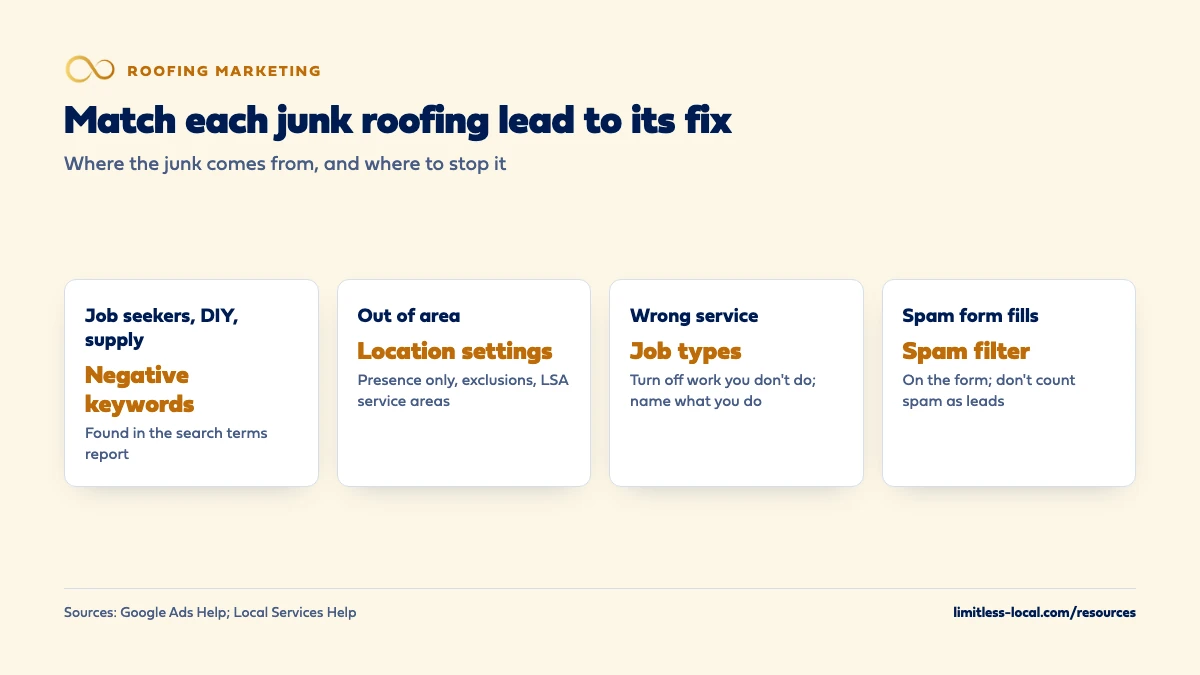
Sort your junk leads by type first, because each type has its own fix: wrong-service and out-of-area leads come from your ad and Local Services Ads settings, job seekers and do-it-yourselfers come from searches you haven’t blocked, and spam comes through web forms. Fix each at the source with negative keywords, tighter location settings, job types and service areas set to the work you want, and a spam filter on your form, then screen whatever still gets through with a few quick questions on the first call. Expect fewer leads afterward, and judge the change by booked inspections, not lead count.
Keeping a roofer’s ads pointed at real homeowners in the right towns is a big part of our local ads work, and every roofing marketing package includes call recording and source tagging, so you can see which channel sends the junk. If you’re still deciding whether paid search is worth it, the guide to whether Google Ads is worth it for roofers covers that, and the rest of the roofing marketing questions library goes question by question.
What counts as a junk roofing lead?
A junk lead is one that could never have become a job, no matter how well your office handled it. For roofers, they usually fall into a few buckets:
- Wrong service: gutter cleaning only, solar panel questions, roof cleaning, work you don’t do.
- Wrong place: homeowners outside the towns you serve.
- Not a customer: job seekers, suppliers, marketing companies and other sales calls.
- Do-it-yourselfers: people looking for how-to help or materials, not a roofer.
- Spam: fake form fills, robocalls and duplicate submissions.
Price shoppers and slow deciders aren’t junk. They’re real homeowners who may or may not be a fit, and they need a different fix; how to stop price shoppers calling your roofing company covers them. Keep the two separate, or you’ll cut leads you actually want.
Step 1: Where are my junk roofing leads coming from?
Don’t guess. For two weeks, have whoever answers the phone and checks the forms tag every lead with two things: the type (good, wrong service, wrong place, not a customer, DIY, spam) and the source (Google Ads, Local Services Ads, Google profile, website form, a lead service, referral).
A simple sheet with two drop-down columns is enough. If you use call tracking, the source is already there, and call recordings make the type easy to check later. At the end of two weeks, sort by source. You’ll usually find that one or two sources send most of the junk, and the type tells you which fix to use.
This also gives you a baseline. Without it, you won’t know in a month whether the changes worked.
Step 2: How do I stop Google Ads from bringing in junk searches?
Open the search terms report. It shows the actual searches that triggered your ads, which are often different from the keywords you chose. Roofing keywords on broad match pull in searches like “roofing jobs near me,” “how to patch a roof” and “roofing supply,” and every click costs money.
When you find a search that isn’t a homeowner looking to hire, add it as a negative keyword. You can do it straight from the report, and it’s worth saving them to a negative keyword list so they apply across campaigns. Negative keywords don’t match to variants, so add “job” and “jobs” separately. If you run Performance Max, negative keywords can be added there too, though they only apply to Search and Shopping inventory.
Check the report weekly while you’re cleaning up. Which negative keywords a roofer should add to Google Ads has a starting list, and the searches you should never block.
Step 3: How do I stop out-of-area leads from my ads?
By default, Google Ads location targeting reaches people who are in or regularly in your target area and people who’ve shown interest in it. For a roofer, interest can mean someone three counties away researching your town. If your out-of-area leads are high, look at three settings:
- Presence only. Switching to people in or regularly in your locations narrows who sees the ads. Expect fewer impressions; that’s the point.
- Exclusions. Exclude the towns or ZIP codes you won’t drive to, especially ones just past your edge.
- Town list, not a giant radius. A radius drawn from your shop can swallow areas you don’t want.
Location targeting isn’t 100% accurate in every case, so a few stragglers will still get through. Whether a roofer can target specific neighborhoods with ads covers the settings in detail.
Step 4: How do I cut wrong-service leads from Local Services Ads?
With Local Services Ads, your settings decide most of what you’re sent. In your Local Services Ads profile, you can edit job types and service areas:
- Turn off job types you don’t want. If you don’t do gutter-only work or skylight installs, switch them off.
- Trim the service area to the counties, cities or ZIP codes your crews will actually drive to.
- Look at broad search. You’re opted in to general category searches like “roofer near me” by default. Turning it off can cut vague leads, but it also cuts volume.
This matters more than it used to: Google no longer gives credits for “job type not serviced” and “geo not serviced” leads. Leads it judges invalid or low quality aren’t charged, and charged leads later judged low quality may be credited automatically, usually within 30 days. Rate leads in the lead feedback survey too; it’s how Google learns what you want.
Curious what your marketing is actually booking?
Get a free visibility audit — no obligation, no sales pitch.
Step 5: How do I stop spam through my roofing website form?
Form spam is a website problem, not an ad problem, and it’s usually the easiest junk to cut:
- Add a spam filter or challenge to the form. Most form builders and website platforms have one built in; make sure it’s switched on.
- Ask for a real phone number and street address, so bots and joke submissions stand out.
- Keep the form short. Name, phone, address and what’s going on with the roof is plenty for a real homeowner.
- Send form leads somewhere they get checked, like your job software, not an inbox nobody reads.
Then make sure spam isn’t being counted as a lead in your tracking. If fake form fills count as conversions, your reports overstate how the site is doing, and automated bidding has a false target to chase.
Step 6: How do I screen junk calls without scaring off real homeowners?
Some junk will always get through. A short, friendly screen on the first call sorts it in under a minute:
- “What’s the address of the home?” Sorts out wrong-place calls right away.
- “What’s going on with the roof?” Sorts out wrong-service calls and tells your estimator what to bring.
- “When are you hoping to get it done?” Separates people ready to book from people collecting information.
Write the three questions on a card by every phone. Sales calls and job seekers usually identify themselves by the second question; give them a set reply and a short email address for applications or vendor pitches, so the line stays clear.
Don’t turn the screen into an interrogation. A homeowner with water coming through the ceiling needs a time slot, not a quiz.
Step 7: Should I stop buying shared roofing leads?
Look at your tagged sheet. If a lead service sends a big share of your wrong-place and wrong-service leads, or the same homeowner is clearly calling three roofers at once, compare its cost per booked inspection with your other sources, not its cost per lead.
Shared leads can still make sense if you call back within minutes and the service gives credits for bad leads. If neither is true, the cheap lead price hides an expensive inspection. Whether to use lead services while roofing SEO ramps up covers when they’re worth keeping.
What should my roofing ads and website say to keep junk out?
Words filter people before they ever call. A few changes do a lot:
- Name the work. “Roof replacement and roof repair” pulls in different people than “Roofing.” If you’re residential only, say so.
- Name the towns. List the towns you serve in the ad and on the page behind it.
- Skip vague freebies. “Free roof” and “free everything” headlines invite the curious and the confused.
- Say what you don’t do, if a common wrong-service request keeps coming in, on the service page and in your Google profile’s services list.
What a roofing Google ad should say goes deeper on ad copy that brings the right homeowners.
How do I know the junk roofing leads are actually going down?
Keep tagging leads after the changes and compare with your two-week baseline. Watch three numbers:
- Junk share: junk leads as a share of all leads. This should fall first.
- Booked inspections: this should hold steady or rise. If it falls, you cut too much.
- Cost per booked inspection: the number that matters.
Setting changes like negative keywords and location tweaks show up within days. Bidding that learns which leads become roofs takes longer. How long it takes to improve roofing ad lead quality lays out the timeline.
What if cutting junk cuts my good roofing leads too?
It can happen. Every narrowing setting trades volume for fit, and Google warns that refining service areas, job types and categories in Local Services Ads could reduce the number of leads you receive. The fix isn’t to undo everything; it’s to find the change that went too far.
- If booked inspections fell right after a location change, widen the area by one ring of towns.
- If they fell after you turned off broad search, turn it back on and block the junk another way.
- If a negative keyword blocked searches like “roof repair cost” or “storm damage roof,” remove it. Those are homeowners getting ready to hire.
Make one change at a time, give it a week or two of leads, and check booked inspections before the next one.
Not sure which of these is costing you jobs?
A free visibility audit checks the Google profile, reviews, site and tracking, and shows what to fix first.
What's different about junk leads for roofers
Roofing pulls in a lot of job seekers. “Roofing” is both a service and a job, so roofing keywords attract people looking for work in a way that, say, “water heater repair” doesn’t. Job-seeker negatives belong in every roofing account from day one.
Storms bring junk in waves. After hail, out-of-area searches, insurance questions and sales calls from other storm crews and vendors all spike. Tighten locations and refresh your negative list before storm season, not during it.
Solar and gutters blur the line. Homeowners often call a roofer about solar panels or gutters. If you don’t do that work, say so in your services list, LSA job types and ads, or those calls keep coming.
Your office time is the real cost. Crews can’t screen calls from a roof. Every junk call is answered by the same person who should be booking inspections.
A worked example: cutting junk without cutting jobs
These numbers are made up to show the math, not a benchmark and not a client result. A roofer spends $3,000 a month on Google Ads and gets 60 leads, or $50 a lead. Two weeks of tagging show 18 of them a month are junk: out-of-area leads, job seekers, wrong-service calls and form spam. Twenty become booked inspections, so each booked inspection costs $150.
After adding negative keywords, switching to presence-only location targeting, excluding a few edge towns and turning on the form’s spam filter, the roofer gets 44 leads on the same $3,000, but only 6 are junk, and booked inspections rise to 22. Cost per lead went up. Cost per booked inspection fell to about $136, and the office handles 12 fewer junk leads a month.
That’s the trade to look for: fewer leads, the same or more inspections. We manage Google Ads in every package and Local Services Ads from Growth up, and every package’s reports break out cost per lead by source, so you can see where junk comes from. We don’t guarantee lead counts or lead quality; we show you what each dollar produced.
Frequently asked questions
Can I get my money back for junk Local Services Ads leads?
Sometimes. Leads judged invalid or low quality aren’t charged, and charged leads later judged low quality may be credited automatically. Leads for job types or areas you don’t serve no longer get credits, so fix those settings.
Should I block the word "free" in my roofing ads?
Not on its own. Homeowners search “free roof inspection” when they’re ready to hire. Block specific junk searches you see in the report instead of the whole word.
How many junk leads are normal for a roofer?
There’s no standard number. Track your own junk share before and after each change, and judge it by cost per booked inspection.
Is it worth paying someone to screen roofing calls?
Only after you’ve fixed the sources. Screening junk you could have blocked in your ad settings means paying twice: once for the click and again for the time.
Should my office hang up on sales calls?
Politely, yes. Give them a short set reply and an email address for pitches so the line stays open for homeowners.
Key takeaways
- Tag two weeks of leads by type and source before you change any settings.
- Use the search terms report and negative keywords to block job seekers, DIY and supply searches.
- Tighten ad locations and LSA job types and service areas to the work and towns you want.
- Cut form spam on the website, and keep spam out of your lead counts.
- Judge the cleanup by booked inspections and cost per inspection, not lead count.
Want a second set of eyes on your setup?
We'll look at how you show up locally and where calls are leaking, then send you a plain-English breakdown.
More in this section
- How does a roofer keep up with leads coming in fast?
- How do I track which roofing leads turn into signed jobs?
- What can a roofer do this month to get more leads without waste?
- How do I turn more roofing leads into booked inspections?
- How do I know if my roofing website is losing leads?
Sources
- About the search terms report — Google Ads Help
- Get negative keyword ideas using the search terms report — Google Ads Help
- Negative keywords in Performance Max campaigns — Google Ads Help
- About advanced location options — Google Ads Help
- Edit your industries, service areas, and job types — Local Services Help
- About Automated Local Services Ads lead credits — Local Services Help