
What is a lead source and why does it matter to a plumber?

- What is a lead source, and why does it matter when I decide where to spend my plumbing marketing budget?
- What counts as a lead source for a plumbing company?
- Is a lead source the same as a channel or a campaign?
- Why does lead source matter when I set my marketing budget?
- How do I capture the lead source on every call?
- How do I set up lead sources in ServiceTitan, Housecall Pro or Jobber?
- What lead source list should a plumber use?
- Should repeat customers and referrals count as lead sources?
- How do I track lead sources for forms, texts and chat?
- What usually goes wrong with lead source tracking?
- How do I use lead source data once I have it?
- Who in my shop should be responsible for lead sources?
- What's different about lead sources for plumbing companies
- A worked example: the cheapest leads aren't the cheapest jobs
- Frequently asked questions
- Key takeaways
- More in this section
- Sources
The short version
- A lead source is where a new customer first found you.
- It belongs on every customer, job and estimate in your field software.
- Capture it with tracking numbers and by asking, and use both.
- Judge each source on booked jobs and revenue, not on calls alone.
For plumbing owners who see a “lead source” field in their software and want to know what goes in it and what it’s good for.
Get a free visibility audit · Book a growth call
What is a lead source, and why does it matter when I decide where to spend my plumbing marketing budget?
A lead source is where a new customer found your plumbing company before they called, texted or filled out a form: Google Ads, Local Services Ads, your Google Business Profile, your website, a referral, a repeat customer, a lead platform or a truck wrap. It matters because it’s the only way to see which marketing books paying jobs and what each of those jobs cost you, so you can move money from sources that make the phone ring to sources that fill the schedule. Without it on every job, each budget decision is a guess.
Lead source is the backbone of how we report on marketing: every package includes call tracking with recording, source tagging on calls, forms and chat, and a monthly report with a cost-per-lead breakdown, so you can see which sources book jobs. Our packages page lists what each tier includes, and you can see how it fits plumbing companies or browse the rest of the plumbing marketing questions library.
What counts as a lead source for a plumbing company?
Anything that sends you a new customer. For most plumbing shops, the list looks like this:
- Paid search: Google Ads and Microsoft Ads.
- Local Services Ads: the pay-per-lead ads with the Google Verified badge.
- Google Business Profile: calls and website clicks from your Maps listing.
- Your website from regular search: people who found your site in the normal Google results.
- Lead platforms: Angi, Thumbtack, Nextdoor and similar.
- Referrals: from customers, realtors, property managers and other trades.
- Repeat customers: people you’ve worked for before.
- Offline: truck wraps, yard signs, door hangers, mailers, sponsorships.
Builder and commercial accounts, home warranty companies and supply-house referrals get their own entries if they send you work. The test is simple: if you’d ever spend money or time to get more of it, it deserves its own name.
Is a lead source the same as a channel or a campaign?
Close, but they sit at different levels, and mixing them up makes reports messy:
- Channel: the broad bucket, like paid search or referrals.
- Lead source: the specific place, like Google Ads or a particular property manager.
- Campaign: one effort inside a source, like your water heater ads or this fall’s mailer.
Most field software has one lead source field, so decide which level goes in it. For a small shop, the lead source level works best: specific enough to act on, short enough that the office picks the right one. Track campaigns inside the ad platforms or your call tracking, where they already live.
Each source also gives you a different amount of control over volume and job type, which is covered in how much control you get over leads in each channel.
Why does lead source matter when I set my marketing budget?
Because without it, you can only see total calls and total revenue. You can’t see that one source books half its calls and another books a handful, or that one sends water heater replacements and another sends price shoppers asking for the cheapest drain clear.
With lead source on every job, you can work out, for each source:
- How many new customers it sent.
- How many of them booked and paid.
- What those jobs brought in.
- What the source cost you, and so what each booked job cost.
That last number is the one to budget by. A source with fewer, more expensive leads can still be your cheapest way to buy booked jobs. When a source can’t cover what it costs, when to stop spending on a lead source covers how to decide.
How do I capture the lead source on every call?
Use two methods together, because each one misses things the other catches.
Tracking numbers. Give each source its own phone number so the call arrives already labeled. CallRail’s guide to common marketing sources to use with call tracking splits them into online sources, where a number swaps onto your website depending on how the visitor arrived, and offline sources, where a number is printed directly on a listing, flyer, door hanger or billboard. It recommends separate numbers for things like Google Ads call extensions, your Google Business Profile, Yelp, Angi and directory listings.
Asking. Have whoever answers ask how the caller found you, and pick from a short list. Callers aren’t always right (many will say “Google” for an ad, your Maps listing or your website alike), but they’re the only way to catch a neighbor’s recommendation or the truck they saw parked down the street.
When the two disagree, trust the tracking number for where the call came from, and note the caller’s answer for why they picked you. If tracking numbers worry you because of your Google listing, whether call tracking numbers hurt your Google rankings covers how to set them up safely.
How do I set up lead sources in ServiceTitan, Housecall Pro or Jobber?
All three have a place for it; the work is making sure the office fills it in.
- Housecall Pro: the lead source field can be tracked on customers, jobs and estimates, and you create your own list under Settings, Lead Sources. Housecall Pro’s guide to lead sources says this tracking lets you make marketing decisions by investing in the sources that bring you good jobs.
- ServiceTitan: sources are set up as marketing campaigns. With phone integration, a tracking number can be attached to each campaign so calls are tagged automatically, and call takers can attach a campaign to any call by hand on the booking screen. ServiceTitan’s marketing campaign setup guide recommends setting up campaigns for all your incoming business.
- Jobber: the Lead Source Report shows leads from each source, how many reached a request, quote, job and invoice, and the value of the first invoice tied to each lead.
Whichever you use, make lead source a required field when a new customer is booked, so a job can’t go on the schedule without one.
Curious what your marketing is actually booking?
Get a free visibility audit — no obligation, no sales pitch.
What lead source list should a plumber use?
Short and specific. A list of forty options means the office picks whatever’s at the top. A list with only “Google” and “Other” tells you nothing. Aim for a list one person can read in a few seconds, built from the sources you actually pay for or work at:
- Google Ads
- Local Services Ads
- Google Business Profile (Maps)
- Website (regular search)
- Lead platform (name each one you use)
- Customer referral
- Trade or business referral
- Repeat customer
- Truck, signs or yard signs
- Mailer or door hanger
Add an entry when you start a new source, and archive old ones instead of deleting them, so past jobs keep their history. Keep “Other” for true unknowns, and look at what lands there every month. If one thing keeps showing up in “Other,” give it its own entry.
Should repeat customers and referrals count as lead sources?
Yes, as their own sources, not folded into whatever brought the customer the first time. There are two reasons.
First, they keep your paid sources honest. If a returning customer calls the number from your Google profile and the job gets credited to Maps, Maps looks better than it is, and you pay more for it than it’s worth. Sorting those calls out keeps the new-customer numbers clean.
Second, they’re often your best work. Referrals and repeat customers usually cost little to win and tend to trust you already. Seeing them in the report tells you whether your follow-up, reviews and maintenance plans are working, and how much of your schedule doesn’t depend on ad spend at all.
How do I track lead sources for forms, texts and chat?
Web leads need a different method from calls. The usual one is tagging the links in your ads, emails and listings with UTM parameters, so analytics can tell where a visitor came from. Google Analytics’ help page on traffic-source dimensions describes source as where your traffic originates (such as Google or Bing) and medium as how people arrive (such as organic, cpc or email), and explains that you can tag destination links by hand with utm_source, utm_medium and utm_campaign, or let Google Ads tag them automatically.
The hard part is getting that source from the website onto the job. Many form and chat tools can pass it through with the lead; others need someone to copy it. Either way, the form lead should arrive in your field software with a source attached, just like a call.

What usually goes wrong with lead source tracking?
Most of the problems are small habits that add up:
- The default wins. The office picks the first item on the list when the caller doesn’t know.
- “Google” swallows everything. Ads, Local Services Ads, Maps and organic search all end up in one bucket, so you can’t tell which to fund.
- After-hours calls lose the source. An answering service books the job but doesn’t record where the caller found you.
- Estimates and jobs don’t match. The source goes on the estimate, and the sold job created from it shows no source.
- Old tracking numbers keep ringing. A number from a finished campaign still sits on a directory, and its calls get credited to the wrong place.
A quick monthly check catches most of these: pull last month’s new customers, look for blanks and “Other,” and fix them while the office still remembers the calls.
How do I use lead source data once I have it?
Once a month, put each source on one line with five numbers: new leads, booked jobs, revenue from those jobs, what the source cost, and cost per booked job. Then look for three things.
- The gap between leads and booked jobs. Booking and closing rates can vary a lot by lead source, so a source that sends lots of calls but books few of them is costing more than it looks.
- The size of the jobs. Compare average ticket by source too. Some sources bring many small service calls, others fewer, bigger jobs, and what an average plumbing job ticket brings in covers how to work that out by job type.
- The trend. One month is a snapshot. Three months of the same pattern is a decision.
The full method for tying a call through to a paid job is in how to track which plumbing marketing books jobs.
Who in my shop should be responsible for lead sources?
Whoever books the jobs enters the source, and the owner checks the report. That split works because the person on the phone knows what the caller said, and the owner is the one deciding where the money goes.
Make it part of the booking script rather than an afterthought, and show the office the monthly report now and then. When they see their entries deciding which ads stay on, the field stops being a box to click past. If you work with an agency, its reports should line up with what your field software shows; if the two tell different stories, sort out why before you change the budget.
Want to see where your company stands?
A free visibility audit shows where you show up on Google, Maps and AI answers, and what it's costing you in calls.
What's different about lead sources for plumbing companies
Emergency callers don’t remember how they found you. Someone with water coming through the ceiling taps the first number they see and won’t recall whether it was an ad, your Maps listing or a neighbor’s text. Tracking numbers matter more for plumbers than for trades where customers plan ahead.
One customer, many jobs. Plumbing customers call back for the next clog, the water heater and the remodel. Credit the source to the customer’s first job, and mark later jobs as repeat business, so one good customer doesn’t make a source look better every time they call.
Referral partners are real sources. Realtors, property managers, home inspectors and other trades can send a steady stream of plumbing work. Give each meaningful partner its own entry so you know who to thank.
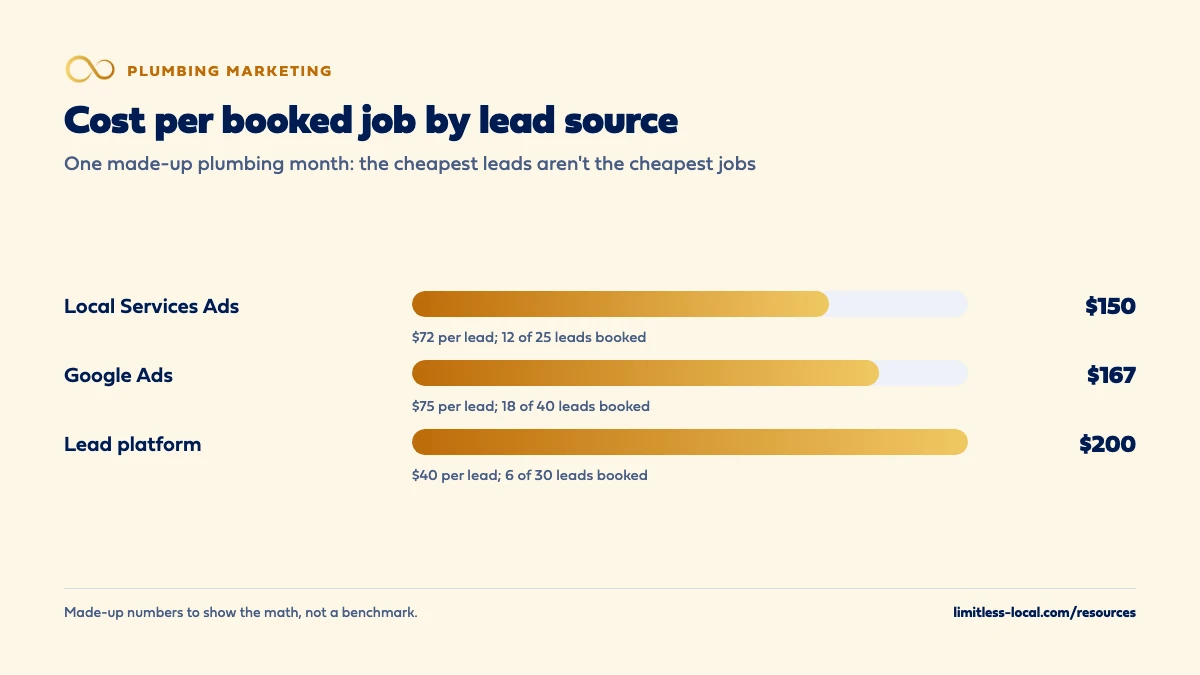
A worked example: the cheapest leads aren't the cheapest jobs
These numbers are made up to show the math, not a benchmark for your market. A plumbing shop pulls one month of new-customer jobs by lead source:
- Google Ads: $3,000 spent, 40 leads, 18 booked jobs, $9,000 in revenue. Cost per lead $75; cost per booked job about $167.
- Local Services Ads: $1,800 spent, 25 leads, 12 booked jobs, $5,400 in revenue. Cost per lead $72; cost per booked job $150.
- Lead platform: $1,200 spent, 30 leads, 6 booked jobs, $2,100 in revenue. Cost per lead $40; cost per booked job $200.
- Referrals and repeat customers: no direct spend, 20 booked jobs, $11,000 in revenue.
Judged on cost per lead, the lead platform looks like the bargain. Judged on cost per booked job, it’s the most expensive source on the list, and its jobs are the smallest. Without a lead source on every job, the owner would only see that total calls went up. A free visibility audit can check whether your own tracking captures sources well enough to run this math.
Frequently asked questions
What if a customer found us two ways, like an ad and then our reviews?
Record the one that made them call, usually the tracking number they dialed, and note the other in the job notes. One clear source per new customer keeps the report usable.
Should I change a customer's lead source when they call back later?
No. Keep the original source on the customer, and mark the later job as repeat business. That way the first source gets credit for bringing them in, and repeat work shows up as its own line.
Is "How did you hear about us?" enough on its own?
It’s better than nothing, but callers often guess. Pair it with tracking numbers so you have a record that doesn’t depend on memory.
How long before lead source data is worth acting on?
A month gives you a first look. Wait for two or three months of the same pattern before you cut or double a source, unless something is plainly broken.
Do I need call tracking software to track lead sources?
Not to start. A required lead source field and a good question on every call get you most of the way. Tracking numbers make the data more reliable once you’re spending real money on several sources.
Key takeaways
- A lead source is where a new customer first found your plumbing company.
- Put a lead source on every new customer, job and estimate, and make the field required.
- Use tracking numbers and ask every caller, because each catches what the other misses.
- Keep repeat customers and referrals as their own sources so paid sources aren’t over-credited.
- Judge each source on cost per booked job and revenue, not on lead count or cost per lead.
Not sure what's working right now?
Start with a free visibility audit: rankings, Google profile, reviews and tracking, checked against your service area.
More in this section
- When should a plumbing company stop spending on a lead source?
- Is it worth paying for plumbing leads?
- Which plumbing channel brings the highest-quality leads?
- How much can I afford to pay for a plumbing lead?
- What does a qualified plumbing lead cost in my market?
Sources
- Common marketing sources to use with call tracking — CallRail Help Center
- How to Use Lead Sources — Housecall Pro Help Center
- Add marketing campaigns in ServiceTitan — ServiceTitan Help
- Lead Source Report — Jobber Help Center
- Traffic-source dimensions, manual tagging, and auto-tagging — Google Analytics Help