
How does a roofer generate transactional roofing leads?
- How do roofers get leads from homeowners ready to hire right now?
- What makes a roofing lead transactional?
- Step 1: Which searches should my list start with?
- Step 2: How do I set up Google Ads to catch ready-to-hire searches?
- Step 3: Which searches should I block?
- Step 4: Where should those ads send homeowners?
- Step 5: How do I get homeowners to call straight from the ad?
- Step 6: Should I add Local Services Ads?
- Step 7: How does my Google Business Profile catch these searches for free?
- Step 8: How fast do I need to answer a transactional lead?
- How do I tell transactional leads from tire-kickers in my numbers?
- What's different about transactional leads for roofers
- A worked example: ready-to-hire keywords versus broad ones
- Frequently asked questions
- Key takeaways
- More in this section
- Sources
The short version
- Transactional searches name a job and a place: repair, replacement, estimate, inspection, near me, your town.
- Build ads, pages and your Google profile around those searches, one job at a time.
- Block research, DIY and job-seeker searches with negative keywords.
- Send every ad to a page about that job, with a phone number and a short form.
- Answer fast and track each lead to a signed roof.
For roofing owners who want more calls from homeowners ready to book an inspection or estimate, and fewer from people who are just researching.
Get a free visibility audit · Book a growth call
How do roofers get leads from homeowners ready to hire right now?
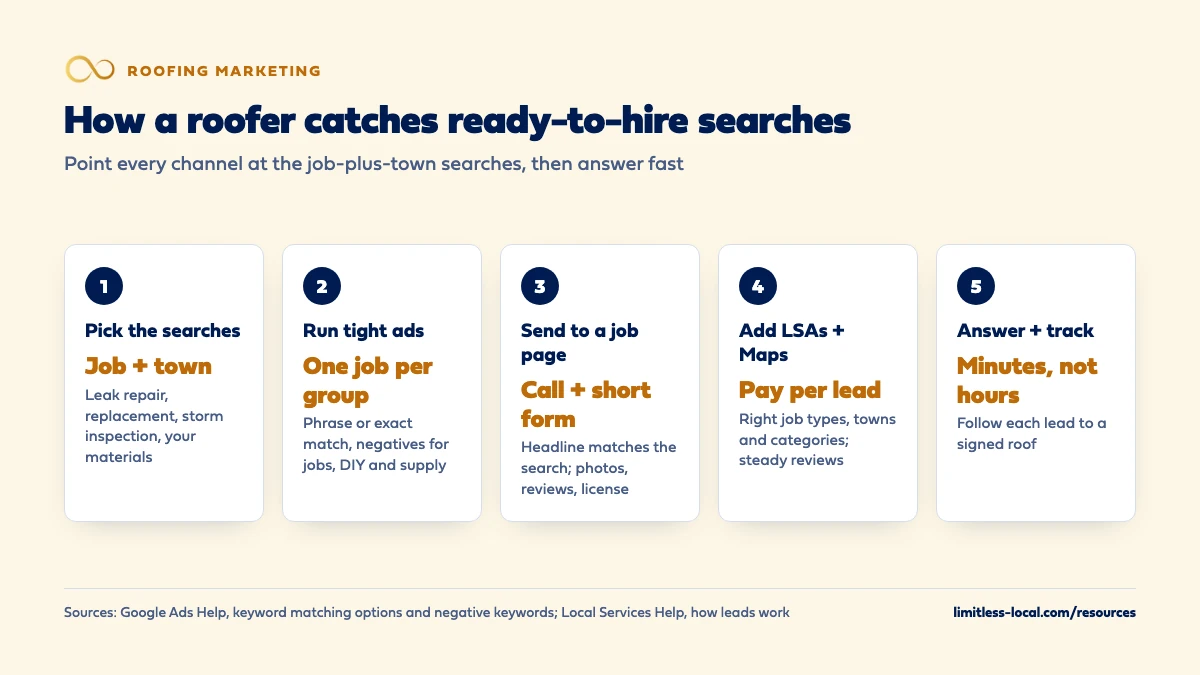
A roofer generates transactional leads by showing up on searches where a homeowner is ready to hire, like “roof leak repair near me”, “roof replacement estimate” or a roofing job plus a town name, and making it easy to call from there. Point three things at those searches: a Google Business Profile that ranks in the map pack for your services, search ads and Local Services Ads limited to the towns you serve, and a page for each job with your phone number and a short estimate form. Then answer within minutes, because a homeowner who’s ready to hire is usually calling more than one roofer.
Catching ready-to-hire searches is most of what our Google Ads and Local Services Ads work does, paired with the Google profile and page work in our roofing marketing packages, and every lead is tracked through to cost per booked job. For every lead source a roofer can use, how to get roofing leads walks through them one by one, and the rest of the roofing marketing questions library goes question by question.
What makes a roofing lead transactional?
A transactional lead comes from a homeowner who has already decided they need a roofer and is picking one. You can usually tell from the words they search:
- A job: roof repair, leak repair, roof replacement, new roof, storm damage inspection, metal roof installation.
- A hiring word: estimate, quote, inspection, company, contractor, near me, emergency.
- A place: a town, a neighborhood or “near me”.
Compare that with research searches: “how long does a metal roof last”, “signs of hail damage”, “how to patch a roof leak”. Those homeowners may hire someone later, but today they want an answer, not a roofer. Then there are searches that will never turn into work, like roofing jobs, roofing salary, or shingles for sale.
Transactional searches cost more per click and come in smaller numbers, but they’re where your inspections come from. Get those working first, then decide how much research traffic is worth paying for.
Step 1: Which searches should my list start with?
Start from the jobs you want most, not from the longest keyword list. Write down your three to five most profitable job types, then list how a homeowner would ask for each one when ready to hire:
- Leak and repair: roof leak repair, emergency roof repair, roof repair near me.
- Replacement: roof replacement, new roof estimate, reroof, roof replacement company.
- Storm work: storm damage roof inspection, wind damage roof repair, hail damage roofer.
- Materials you install: metal roof installation, tile roof repair, flat roof replacement.
Then check real demand in your towns with Google’s Keyword Planner, which shows search volume and forecasts for the keywords you enter. Very low-volume terms may not show up there at all, which is normal for small towns. Keep them if they describe the job exactly. Which search terms a roofing company should target goes deeper on building the list.
Step 2: How do I set up Google Ads to catch ready-to-hire searches?
Give each job its own ad group, with keywords, ads and a landing page that all talk about that one job. A homeowner searching “roof leak repair” should see an ad about leak repair and land on a leak repair page.
Match types decide how loosely Google can stretch your keywords. Google’s help page on keyword matching options explains the three:
- Broad match is the default. It can show your ad on searches related to your keyword, even ones that don’t contain its direct meaning, and Google recommends using it with Smart Bidding.
- Phrase match shows on searches that include the meaning of your keyword.
- Exact match shows on searches with the same meaning or intent, and gives you the most control over who sees your ad.
For a roofer with a modest budget, phrase and exact match on your core job terms keep spending on ready-to-hire searches while you learn which ones sign roofs. Broad match with Smart Bidding can find more volume once you’re tracking signed jobs, not just clicks. Either way, set location targeting to the towns your crews actually serve.
Step 3: Which searches should I block?
Negative keywords keep your ads off searches that look similar but won’t turn into jobs. A starting list for most roofers:
- Job seekers: jobs, hiring, salary, apprentice, training.
- DIY: how to, DIY, video, tutorial.
- Supply buyers: for sale, wholesale, supplies, big-box store names.
- Work you don’t do: any roof types, add-on services or towns you don’t take.
One detail trips up a lot of owners: negative keywords don’t match close variants. Google’s page on negative keywords gives the example that excluding “flowers” still lets an ad show for “red flower”, so add singular and plural forms and obvious synonyms yourself.
Then open your search terms report every week for the first couple of months. It shows the actual searches that triggered your ads. Anything that’s clearly research or junk goes on the negative list. The negative keywords a roofer should add to Google Ads has a fuller list.
Curious what your marketing is actually booking?
Get a free visibility audit — no obligation, no sales pitch.
Step 4: Where should those ads send homeowners?
To a page about the job they searched, not your homepage. Google rates each keyword’s landing page experience as above average, average or below average, and pages that rate well are usually well organized, with text that relates to what the person searched.
A transactional landing page for a roofer needs:
- A headline that matches the search, such as “Roof leak repair in your town” for a leak search.
- A tap-to-call phone number at the top, and a short form: name, phone, address, what’s going on.
- What happens next: who calls back, how fast, and what the inspection involves.
- Proof: photos of your own jobs, a few reviews, your license number and insurance.
- The towns you serve, so homeowners know you’ll come to them.
Skip anything that slows a ready buyer down: long galleries above the form, pop-ups, or a form that asks for roof age and square footage before you’ve spoken. Whether roofing ads should go to your homepage or a landing page covers the trade-offs.
Step 5: How do I get homeowners to call straight from the ad?
Add a call asset. Call assets put your phone number on your ads, with a call button on phones and a “Call us” button on desktop. A few settings matter for a roofer:
- Business hours. You can set the number to show only when someone can answer. If nights go to voicemail, don’t show the button at night.
- Cost. A tap on the call button costs the same as a click on the headline.
- Call reporting. Turn it on so Google forwarding numbers can count calls from your ads as conversions. That’s how you learn which keywords make the phone ring.
Don’t type a phone number into the ad text itself. That may get the ad disapproved; the call asset is the right place for it.
Step 6: Should I add Local Services Ads?
For most roofers chasing ready-to-hire homeowners, yes. Local Services Ads show at the top of Google with your name and reviews, and the homeowner calls or messages you straight from the ad. With LSAs you pay for valid leads, not clicks. Calls you answer count, and so does a call you miss during business hours if the caller stays on the line for more than 20 seconds.
They’re also changing. Google is moving Local Services Ads into Google Ads as Performance Max campaigns with pay-per-lead goals, and roofing is named in the first phase, which began in August 2026 for select advertisers. Those campaigns stay keywordless: targeting is based on the service categories and areas you choose, and your business name, address and hours come from your Google Business Profile.
Pick only the job types and towns you want; leads outside them still cost you. Whether Local Services Ads are worth it for a roofing company covers the full picture.
Step 7: How does my Google Business Profile catch these searches for free?
When someone searches “roofer near me” or “roof repair” plus a town, the Maps results show up next to the ads, and clicks there cost nothing. Google’s help page on improving your local ranking says local results are mainly based on relevance, distance and popularity, and that you can’t pay for a better local ranking.
To match more ready-to-hire searches:
- Choose the most accurate primary category, and add secondary ones only for work you do.
- List each service you want calls for: repair, replacement, leak repair, inspections, the materials you install.
- Post photos of real jobs regularly, especially finished roofs in your core towns.
- Ask every happy customer for a review, and reply to each one.
- Keep your hours honest, so homeowners calling at 7 a.m. reach someone.
For the category choice itself, see which Google Business Profile categories a roofer should choose.
Step 8: How fast do I need to answer a transactional lead?
Faster than the next roofer. A homeowner with a leak or a storm-damaged roof often calls two or three companies in a row and books whoever picks up and can come out soonest. A lead that waits until the end of the day has usually already booked someone else.
Set it up so someone always answers during business hours, forms trigger a call back within minutes, and after-hours calls get a plan: an answering service, an on-call phone, or at least a text reply that says when you’ll call. How fast a roofing company should call back a new lead covers the setup.
How do I tell transactional leads from tire-kickers in my numbers?
Track every lead from the search to the signed contract, not just to the click. For each one, record:
- Where it came from: search ad, Local Services Ad, Maps, website form.
- The keyword or job type, where you can see it.
- Whether it booked an inspection, got an estimate and signed.
After a month or two, the pattern shows. Keywords with “repair” or “replacement” plus a town usually book inspections at a much higher rate than vague ones. Some keywords that look transactional won’t be in your market, and that’s what the tracking is for. Cut or lower bids on searches that bring calls but never signed roofs, and move the money to the ones that do. The number to judge them by is cost per signed roof.
Not sure which of these is costing you jobs?
A free visibility audit checks the Google profile, reviews, site and tracking, and shows what to fix first.
What's different about transactional leads for roofers
Two kinds of urgency. A leak is urgent today; a replacement is urgent this season. Leak and emergency searches need a phone answered now. Replacement searches need a page that builds trust, because the homeowner is about to spend a lot and may compare three estimates.
Storms change the search mix overnight. After hail or high wind, storm damage and inspection searches jump in the hit towns. Have a storm ad group and landing page built and paused, so you can turn them on for those towns only.
Insurance wording needs care. Many storm searches mention insurance. If your ads or pages mention claims, check your state’s rules before they run, and keep the offer about the inspection itself.
A worked example: ready-to-hire keywords versus broad ones
These numbers are made up to show the math, not a benchmark for your market. Roofing search clicks commonly run about $20 to $50 each as of 2026. Say a roofer spends $2,000 in a month on two ad groups, $1,000 each, at $40 a click, so 25 clicks each.
- “Roof leak repair” and “roof replacement estimate” plus town names: 25 clicks bring 7 calls and forms, 4 inspections and 2 signed roofs. The ad spend behind each signed roof is $500.
- Broad terms like “roofing” and “roof cost”: 25 clicks bring 3 leads, 1 inspection and no signed roof yet.
Same click price, very different results. The fix is to move the second $1,000 into the first group or into Local Services Ads, then check again next month.
Management is a separate line. Our Essentials package is $3,500 a month and covers Google Ads management up to $2,500 a month in spend; Growth, at $4,500 a month, adds Local Services Ads management and Google Ads up to $5,000 a month in spend. Ad spend is paid to Google directly in both.
Frequently asked questions
Are "near me" searches transactional for roofers?
Usually, yes. “Roofer near me” or “roof repair near me” means the homeowner wants someone local now. Make sure your Google profile and ads cover the area those searches come from.
Are searches with "cost" or "price" ready-to-hire leads?
Sometimes. “Roof replacement cost in my town” can come from a homeowner who’s getting estimates, or from someone just budgeting. Bid on them carefully and watch the search terms report to see which ones book inspections.
Should I bid on my own company name?
It’s worth testing, because people searching your name are about as ready to hire as anyone, and the clicks are usually cheap. Check whether those clicks would have reached you anyway through your Maps listing or website.
Can SEO bring transactional roofing leads too?
Yes. Service and town pages that rank organically catch the same job-plus-town searches without a cost per click. SEO typically takes 3-6 months to show meaningful growth, so ads usually carry the load while it builds.
Do Local Services Ads use my keywords?
No. Local Services Ads are keywordless, before and after the move into Google Ads. Targeting is based on the service categories and areas you choose.
How many keywords does a roofer need to start?
Fewer than most people think. A handful of tight keywords per job type, in phrase or exact match, plus a solid negative list, is enough to start learning which searches sign roofs.
Key takeaways
- Transactional searches name a job and a place, like leak repair, replacement, inspection, near me or a town.
- Give each job its own ad group, keywords and landing page, and limit targeting to the towns you serve.
- Negative keywords don’t cover close variants, so add plurals and synonyms for job, DIY and supply searches yourself.
- Call assets, Local Services Ads and a complete Google profile let ready buyers call you straight from the results.
- Answer within minutes and judge every keyword by cost per signed roof, not cost per click.
Want a second set of eyes on your setup?
We'll look at how you show up locally and where calls are leaking, then send you a plain-English breakdown.
More in this section
- What is the fastest way for a roofer to get leads online?
- How does a roofer keep up with leads coming in fast?
- How does a roofer see which searches and pages bring leads?
- Which service provides qualified roofing leads?
- Should a roofer buy leads from a lead-selling company?
Sources
- Use Keyword Planner — Google Ads Help
- About keyword matching options — Google Ads Help
- About negative keywords — Google Ads Help
- Landing page experience: Definition — Google Ads Help
- About call assets — Google Ads Help
- How leads work — Local Services Help
- Local Services Ads transition to Performance Max campaigns with pay-per-lead goals — Google Ads Help
- Tips to improve your local ranking on Google — Google Business Profile Help