
What is roofing business management software, and do I need it?

- What does roofing job-management software do, and when is a roofer ready for it?
- What is roofing business management software?
- What does it do day to day for a roofing company?
- How is it different from a CRM?
- Where does job-management software stop and marketing tools start?
- When does a roofing company need management software?
- When can a roofer get by without it?
- What features matter most for a roofing company?
- Should a roofer choose roofing-specific or general field service software?
- How does management software help with marketing decisions?
- What mistakes do roofers make with management software?
- What's different about management software for roofers
- A worked example: what losing track of estimates can cost
- Frequently asked questions
- Key takeaways
- More in this section
- Sources
The short version
- It tracks each job from lead to payment: estimates, scheduling, photos, invoices.
- Most roofers need it once more than one person handles leads, estimates or crews.
- A solo roofer with a handful of jobs can often get by with a calendar and a spreadsheet.
- It runs jobs, not marketing. Tracking where leads come from still has to be set up on purpose.
For roofing owners running jobs off paper, spreadsheets and texts who want to know what management software actually handles and whether it’s time.
Get a free visibility audit · Book a growth call
What does roofing job-management software do, and when is a roofer ready for it?
Roofing business management software is one system that tracks a job from the first lead to the final payment: customer records, estimates, scheduling crews, job photos, materials, invoices and payments, often with a pipeline that shows where every job stands. You need it once your jobs, estimates and crews are more than one person can keep straight with a calendar and a notebook, usually when you add a second crew, a salesperson or an office manager. It runs the job side of the business; it doesn’t bring in leads, so you still need marketing and tracking to fill it.
Job software and marketing meet at one point: the lead source on each job. When it’s filled in, you can see which marketing signed roofs. Every one of our roofing marketing packages includes call tracking with recording, form and chat lead tracking, source tagging and a monthly report with a cost-per-lead breakdown. A lead tracking dashboard, unified messaging, calendar reminders, after-hours answering and AI website chat are automation add-ons that plug into any tier, with pricing shared on the discovery call. The roofing marketing guide covers the bigger picture, and the roofing marketing questions library has the rest.
What is roofing business management software?
It’s the system a roofing company runs its jobs on. Instead of customer details in one place, estimates in another, the schedule on a whiteboard and invoices in your accounting software, it keeps each job on one record from the first call to the last payment.
Roofing-specific products describe it in exactly those terms. JobNimbus calls its workflow the pipeline that contacts and jobs move through, starting when you get a lead and ending when you complete the job and get paid, showing every step so nothing slips through the cracks.
You’ll hear it called a lot of things: roofing CRM, field service management software, job management software, contractor software. The labels overlap, and most products do some of each. What matters is what it actually does for your company, not what it’s called.
What does it do day to day for a roofing company?
Most roofing management systems cover some or all of these:
- Leads and customers: a record for every homeowner, with contact details, address, notes and history.
- Estimates: line items, options and pricing you can send from the system. Jobber’s quote basics describe quotes that convert into jobs, get scheduled and turn into invoices once approved.
- Scheduling: inspections, crews and job dates on a shared calendar.
- Photos and documents: inspection photos, contracts and job notes stored with the job.
- Materials: some roofing systems handle measurements and material orders.
- Invoices and payments: billing from the job record, often syncing to your accounting software.
- Automations: reminders and messages triggered by what happens on a job.
You won’t use all of it on day one, and you don’t need to. Most roofers start with leads, estimates and scheduling, and add the rest once those are running.
How is it different from a CRM?
A CRM, or customer relationship management system, is built around leads and customers: who contacted you, what stage they’re at, and who’s following up. Business management software is built around the job: estimates, schedules, crews, materials and invoices.
In practice, roofing software blurs the two. Most roofing management systems include a lead pipeline, and many roofing CRMs include estimates and job tracking. The question to ask isn’t which label a product uses. It’s whether one system covers both your sales side (leads, inspections, estimates, follow-up) and your production side (scheduling, crews, invoicing), or whether you’d be running two.
If you’re mainly struggling with leads going cold and estimates going unfollowed, whether a roofing company needs a CRM to follow up on leads covers that side in detail.
Where does job-management software stop and marketing tools start?
Job software manages leads once you have them. It doesn’t bring them in. That gap is worth understanding before you buy, because some owners expect new software to fix a lead problem.
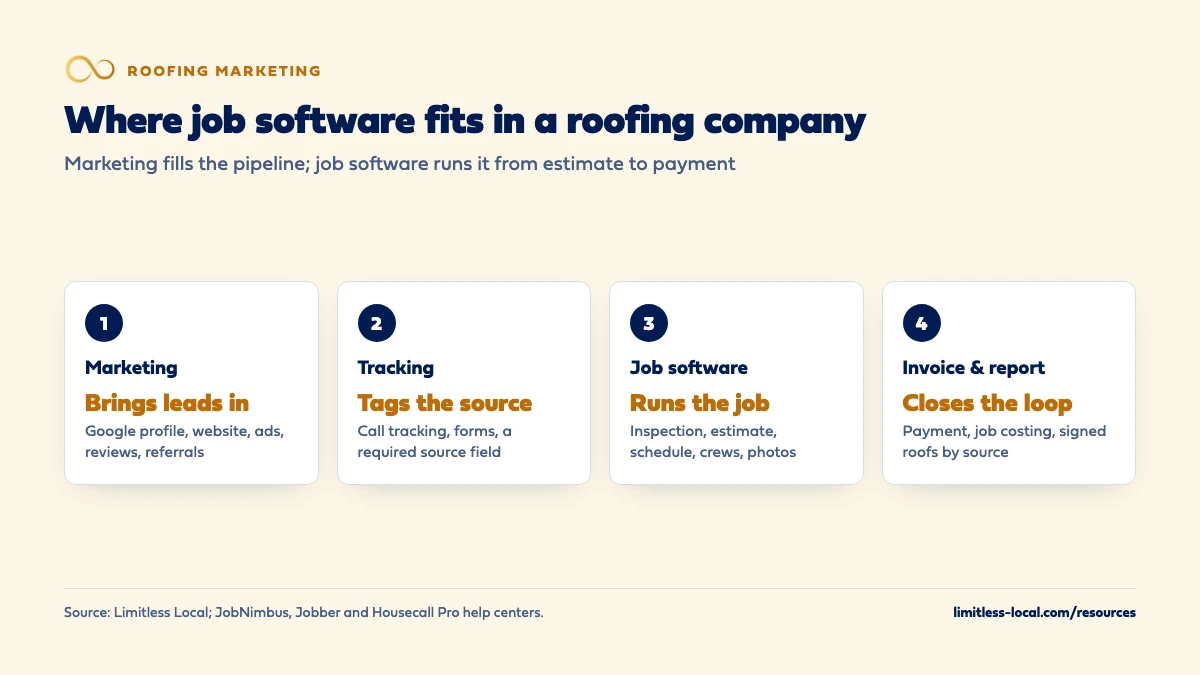
Here’s roughly where the line falls:
- Marketing brings leads in: your Google Business Profile, website, Google Ads, Local Services Ads, reviews and referrals.
- Tracking records where they came from: call tracking numbers, form tracking and source tags.
- Follow-up tools reach them fast: after-hours answering, text messaging, chat and reminders.
- Job software takes over from there: the inspection, estimate, contract, schedule, invoice and payment.
The two meet at the lead source. Most systems have a field for it. Housecall Pro’s lead source field, for example, records where customers found you, so reports can show which sources bring good jobs. If that field is filled in on every job, your software can tell you which marketing signed roofs. What call tracking is and whether a roofing company needs it covers the tracking piece.
Curious what your marketing is actually booking?
Get a free visibility audit — no obligation, no sales pitch.
When does a roofing company need management software?
Usually when one of these becomes true:
- More than one person handles leads or estimates. The moment an office manager, salesperson or second estimator gets involved, information starts living in different heads and phones.
- You run more than one crew. Scheduling, materials and job notes get hard to keep straight across crews on a whiteboard.
- Open estimates pile up. If you can’t say, right now, how many estimates are out and who’s following up on each, some are slipping.
- Insurance jobs stay open for weeks. Long-running jobs with lots of steps are exactly what a pipeline is for.
- You can’t answer “where did our signed roofs come from last month?” Without a lead source on every job, your marketing decisions are guesses.
If two or more of those describe your company, the software will likely pay for itself in estimates that no longer fall through the cracks.
When can a roofer get by without it?
A one- or two-person roofing company with a modest number of jobs a month can run well on simpler tools:
- A shared calendar for inspections and jobs.
- A spreadsheet with one row per lead: date, source, stage, estimate amount and outcome.
- Estimate and invoice templates in your accounting software.
- A phone folder of job photos by address.
That setup only works if it’s kept up the same day, every day. The spreadsheet is a funnel tracker in disguise, and it tells you the same things software would: how many leads came in, how many booked, how many signed, and from where.
The signs you’ve outgrown it are the same ones in the section above. Software doesn’t fix a missing habit, though. If the spreadsheet isn’t kept up, a new system usually won’t be either.
What features matter most for a roofing company?
Skip the long feature lists and check these first:
- A required lead source field with a fixed list you set, so every job is tied to the marketing that brought it.
- A clear pipeline with stages that match how you actually sell: new lead, inspection booked, estimate sent, follow-up, signed, lost.
- Fast call intake. Whoever answers the phone should be able to log a lead in under a minute. ServiceTitan’s roofing help describes capturing leads from incoming calls so inquiries that don’t book right away can still be tracked and followed up.
- Estimates with options, like repair versus replacement or different materials.
- Photos on the job record from the inspection onward.
- Automations for reminders. AccuLynx’s Automation Manager, for example, can send emails or texts or assign tasks when something happens on a job, like an appointment being set.
- Accounting sync. Housecall Pro’s QuickBooks Online integration typically syncs invoices, payments and new customer information one way into QuickBooks.
- Job costing, so you know which jobs actually made money.

Should a roofer choose roofing-specific or general field service software?
Both can work, and the choice comes down to the kind of roofing you do.
- Roofing-specific systems, like JobNimbus and AccuLynx, are made for roofing companies. They tend to fit companies doing mostly replacements, with inspections, measurements, materials and long sales cycles to track.
- General field service systems, like Jobber, Housecall Pro and ServiceTitan, are built for home-service trades in general, and ServiceTitan has a roofing version. They can fit roofers who do more repairs and maintenance, or who also run gutters, siding or other trades.
Whichever way you lean, test it with your real process: take a sample lead from first call to signed contract to final invoice in a demo account. If your team can’t do that without workarounds, it’s the wrong fit, however good the feature list looks.
How does management software help with marketing decisions?
It’s where the marketing math finally gets done. Call tracking can tell you a Google Ads call came in. Only your job records can tell you whether that call became a signed roof and what it was worth.
Once every job has a lead source, a stage and a value, you can answer the questions that matter: which sources sign the most roofs, which bring the biggest jobs, and what each signed roof cost you by source. Job costing goes a step further. Jobber’s job costing tracks profit, profit margin and total price on each job from labor, line items and expenses, so you can judge marketing on profit, not just revenue.
Whether a CRM can help a roofer track marketing ROI goes through the setup, and what marketing attribution means for a roofing company covers how to give credit when a homeowner found you more than one way.
What mistakes do roofers make with management software?
- Buying it to fix a habit problem. If leads aren’t logged today, they won’t be logged in new software either. Set the habit first.
- Leaving lead source optional. Make it required, from a fixed list, or your marketing reports will be full of blanks.
- Too many stages. A pipeline with fifteen stages doesn’t get updated. Keep it to the handful you actually use.
- Only logging leads that book. Callers who aren’t ready yet are leads too, and they’re the ones most worth following up.
- Running two systems for the same thing. If leads live in one tool and estimates in another with no connection, you’ll lose the link between marketing and signed roofs.
- Nobody owns it. One person should check every week that jobs are in the right stage and nothing is stuck.
How a roofer sets up a funnel for roofing leads lays out the stages worth tracking before you configure any system, and how to follow up on unsigned roofing estimates covers the follow-up those stages should drive.
Want to see where your company stands?
A free visibility audit shows where you show up on Google, Maps and AI answers, and what it's costing you in calls.
What's different about management software for roofers
Jobs run long. A replacement can go from first call to final payment over weeks, and claim-related jobs can run longer. A pipeline that shows every open job and its stage matters more for a roofer than for a trade that finishes most jobs in a day.
Photos are evidence. Inspection photos support the estimate, help the homeowner understand the problem, and document the work. Keep them on the job record, not on one person’s phone.
Storms overload the system. After a big storm, leads and inspections pile up fast. Software with quick intake and clear stages is what keeps a surge from turning into lost estimates.
A worked example: what losing track of estimates can cost
These numbers are made up to show the math, not a benchmark for your market. Say a two-crew roofer has about 30 open estimates at any time, tracked on paper and in texts. Each month, three of them never get a second follow-up because they were in someone’s truck or someone’s phone.
If even one of those three would have signed with a follow-up call, and the average signed job is $12,000, that’s $12,000 in revenue a month going to whoever followed up instead. Over a year, that’s $144,000 in jobs.
A pipeline that shows every open estimate and who owns it, with a reminder when one goes quiet, is how you get those back. The math won’t look this dramatic for every company, but most roofers who move from paper to a pipeline find estimates they’d forgotten.
Frequently asked questions
Is a roofing CRM the same as roofing management software?
Often, yes. Many roofing products do both. A CRM leans toward leads and follow-up, management software toward jobs and invoicing, and most roofing systems cover some of each.
Can I switch software later without losing everything?
Usually, but it takes work. Before you commit, check that you can export customers, jobs and estimates, so your history isn’t stuck if you switch.
Will job software get me more roofing leads?
No. It helps you book and close more of the leads you already get. New leads come from your marketing: your Google profile, website, ads, reviews and referrals.
Does my crew need to use it?
At least for photos, notes and job status. The more of the job that lives in one place, the less gets lost between the office and the roof.
Can it send my signed jobs back to Google Ads?
Some systems can connect to tools that report signed jobs back to Google Ads, either directly or through call tracking. It’s worth asking about if you run ads, since it lets Google learn which leads became real jobs.
How long does it take to set up?
The basics, like your customer list, lead sources, pipeline stages and estimate templates, can usually be in place in a few weeks. Getting the whole team to use it every day takes longer.
Key takeaways
- Roofing management software keeps each job on one record, from lead to payment.
- You usually need it once more than one person handles leads, estimates or crews.
- It runs the job side; marketing still has to bring the leads in.
- A required lead source field is what connects your software to your marketing.
- Test any system with a real job from first call to final invoice before you commit.
Not sure what's working right now?
Start with a free visibility audit: rankings, Google profile, reviews and tracking, checked against your service area.
More in this section
- Does a roofing company need a CRM to follow up on leads?
- What is call tracking, and does a roofing company need it?
- Why is marketing important for roofing companies?
- How does a roofing leads program work for a roofing company?
- Can a CRM help a roofer track marketing ROI?
Sources
- What Is a Workflow? — JobNimbus Help Center
- Quote Basics — Jobber Help Center
- How to Use Lead Sources — Housecall Pro Help Center
- Capture a lead from an incoming call — ServiceTitan Help Center
- How to Use the Automation Manager in AccuLynx — AccuLynx
- QuickBooks Online: Syncing Information from Housecall Pro — Housecall Pro Help Center
- Job Costing — Jobber Help Center