
What is geo-targeting for a roofing company’s ads?
- What does geo-targeting mean for a roofer's Google Ads and Local Services Ads?
- What does geo-targeting actually do for roofing ads?
- What are the ways to set a roofing ad area?
- Is radius or city and ZIP code targeting better for a roofer?
- What's the difference between Presence and Presence or Interest?
- How do I pick the areas worth paying for?
- Should a roofer exclude areas from their ads?
- How does geo-targeting work for Local Services Ads?
- How big should my target area be for my budget?
- How should geo-targeting change after a storm?
- How do I check where my roofing ads actually showed?
- What geo-targeting mistakes cost roofers money?
- What's different about geo-targeting for roofers
- A worked example: metro-wide versus core towns
- Frequently asked questions
- Key takeaways
- More in this section
- Sources
The short version
- Geo-targeting decides where your roofing ads can show.
- Google Ads: cities, ZIP codes or a radius, plus exclusions.
- Local Services Ads: service areas by county, city or ZIP code.
- Target the towns you want roofs in, then check where ads actually showed.
For roofing owners running Google Ads or Local Services Ads who want their budget spent only where their crews will actually drive.
Get a free visibility audit · Book a growth call
What does geo-targeting mean for a roofer's Google Ads and Local Services Ads?
Geo-targeting is the setting that tells an ad platform where your ads should show. In Google Ads, a roofer can target cities, ZIP codes or a radius around an address, exclude areas inside those, and choose whether to reach only people in the area or also people searching about it. Local Services Ads use service areas set by county, city or ZIP code. The goal is simple: pay only for homeowners in the towns where you want roofs, and nowhere your crews won’t go.
Setting and checking location targeting is part of how we run local ads for roofers. Every package includes Google Ads management (up to $2,500 a month in spend on Essentials, up to $5,000 on Growth), and Growth adds Local Services Ads, so both are aimed at the same towns. See how it fits a roofing company on our roofing marketing page, read whether Google Ads are worth it for roofing, or browse the roofing marketing questions library.
What does geo-targeting actually do for roofing ads?
Geo-targeting draws the line around where your ads are allowed to show. Without it, a roofing ad could show to someone two states away who will never hire you. With it, your budget goes to homeowners in the towns your crews serve.
Google’s two ad products for roofers each have a version:
- Google Ads lets you target areas such as cities or ZIP codes, or a radius around a location, and exclude areas inside them.
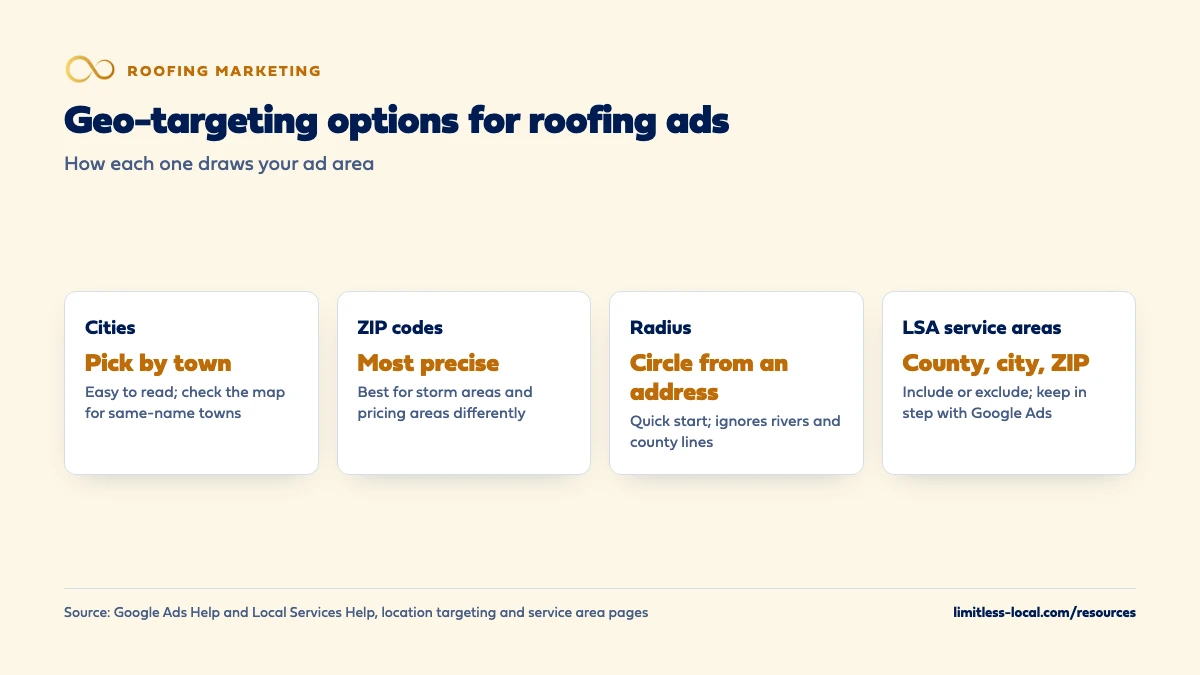
- Local Services Ads use service areas that you include or exclude by county, city or ZIP code.
Two things to understand from the start. First, Google says its location targeting doesn’t determine geographic borders, and because it relies on signals like device settings and behavior, 100% accuracy isn’t guaranteed in every situation. A few clicks from just outside your area are normal. Second, geo-targeting doesn’t decide which searches you show for; that’s your keywords’ job. The two work together: keywords pick the job, location picks the town.
What are the ways to set a roofing ad area?
Google’s help page on how to target ads to geographic locations lists the options. For a local roofer, three matter:
- Cities. Pick the towns by name. Easy to understand and easy to match with your website’s town pages.
- ZIP codes. Google calls these postal codes. More precise than cities, and handy when you want part of a big city but not all of it.
- Radius. A circle of a set distance around an address, such as your shop. The smallest radius Google allows is 1 km.
You can mix them in one campaign, for example a handful of cities plus a few extra ZIP codes on the edge. One caution: very small targets, whether a tiny radius or a single small ZIP code, might show your ads only now and then or not at all, because they may not meet Google’s targeting rules.
When you add a city by name, check the map. A seller who means Paris, Texas can end up targeting Paris, France. Plenty of American towns share names, and the map is the quickest way to catch the wrong one.
Is radius or city and ZIP code targeting better for a roofer?
For most roofers, cities and ZIP codes work better than a radius. Here’s why:
- A circle ignores how you actually drive. A 20-mile radius from your shop might cross a river with one bridge, a county where you aren’t licensed, or a town where you’ve never signed a roof.
- Your results come in towns and ZIP codes. Your CRM records jobs by address, and Google’s location reports break results down to postal code. Matching your targets to those units makes the numbers easier to read.
- You can price areas differently. With separate ZIP codes, you can see which ones sign roofs and put more budget behind them.
A radius still has its place. If you’re brand new and have no job history, a radius around the shop is a quick, sensible start. It also suits a roofer in a rural area where towns are small and spread out, and listing every one would be a chore.
A practical middle path: start with a radius, run it for a couple of months, then look at where leads and signed roofs actually came from and rebuild the targeting around those towns and ZIP codes.
What's the difference between Presence and Presence or Interest?
This setting decides who counts as “in” your area. Google’s page on advanced location options describes two choices:
- Presence or Interest is the default. It reaches people who are in or regularly in your area, plus people who have shown interest in it, for example by searching for a town by name.
- Presence reaches only people who are likely to be in or regularly in your area.
The default is the recommended setting for Search, and most campaigns see fewer impressions after switching away from it. For a roofer, the interest side has real value in one case: the grown son in another state searching for a roofer for his parents’ house in your town. It also has a cost: people researching your town for other reasons, or searching from far away with no plan to hire.
The test is in your results. If your location report shows clicks from far outside your towns that never turn into inspections, switch to Presence. If out-of-area searches are booking real jobs, keep the default. Whether a roofer can target specific neighborhoods with ads walks through this setting step by step.
How do I pick the areas worth paying for?
Start from your jobs, not from a map. Pull a year of signed roofs from your CRM or job software and look at where they were. Then sort the towns and ZIP codes into three groups:
- Core areas. Where you’ve signed the most roofs, at good margins, within an easy drive. These get the most budget.
- Growth areas. Places you want more work: newer subdivisions, neighborhoods with aging roofs, towns where a competitor has slipped. These get a smaller, test budget.
- No-go areas. Too far, too slow to pay, too price-driven, or not worth the drive time. These get excluded.
A few roofing-specific factors are worth weighing:
- Drive time. Inspections, estimates, the crew and the follow-up visit all add up. A town an hour away costs more to serve than it looks.
- Roof age and home value. Older neighborhoods need more replacements; higher-value homes often mean bigger tickets.
- Permits and licensing. Only target where you can legally pull permits and do the work.
- Storm exposure. Areas that see hail or high wind often may justify a standing budget you raise when weather hits.
Write the three lists down. They become your targeting, your exclusions and your town pages.
Curious what your marketing is actually booking?
Get a free visibility audit — no obligation, no sales pitch.
Should a roofer exclude areas from their ads?
Yes, almost always. Exclusions keep ads away from pockets inside your target area that you don’t want. Google’s page on how to exclude ads from geographic locations gives the plain reason: it helps you use your budget wisely by not showing ads to people who can’t get what you offer.
Common roofing exclusions:
- The far side of a lake, river or county line that falls inside your radius.
- A city you can’t get permits in, or don’t want to.
- Neighborhoods mostly made up of apartments or condos, if you only do houses.
- Towns that produced leads but never signed, after you’ve given them a fair test.
Exclusions by default block people likely to be located in the excluded area. People outside it may still see your ads, so exclusions aren’t a perfect wall.
Geo exclusions and negative keywords do different jobs. A negative keyword blocks a search; a location exclusion blocks a place. If people keep searching for a town you don’t serve, block it both ways. Which negative keywords a roofer should add covers the search side.
How does geo-targeting work for Local Services Ads?
Local Services Ads don’t use radius targeting or keywords. You choose service areas instead. Google’s page on how to edit your industries, service areas, and job types shows that you add a service area by searching for a county, city or ZIP code, and remove one the same way.
Treat your LSA service areas like the core list above, not a wish list. Leads from areas you’ve drawn too wide cost you money and time, and calls from towns you won’t drive to are hard to turn into anything but a polite no.
Keep your Google Ads and LSA areas in step. If your search ads cover twelve towns and your LSAs cover forty, you’re paying for two different businesses. Match them, then expand both together when a new area proves itself. Local Services Ads are moving into Google Ads as Performance Max campaigns with pay-per-lead goals, so expect these settings to show up in a new place, but the job of drawing service areas stays the same.
How big should my target area be for my budget?
Smaller than most owners first think. A modest budget spread across a whole metro buys a few clicks in every town; focused on your best areas, it shows up consistently where you most want roofs.
A simple way to size it:
- Decide your monthly ad budget.
- Estimate how many clicks it buys at the cost per click you’re seeing.
- Ask whether that’s enough to show up most days in every area you’ve picked.
- If it isn’t, cut areas before cutting keywords. Keep the core, pause the growth areas, and add them back as the budget grows.
Peak season changes the math, so plan for it. How a roofer should prepare marketing for peak season covers getting targeting and budgets ready before demand rises, and the worked example below shows the sizing math.
How should geo-targeting change after a storm?
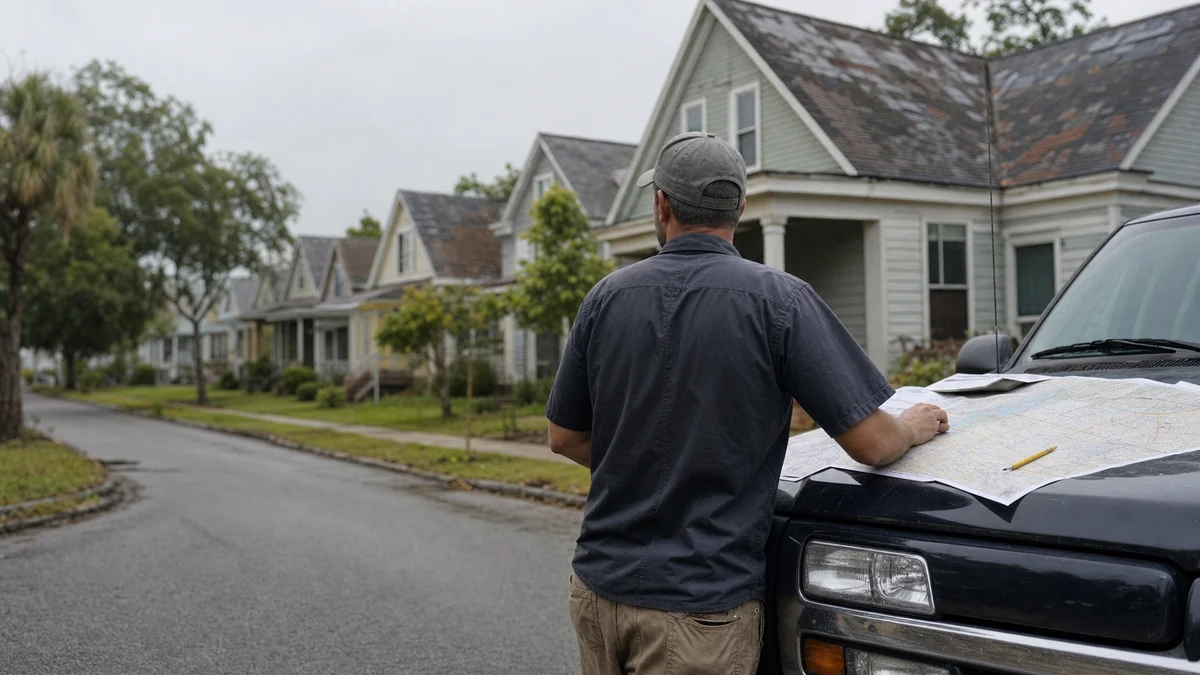
Hail and wind damage land in a strip of specific ZIP codes, not across a whole metro. The roofer who points extra budget at exactly those ZIP codes, fast, gets the calls.
A sensible storm setup:
- Keep your regular campaign running for your normal areas.
- Have a separate storm campaign built and paused, ready to switch on.
- When a storm hits, add the affected ZIP codes as targets and give the campaign its own budget.
- Trim it once the calls slow.
Only target storm areas your crews can actually serve within a reasonable time. A homeowner with a tarp on the roof won’t wait three weeks. How a roofing company can find leads after a storm covers confirming where the storm hit and what the ads should say.
How do I check where my roofing ads actually showed?
Use the Locations report in Google Ads. Google’s page on measuring geographic performance describes two views: Targeted locations, which shows results by the areas you chose, and Matched locations, which shows where your ads actually appeared, based on people’s physical location or locations of interest. In the US, the report can go down to the postal code level.
Check it once a month and look for:
- Clicks from outside your towns. A few are normal. A lot means it’s time to tighten the location option or add exclusions.
- Areas with spend but no inspections. Give them a fair test, then cut them.
- Areas that sign roofs cheaply. Put more budget there.
- “Unspecified” rows. Google can’t always tell where a searcher was, so some of your data will land here.
The Locations report shows clicks and conversions by area, but signed roofs live in your CRM. Compare the two by town or ZIP code so you can judge each area on cost per signed roof.
What geo-targeting mistakes cost roofers money?
- Leaving the target as the whole state or country after a rushed setup.
- One giant radius that pulls in towns you don’t want and spreads the budget thin.
- A radius so small the ads barely show.
- Never opening the Matched locations view. Your settings say one thing; the report shows what happened.
- Targeting towns your website doesn’t mention. Homeowners who click want to see their town and your work nearby.
- A storm campaign left running at full budget months after the calls stopped.
All of these are caught by a monthly look at the location report and the settings.
Want to see where your company stands?
A free visibility audit shows where you show up on Google, Maps and AI answers, and what it's costing you in calls.
What's different about geo-targeting for roofers
Weather draws the map. Roofers get bursts of demand in specific ZIP codes after hail and wind. Fast, precise location changes pay off.
Every job takes several trips. Inspection, estimate, install and often a follow-up visit, so drive time belongs in the targeting decision.
The homeowner may not live there. Adult children often arrange a roof for aging parents, and landlords hire for rentals they don’t live in. That’s the case where the default Presence or Interest setting can be worth keeping.
A worked example: metro-wide versus core towns
These numbers are made up to show the math, not a benchmark for your market. Say you spend $1,500 a month on Google Ads and pay an average of $30 a click. That buys about 50 clicks a month.
Spread across a metro of 25 towns, that’s about 2 clicks per town each month. You barely show up anywhere. Focus the same budget on the 5 towns where you’ve signed the most roofs, and it’s about 10 clicks per town, enough to show up most weeks where your reputation is already strongest.
Now check the results. If those 50 clicks turn into 8 leads and 3 signed roofs, your ad cost per signed roof is $1,500 divided by 3, or $500. Compare that number town by town over a few months, and move budget toward the towns where it’s lowest.
Frequently asked questions
Can I target one neighborhood with roofing ads?
Sometimes. ZIP codes and small radius targets get close, but Google may show ads only now and then on very small targets. For most roofers, a set of ZIP codes is the closest practical fit.
Why do I get clicks from outside my area?
Location targeting is Google’s best effort, based on signals like device settings and searches, so some clicks land just outside. The default setting also reaches people interested in your area. Check the Matched locations view and switch to Presence if those clicks never book.
Should each town get its own campaign?
Not at first. One campaign for your core towns keeps the budget together; split out a town or storm area when it needs its own budget.
Does geo-targeting affect my Google Maps ranking?
No. Ad location settings control where ads show. Your position in the map pack comes from your Google Business Profile, not from your ad settings.
Can I raise bids in my best towns?
Location bid adjustments let you bid more where results are strongest. With automated bidding, putting your best towns in their own campaign with its own budget is often the simpler way to do it.
Key takeaways
- Geo-targeting is where your ads can show; keywords decide which searches.
- For most roofers, cities and ZIP codes beat one big radius.
- Pick areas from your signed jobs: core, growth and no-go.
- Keep Google Ads and Local Services Ads areas in step.
- Check the Matched locations view monthly and judge each area on cost per signed roof.
Not sure what's working right now?
Start with a free visibility audit: rankings, Google profile, reviews and tracking, checked against your service area.
More in this section
- Can a roofer target specific neighborhoods with ads?
- Which keywords should a roofing company target for local leads?
- What should a roofing Google ad actually say?
- Which search terms should a roofing company target for jobs it wants?
- Are Google Local Services Ads worth it for a roofing company?
Sources
- Target ads to geographic locations — Google Ads Help
- About advanced location options — Google Ads Help
- Exclude ads from geographic locations — Google Ads Help
- Edit your industries, service areas, and job types — Local Services Help
- About measuring geographic performance — Google Ads Help
- Local Services Ads transition to Performance Max campaigns with pay-per-lead goals — Google Ads Help