
Can AI help track my plumbing rankings, calls and leads?

- How can a plumbing company use AI to track rankings, calls, leads and booked jobs?
- What can AI actually track for a plumbing company?
- What has to be set up before AI can track anything?
- Can AI track where my plumbing company ranks on Google?
- What do my Google profile numbers tell me, and what don't they?
- Can AI listen to my calls and tell me which ones were real leads?
- Which call tags should a plumbing company use?
- How does AI connect a call or lead to a booked job?
- Can AI pull everything into one weekly report?
- Where does AI get plumbing tracking wrong?
- What should a person still check every week?
- Do I need new software to do this?
- What's different about tracking for plumbing companies
- A worked example: what AI tags change in one month
- Frequently asked questions
- Key takeaways
- More in this section
- Sources
The short version
- AI sorts, tags and summarizes; it doesn't create the data.
- Set up tracking numbers and a lead source on every job first.
- Use AI call summaries to separate real job requests from noise.
- Have a person spot-check the AI's tags and totals every week.
For plumbing owners who want one clear weekly picture of where calls come from and which ones book, without spending Sunday night in five different dashboards.
Get a free visibility audit · Book a growth call
How can a plumbing company use AI to track rankings, calls, leads and booked jobs?
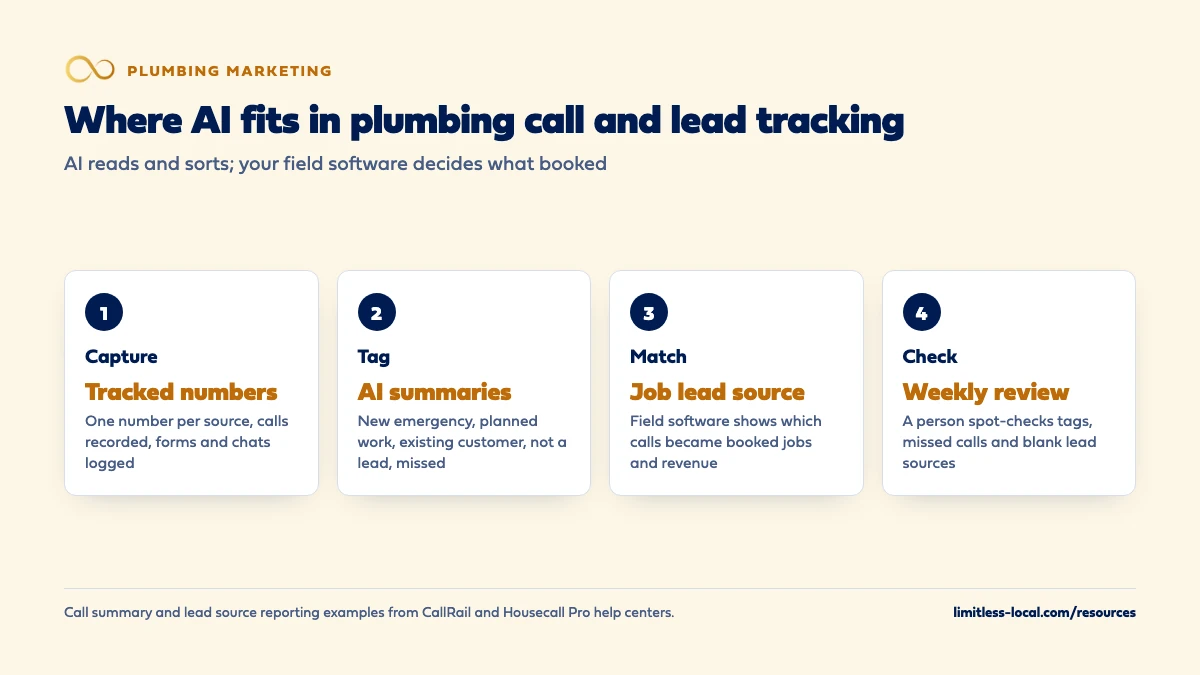
Yes. AI is good at the reading and sorting part of tracking: summarizing recorded calls, tagging which ones were real job requests, flagging missed calls and turning your Google profile, Search Console and ad numbers into one short weekly summary. It can’t decide what counts as a booked job, and it can’t fix tracking that was never set up. The base still has to be built by a person: a tracking number for each source, a lead source on every job in your field software, and someone who spot-checks the AI’s tags every week.
That base layer is what we build first for every client: every Limitless Engine package includes call tracking with recording and transcription, form and chat lead tracking, source tagging, a real-time dashboard and a monthly report with a cost-per-lead breakdown. Our automation add-ons add a lead tracking dashboard and follow-up tools on top of any tier. See how it all fits plumbing companies, or browse the rest of the plumbing marketing questions.
What can AI actually track for a plumbing company?
Think of tracking as five layers, from the first time someone sees you to money in the bank:
- Rankings: where you show up on Google for searches like “water heater repair” or “emergency plumber” in your towns.
- Profile actions: calls, website clicks and direction requests from your Google Business Profile.
- Calls: every ring to your tracked numbers, answered or missed, with the recording.
- Leads: website forms, chats and texts.
- Booked jobs: the jobs and estimates in ServiceTitan, Housecall Pro or Jobber, and what they were worth.
AI reads the first four faster than you can: it listens to calls, sorts leads, spots changes and writes the summary. The fifth layer, booked jobs, comes from your field software, and that’s the one that tells you whether any of it paid.
What has to be set up before AI can track anything?
AI can only summarize data that exists. Before you add any AI tool, check these are in place:
- A tracking number for each source. One for Google Ads, one for your Google profile, one for the website, one for the truck wraps or mailers. Without them, every call looks the same.
- Call recording turned on in your call tracking or phone system, so there’s something for AI to transcribe.
- A required lead source field on every new customer and job in your field software.
- A verified Google Business Profile and a verified Search Console property for your website.
- Conversions set up in Google Ads, so ad calls and forms are counted.
If you’re starting from zero, how to track which plumbing marketing books jobs walks through the setup in order. Get this layer right and every AI tool you add later has clean numbers to work with.
Can AI track where my plumbing company ranks on Google?
Partly. For your website, Google Search Console’s Performance report shows clicks, impressions and average position for each search and each page, free. Two things to know before you trust the position number. It’s an average of your topmost spot across every time you were seen, and results differ by time, place, device and the searcher’s recent history. So a position of 4 for “drain cleaning” doesn’t mean you’re fourth for everyone in town.
The map pack is even more local. Someone searching from one end of your service area can see a different top three than someone across town, which is why a single “rank check” from your office tells you very little. Rank tracking tools check the same search from many points across your area; AI is useful for reading that grid and telling you which towns moved.
Search Console now also has a generative AI performance report, which counts how often links to your site were shown in AI Overviews and AI Mode. For how those answers affect plumbing calls, see whether Google AI Overviews take calls from plumbing companies.
What do my Google profile numbers tell me, and what don't they?
Google’s Business Profile performance page shows views, the searches people used to find you, calls, website clicks, direction requests and messages. It’s only available for verified profiles, and you can download it as a spreadsheet, which is exactly the format an AI tool can read and compare month over month.
Read those numbers with care:
- Calls are taps on the call button, not conversations, and not booked jobs.
- Ads are mixed in. The data includes views, searches and actions from both organic results and Google Ads.
- Search terms update monthly, at the start of each month.
- Direction requests matter less for most plumbers. Customers don’t drive to you; you drive to them.
One more gap: Google removed call history from Business Profiles in 2024, so you can’t see a list of who called from your profile there. A tracking number on the profile is the only way to hear those calls and match them to jobs.
Can AI listen to my calls and tell me which ones were real leads?
Yes, and for most plumbing shops this is where AI saves the most time. Call tracking tools now transcribe recorded calls and write a short summary of each one. CallRail’s call summaries, for example, give three to five sentences per transcribed call, need its Premium Conversation Intelligence plan with transcripts on, and only cover calls made after the feature is switched on.
That turns a pile of recordings into something you can scan over coffee: “Caller reports no hot water, 50-gallon gas unit, asked about same-day replacement, booked for 2 pm.” From there, AI or a simple rule can tag each call so you can count only the ones that matter.
The catch is that a summary is a guess about what happened. A caller who says “I’ll think about it” and then books online an hour later looks like a lost lead. That’s why the tags feed your report, but the booked job in your field software is what you count as the result.
Curious what your marketing is actually booking?
Get a free visibility audit — no obligation, no sales pitch.
Which call tags should a plumbing company use?
Keep the list short enough that you’d actually read it. A set that works for most plumbing shops:
- New customer, emergency: leaks, no water, backups, burst pipes.
- New customer, planned work: water heaters, repipes, sewer lines, fixtures, softeners.
- Estimate request: anyone asking for a price on bigger work.
- Existing customer: repeat work, members, callbacks and warranty questions.
- Not a lead: wrong service, outside your area, suppliers, job seekers, sales calls, spam.
- Missed: rang out or went to voicemail with no callback.
Splitting emergency from planned work matters because they’re worth different amounts and come from different searches. Splitting new from existing customers keeps repeat business from making your ads look better than they are. And the “missed” tag is the one to watch weekly; how fast a plumbing office should answer a new call covers why.
How does AI connect a call or lead to a booked job?
Only through your field software. A call tool knows the caller and the source; your field software knows whether a job got booked and what it was worth. The link between them is the lead source on the job, filled in by the person who books it or by an integration between the two systems.
Field software is starting to do the math for you. Housecall Pro’s ROI Table groups new customers, jobs and revenue by lead source, and once you enter what you spent on each source, it can show cost per job and booking rate. It also puts anything without a lead source in a “No lead source” row, and a big number there means the field isn’t being filled in.
That row is the best weekly check you can give anyone, AI or human. If it’s growing, fix the booking habit before you trust any cost-per-job number. Working out your plumbing customer acquisition cost shows how to use those numbers once they’re clean.
Can AI pull everything into one weekly report?
Yes, and it’s a good use of it, as long as you give it the numbers instead of asking it to find them. A simple routine:
- Export last week’s calls with tags, your profile performance download, your Google Ads campaign summary and a lead source report from your field software.
- Ask the AI to total calls by source and tag, compare each number with the week before, and list anything that moved a lot.
- Ask it to match that against booked jobs and revenue by source, and to say plainly where the data is missing.
- Read the summary, then open the raw numbers for anything surprising.
If you’re pasting call notes into a general AI chatbot, strip out customer names, addresses and phone numbers first. Some call tracking tools can also send summaries to dashboards and other software through integrations, which saves the copy and paste.

Where does AI get plumbing tracking wrong?
The common mistakes all come from treating AI output as fact:
- Wrong tags. A homeowner asking about a water heater “for later” gets tagged as an estimate, or a supply house gets tagged as a lead.
- Double counting. The same customer calls three times about one leak and shows up as three leads.
- Filling gaps with guesses. Ask a chatbot why calls dropped without giving it the data and it’ll offer a confident answer anyway. Make it work only from what you exported.
- Mixing sources. Profile calls include ad activity, so adding profile calls and ad calls together counts some of them twice.
- Trusting an average. An average ranking can rise while the towns you care about slip.
None of these is a reason to skip AI. They’re the reason a person checks it. If the numbers do drop, what to check when the plumbing phone stops ringing gives you the order to look in.
What should a person still check every week?
About 15 minutes covers it:
- Listen to a few tagged calls. Pick a handful at random, including some the AI marked “not a lead”. If it’s mislabeling, fix the tag rules.
- Check the missed calls. Did each one get a callback, and did any book?
- Check the “No lead source” jobs in your field software and fill them in while people still remember.
- Compare totals. New-customer calls from a source should roughly line up with new jobs from that source. A big gap means a tracking or booking problem.
- Note anything that changed: a new ad, a paused campaign, a tech out sick, a cold snap. AI can’t know about those unless you tell it.
That last step matters more than it looks. Numbers without context lead to the wrong fix, like cutting an ad that only looked bad because nobody was answering the phone that week.
Do I need new software to do this?
Probably not much. Most plumbing shops already have the pieces: a field service program with lead source reporting, a call tracking or phone system that records calls, and Google’s free tools. The AI features are often add-ons inside software you already pay for, so check those before buying something new.
The order to add things in: tracking numbers and lead sources first, call transcription and summaries second, a weekly AI summary third. For a wider look at which AI tools earn their keep in plumbing marketing, see which AI tools are actually useful for plumbing marketing.
Not sure which of these is costing you jobs?
A free visibility audit checks the Google profile, reviews, site and tracking, and shows what to fix first.
What's different about tracking for plumbing companies
Night and weekend calls. A big share of emergency work comes in after hours, often to an answering service or an on-call tech’s cell. Make sure those calls still go through a tracked number, or your best-paying calls disappear from the report.
Big jobs book later. A water heater or repipe call can turn into an estimate, then a booked job days or weeks later. Count those by the lead source on the job, not by the week the call came in, or your planned-work marketing will look weaker than it is.
Members and repeat customers. Maintenance members and past customers call the number they know. Keep them tagged as existing customers so they don’t inflate what your ads booked.
You go to the customer. Most plumbers run as service-area businesses, so direction requests and storefront-style numbers say little. Calls and booked jobs are the numbers to watch.
A worked example: what AI tags change in one month
These numbers are made up to show the math, not a benchmark for your market. Say your Google Ads tracking number got 70 calls last month on $2,700 of ad spend. Counted that way, each call cost about $39, which looks great.
Now the AI tags them. Of the 70, 12 were existing customers, 14 weren’t leads (wrong service, outside the area, sales calls) and 6 were missed. That leaves 38 new-customer job requests. Your field software shows 19 of them booked.
Your real cost per booked job from ads was $2,700 divided by 19, or about $142. That’s the number to compare against what an average ticket is worth to you. The 6 missed calls are the cheapest jobs you’ll ever win back: if a better call-back routine had booked half of them, that’s 3 more jobs on the same spend, bringing it down to about $123 per booked job.
Frequently asked questions
Can I paste my Search Console data into ChatGPT?
You can export the Performance report and have an AI tool summarize it. Ask it to work only from the export, and check any number it reports against the original before acting on it.
Is AI call tagging accurate enough to pay staff bonuses on?
Not on its own. Use AI tags to spot trends, and base anything that affects pay on booked jobs in your field software, checked by a person.
Will a tracking number on my Google profile confuse Google?
It can if it’s set up carelessly. Whether call tracking numbers hurt plumbing Google rankings covers how to add one safely.
Can AI tell me why my calls dropped this month?
It can point to where the drop happened, by source, tag or week. The why usually needs context it doesn’t have, like a paused campaign, a lost map spot or a staffing gap.
How often should I look at the tracking numbers?
A quick look weekly for missed calls and tagging problems, and a fuller monthly review of cost per booked job by source.
Do I still need call recordings if AI writes summaries?
Yes. The summary is a shortcut, and the recording is what you go back to when a tag looks wrong or a customer remembers the call differently.
Key takeaways
- AI is good at summarizing calls, tagging leads and writing a weekly summary; it can’t create data that was never tracked.
- Set up a tracking number per source and a required lead source on every job before adding AI.
- Google profile calls are button taps that include ad activity, so they’re a trend, not a job count.
- Count results by booked jobs in your field software, not by AI tags.
- Spend 15 minutes a week spot-checking tags, missed calls and jobs with no lead source.
Want a second set of eyes on your setup?
We'll look at how you show up locally and where calls are leaking, then send you a plain-English breakdown.
More in this section
- Can AI help a plumbing company answer leads faster?
- Can AI help improve my plumbing Google Business Profile?
- Will Google AI Overviews take calls from my plumbing company?
- Can AI help my plumbing company get more 5-star reviews?
- How can I use AI to improve my plumbing ads and messages?
Sources
- Understand your Business Profile performance & insights — Google Business Profile Help
- Changes to Google Business Profile chat and call history — Google Business Profile Help
- Performance report (Search results): Overview and basic setup — Search Console Help
- Generative AI performance report (Search) — Search Console Help
- Call summaries — CallRail Help Center
- Marketing Dashboard: ROI Table — Housecall Pro Help Center