
Can AI help write plumbing service pages and Google Posts?
- How do I use AI to write plumbing service pages and Google profile posts that don't read like every other plumber's?
- Can AI really write a plumbing service page?
- What should I give AI before it drafts a service page?
- How do I get my plumbers' knowledge into the draft?
- What should a plumbing service page draft include?
- How do I edit an AI draft so it isn't generic?
- Can AI write my plumbing town pages too?
- Can AI write my Google Business Profile posts?
- What should a plumbing Google post actually say?
- Can AI write the service descriptions on my Google profile?
- How do I keep AI-written content accurate over time?
- What's different about AI content for plumbing companies
- A worked example: the time AI drafting saves on ten service pages
- Frequently asked questions
- Key takeaways
- More in this section
- Sources
The short version
- AI drafts; a plumber supplies the facts and checks the result.
- Feed it a job file: what the job involves in your area, your process, towns, proof and real questions.
- Cut every sentence that could sit on any plumber's site, and add specifics.
- Turn a tech's two-line job note plus a real photo into a Google post in minutes.
For plumbing owners who want AI to take the blank-page work off their plate without ending up with pages and posts that could belong to any plumber in any town.
Get a free visibility audit · Book a growth call
How do I use AI to write plumbing service pages and Google profile posts that don't read like every other plumber's?
Yes. AI is a fast first-draft writer for plumbing service pages, Google Business Profile posts and service descriptions, as long as you feed it what only your company knows: the jobs you do, how you do them, the towns you cover, real photos and what customers ask. A plumber or the owner then cuts anything generic, checks every fact and adds proof before it’s published. Skip that step and you get the same page as every other plumber, which helps nobody choose you.
Drafting is the quick part; deciding which pages to build and keeping them accurate is the work. Our local SEO covers it in every package: Essentials includes a content sprint of up to 10 pages, 2 blog posts a month and Google Business Profile management with a post every week, and Growth raises that to 4 blog posts a month and profile posts 3 times a week. See how we approach plumbing marketing, or browse the rest of the plumbing marketing questions.
Can AI really write a plumbing service page?
It can write a solid first draft in a couple of minutes. What it can’t do is know your company. Ask a chatbot for a drain cleaning page and you’ll get a tidy page about drain cleaning in general: clogs are annoying, call a professional, we use the latest equipment. Every plumber in your market could post it.
A homeowner choosing between three plumbers wants something else: proof that you do this job often, in houses like theirs, and that you’ll show up. That part comes from you. So think of AI as the typist and the plumber as the author.
If you’re worried AI writing will hurt your rankings on its own, whether AI-written content hurts plumbing website rankings covers Google’s view in detail. This page is about how to do the drafting well.
What should I give AI before it drafts a service page?
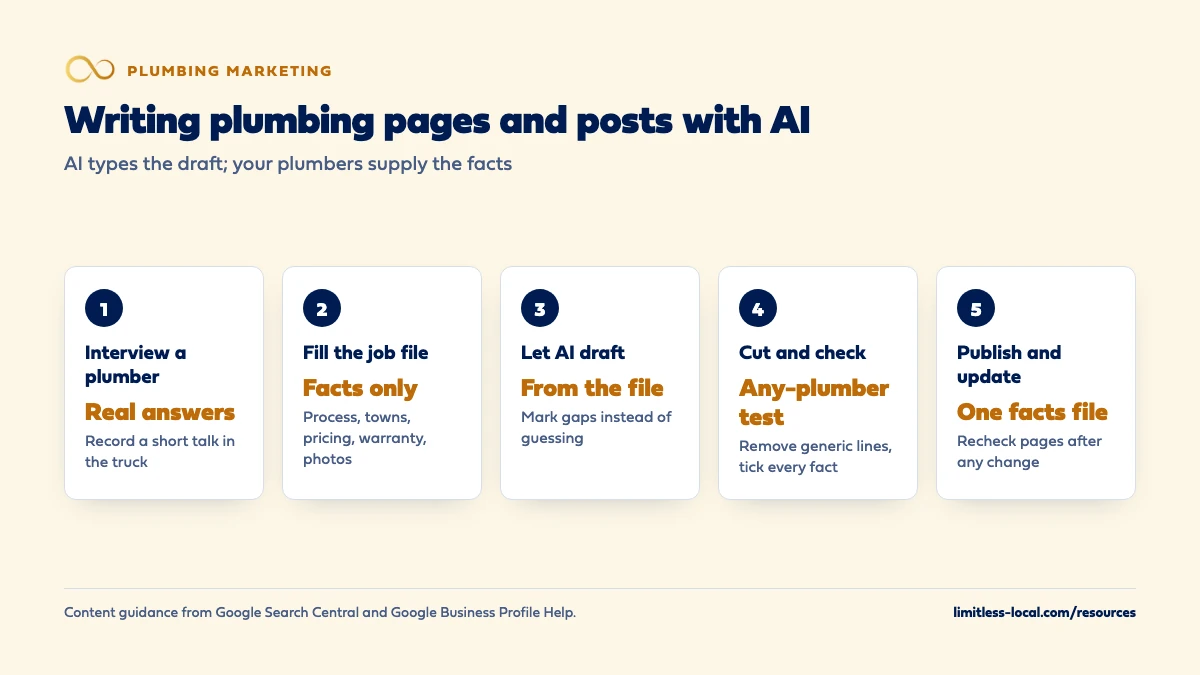
A job file. Fill one in for each service, and the draft gets better every time you reuse it:
- What the job really involves in your area: the pipe materials and fixtures you run into in local homes, hard water, slab or crawlspace, old sewer lines.
- Signs a homeowner notices before they call, in their words.
- Your process: what the tech checks first, what options you give, how long it usually takes.
- How you price, even if you don’t post prices: flat rate, a service call fee, free estimates on replacements.
- Warranty, license and insurance details, copied from your paperwork.
- Towns you cover for this job.
- The five questions customers ask most on the phone.
- Real photos of this job from your own trucks.
Then ask for a draft that uses only the facts in the file, and tell it to mark any gap with a note instead of guessing.
How do I get my plumbers' knowledge into the draft?
Talk, don’t type. Most plumbers won’t write a page, but almost all of them will answer questions for ten minutes in the truck. Record the conversation on a phone, get a transcript, and give that to the AI along with the job file.
Good questions to ask your best tech about a job:
- What’s the most common cause of this problem in houses around here?
- What do homeowners usually get wrong before they call?
- What do you check first when you walk in?
- When do you repair, and when do you tell them to replace?
- What’s the job that surprised you most last year?
Those answers are what no other site has. They’re also the details Google’s guide to creating helpful, reliable, people-first content asks about: whether a page shows first-hand expertise, offers original information, and goes beyond the obvious.
What should a plumbing service page draft include?
Give the AI an outline so it doesn’t invent its own. A plain structure that works for most plumbing jobs:
- What the job is and who needs it, in one short paragraph.
- Signs you need it, written the way customers describe them.
- How you do it, step by step, from your tech’s interview.
- Repair or replace, and how you help the homeowner decide.
- Pricing approach and what affects the cost.
- Towns you serve for this job.
- Proof: photos of your work, a real review that mentions this job, warranty terms.
- Common questions and a clear way to call or book.
Which jobs deserve their own page is a separate decision; how many service pages a plumbing website needs helps you pick. Emergency service is the one page where speed beats depth, so it gets its own outline.
Curious what your marketing is actually booking?
Get a free visibility audit — no obligation, no sales pitch.
How do I edit an AI draft so it isn't generic?
Run three passes:
- The any-plumber test. Read each sentence and ask: could a plumber two towns over post this unchanged? If yes, cut it or replace it with something specific. “We use the latest equipment” becomes “We camera-inspect every sewer line before we quote a replacement.”
- The fact check. Tick every claim against the job file: times, prices, warranty terms, license details. Anything you can’t tick comes out.
- The read-aloud. Read it as if you were explaining the job to a customer at the kitchen table. Fix anything you wouldn’t say.
Watch for typos, padded paragraphs and exaggerated headlines like “best plumbers in the state” too. They make a page look rushed, and a homeowner notices.
Expect to change a third to half of a decent draft. If you’re changing nothing, the draft probably isn’t saying anything.
Can AI write my plumbing town pages too?
This is where AI gets plumbers into trouble. It’s tempting to have it write a page for every town you serve with only the town name swapped. Google’s spam policies list using generative AI tools to generate many pages without adding value for users as an example of scaled content abuse.
A town page earns its place when it carries something true about that town: the jobs you do there most, the kind of homes and plumbing you find, how fast you usually get there, real jobs with photos. AI can help organize that, but only you can supply it. If you don’t have anything specific to say about a town yet, don’t publish a page for it.
Building city pages for a plumbing company without spam walks through what each page needs.
Can AI write my Google Business Profile posts?
It can turn a tech’s job note into a post in a minute, which is the easiest way to keep posting when you’re busy. Google’s help page on creating and managing posts asks for posts without text that adds no value, and specifically without auto-generated or distracting content, so the raw AI output isn’t the post. Your edit is.
A simple routine:
- The tech texts the office a photo and two lines: the job, the town, what was wrong.
- Someone pastes those lines into AI with your standing instructions: under 100 words, plain language, no prices unless you’ve approved them, end with a reason to call.
- The office reads it, fixes anything off, and posts it with the real photo.
Leave phone numbers out of the text. Google’s posts content policy says posts with unverified contact information may be removed, and suggests the Call now button instead, which uses your verified profile number.
What should a plumbing Google post actually say?
Something true this week. Good subjects for AI to draft from:
- A finished job, with a real photo: a water heater swap, a sewer line repair, a slab leak found.
- A seasonal reminder before a hard freeze or ahead of holiday kitchen backups.
- An offer, with real dates and terms, using the Offer post type.
- A new town or service you’ve added.
Posts older than 6 months are archived unless a date range is set, so a steady habit beats a burst of posts once a year. What photos and posts a plumber should add to Google Business Profile covers photos, video and how often to post. Use AI for the words, never for the pictures; a generated photo of a perfect install isn’t your work.
Can AI write the service descriptions on my Google profile?
Yes, and it’s a quick job worth doing. Google’s guide to managing services on your Business Profile says service businesses can pick from suggested services, which for a plumber look like “Install faucet” or “Repair toilet”, add custom services, group them into categories, and add details like descriptions and prices. It also says custom services that violate its policy are automatically rejected, and to keep prices, phone numbers, personal information and gibberish out of custom service names.
Give AI your service page drafts and ask for a two-sentence description of each service that matches them. Keep the wording consistent with your website, so a homeowner who reads one and then the other sees the same company. Add custom services for the jobs Google doesn’t suggest but you want more of, like repiping or water softener installs, and keep each name plain.
How do I keep AI-written content accurate over time?
Pages and posts drift. You raise a price, drop a town, change a warranty, stop doing gas lines, and the old wording sits on the site for a year. AI makes it easy to publish more, which makes it easier to forget what you published.
- Keep one facts file with prices, towns, hours, warranty terms and services. Every AI prompt starts from it, and every change starts there too.
- Name one person who approves anything before it goes live.
- Check each service page twice a year against the facts file, and after any change in what you offer.
- Save your best edited drafts as examples for the next round, so the AI keeps learning your voice from your own words.
The same facts file also feeds your ads. Using AI to improve plumbing ads and messages shows how it keeps ad copy honest.
Not sure which of these is costing you jobs?
A free visibility audit checks the Google profile, reviews, site and tracking, and shows what to fix first.
What's different about AI content for plumbing companies
Local houses make the page. Plumbing problems depend on the homes in your area: the age of the housing, the pipe materials behind the walls, the water, the soil around the sewer lines. That local detail is exactly what AI doesn’t have and exactly what makes a plumbing page worth reading.
Emergency pages need fewer words, not more. Someone with water coming through the ceiling wants your number, your hours and how fast you can come. Keep AI from padding that page; what an emergency plumbing page should include covers the essentials.
Big-ticket pages need the most proof. Water heaters, repipes and sewer replacements are where homeowners compare companies hardest. Those pages need your photos, your warranty terms and your process, checked line by line.
Safety lines stay human. Anything about gas, sewage or water heater safety should be written or checked by a licensed plumber, never left to an AI draft.
A worked example: the time AI drafting saves on ten service pages
These numbers are made up to show the math, not a benchmark. Say writing a strong service page from scratch takes the owner about 6 hours. Ten pages is 60 hours, which is why most plumbers never finish.
Now say each page goes like this with AI: a 15-minute recorded interview with a tech, half an hour to fill in the job file, a few minutes for the AI draft, and about 2 hours of editing, fact-checking and adding photos. Call it 3 hours a page, or 30 hours for ten.
That’s half the time, and the pages are better, because they’re built from your tech’s real answers rather than the owner’s memory late at night. The editing hours are the part you can’t skip; they’re what turns a generic draft into a page that books jobs.
Frequently asked questions
Which AI tool is best for writing plumbing pages?
The tool matters less than what you feed it. Any capable chatbot can draft from a good job file and a tech interview; none of them can write a good page without one.
Should my website say AI helped write it?
For a service page you’ve rewritten and checked, it’s your company’s page. If a page was mostly generated, think about whether a visitor would reasonably wonder how it was made.
Can AI write my plumbing blog posts?
It can draft them the same way. Pick topics customers actually ask about, feed it your tech’s answers, and skip posts written only to fill a calendar.
Can I copy a competitor's page and have AI rewrite it?
Don’t. Reworded copies add nothing new, and your page should be about your work, not someone else’s.
How long should a plumbing service page be?
Long enough to answer what a homeowner needs to decide and call, and no longer. An emergency page can be short; a repipe or sewer replacement page usually needs more.
Can AI translate my service pages into Spanish?
It can draft a translation. Have a fluent Spanish speaker check it, and only publish Spanish pages if someone can take Spanish calls.
Key takeaways
- AI is a fast first-draft writer; the facts and the final word come from your plumbers.
- Build a job file and record a short tech interview for each service before asking AI to draft.
- Cut any sentence a plumber two towns over could post unchanged, and check every fact.
- Never mass-produce town pages with only the name swapped.
- Turn a tech’s job note and a real photo into a Google post, and keep phone numbers out of the text.
Want a second set of eyes on your setup?
We'll look at how you show up locally and where calls are leaking, then send you a plain-English breakdown.
More in this section
- Will AI-written content hurt my plumbing website's Google rankings?
- How can I use AI to improve my plumbing ads and messages?
- Can AI help my plumbing company get more 5-star reviews?
- Will Google AI Overviews take calls from my plumbing company?
- Can AI help a plumbing company answer leads faster?
Sources
- Creating helpful, reliable, people-first content — Google Search Central
- Spam policies for Google web search — Google Search Central
- Create & manage posts on your Business Profile — Google Business Profile Help
- Business Profile photos, videos & posts content policy — Google Business Profile Help
- Manage your services on your Business Profile — Google Business Profile Help