
What should an HVAC owner check monthly for SEO and AI visibility?

- Which monthly numbers show whether my HVAC SEO and AI visibility are improving?
- Why check SEO monthly instead of every week?
- Check 1: What does your Google Business Profile report show?
- Check 2: Where do you show up on Maps in the towns you want?
- Check 3: Are more people finding your site who didn't know your name?
- Check 4: Which pages are earning the clicks?
- Check 5: Is your site showing up in Google's AI answers?
- Check 6: Are you being cited in Bing and Copilot answers?
- Check 7: What do ChatGPT and Google say when you ask them?
- Check 8: How many calls and booked jobs came from organic search and Maps?
- Check 9: Are your reviews keeping pace?
- How do I read the month without fooling myself?
- What's different about checking SEO for an HVAC company
- A worked example: one month on the sheet
- Frequently asked questions
- Key takeaways
- More in this section
- Sources
The short version
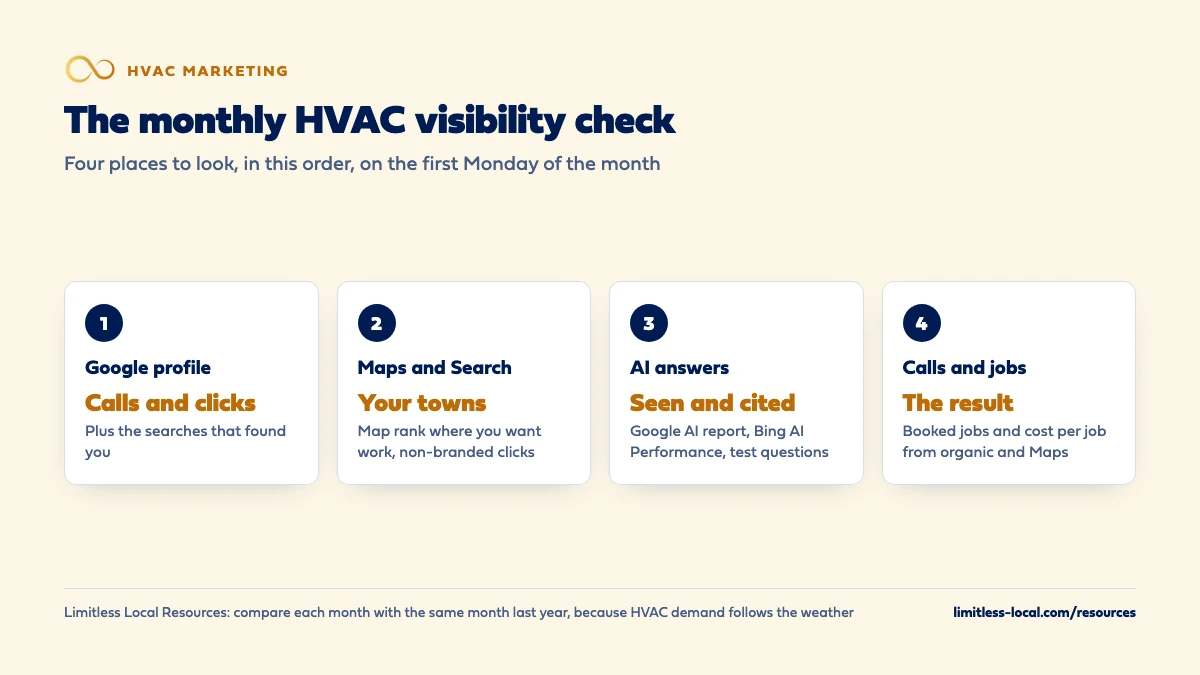
- Google profile: calls, website clicks and the searches that found you.
- Maps and Search: where you rank in the towns you want, and non-branded clicks.
- AI answers: Search Console's AI report, Bing's AI Performance and a few test questions.
- Calls and booked jobs from organic and Maps: the number that matters most.
For HVAC owners who pay for SEO, or do it themselves, and want a short monthly checklist that shows whether it’s working.
Get a free visibility audit · Book a growth call
Which monthly numbers show whether my HVAC SEO and AI visibility are improving?
Once a month, check your Google Business Profile calls and website clicks, where you show up on Maps in the towns you want, your non-branded clicks in Google Search Console, whether your site appears in AI answers on Google and Bing, and how many calls and booked jobs came from organic search and Maps. That last number is the one that decides whether SEO is paying off; the rest tell you why it’s moving. Compare each month with the same month last year, not just last month, because HVAC demand rises and falls with the weather.
We optimize for the same three places owners need to show up: the regular Google results, the Maps 3-pack, and AI answers like ChatGPT, Google AI Overviews and Siri. Our local SEO work comes with monthly performance reports, call tracking and a real-time dashboard, so the calls, leads and cost-per-lead side of this checklist comes to you every month. Our HVAC marketing page shows how that fits the trade, the HVAC marketing guide covers every channel, and the HVAC marketing questions library goes question by question.
Why check SEO monthly instead of every week?
SEO moves slowly. It typically takes 3 to 6 months to show meaningful organic growth, and from week to week the numbers bounce around with the weather, holidays and whatever Google tested that Tuesday. Checking weekly mostly teaches you to react to noise.
Monthly is the right rhythm for visibility. Your weekly scorecard should still track leads, missed calls and booking rate, because those move fast and need fast fixes. Which numbers an HVAC owner should track every week covers that list. This page is the slower, monthly layer on top: are more homeowners finding you on Google, in Maps and in AI answers, and is that turning into calls?
Set a recurring hour on the first Monday of the month, pull the same reports in the same order, and write the numbers into one sheet. The value is in the trend, so consistency matters more than detail.
Check 1: What does your Google Business Profile report show?
Open your profile and click Performance. Google’s guide to Business Profile performance lists what you’ll find there, including:
- Calls: taps on the call button on your profile.
- Website clicks: taps on the website link.
- Searches: the search terms people used to find your profile. This one updates at the start of each month and can take up to 5 days to show.
- Views: unique people who viewed your profile on Search and Maps.
Two things to know before you read it. These numbers include actions from both organic results and Google Ads, so a month with higher ad spend can lift them without any SEO change. And views count each person once a day, so they’ll look lower than you might expect.
For an HVAC shop, calls and website clicks are the numbers to write down. Glance at the searches list too: if “ac repair” and “furnace repair” are growing next to your company name, more homeowners are finding you who didn’t already know you.
Check 2: Where do you show up on Maps in the towns you want?
Your profile report tells you how many people found you, but not where you ranked. For that, check the map results yourself, from the places your customers actually are.
Google says local results are mainly based on relevance, distance, and popularity, so where you rank changes depending on where the homeowner is standing. A search from your shop’s parking lot will flatter you. Pick three to five towns or zip codes you want more work from and two or three searches homeowners use, like “ac repair” and “furnace replacement.” Each month, record whether you’re in the top three map results for each pair.
Watch the direction, not one result. Moving from not showing to fourth in a town you want is real progress. If a competitor keeps sitting above you, why other HVAC companies are ranking above you walks through the usual reasons.
Check 3: Are more people finding your site who didn't know your name?
Google Search Console is free, and its Performance report shows clicks, impressions, average position and the queries people used to find your site. If nobody has set it up for your website yet, that’s step one.
The most useful view for an owner is the split between branded and non-branded searches. Google’s branded queries filter separates searches that include your company name from everything else, and it can be applied to impressions, clicks, average position and CTR. Branded searches mostly come from people who already know you, from your trucks, a referral or an ad. Non-branded searches like “heat pump installer near me” show how new customers are finding you.
So the number to write down each month is non-branded clicks. If it’s climbing, your SEO is reaching new homeowners. If only branded clicks are growing, your name is getting around, but the SEO itself may not be doing much. The filter only works on top-level properties with enough search volume, so if you don’t see it, filter queries that contain your company name by hand.
Check 4: Which pages are earning the clicks?
Still in the Search Console Performance report, switch to the Pages tab and sort by clicks. For an HVAC site you want to see your service pages near the top: AC repair, furnace repair, heat pumps, replacement, maintenance plans, and any town pages you’ve built.
Write down the top five pages and their clicks each month, and look for three things:
- A service you want more of that gets almost no clicks. That page probably needs work, or doesn’t exist.
- A page that dropped sharply. Check whether it was changed, moved or broken.
- A blog post outranking your service pages for a money search. Make sure that post links clearly to the service page.
This is also the easiest way to check that the content your SEO provider wrote last month is getting seen at all. What HVAC SEO actually includes month to month lists the work you should be able to match against these pages.
Curious what your marketing is actually booking?
Get a free visibility audit — no obligation, no sales pitch.
Check 5: Is your site showing up in Google's AI answers?
Search Console now has a generative AI performance report. It shows how many times links to your site were shown in Google’s AI Overviews and AI Mode, which pages got those impressions, and how that changes over time. Google rolled it out to all websites worldwide as of August 31, 2026, though a site with very few AI impressions may not see it yet.
Each month, note the total AI impressions and which pages earned them. For most HVAC companies, you’d expect your service pages and helpful how-to pages to show up first. If the report is empty or flat for months while your regular search impressions grow, AI features aren’t picking up your pages yet.
Two limits to keep in mind: the report counts impressions, not clicks or calls, and Google’s guide to AI features and your website says traffic from AI Overviews and AI Mode is included in your overall Search traffic in the Performance report, not reported separately. Treat it as a visibility check, and judge results by the calls in Check 8.
Check 6: Are you being cited in Bing and Copilot answers?
Google isn’t the only AI answer engine. Bing Webmaster Tools, free like Search Console, has an AI Performance report that shows how often your pages are cited in AI-generated answers across Microsoft Copilot, AI summaries in Bing and select partner AI tools. It lists total citations, which pages were cited, and the grounding queries, the short phrases the AI used when it pulled your content.
Each month, write down total citations and the top cited pages, and read the grounding queries.
Bing is clear that this report doesn’t measure rankings or importance; it only shows which content was cited. Use it the same way as Google’s AI report: a sign of whether AI tools are finding you, not a measure of business.
Check 7: What do ChatGPT and Google say when you ask them?
Reports only cover the tools that share data. For the rest, ask. Keep a short, fixed list of five or six questions a homeowner in your area might ask, like “Who’s a good AC repair company in [your town]?” or “Best HVAC company for a heat pump install near [your town]?” Each month, ask the same questions in ChatGPT, Google’s AI Mode and Gemini, and note:
- Were you named?
- Which competitors were named instead?
- Did the answer get any facts about you wrong, like your service area, hours or services?
Answers change from one ask to the next, so don’t read much into a single month. Over six months, though, a pattern shows: you start appearing in more answers, or you don’t. Wrong facts are worth fixing quickly, usually at the source, which is your Google profile, your website and your main directory listings.

Check 8: How many calls and booked jobs came from organic search and Maps?
Everything above is visibility. This is results, and it’s the check that decides whether your SEO is worth what you pay for it. You need three numbers:
- Calls from your Google profile and your website’s organic visitors, from your call tracking. A tracking number on the profile and a swapping number on the site keep these separate from ad calls.
- Form and chat leads from organic visitors, from your website analytics. In Google Analytics 4, the AI Assistant channel counts visits from tools like ChatGPT, Gemini and Copilot, so you can see those separately; visits from Google’s AI Overviews and AI Mode fall under organic search instead.
- Booked jobs and revenue tagged to organic, Maps or AI sources in your field software.
Then divide what you spent on SEO that month by the booked jobs it produced. That’s your cost per booked job for SEO, and the number you compare against your ads. How to know if AI search is sending your HVAC company calls goes deeper on tracking the AI piece.
Check 9: Are your reviews keeping pace?
Reviews feed your Maps rankings and help homeowners pick you, so give them a line on the monthly sheet:
- Total Google reviews and your average rating.
- New reviews this month, compared with the jobs you finished.
- Reviews that haven’t had a reply yet.
- Any new review that mentions a problem you should fix in the field or the office.
A steady stream of new reviews matters more than a big total from three years ago. If new reviews dropped this month while jobs held steady, the review ask slipped somewhere, usually at the end of the job.
How do I read the month without fooling myself?
A few rules keep the monthly check honest:
- Compare with the same month last year as well as last month. A September that’s down from August can still be well up on last September.
- Look at three months, not one. One bad month is weather or noise. Three in a row is a trend worth acting on.
- Separate visibility from results. More impressions with no more calls means homeowners see you but aren’t choosing you; look at reviews, photos and your service pages.
- Watch for ads muddying organic numbers. Profile actions include Google Ads, and a bigger ad push lifts branded searches too.
- Act on the first broken link. If visibility is up but calls aren’t, the problem may be the website or the phones, not SEO. How to run an HVAC company so the phones keep ringing covers the whole chain.
And if the monthly report you get from a provider doesn’t show calls and booked jobs from organic and Maps, ask for it. Rankings alone don’t pay the bills.
Want to see where your company stands?
A free visibility audit shows where you show up on Google, Maps and AI answers, and what it's costing you in calls.
What's different about checking SEO for an HVAC company
Weather drives the swings. A heat wave can double profile calls in a week with no SEO change at all, and a mild spring can make good SEO look like it stopped working. That’s why year-over-year comparisons matter so much more in HVAC than in steadier trades.
Emergency searches happen on phones, in Maps. A homeowner with no AC often taps call straight from the map results without visiting your site. Profile calls can be your biggest organic source, so make sure that number has its own tracking.
Repair and replacement searches are different. Track at least one repair search and one replacement search in your Maps check. You can rank well for one and poorly for the other, and replacement work is worth far more per job.
A worked example: one month on the sheet
These numbers are made up to show how to read the sheet, not a benchmark for your market. Say this September looks like this, next to last September:
- Google profile calls: 180, up from 150.
- Non-branded clicks in Search Console: 420, up from 300.
- AI impressions in Search Console: 900, a number you couldn’t see last year.
- Booked jobs from organic search and Maps: 38, up from 29.
If you spent $2,000 on SEO that month, each organic booked job cost about $53. The non-branded clicks rising tells you the SEO is reaching new homeowners, not just people who already knew your name, and the booked jobs tell you it’s turning into work. If profile calls had risen but booked jobs hadn’t, the next place to look would be the phones, not the SEO.
Frequently asked questions
Do I need paid tools to check my HVAC SEO each month?
No. Your Google Business Profile, Google Search Console, Bing Webmaster Tools and Google Analytics are all free. A paid rank tracker helps with the Maps check across many towns, but it’s optional for a small service area.
What if my SEO numbers drop for a month?
Check the same month last year and the two months before. One down month in HVAC is often weather; three in a row is worth a closer look at rankings, reviews and your site.
Can I see exactly which questions people asked an AI tool before finding me?
Not exactly. Bing’s AI Performance report shows grouped phrases, not full prompts, and Google’s AI report shows impressions by page. Asking your own fixed list of questions each month fills some of the gap.
How long should the monthly check take?
About an hour once the sheet is set up. The first month takes longer because you’re setting up access and choosing your towns and searches.
Should my SEO provider send me these numbers?
Yes. A monthly report should show calls and booked jobs from organic search and Maps, not only rankings and traffic. If it doesn’t, ask for it.
Key takeaways
- Check SEO and AI visibility monthly; check leads and booking weekly.
- Write down profile calls, Maps rank in your towns, non-branded clicks and AI impressions or citations.
- Calls and booked jobs from organic and Maps decide whether SEO is paying off.
- Compare each month with the same month last year, because HVAC demand follows the weather.
- If visibility rises but calls don’t, look at reviews, the website and the phones.
Not sure what's working right now?
Start with a free visibility audit: rankings, Google profile, reviews and tracking, checked against your service area.
More in this section
- What does HVAC SEO actually include month to month?
- How much does HVAC SEO cost per month?
- What do Google's AI Overviews mean for my HVAC company?
- Should my HVAC company start with LSAs, Google Ads or SEO?
- How long does HVAC SEO take to bring in calls?
Sources
- Understand your Business Profile performance & insights — Google Business Profile Help
- Tips to improve your local ranking on Google — Google Business Profile Help
- Performance report (Search results): Overview and basic setup — Search Console Help
- Introducing the branded queries filter in Search Console — Google Search Central Blog
- Generative AI performance report (Search) — Search Console Help
- AI features and your website — Google Search Central
- AI Performance in Bing Webmaster Tools — Bing Webmaster Tools
- Default channel group — Analytics Help