
What should an electrician set up for conversion tracking first?

- What conversion tracking should an electrician have in place before spending more on ads?
- What does conversion tracking mean for my electrical business?
- Why set this up before raising ad spend?
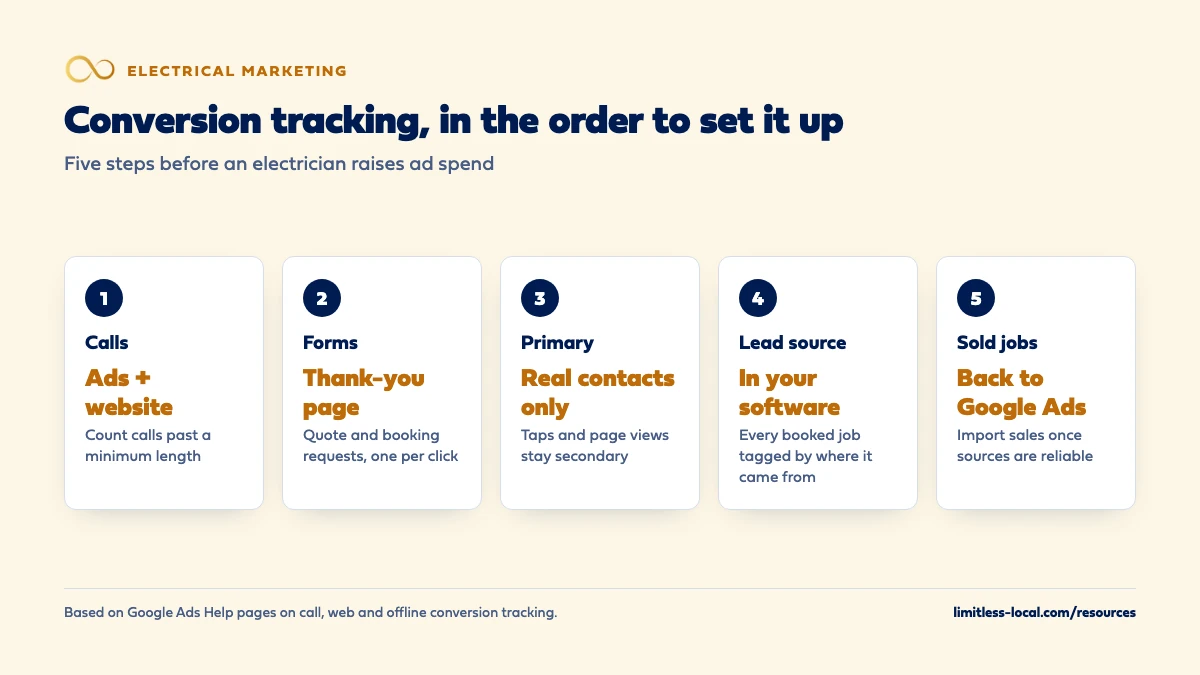
- Step 1: Which calls should count as conversions?
- Step 2: How do I track quote forms and booking requests?
- Step 3: What should be primary and what should be secondary?
- Step 4: How does every lead get its source in my field software?
- Step 5: When should I send sold jobs back to Google Ads?
- What about Local Services Ads?
- How do I check the tracking works before I spend more?
- What can wait until later?
- What mistakes make the numbers look better than they are?
- What's different about conversion tracking for electricians
- A worked example: what loose tracking hides
- Frequently asked questions
- Key takeaways
- More in this section
- Sources
The short version
- Calls first: calls from your ads and calls from your website, with a minimum call length.
- Then quote forms and booking requests, counted once per ad click.
- Only real contact actions go in as primary conversions; everything else is observe-only.
- Lead source in your field software, then sold jobs sent back to Google Ads.
For electrical contractors running Google Ads or Local Services Ads who want to know which calls and requests are real before turning the budget up.
Get a free visibility audit · Book a growth call
What conversion tracking should an electrician have in place before spending more on ads?
Set up phone call tracking first, because most electrical work starts with a call: count calls from your ads and calls from your website once they pass a minimum length. Next, track quote forms and booking requests as one lead per click, and mark only those real contact actions as primary conversions so bidding doesn’t chase page views or button taps. Then make sure every lead lands in your field software with its source, so you can send sold jobs back to Google Ads before you raise the budget.
That order is how we set up every account too: call, web and form tracking come in every package, and Growth adds advanced attribution, so the monthly report talks about booked jobs and what they cost instead of clicks. Our local ads page explains how we run Google Ads and Local Services Ads, and our electrical contractor marketing page shows how it fits an electrical shop. The rest of the electrical marketing questions library goes question by question.
What does conversion tracking mean for my electrical business?
A conversion is an action you decide is worth counting after someone sees or clicks your ad. For an electrician, that list is short: a real phone call, a quote or service request form, and a booking request.
Conversion tracking does two jobs at once. It shows you which keywords, ads and campaigns bring in customers, and it feeds Google’s automated bidding, which uses those counts to decide where your money goes next. That second job is why the setup order matters so much. Whatever you tell Google to count is exactly what it’ll go looking for more of.
Why set this up before raising ad spend?
Because more budget on loose tracking buys more of the wrong thing. If a tap on your phone number, a visit to your contact page and a quick wrong-number call all count as conversions, your account looks great on paper while the schedule stays thin. Automated bidding will happily chase whatever is cheapest to count.
There’s a timing cost too. Google’s page on primary and secondary conversion actions says Smart Bidding needs a standard 7-14 day learning phase, and that frequent changes to budgets, targets or conversion goals reset it. So get the conversion setup right first, then leave it alone while you raise spend. If you’re weighing that move right now, how many jobs your marketing should produce before you add budget walks through the checks.
Step 1: Which calls should count as conversions?
Calls come first because they’re where most electrical work starts. Google’s page on phone call conversion tracking lists several ways to count them. Two matter most for an electrical shop:
- Calls from ads. Calls made straight from a call ad or the call button on your ad. You set a minimum call length, and every call that lasts at least that long counts. Call reporting has to be turned on in your account settings, which uses Google forwarding numbers.
- Calls to the number on your website. When someone clicks your ad and then calls the number on your site, a Google forwarding number swaps in for your regular one, so the call is tied back to the ad. This needs the Google tag and a phone snippet on every page where your number appears.
A third option, counting clicks on the phone number on your mobile site, only tracks the tap, not the call itself. Keep that one for watching, not for bidding (more on that in Step 3).
Pick a minimum call length that screens out hang-ups, robocalls and wrong numbers but still counts a short "can you come out today?" call. The quickest way to set it: listen to a week of recorded calls and note how long the real ones run. Calls shorter than the setting simply won’t count.
Step 2: How do I track quote forms and booking requests?
Send every form on your site to its own thank-you page after it’s submitted. Google’s guide to setting up web conversions lets you count that page load as a conversion with a URL rule, such as "URL contains thank-you", with no code changes once the Google tag is on your site. Tracking a button click instead of a page load needs code, so the thank-you page is the easier path for most shops.
Then set how each form is counted. Google’s page on conversion counting options describes two settings: Every counts every conversion after an ad click, and One counts only one per click. For quote forms and booking requests, use One. A homeowner who fills out your EV charger form twice is still one lead.
One more trap: Google warns that if your website platform has a plugin managing tags, you shouldn’t add the same tag again yourself, because double-tagging causes duplicate conversion reporting. Check before you install anything.
Step 3: What should be primary and what should be secondary?
This is the step most accounts get wrong, and it decides what your bidding chases. Primary actions show up in the Conversions column and are used for bidding. Secondary actions are observe-only: they show in the All conversions column but aren’t used for bidding (the one exception is when they’re part of a custom goal).
For an electrical shop, a clean split usually looks like this:
- Primary: calls from ads past your minimum length, calls to your website number past your minimum length, quote and service request forms, booking requests.
- Secondary: taps on your phone number, clicks on directions, visits to service pages, and anything else you want to see without bidding on it.
If you build conversions in Google Analytics, they come into Google Ads as secondary by default, and you can only switch them to primary inside Google Ads.
Curious what your marketing is actually booking?
Get a free visibility audit — no obligation, no sales pitch.
Step 4: How does every lead get its source in my field software?
Google Ads only sees its own clicks. It can’t see the call that came from your truck wrap, your Google Business Profile, a mailer or a builder you’ve worked with for years. So the next layer lives in the software you run the business on.
For calls, that usually means a tracking number per source. CallRail describes source tracking as a unique number for each campaign, each one forwarding to your main line, and says one number per campaign keeps the reports accurate. It also notes that plain source-tracking numbers won’t show your call conversions inside Google Ads, which is one more reason to keep Google’s own call tracking on your ads.
Then make the lead source a required field when the job is booked in ServiceTitan, Housecall Pro or Jobber, and check for blanks every week. Whether you need call tracking numbers covers how many to buy and where to put them, and tracking which marketing brings in real jobs covers the monthly review that uses all of this.
Step 5: When should I send sold jobs back to Google Ads?
Once the lead source is getting filled in reliably for a few weeks. Before that, you’d be sending Google holes.
Google gives you two ways in. Importing call conversions lets you count calls only when they include sales, and include the value of those sales. Google’s page on offline conversion imports covers the wider version: measuring what happens offline, such as a sale closed over the phone or at your office, after an ad click or call. If you haven’t set up offline imports before, Google recommends starting with enhanced conversions for leads, which uses details from your lead form, such as an email address, to match sales back to the ad.
You don’t have to build any of this by hand. Ask your field software or call tracking provider whether it can send booked and sold jobs to Google Ads for you. Once it does, the account can tell a panel upgrade from someone asking whether you sell light bulbs, and that’s when raising the budget gets a lot less risky.
What about Local Services Ads?
Local Services Ads count their own leads, so there’s less to set up. Google is moving them into Google Ads as Performance Max campaigns with pay-per-lead goals, and electrical is in the first phase that began in August 2026 for select advertisers. Once your account moves, Google’s transition page says the Conversions column for those campaigns shows the leads you’re charged for, and the Leads page shows charged status, lead type and call recordings, with a download you can import into your own CRM.
What Google can’t tell you is which of those leads booked. Give Local Services Ads its own lead source in your software, and download or log the leads every week so they can be matched to jobs. Whether Local Services Ads are worth it for electricians covers the rest of the setup, and the reviews and rating you need before local ads covers the profile side.

How do I check the tracking works before I spend more?
- Check the status. In your conversion summary, every action should be active. Google says an Inactive Tag status often means the tag or snippet isn’t installed correctly.
- Test the website number. Google’s page on tracking calls to a number on your website says it can take up to an hour after setup, and suggests searching for your ad and clicking it (you’ll be charged for the click) to check that your regular number has switched to a forwarding number.
- Submit your own form. Make sure the thank-you page loads, then confirm the conversion shows up.
- Compare for two weeks. Put the Conversions column next to the real leads in your field software. If Google shows far more, something is counting twice or counting junk. If it shows far fewer, a form or number isn’t tagged.
Two clean weeks is a good bar before you touch the budget.
What can wait until later?
Plenty. You don’t need these on day one:
- Different values for different jobs. Giving a generator install a higher value than a service call is useful once sold jobs flow back, not before.
- Chat and text tracking. Worth adding if your website chat or text button gets real use. If it doesn’t, it’s noise.
- Fancy attribution reports. Until calls, forms and sources are clean, a more detailed model just slices bad data more finely.
What mistakes make the numbers look better than they are?
- Counting taps as primary. A tap on your number isn’t a call, and bidding will chase taps.
- Counting every form submission. Use One for leads, or a homeowner who resubmits shows up twice.
- A minimum call length that’s too short. Robocalls and wrong numbers sneak into your results.
- Double tags. A website plugin plus a hand-added tag can count every form twice.
- Calling every call a lead. Vendors, spam and people asking for free advice all ring the same phone. Telling a junk lead from a real job covers how to sort them.
Each one makes cost per conversion look lower than what you’re really paying per booked job.
Not sure which of these is costing you jobs?
A free visibility audit checks the Google profile, reviews, site and tracking, and shows what to fix first.
What's different about conversion tracking for electricians
Service calls and quoted work don’t behave the same. A breaker that keeps tripping books the same day. A panel upgrade, EV charger or whole-home generator goes through a site visit and a quote, and may sign weeks later. Count the call or form as the lead right away, and send the signed quote back later as the sale, so a slow-closing channel isn’t judged on its first week.
Emergency calls come after hours. If your phones roll to an answering service at night, make sure those calls still pass through your tracked numbers, or your best-converting hours vanish from the data.
Commercial and builder work skips the ads. Bid invitations from general contractors and property managers rarely touch a tracking number. Give each partner its own lead source so that work shows up in your numbers too, even though Google Ads will never see it.
A worked example: what loose tracking hides
These numbers are made up to show the math, not a benchmark for your market. Say you spend $2,000 a month on Google Ads, and the account reports 40 conversions, or $50 each. That looks cheap.
Now clean it up. 15 of those conversions were taps on the phone number on your mobile site, counted alongside the calls they led to. Another 8 were calls under a minute: wrong numbers and robocalls. That leaves 17 real leads, so the real cost per lead is about $118. Of those 17, 9 booked a job, which puts your cost per booked job at about $222.
Neither number is good or bad on its own. But $222 is the one to hold against what a job is worth to you. If you’d raised the budget because leads looked like $50 each, you’d have been planning on the wrong number by more than four times.
Frequently asked questions
Do I need Google Analytics to track conversions?
No. The Google tag in Google Ads can count calls and forms on its own. If you do use Google Analytics, conversions you create there come into Google Ads as secondary, and you switch them to primary inside Google Ads.
Can my website builder handle the tracking?
Usually, yes. Counting a thank-you page needs no code once the Google tag is installed, but swapping the phone number on your site needs a small snippet, so you or your web person need access to edit the site.
Should a call from a past customer count as a conversion?
In Google Ads it will, if they came through an ad, and that’s fine. In your field software, give repeat customers their own lead source so they don’t make a paid channel look better than it is.
Whose account should the tracking live in?
Yours. Set conversions up in your own Google Ads account and give anyone helping you their own access, so the history stays with you if you ever change who runs the ads.
My work is mostly referrals. Do I still need this?
Less of it. If you’re not running ads, skip the Google Ads steps and focus on recording a lead source on every job, so you know which referral partners and past customers keep the phone ringing.
How long until I can trust the numbers?
Give a new setup two clean weeks of matching Google’s numbers against real leads in your software. After a change to conversion goals, expect Smart Bidding to need its 7-14 day learning phase before results settle.
Key takeaways
- Track calls first: calls from your ads and from your website, with a minimum call length that screens out junk.
- Count quote forms and booking requests on a thank-you page, once per ad click.
- Only real contact actions should be primary; taps, clicks and page views stay secondary.
- Record a lead source on every booked job, then send sold jobs back to Google Ads.
- Check two clean weeks of data against your field software before raising the budget.
Want a second set of eyes on your setup?
We'll look at how you show up locally and where calls are leaking, then send you a plain-English breakdown.
More in this section
- What should an electrician fix first after losing the map pack spot?
- Do I need call tracking numbers for my electrical business?
- How do I track which electrical marketing brings in real jobs?
- What should an electrician check weekly to see if SEO is working?
- How do I follow up on electrical quotes automatically?
Sources
- About phone call conversion tracking — Google Ads Help
- Set up Tracking calls to a phone number on a website — Google Ads Help
- Set up your web conversions — Google Ads Help
- About conversion counting options — Google Ads Help
- About primary and secondary conversion actions — Google Ads Help
- About offline conversion imports — Google Ads Help
- Local Services Ads transition to Performance Max campaigns with pay-per-lead goals — Google Ads Help
- Source tracking basics — CallRail Help Center