
Electrician Google Ads geotargeting: how tight a service area?
- How should an electrical company set location targeting in Google Ads?
- What does geotargeting mean in Google Ads?
- How tight should my service area be?
- Should I target a radius, cities or ZIP codes?
- What is the "Presence" setting and which should I pick?
- Why do I still get calls from outside my area?
- Should I exclude areas inside my service area?
- Should emergency calls have a smaller area than planned work?
- Should I bid differently in different towns?
- How do Local Services Ads and Performance Max handle service areas?
- How do I know if my service area is set right?
- What's different about service areas for electricians
- A worked example: what a wide service area costs
- Frequently asked questions
- Key takeaways
- More in this section
- Sources
The short version
- Target the towns or ZIP codes you can reach and want, not the widest area you'd ever drive to.
- Use "Presence" so ads reach people in or regularly in your area, not just interested in it.
- Exclude the pockets you don't serve, and give emergency calls a smaller area of their own.
- Review the locations report monthly and adjust on booked jobs, not clicks.
For electrical contractors setting or fixing where their Google Ads show, who want calls from towns the trucks can reach, not from people two counties away.
Get a free visibility audit · Book a growth call
How should an electrical company set location targeting in Google Ads?
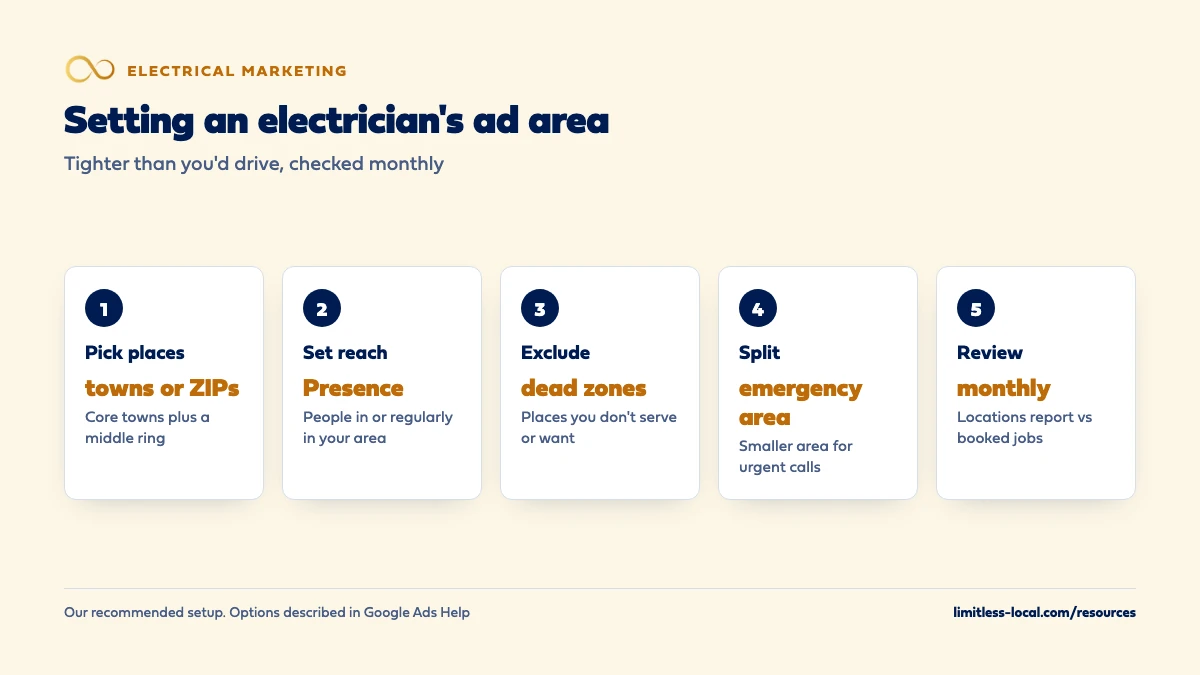
Set your Google Ads service area to the towns or ZIP codes you can reach and want work in, usually a bit tighter than the area you’d accept a job from, and use the “Presence” setting so ads reach people who are in or regularly in those places rather than anyone who has shown interest in them. Exclude areas inside the map that you don’t serve or don’t want, and if one part of your area is too far for emergency calls, put urgent-service keywords in a campaign with a smaller area. Then check the locations report monthly and tighten or widen based on where booked jobs actually come from.
Setting where ads show is part of how we build and run Google Ads for home-service businesses, and Google Ads management is included in all of our packages. Our electrical contractor marketing page shows how ads fit with SEO and follow-up for electricians, and the full electrical marketing questions library covers the rest.
What does geotargeting mean in Google Ads?
Geotargeting, or location targeting, is the setting that decides where your ads can appear. Google’s help page on targeting geographic locations says locations can include countries, areas within a country, and a radius around a location. Depending on the country, areas within it can be regions, cities or postal codes.
For an electrician, it answers one question: when someone searches “electrician” or “panel upgrade”, should your ad be eligible to show to them, given where they are? Get it right and every click comes from someone your trucks can reach. Get it wrong and you pay for calls from places you’d never drive to, which is one of the quieter ways an electrical account wastes money.
How tight should my service area be?
In our judgement, set it to the area where you want work and can get to reliably, which is usually smaller than the area you’d accept a job from. Most electricians have three rings: the core towns where crews already are most days, a middle ring you’ll drive to for the right job, and an outer edge you’d only go to for something large.
Start the ads on the core and the middle ring. The outer edge tends to cost the same per click and book fewer jobs, because travel time eats the margin on service calls and customers there often have someone closer. If a big job comes from the edge through a referral or your Google profile, take it. You don’t need to pay to find it.
A tighter area also stretches a small budget. Our page on monthly Google Ads budgets covers why a budget spread across too many towns runs out before the day is over.
Should I target a radius, cities or ZIP codes?
Google’s targeting page describes radius targeting as showing ads to people within a certain distance of your business, rather than choosing individual cities, regions or countries. It’s quick to set up, but a circle rarely matches a real service area: it crosses rivers, highways and county lines you don’t want to cross, and takes in towns on the far side of a traffic bottleneck.
In our view, city or ZIP code targeting usually fits an electrical company better. You list the places you serve, add or remove one at a time, and the locations report shows results by place, which makes it easy to see which towns book jobs. ZIP codes give finer control in a large metro, where one side of a city may be twenty minutes away and the other side an hour.
Google does warn that a small radius or very small location may only show ads intermittently or not at all, because small targets might not meet its targeting criteria. Its page also says Google doesn’t allow radius targeting under 1 km around a location. So don’t shrink the area to a few blocks; keep it to real towns or ZIP codes.
What is the "Presence" setting and which should I pick?
Google’s page on advanced location options explains that by default, location targeting reaches people who are in or regularly in your targeted locations and people who have shown interest in them. It calls that option “Presence or Interest”. The other option, “Presence”, reaches people in or regularly in your targeted locations only.
Google recommends broad targeting as a best practice on Search, and cites travel, real estate and education advertisers who saw more conversions after switching to it. Its page also says to consider “Presence” when you only want to reach people in specific locations, not people elsewhere who are interested in them. A homeowner in another state researching electricians in your town is rarely your customer. In our judgement, “Presence” is the right default for most electrical contractors. The exception is a market where adult children often arrange work for parents, or where second-home owners book from out of town; there, test “Presence or Interest” in its own campaign and compare booked jobs.
Curious what your marketing is actually booking?
Get a free visibility audit — no obligation, no sales pitch.
Why do I still get calls from outside my area?
A few reasons. With “Presence or Interest” left on, Google can show ads to people elsewhere who have shown interest in your area. Google’s page on location targeting also says that when you target an area, it may show ads to people in nearby, closely related areas that normally couldn’t be targeted because of low population or not enough data. And location signals are estimates: someone who commutes into your area may count as regularly there.
Fix the setting first. Then look at the locations report, which shows where clicks and conversions came from, and exclude places that keep costing money without booking jobs. If out-of-area calls come from search terms with a far-off town name in them, add that town as a negative keyword too. Our page on negative keywords for electricians covers that list.
Should I exclude areas inside my service area?
Often, yes. Google’s page on excluding geographic locations gives the example of a business that targets a whole state but excludes the one island where it has no location. For an electrician, the same idea applies to a neighborhood behind a toll bridge, a town where your license doesn’t cover you, or a part of the metro where traffic makes a two-hour round trip out of a one-hour job.
Exclusions also protect you from the edges of a radius or a large city target. Target the county, then exclude the corner you never go to. In our judgement, that’s cleaner than trying to draw the perfect area from scratch.
Should emergency calls have a smaller area than planned work?
In our view, yes, if you take emergency work. A customer with no power wants someone in an hour, and a crew forty minutes away can lose that job to someone closer, or win it and lose money on the drive. Planned jobs like panel upgrades, EV charger installs, generators and rewiring are booked days ahead, so a longer drive is easier to justify for the bigger ticket.
That’s a reason to split campaigns by job type, which is how many electrical accounts are built anyway. Emergency and repair keywords go in a campaign aimed at the core towns. Panel, EV and generator keywords go in campaigns that reach the middle ring too. Our page on campaigns that work for electricians covers that structure, and keywords electricians bid on covers the keyword groups inside it.

Should I bid differently in different towns?
It can make sense once there’s data. If your nearest towns book jobs at a lower cost than the far ones, you can raise bids where jobs are cheap to win and lower them where they’re expensive. If you use Smart Bidding, Google’s page on Smart Bidding says it can optimize bids based on the specific location someone is in, down to the city, so manual location adjustments matter less.
In our judgement, don’t add bid adjustments in the first month. Start with clean targeting and the right setting, let calls and booked jobs build up, then adjust the towns with enough data to judge. A town with three clicks tells you nothing yet.
How do Local Services Ads and Performance Max handle service areas?
Local Services Ads have used service areas rather than keyword-style targeting. Google’s page on the Local Services Ads move to Performance Max says electrical is among the first categories moving into Google Ads as Performance Max campaigns with pay-per-lead goals, that targeted locations transfer automatically, and that after the move, service areas and ad schedules can be customized in Google Ads independently of your Google Business Profile.
That independence matters. Your Business Profile service area tells customers where you work. Google’s service area help page says you can list up to 20 service areas and the overall area shouldn’t be more than about 2 hours of driving from where your business is based. Your ads can now be tighter than that. In our judgement, keep the profile honest about everywhere you work, and keep the ad targeting on the towns where you want to pay for leads.
How do I know if my service area is set right?
Check three things monthly. The locations report: which towns or ZIP codes get clicks, calls and conversions. Your job records: which of those calls became booked jobs, and in which towns. And the drive: whether jobs in the farther towns are still worth it after travel time.
If a town gets clicks and no booked jobs for a few months, exclude it or move it to a campaign with a lower bid. If a town you left out keeps showing up in calls from your profile or referrals, add it and see what the ads do there. The landing page matters too: a town in the targeting with no mention on the page loses some of its callers. Our page on landing pages for electrical ads covers that side.
Want to see where your company stands?
A free visibility audit shows where you show up on Google, Maps and AI answers, and what it's costing you in calls.
What's different about service areas for electricians
Emergency and planned work have different drive limits. A no-power call needs someone soon, while a panel upgrade or generator is scheduled ahead. That split doesn’t exist for every trade, and it’s the main reason electrical accounts benefit from different areas per campaign.
Licensing and permits follow boundaries. Electrical licensing and permitting rules vary by state and sometimes by city or county. If you aren’t set up to pull permits somewhere, in our judgement that place belongs in your exclusions, not your targeting. Check your own state and local rules; this isn’t legal advice.
Commercial work travels further. A commercial build-out or tenant improvement job can justify a much longer drive than a service call. If you want that work, a separate commercial campaign with its own wider area keeps it from stretching your residential targeting.
Storms change the map. After an outage, demand for generator and repair work rises in specific areas. A campaign you can widen for a few weeks, then pull back, is easier to manage than changing your main targeting.
A worked example: what a wide service area costs
These numbers are made up to show the math, not a benchmark. Say you spend $2,000 a month on Google Ads with a 30-mile radius. The locations report shows that 40% of clicks come from towns past your middle ring, and those towns booked two jobs last month, against 18 from the core and middle towns.
That’s $800 a month on the far towns, or $400 per booked job there, against $1,200 for 18 jobs, about $67 per booked job, in the towns you actually want. Cutting the far towns and putting the $800 back into the core doesn’t guarantee 12 more jobs, because click costs and demand change. But it moves the money to where the record says jobs come from.
Ad spend is paid directly to Google and isn’t part of any package. Our Essentials package, at $3,500 a month, includes Google Ads management for up to $2,500 a month in spend and one location; Growth, at $4,500 a month, covers up to $5,000 a month in spend, SEO for up to two locations, and Local Services Ads management.
Frequently asked questions
Does my Google Business Profile service area control where my ads show?
Not for Search campaigns; those use the campaign’s location targeting. For Local Services Ads moving to Performance Max, Google says service areas can be customized in Google Ads independently of your profile.
Can I target a radius around each truck's location?
Google lets you target a radius around a location, but in our view one tidy list of towns or ZIP codes is easier to manage and report on than several overlapping circles.
Should I use location assets in my ads?
If you have an address customers can visit, they can help. Many electricians are service-area businesses without a storefront, so a call asset usually matters more.
Why does my ad not show when I search from home?
Location, settings and budget all affect it. Google’s Ad preview and diagnosis tool lets you check how your ad appears, and Google says using it avoids piling up impressions the way searching for yourself does.
Should I target a whole metro if I live in the middle of it?
Only if you’ll drive to every part of it for a service call. Otherwise target the parts you serve and exclude the rest.
How often should I change my service area?
In our judgement, review it monthly, but change it only when a town has enough clicks and calls to judge.
Key takeaways
- Target the towns or ZIP codes you want work in, usually tighter than the furthest you’d drive.
- Use “Presence” so ads reach people in or regularly in your area; test “Presence or Interest” separately if you need it.
- Prefer town or ZIP targeting over a single radius, and exclude pockets you don’t serve.
- Give emergency keywords a smaller area than planned panel, EV charger and generator work.
- Keep the Business Profile honest about everywhere you work; ads can be tighter.
- Judge each town on booked jobs from the locations report, not clicks.
Not sure what's working right now?
Start with a free visibility audit: rankings, Google profile, reviews and tracking, checked against your service area.
More in this section
- What Google Ads campaigns work best for electricians?
- Are Google Local Services Ads worth it for electricians?
- How much should an electrician spend on Google Ads each month?
- Which keywords should an electrician bid on in Google Ads?
- What negative keywords should electricians add to Google Ads first?
Sources
- About advanced location options — Google Ads Help
- Target ads to geographic locations — Google Ads Help
- About targeting geographic locations — Google Ads Help
- Exclude ads from geographic locations — Google Ads Help
- Local Services Ads transition to Performance Max campaigns with pay-per-lead goals — Google Ads Help
- About Smart Bidding — Google Ads Help
- About the Ad preview and diagnosis tool — Google Ads Help
- Manage your service areas for service-area & hybrid businesses — Google Business Profile Help