
What should an HVAC company fix when its leads are mostly junk?

- My HVAC leads are mostly junk: what do I change first, and in what order?
- What counts as a junk lead for an HVAC company?
- How do I find out where the junk is coming from?
- Are my leads junk, or is my follow-up too slow?
- Fix 1: Clean up the searches your Google Ads pay for
- Fix 2: Stop your ads reaching people outside your service area
- Fix 3: Write ads that turn the wrong people away
- Fix 4: Tighten your Local Services Ads job types and service area
- Fix 5: Ask better questions on your web and Facebook forms
- Fix 6: Screen calls in the first minute
- Which lead sources should I stop paying for?
- How do I know the fixes are working?
- What's different about junk leads for HVAC companies
- A worked example: what cleaning up junk does to cost per booked job
- Frequently asked questions
- Key takeaways
- More in this section
- Sources
The short version
- Sort last month's leads by source and reason before you change anything.
- Block wrong searches with negative keywords and show ads only to people in your area.
- Trim Local Services Ads job types and service area to the work you want.
- Screen with form questions and a short call script, and judge by booked jobs, not lead count.
For HVAC owners whose phones and inboxes fill up with wrong-service calls, out-of-area requests and spam, and who want the exact settings and scripts that cut it down.
Get a free visibility audit · Book a growth call
My HVAC leads are mostly junk: what do I change first, and in what order?
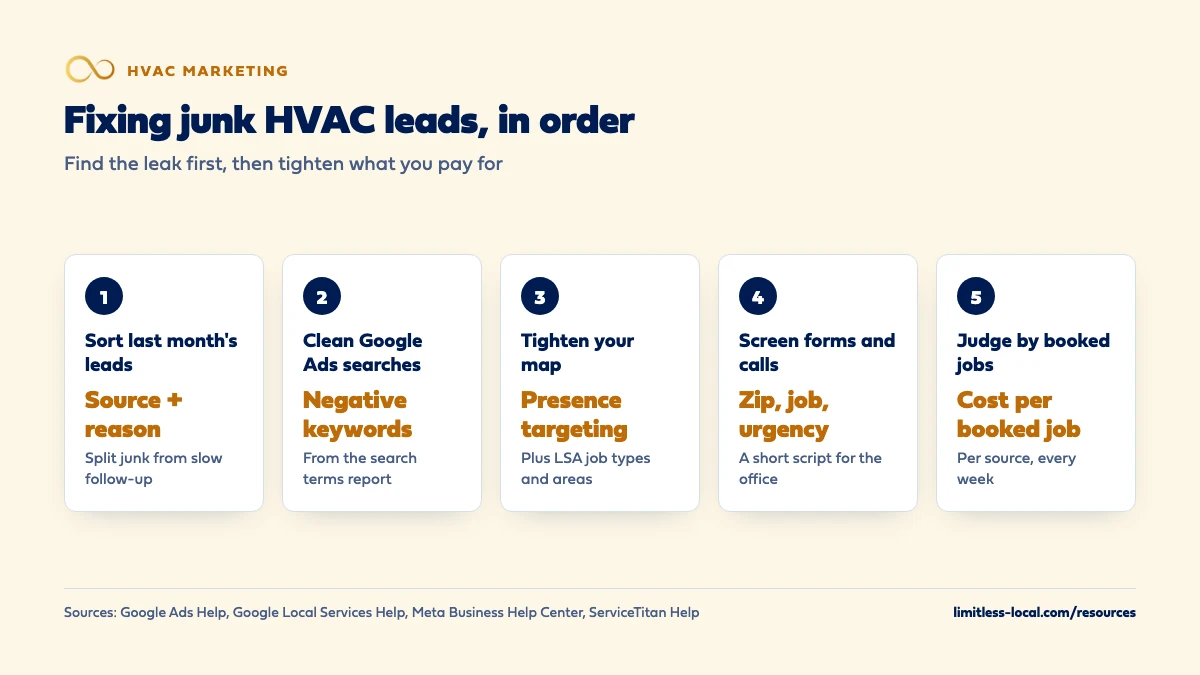
Start by sorting a month of leads by source and reason, because junk almost always comes from a few fixable leaks, and some of it is really good leads that went cold waiting for a callback. Then tighten what you pay for: block the wrong searches in Google Ads with negative keywords, show ads only to people in your service area, trim your Local Services Ads job types and map, and write ads that say exactly what you do and where. Finally, add a couple of qualifying questions to your forms and a short screening script for calls, and judge the result by booked jobs per source, not by lead count.
That’s the standard we hold ads to as well: what each booked job cost, not how many leads came in. Google Ads management is part of every one of our HVAC marketing packages, and the Growth package ($4,500 a month) adds Local Services Ads management, all run through our local ads work. Every package also includes call tracking with recording and transcription, plus source tagging, so the sort below runs on real data instead of guesses. For how ads fit with SEO and reviews, see the HVAC marketing guide and the rest of the HVAC marketing questions library.
What counts as a junk lead for an HVAC company?
A junk lead is any contact that could never turn into a job you want. For most HVAC shops it lands in one of five buckets:
- Wrong service. Car AC, fridge repair, window units, or someone hunting for a part to fix it themselves.
- Wrong place. A homeowner two counties past where your trucks go.
- Wrong person. Job seekers, vendors, robocalls, someone selling you SEO.
- Wrong fit. A caller who only wants a price over the phone and hangs up when you mention a diagnostic fee.
- Spam. Bot form fills with fake names and gibberish.
Here’s the catch: plenty of leads that feel like junk aren’t. A real homeowner with a dead AC who got a callback the next afternoon has usually hired someone else by then, and the lead looks worthless in your notes. So before you fix anything, split the leads that were bad on arrival from the good ones that went cold waiting for you. They need completely different fixes.
How do I find out where the junk is coming from?
Pull every call, form and message from last month and give each one two tags: where it came from (Google Ads, Local Services Ads, your Google Business Profile, your website, Facebook, a lead site) and, for the bad ones, one reason from the list above. A spreadsheet works fine.
If you use ServiceTitan, its call classifications do part of this for you, but only once call reasons are set up. Without them, any call longer than 60 seconds is classified as a lead, which pads your lead count and drags your booking rate down for no reason. Mark vendors, wrong numbers and spam as Not a Lead so the count stays honest.
What you’re looking for is the pattern. Usually one or two sources produce most of the junk, and usually for one or two reasons. That tells you which fix below to do first.
Are my leads junk, or is my follow-up too slow?
Check this before you touch a single ad setting. Look at the leads you tagged as no good and ask how long each one waited for a real person. If a lot of them were form fills answered hours later or missed calls returned the next day, the source isn’t the problem. Response time is.
Two quick tests settle it. Listen to a handful of recorded calls tagged as junk. If the caller described a real HVAC problem in your area, it wasn’t junk, it was a lost job. Then compare the junk rate for calls answered live with the rate for calls returned later. If the returned ones look much worse, fix the phones first; how fast an HVAC company should respond to new leads covers the setup. Skip this check and you risk shutting off a channel that was working fine.
Fix 1: Clean up the searches your Google Ads pay for
Your keywords aren’t the searches you pay for. The search terms report in Google Ads shows the real searches that triggered your ads and how each one performed, and it’s where most HVAC junk shows up first.
Open it, sort by cost, and read the top of the list. Anything that could never become a job you want goes on your negative keyword list. Common HVAC examples:
- Job hunters: hvac jobs, technician salary, hvac school, apprentice
- DIY: how to, parts, diagram, reset, manual
- Wrong equipment: car, auto, window unit, portable, RV
- Wrong trade: refrigerator, washer, dryer (if you don’t do appliances)
Two details matter. Negative keywords don’t match close variants, so you need to add synonyms and singular and plural versions yourself. And an account-level negative list applies across all your search campaigns at once, which saves you adding the same words to every campaign. Review it weekly in peak season, because new junk searches keep turning up.
Fix 2: Stop your ads reaching people outside your service area
This one surprises a lot of owners. By default, Google Ads location targeting reaches people who are in or regularly in your area and people who’ve shown interest in it, such as someone two states away searching for a company in your town. For a three-truck HVAC company, a caller three hours away is junk.
In your campaign’s advanced location options you can switch to Presence, which shows ads only to people likely to be located, or regularly located, in the places you target. Most campaigns see fewer impressions after switching away from the default, which is exactly the point here. Then check the map itself: draw it around the towns and zip codes you actually want to drive to, and exclude the ones you don’t. Deciding which cities and zip codes your HVAC company targets walks through choosing them by drive time and job value. A few stray calls will still slip through; location targeting is a best effort, not a fence.
Curious what your marketing is actually booking?
Get a free visibility audit — no obligation, no sales pitch.
Fix 3: Write ads that turn the wrong people away
Your ad copy is a filter. An ad that says “Heating and Cooling Services, Call Now” invites everybody, including the people you don’t want. An ad that says exactly what you do, where and for whom quietly sends the wrong callers elsewhere before they cost you a click.
- Name the job. “Central AC and heat pump repair” tells the window-unit and car-AC crowd this isn’t for them.
- Name the towns. “Serving Brookfield, Oak Park and Riverside” (made-up towns) cuts out-of-area calls.
- Say who you serve. “Residential” or “homes and light commercial”, whichever is true.
- Be upfront about how you price. If there’s a diagnostic fee, saying so in the ad or on the landing page screens out callers who only want a free phone quote.
Make the landing page match, too. Price shoppers are a topic of their own, and attracting fewer price shoppers to your HVAC company goes deeper on offers and wording.
Fix 4: Tighten your Local Services Ads job types and service area
Local Services Ads have their own version of this problem, and the stakes went up. Google already screens out spam and duplicate contacts and can credit low-quality leads automatically, but it no longer gives credits for leads about a job type you don’t service or an area you don’t serve. Those leads are now on you.
So go through your settings line by line and uncheck every job type you don’t want, whether that’s commercial rooftop units, ductless installs or indoor air quality. Shrink the service area to where you’ll actually send a truck. Changes like these can reduce how many leads you get, and that’s the trade you want: fewer leads to pay for, more of them worth running.
Then rate the bad leads you do get in the lead feedback survey. Google uses that feedback to send more of the leads you want, and it may occasionally credit leads you report as poor quality. If you’re still deciding whether LSAs belong in your mix at all, whether Google Local Services Ads are worth it for HVAC covers the cost side.
Fix 5: Ask better questions on your web and Facebook forms
A form with just name, phone and “message” lets anyone through, bots included. Two or three required questions do most of the screening for you:
- Zip code. The fastest way to catch out-of-area requests before anyone calls back.
- What do you need? A short dropdown: AC repair, heating repair, maintenance, new system quote, other.
- Is your system down right now? Tells the office which leads to call first.
Don’t overdo it. Every extra field costs you a few real customers, so keep only what changes how you’d handle the lead. Add spam protection to your website form too.
On Facebook and Instagram lead ads, check the form type. The default instant form is More volume, built so people can submit quickly on a phone. The Higher intent form adds a review screen where people confirm their details, which Meta says brings more intentional submissions and fewer from people who are only marginally interested. For HVAC, fewer and better is usually the right trade.

Fix 6: Screen calls in the first minute
Even with clean ads, some wrong calls get through. A short script lets your office sort them fast and politely, and log them correctly:
- “What’s the zip code where you need service?”
- “What’s going on with the system?”
- “Is this your home, a rental you own, or a business?”
- “When would you like someone out?”
If an answer rules the job out, say so kindly, pass along a referral if you have one, and tag the call with its reason. That tag is what makes next month’s sort quick.
Don’t tag a real customer who simply didn’t book as junk, though. Someone who balked at the diagnostic fee is a lost booking, not a junk lead, and it points to a different fix: how your office talks about price. Tag it honestly, because a booking problem hiding in your junk pile never gets fixed.
Which lead sources should I stop paying for?
After a month of fixes, run the sort again. The sources that don’t improve are the ones to shrink or cut.
Shared lead sites are the usual suspects. When the same homeowner request goes to several contractors, the lead can be real and still a poor buy, because you’re racing other companies to the phone and the lowest price. Avoiding wasted money on shared HVAC leads covers credits, caps and when those leads are worth keeping.
The rule for every source is the same: judge it by what a booked job from it costs, not by how many leads it sends. A source with a 50% junk rate can still earn its place if the good half books cheaply.
How do I know the fixes are working?
Expect your lead count to drop. That’s the filters working, so don’t undo them. The numbers that should go up are the share of leads that are real, the share of real leads that book, and how many booked jobs each dollar buys, source by source.
Which numbers an HVAC owner should track every week lays out a short scorecard that covers all three. If leads drop and bookings drop right along with them, you’ve cut too deep: undo the last change you made, give it another week, and look again.
Not sure which of these is costing you jobs?
A free visibility audit checks the Google profile, reviews, site and tracking, and shows what to fix first.
What's different about junk leads for HVAC companies
A heat wave brings more of everything. The same hot week that fills your board with real no-cool calls also brings searches for portable units, window units and DIY fixes. Review your search terms more often during a heat wave, not less.
Repair and replacement leads need different filters. A no-cool repair call is short and urgent, so screen it fast. A system replacement lead is worth far more and can handle an extra question or two about the home and the current equipment.
Rentals and property managers aren’t junk. They can be some of your best repeat work. Decide your policy on them, then set your ads and script to match.
A worked example: what cleaning up junk does to cost per booked job
These numbers are made up to show the math, not a benchmark for your market. Say you spend $3,000 a month across Google Ads and Local Services Ads and get 90 leads. Your sort shows 36 are junk, which leaves 54 real ones, and 18 of those book. Cost per booked job: $3,000 ÷ 18 = $167.
After a month of negative keywords, Presence targeting, tighter LSA job types and a zip code question on your form, the same $3,000 brings in 66 leads. Only 10 are junk, so 56 are real, and with faster callbacks 22 of them book. Cost per booked job: $3,000 ÷ 22 = $136.
Fewer leads, more jobs, and far less office time spent on wrong numbers. A free visibility audit runs this same sort on your live accounts and shows which leak to fix first.
Frequently asked questions
Should I just turn off the channel that sends the most junk?
Not until you’ve tried the fixes. Junk usually comes from settings, not the channel itself, and a channel can send plenty of junk and still produce your cheapest booked jobs. Cut it only if its cost per booked job stays too high after a month of cleanup.
How many negative keywords should an HVAC company have?
There’s no right number. Start with the obvious groups (jobs, DIY, car AC, appliances), then add from your search terms report every week or two. A list that grows fast at first and then levels off is normal.
Are callers who only want a price over the phone junk?
Not always. Some are shopping and won’t book; others just want to know you won’t surprise them. Explain how you price service calls, offer a time, and tag the ones who still don’t book as lost bookings, not junk.
Should my office count spam calls and vendors as leads?
No. Tag them as not a lead so your lead count and booking rate reflect real customers. Counting them makes every channel look worse and hides the ones that are working.
Can I get money back for junk Local Services Ads leads?
Google doesn’t charge for leads it decides are invalid, like spam or duplicates, and may credit low-quality leads automatically. It no longer credits leads for job types or areas you don’t serve, so your settings are your main protection.
Key takeaways
- Sort a month of leads by source and reason before changing anything; the pattern shows which fix comes first.
- Split leads that were bad on arrival from good leads that went cold waiting for a callback.
- Clean up Google Ads with the search terms report, negative keywords and Presence location targeting.
- Trim Local Services Ads job types and service area, because Google no longer credits leads for work or areas you don’t cover.
- Screen with a zip code question and a short call script, and judge every source by cost per booked job.
Want a second set of eyes on your setup?
We'll look at how you show up locally and where calls are leaking, then send you a plain-English breakdown.
More in this section
- How can an HVAC company get more leads?
- Should HVAC companies market replacements differently from repairs?
- How long does it take an HVAC lead to turn into a booked job?
- How fast should an HVAC company respond to new leads?
- How do I avoid wasting money on shared HVAC leads?
Sources
- About the search terms report — Google Ads Help
- About negative keywords — Google Ads Help
- About advanced location options — Google Ads Help
- About Automated Local Services Ads lead credits — Google Local Services Help
- How leads work — Google Local Services Help
- About instant form types — Meta Business Help Center
- Understand call classifications — ServiceTitan Help Center