
How do I make my electrical website fast on mobile?
- How do I get my electrician website to load quickly and work well on a phone?
- Why does mobile speed matter so much for an electrician?
- Step 1: How do I test how fast my site is on a phone?
- Step 2: What numbers should I aim for?
- Step 3: Are my photos slowing the site down?
- Step 4: Is my hosting or website builder the problem?
- Step 5: Which plugins and scripts should I remove?
- Step 6: Does my site look and work right on a phone?
- Step 7: Are pop-ups or chat boxes blocking the page?
- Step 8: Does the mobile version show everything?
- Should I fix my current site or rebuild it?
- What's different about mobile speed for electricians
- A worked example: what a slow phone page can cost
- Frequently asked questions
- Key takeaways
- More in this section
- Sources
The short version
- Test your homepage and main service pages in PageSpeed Insights, on mobile.
- Fix photos, hosting, plugins and scripts first; they cause most slow electrical sites.
- Aim for Google's targets: main content within 2.5 seconds, quick taps, no jumping layout.
- Make calling easy: big tap-to-call button, short form, no pop-ups blocking the page.
For electrical contractors whose website feels slow or clumsy on a phone, and who want to know what to fix first so fewer callers give up.
Get a free visibility audit · Book a growth call
How do I get my electrician website to load quickly and work well on a phone?
Test your key pages in Google’s PageSpeed Insights on mobile, then fix the usual causes in order: oversized photos, slow hosting, too many plugins and third-party scripts, and anything that pops up over the page. Google’s Core Web Vitals give the targets: the main content should load within 2.5 seconds, the page should respond to a tap within 200 milliseconds, and the layout shouldn’t jump around while it loads. Speed is only half of it on a phone, so also make the call button big and visible without scrolling, keep forms short, and make sure the mobile version shows everything the desktop version does.
Fast, call-ready mobile pages are part of how we build websites for home-service businesses. Our electrical contractor marketing page shows how the website fits with SEO, ads and follow-up for electricians, and the rest of the electrical marketing questions library goes question by question.
Why does mobile speed matter so much for an electrician?
Because the people who need an electrician are often on a phone, sometimes standing in a dark room. Google’s article on mobile landing pages puts it simply: speed is everything, and prospects will wait only seconds for mobile pages to load before going elsewhere. A homeowner with a tripped main or a dead circuit doesn’t wait for a slider to load. They tap back and call the next result.
Speed also matters to Google. Its page on page experience says Core Web Vitals are used by its ranking systems and recommends that site owners achieve good Core Web Vitals. It also says Google always seeks to show the most relevant content, even if the page experience is sub-par, so speed alone won’t lift a weak page. In our judgement, the bigger cost of a slow site is the calls you never see, not the ranking.
This page goes deeper than our pre-SEO website fix list, which treats speed as one step among several.
Step 1: How do I test how fast my site is on a phone?
Use Google’s free PageSpeed Insights. Enter the address of your homepage, then your most important service pages (panel upgrades, EV chargers, repairs), and look at the mobile results. Google’s page explains that it reports two kinds of data. Field data comes from real visitors on Chrome over time and shows how your site actually performs. Lab data is a simulated test, useful for finding what to fix.
Field data is the one to trust when you have it. Small electrical sites often don’t get enough traffic to show field data, so the lab score is what you’ll have. Google says any lab score of 90 or above is considered good, but also that good lab data doesn’t guarantee a good experience for real visitors. Use the score to find problems, not as the goal.
Then do the simplest test of all: open your site on your own phone, on mobile data rather than Wi-Fi, and try to call yourself. Count how long it takes.
Step 2: What numbers should I aim for?
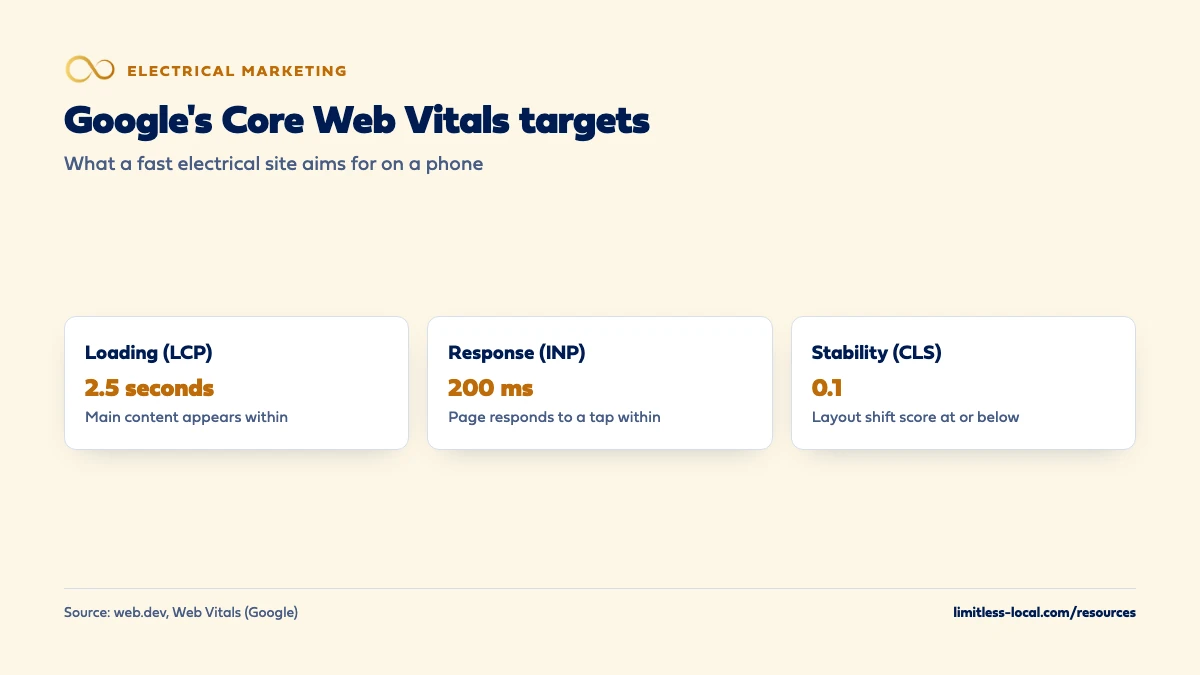
Google’s Web Vitals guidance sets three targets:
- Largest Contentful Paint (loading): the main content should appear within 2.5 seconds of the page starting to load.
- Interaction to Next Paint (responsiveness): the page should respond to taps within 200 milliseconds.
- Cumulative Layout Shift (stability): the layout shouldn’t jump around, with a score of 0.1 or less.
Google suggests measuring at the 75th percentile of page loads, split between mobile and desktop, which roughly means most of your visitors should get that experience, not just the ones on fast phones. For an electrician, layout shift is the sneaky one: a call button that moves just as someone taps it sends them to the wrong place, or nowhere.
Step 3: Are my photos slowing the site down?
On most contractor sites, in our judgement, oversized photos are the first and easiest fix. A photo straight off a phone camera is far larger than anyone needs on a phone screen. Resize photos to the size they display at, save them in a modern format such as WebP, and compress them before upload. Many website builders and plugins can do this automatically.
Then lazy-load what’s below the first screen, so photos further down the page load only as someone scrolls. web.dev’s guide to image lazy loading has one important warning: always load images visible in the first screen normally, because lazy-loading the main image can make the page feel slower. For an electrician, that usually means the top photo loads right away, and the project gallery lazy-loads.
Curious what your marketing is actually booking?
Get a free visibility audit — no obligation, no sales pitch.
Step 4: Is my hosting or website builder the problem?
Sometimes. Cheap shared hosting, a heavy page builder theme, or a site that’s been patched for years can all be slow before a single photo loads. Signs of a hosting problem: the page takes a long time to start showing anything, it’s slow even on a page with almost no images, or speed varies a lot between tests.
In our judgement, before moving hosts, try the cheaper fixes in this list. If the site is still slow after photos, plugins and scripts are cleaned up, better hosting or a caching setup is usually the next step. If the site is old enough that every fix fights the theme, a rebuild can cost less in the long run than repeated patches.
Step 5: Which plugins and scripts should I remove?
Every chat widget, review feed, tracking tag, social feed, animation library and slider adds code a phone has to download and run. Each one seemed worth it when it was added. Together, they’re often why a page responds slowly to taps.
Go through the list and ask what each one does for calls:
- Keep: call tracking, form tracking, your analytics and ad conversion tags. You need them to know what’s working.
- Question: chat widgets, review carousels, Instagram feeds and video backgrounds. Keep them only if they help people call or trust you.
- Remove: old tracking tags from past vendors, duplicate analytics, plugins for features you no longer use, and sliders.
In our view, a sliding banner on the homepage is the most common thing an electrical site can lose with no downside. A single strong photo with the job, the area and a call button does the same work faster.
Step 6: Does my site look and work right on a phone?
Fast isn’t the same as usable. Check the first screen on a phone: does it say what you do, where, and show a tap-to-call button? web.dev’s guide to tap targets recommends a minimum touch target of around 48 pixels, so buttons and links should be big enough for a thumb and spaced so people don’t hit the wrong one.
Then check text size (readable without zooming), forms (name, phone, the job and a short note is usually enough on a phone), and whether the menu covers the call button. Our page on what gets electrical sites more calls covers what belongs on the first screen.
Step 7: Are pop-ups or chat boxes blocking the page?
Google’s page on interstitials and dialogs describes them as elements that obstruct the view of the content, usually for promotional purposes, and its mobile landing page article says full-screen pop-ups or chat boxes that cover the site can disrupt the experience. On a small screen, a coupon pop-up or a chat window that opens itself can hide the call button entirely.
In our judgement, an electrical site shouldn’t open anything over the page on a phone. If you have a seasonal offer, put it in a banner within the page. If you use website chat, keep it as a small button people choose to open.
Step 8: Does the mobile version show everything?
Google uses the mobile version of a site for indexing and ranking, according to its mobile-first indexing guidance, and it recommends the mobile site has the same content as the desktop site. Some older builders hide sections on phones to make pages lighter, such as service lists, reviews or the towns you serve. If those are missing on mobile, Google may not see them.
Shorter isn’t the fix for a slow mobile page. Lighter is: the same words and sections, with smaller images and fewer scripts.
Should I fix my current site or rebuild it?
Fix it if the problems are photos, plugins and pop-ups. Those are a few days of work on most sites. Consider a rebuild if the site is on a builder or theme that’s slow even when empty, if the mobile version is a separate, older design, or if fixing it means fighting the theme on every change.
Either way, speed is worth checking on the pages your ads send people to first, because every slow click there is money spent. Our page on landing pages for electrical ads covers which pages those should be.
Not sure which of these is costing you jobs?
A free visibility audit checks the Google profile, reviews, site and tracking, and shows what to fix first.
What's different about mobile speed for electricians
Urgent searches are less patient. A homeowner without power, or with a breaker that won’t reset, is often on a phone with low battery and no Wi-Fi. In our judgement, repair and emergency pages should be the lightest pages on the site.
Project photos are heavy. Electricians often show panel swaps, EV charger installs and generator pads, which is good for trust. Without resizing, a gallery of full-size phone photos is usually the single biggest drag on load time.
Commercial buyers browse differently. Facility managers and general contractors may look at your site on a desktop during the day, but homeowners mostly use phones. Test both, and design the residential pages for the phone first.
Trust signals must survive the phone layout. License number, insurance and reviews often get pushed far down the page on mobile. Keep a short version near the top.
A worked example: what a slow phone page can cost
These numbers are made up to show the math, not a benchmark. Say your EV charger page gets 500 visits a month from phones, and 1 in 20 visitors calls, which is 25 calls. If about half of those book, that’s 12 jobs.
Now say you cut the page’s load time by resizing photos and removing a slider, and the share of visitors who call rises to 1 in 16. That’s about 31 calls and 15 booked jobs from the same traffic. No new ad spend, no new rankings, just fewer people leaving before they see the call button. Real results depend on the page and the market, and speed fixes don’t guarantee more calls, but this is the math that makes speed worth an afternoon.
If the site needs rebuilding rather than fixing, our themed websites are $3,750, or $3,000 with any of our marketing packages, and custom builds start at $5,000.
Frequently asked questions
What PageSpeed score should my electrical site get?
Google says a lab score of 90 or above is considered good, but also that good lab data doesn’t guarantee a good real-world experience. Focus on the Core Web Vitals and on calls.
Do I need a separate mobile site?
No. A responsive site that adjusts to the screen is simpler to maintain, and Google recommends the mobile version have the same content as desktop either way.
Does a video on the homepage slow it down?
Usually, yes, especially an autoplaying background video. In our judgement, a still photo with a call button does more for an electrician’s homepage.
Will a faster site rank higher on Google?
It can help. Google says Core Web Vitals are used by its ranking systems, but it always seeks the most relevant content first, so speed won’t rescue a page that doesn’t answer the search.
How often should I check site speed?
In our view, after every change to the site, and at least every few months, since new plugins and tags tend to creep in.
Does website chat slow my site down?
It adds code, so it can. If you use chat, load it as a small button rather than a window that opens itself, and check the speed before and after.
Key takeaways
- Test the homepage and main service pages in PageSpeed Insights on mobile, and on your own phone.
- Aim for Google’s targets: main content within 2.5 seconds, taps answered within 200 milliseconds, layout shift of 0.1 or less.
- Fix photos first, then plugins and scripts, then hosting.
- Keep the call button big, visible and still; no pop-ups over the page.
- Make sure the mobile version shows the same content as desktop.
- Check the pages your ads send people to first.
Want a second set of eyes on your setup?
We'll look at how you show up locally and where calls are leaking, then send you a plain-English breakdown.
More in this section
- What should I fix on my electrical website before investing in SEO?
- Which keywords should my electrical website target to rank on Google?
- What should an electrician's website have to get more calls?
- How many city pages should an electrician's website have?
- How fast should my office answer electrical calls before I lose them?
Sources
- Web Vitals — web.dev
- About PageSpeed Insights — Google for Developers
- Understanding Google Page Experience — Google Search Central
- Browser-level image lazy loading for the web — web.dev
- Accessible tap targets — web.dev
- Interstitials and dialogs — Google Search Central
- Mobile-first Indexing Best Practices — Google Search Central
- Optimizing your mobile landing page for sales — Google Ads