
Should a plumber use lead form extensions in Google Ads?

- Are Google Ads lead forms worth testing for a plumbing company?
- What is a lead form extension in Google Ads?
- How is a lead form different from a call or a website visit?
- Should emergency plumbing ads use a lead form?
- When can a lead form make sense for a plumber?
- What does Google require before a plumber can use one?
- How do I get lead form leads out of Google fast enough?
- Should I choose more volume or more qualified leads?
- What should a plumbing lead form ask?
- How do I tell if lead form leads are booking jobs?
- How do I test a lead form without losing calls?
- What's different about lead forms for plumbing companies
- A worked example: a water heater campaign with and without a form
- Frequently asked questions
- Key takeaways
- More in this section
- Sources
The short version
- Lead form extensions are now called lead form assets: a short contact form inside your ad.
- Keep emergency plumbing ads focused on calls; a form slows down someone with water on the floor.
- Test forms on planned work like water heaters, repipes and sewer lines.
- Only test if form leads reach your office instantly and get called back fast.
For plumbing owners running Google Ads who keep seeing the lead form option and want to know whether it will bring jobs or just more names to chase.
Get a free visibility audit · Book a growth call
Are Google Ads lead forms worth testing for a plumbing company?
Most plumbers should keep emergency campaigns pointed at a phone call and test a lead form, which Google now calls a lead form asset, only on planned, higher-ticket work like water heaters, repipes and sewer lines. A lead form lets a homeowner send a name and number without leaving the ad, which can add leads, but those leads wait in Google until someone calls them back, and the easiest form designs tend to bring in less serious people. It’s worth a test only if your office will call each form lead within minutes and you can see whether those leads book jobs.
We judge every Google Ads change, lead forms included, on cost per booked job. Google Ads management is part of every Limitless Engine package, with call, web and form tracking so each lead can be matched to the job it booked, and ad spend paid to Google separately. See how our local ads work for plumbing companies, or browse more plumbing marketing questions.
What is a lead form extension in Google Ads?
It’s a contact form that opens inside your ad, so a homeowner can send their details without visiting your website. Google used to call them lead form extensions; its help center now calls them lead form assets.
Here’s how they work. You build the form in Google Ads and add it to a Search or Performance Max campaign. Someone sees your ad, taps to open the form, and submits contact details such as a phone number or email. You then pick the leads up from Google Ads or have them sent to your email or your CRM.
A few limits worth knowing: only one lead form can be added per campaign, and on Search they work only with responsive search ads.
How is a lead form different from a call or a website visit?
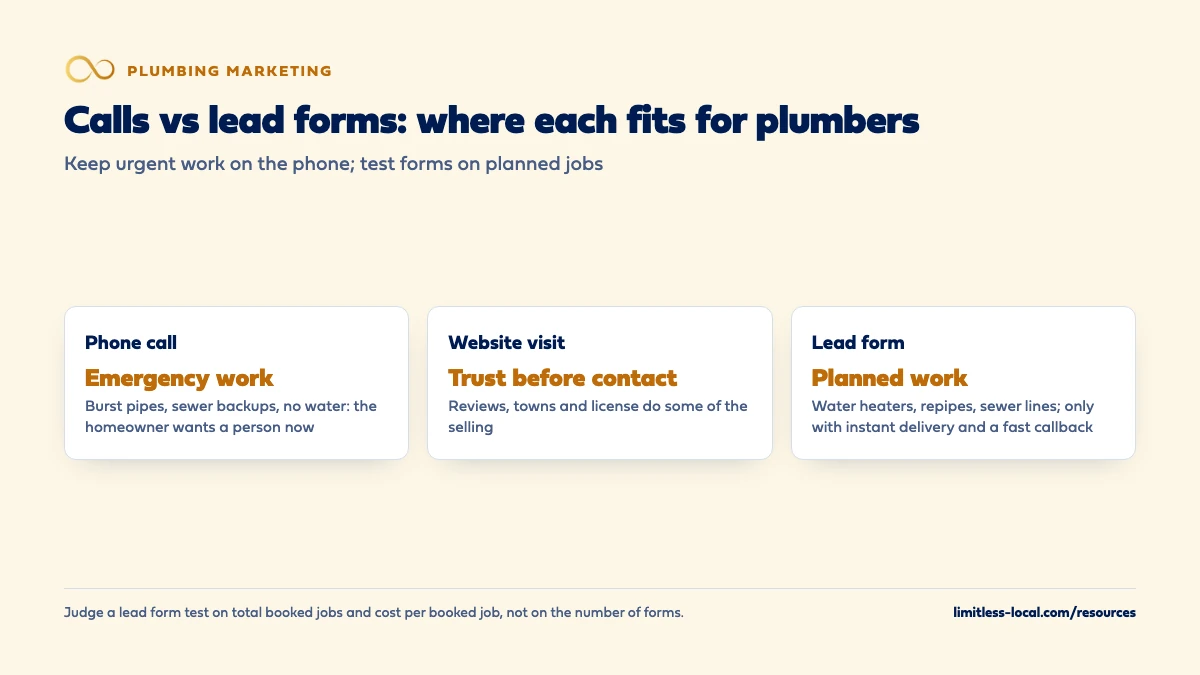
Each one gives you a different kind of lead:
- A call is a homeowner talking to you right now. You can answer questions, give a time and book the job on the spot.
- A website visit lets the homeowner see your reviews, your towns and your license before calling or filling in a form. Your page does some of the selling.
- A lead form is the fastest thing to submit, but you get the least context. The homeowner hasn’t heard your voice or seen your site, and they may have tapped three plumbers’ forms in a row.
So a form lead is a name to call, not a booked job. Its value depends almost entirely on how fast and how well your office calls back. If your website already turns visitors into calls, it’s worth checking what a good landing page conversion rate looks like for a plumber before you add a form that skips the site.
Should emergency plumbing ads use a lead form?
Usually not. Someone with a burst pipe, a backed-up sewer or no water wants a person on the phone. A form means they wait for you to call back, and if another plumber’s ad has a call button, that’s who gets the job.
Keep emergency campaigns built around calls: a call-focused ad, a page with a tap-to-call number, and someone who answers. If emergency and planned work are in the same campaign, that’s another reason to split them. How to structure your plumbing Google Ads campaigns shows how, and once they’re separate, you can test a form on one without touching the other.
When can a lead form make sense for a plumber?
Lead forms fit work where the homeowner is planning, comparing or not ready to talk yet:
- Water heater replacements, especially tankless upgrades that people research before calling.
- Repipes and sewer line replacements, where the homeowner wants an estimate and time to think.
- Water softeners and filtration, often researched in the evening.
- Remodel plumbing and commercial work, where someone is gathering quotes.
They can also help when someone searches late at night and would rather not call. A form submitted at 11 p.m. becomes a call first thing in the morning, which beats a homeowner who leaves and never comes back.
If your website is slow or hard to use on a phone, a form can catch leads the site is losing. But that’s a patch. Fixing the site helps every channel at once.
Curious what your marketing is actually booking?
Get a free visibility audit — no obligation, no sales pitch.
What does Google require before a plumber can use one?
Google’s lead form requirements ask for three basics:
- A good history of policy compliance.
- An account in an eligible business category. The excluded ones Google lists, such as sexual, alcohol, gambling, healthcare and political content, don’t include plumbing.
- A link to your privacy policy, which appears at the end of the form.
There’s a higher bar for one format. If you want the ad’s headline to open the form directly on Search, Google requires more than $50,000 in total Google Ads spend, though advertisers spending more than $1,000 per account may also be eligible after further verification. Most plumbing shops won’t start there, and they don’t need to: the standard form inside the ad works without it.
Google also says forms are only for first-party advertisers or agencies with a direct relationship with the service. Lead-selling businesses aren’t allowed to use them.
How do I get lead form leads out of Google fast enough?
This is where most lead form tests fail. Google keeps the leads in your account, and you have to get them out. The options:
- Email notifications for each lead, set up when you build the form.
- A webhook or Zapier, which sends each lead straight to your CRM or field software.
- CSV download, by hand. Google says leads expire after 60 days, and the download covers only the last 30 days, so don’t rely on this one.
For a plumber, a lead that sits in an inbox until Friday is gone. Send every form lead to the same place your office already works from, with an alert, and treat it like a missed call: call back within minutes during business hours. How fast your plumbing office should answer a new call covers the response times that matter.
Should I choose more volume or more qualified leads?
Google offers two form designs. More volume, the default, uses fewer steps and may bring more leads, including people less interested in your service. More qualified adds steps and may bring fewer leads with greater interest. You can switch between them at any time, and the choice can change your cost per lead.
For most plumbers, start with more qualified. A pile of half-interested names costs your office time and makes the form look worse than it is. Two other settings help too:
- Phone number verification, available on Search, adds a one-time code by text, which filters out invalid numbers, spam and bots.
- Qualifying questions, such as the type of job, tag the answers you care about so the strongest leads stand out.
If junk is already a problem in your account, how to cut down on junk plumbing leads covers the other places it comes from.

What should a plumbing lead form ask?
Enough to call back and book, and nothing more:
- Name and phone number. Phone first; plumbing jobs get booked on calls.
- Zip code or town, so you can drop leads outside your service area.
- The job, as a multiple-choice question: water heater, repipe, sewer line, water treatment, other.
- When they need it: this week, this month, just pricing.
Every extra question loses some people, so ask only what changes how you call them back. Write the form’s headline and description in plain words that match the ad, and make the thank-you message say what happens next, such as a call within the hour during business hours, but only if that’s true.
How do I tell if lead form leads are booking jobs?
Google Ads counts each submitted form as a conversion, but that tells you nothing about jobs. To judge the test:
- Tag every form lead with its own lead source in your CRM or field software.
- Mark each one as reached, booked, sold or lost.
- After a month or two, divide the campaign’s spend by the jobs booked from forms and calls together.
Compare that cost per booked job with the same campaign before the form. If you can, send booked jobs back to Google Ads so it learns which leads were real. Which conversions to track in your plumbing Google Ads explains how to set that up without teaching Google to chase junk.
How do I test a lead form without losing calls?
- Test on one planned-work campaign, never on emergency campaigns.
- Change nothing else in that campaign while the test runs: same budget, same keywords, same ads.
- Watch calls as well as forms. Some people who would have called will use the form instead. The question is whether total booked jobs went up.
- Give it enough time. A few weeks of leads at least, and longer in a slow season. How long a plumber should wait before changing Google Ads covers how long is fair.
- Know how to stop. Removing the form is easy, but a removed form can’t be restored, so download its leads first.
If the test doesn’t produce cheaper booked jobs after a fair run, take it off. A form that adds names but not jobs is just more work for your office.
Not sure which of these is costing you jobs?
A free visibility audit checks the Google profile, reviews, site and tracking, and shows what to fix first.
What's different about lead forms for plumbing companies
Most plumbing work is urgent. In many trades a form is the normal first step. In plumbing, a large share of jobs start with someone who needs help today, and they want a phone call. That’s why forms belong on planned work, not on the campaigns that bring your emergency calls.
Night forms need a morning routine. A homeowner who fills in a water heater form at night expects a call when you open. Make the first job of the day calling back every form that came in overnight.
Service area is easy to blur. Ads reach people at the edge of your area. Ask for a zip code on the form so a dispatcher can turn down a lead two counties away before a truck is sent.
A worked example: a water heater campaign with and without a form
These numbers are made up to show the math, not a benchmark for your market. Say a plumbing company spends $1,200 a month on a water heater campaign. Before the test, it brings 20 calls, and 9 book a replacement. That’s about $133 per booked job.
The company adds a lead form, set to more qualified, with phone verification and a zip code question, and changes nothing else. Next month the same spend brings 18 calls, because some people now use the form instead, and 8 of those book. The form brings 14 leads. The office calls each one within minutes, and 4 book.
Total booked jobs rise from 9 to 12, and the cost per booked job falls from about $133 to $100. That’s a win worth keeping. If the office had called the form leads back the next day and booked only one of them, the total would have dropped to 9 jobs and the form would have added nothing but work.
Frequently asked questions
Are lead form extensions and lead form assets the same thing?
Yes. Google renamed extensions to assets. The feature is the same idea: a contact form that opens inside your ad.
Can I add a lead form to a Performance Max campaign?
Yes. Lead form assets can be added to Search and Performance Max campaigns. For plumbing, keep the campaigns that bring urgent calls focused on the phone either way.
Do I need a privacy policy to use a lead form?
Yes. Google requires a link to your business’s privacy policy, and it appears at the end of the form.
Can a lead form go straight into my field software?
Often, yes, through a webhook or Zapier connection. Check with your software provider before you launch the form.
Will a lead form lower my cost per lead?
It can, because forms are easy to submit. But cost per lead isn’t the test. Watch cost per booked job, because cheap form leads that don’t answer the phone aren’t cheap.
Should I add a lead form if my office is already swamped?
No. A form adds leads that need calling back. If the office can’t keep up with calls now, fix that first.
Key takeaways
- Lead form extensions are now lead form assets: a contact form inside a Search or Performance Max ad.
- Keep emergency plumbing campaigns built around calls.
- Test forms on planned work like water heaters, repipes and sewer lines, with the more qualified design and phone verification.
- Send every form lead straight to your office and call it back within minutes.
- Judge the test on total booked jobs and cost per booked job, not on form count.
Want a second set of eyes on your setup?
We'll look at how you show up locally and where calls are leaking, then send you a plain-English breakdown.
More in this section
- Are Google Local Services Ads worth it for plumbers?
- If I stop Google Ads, will my plumbing leads drop?
- How should I structure my plumbing Google Ads campaigns?
- How long should a plumber wait before changing Google Ads?
- What keywords should my plumbing Google Ads target?
Sources
- About lead form assets — Google Ads Help
- How to use lead forms in responsive search ads and campaigns — Google Ads Help
- Create lead form assets — Google Ads Help
- Lead form requirements — Advertising Policies Help
- Download leads — Google Ads Help