
Who owns my plumbing website and ad accounts, and who should?
- How do I make sure my plumbing company owns its website, Google profile and ad accounts?
- Which plumbing marketing accounts should be in my name?
- How do I check who owns my Google Ads account?
- How do I make sure I own my Google Business Profile?
- Who should own my plumbing website and domain?
- What happens to my call tracking numbers if I leave an agency?
- Who owns my Local Services Ads account now that it's moving into Google Ads?
- Who owns the customer data and call recordings?
- How do I audit what I own today?
- How do I leave a plumbing marketing agency cleanly?
- What if my agency refuses to hand over my accounts?
- What's different about account ownership for plumbers
- A worked example: what one lost tracking number could cost
- Frequently asked questions
- Key takeaways
- More in this section
- Sources
The short version
- Domain and hosting: registered to your business, with your login.
- Google profile: you as primary owner, the agency as a manager.
- Google Ads: your account, your card, you as admin.
- Tracking numbers and customer data: in accounts you control, with a plan to move them.
For plumbing owners who work with an agency, a freelancer or a nephew who “does the website,” and want to know what they actually own today and how to leave cleanly if they ever need to.
Get a free visibility audit · Book a growth call
How do I make sure my plumbing company owns its website, Google profile and ad accounts?
Your plumbing company should own every account a customer or a dollar passes through: the domain, the website and its hosting login, your Google Business Profile, your Google Ads and Local Services Ads accounts, your call tracking numbers and your customer data. Agencies and freelancers should work inside those accounts on their own logins, with you as the admin or primary owner. If any of them is in someone else’s name today, fix it while the relationship is friendly, not on the way out.
Whoever runs your marketing, the accounts should outlast the relationship. Our own terms are month to month: we ask for three months, written into the contract, but if you want to leave, we won’t make you stay. See what’s included in our marketing packages, how we work with plumbing companies, or browse the full plumbing marketing library.
Which plumbing marketing accounts should be in my name?
In our judgement, anything that would be slow, costly or impossible to rebuild belongs to your business:
- Your domain name, the web address on your trucks and invoices.
- Your website and hosting, including an admin login to the site itself.
- Your Google Business Profile, with its reviews and photos.
- Your Google Ads account, including Local Services Ads now that they’re moving into Google Ads.
- Your call tracking account and numbers, especially any on vans, door hangers or water heater stickers.
- Analytics and Search Console for the website.
- Your customer list and job history in ServiceTitan, Housecall Pro, Jobber or whatever you use.
- Social pages and email lists, if you use them.
Ownership is separate from who does the work. An agency can run all of it day to day while every account stays yours. What to look for in an agency contract covers how to write that into the agreement; this page is about checking what you hold today and leaving cleanly.
How do I check who owns my Google Ads account?
Sign in to Google Ads and open Access and security. If you can’t sign in at all, that’s your answer. If you can, check two things.
First, your own access level. Google’s page on access levels in your Google Ads account says only admins can give or change access, accept or reject manager link requests and unlink manager accounts. Standard access lets you edit campaigns but not do those things. Google also notes that an account with only one admin may lose access to its tags if that person becomes unavailable, so add a second admin you trust, such as a partner or office manager.
Second, the Managers tab. Google’s page on ownership of client accounts explains that when an agency’s manager account creates a new account, the manager automatically becomes its owner, with full administrative access. The client account still owns its data, and users on the client account can always unlink a manager that owns it. That’s why being an admin on your own account matters: it’s what lets you unlink an agency without asking permission.
How do I make sure I own my Google Business Profile?
Open your profile while signed in and go to the People and access settings. Google’s page on Business Profile owners and managers says a profile can have several owners but only one primary owner, and that managers can do almost everything owners can except add or remove users and remove the profile. The setup you want: you as primary owner, your agency or office manager as managers on their own Google accounts.
Two details matter when you change things. Google says new owners and managers must wait 7 days before they can transfer primary ownership or remove other users, so don’t leave this to the last week of an agency relationship. And when you remove someone, their past review replies and posts stay on the profile.
If someone else is primary owner and won’t hand it over, Google’s page on requesting ownership of a Business Profile explains the process. For a storefront business, you request access and the current owner has three days to respond; if they don’t, you may get the option to claim it. Most plumbers are service-area businesses without a storefront, and for those Google says to contact its support and ask for a transfer of ownership of the listing.
Who should own my plumbing website and domain?
Your business, in name and in login. The domain is registered through a registrar, and ICANN calls the person or business listed as the registrant the domain name holder. ICANN’s FAQs for registrants on transferring a domain name say it’s your right to move a domain between registrars, and that you can look up which registrar holds your domain at lookup.icann.org.
Two rules from the same FAQ are worth knowing before you need them:
- The transfer code. Moving a domain needs an authorization code, and your registrar must provide it within five calendar days of your request.
- The 60-day lock. You generally can’t transfer a domain to another registrar within 60 days of changing the registrant name, organization or email (some registrars offer an opt-out, but they don’t have to), and a registrar may refuse a transfer within 60 days of a new registration or a previous transfer.
So if an agency registered your domain under its own name, ask for the registrant to be changed to your business now, then plan any move between registrars around that lock. For the website itself, in our judgement you should hold an administrator login to the site and to the hosting account, plus a recent backup. If the agency built the site on its own platform or hosting, get in writing what you can take with you. A site you can’t export is a site you’re renting.
Curious what your marketing is actually booking?
Get a free visibility audit — no obligation, no sales pitch.
What happens to my call tracking numbers if I leave an agency?
That depends on whose account they’re in, and it’s the question plumbers can least afford to get wrong, because those numbers are on your vans, your Google profile and the stickers you leave on water heaters.
CallRail, a common call tracking tool, says on its page about porting a number away from CallRail that you own the numbers you create there, that porting a U.S. number away is free and typically takes 4-6 weeks, and that the request has to be approved by an administrator on the account. Its page on deactivating a tracking number says a deactivated number is released, callers hear that the number is no longer in service, and after four weeks it can’t be brought back.
So the order matters: start the port or account transfer first, keep the numbers active until the move is confirmed, and only then let anything be cancelled. If the numbers sit in the agency’s own account, ask now who is the administrator and what the plan is if you part ways. Whether tracking numbers affect your rankings is a separate question, covered in call tracking numbers and rankings.
Who owns my Local Services Ads account now that it's moving into Google Ads?
Check before the move reaches you. Google’s page on the Local Services Ads transition says Local Services Ads are moving into Google Ads as Performance Max campaigns with pay-per-lead goals, and plumbing is named in the first phase. A few details from that page bear on ownership:
- The account administrator on the Local Services profile gets an email 14 days before migration. If that’s the agency’s address, you may not hear about it.
- Past Local Services Ads performance reports won’t carry over to Google Ads, though past leads and call recordings will. Download the reports you want to keep.
- In Google Ads, the phone number that call and message leads route to can be changed. Make sure it’s a number you control.
After the move, the Google Ads ownership rules above apply. Whether Local Services Ads are worth it covers the channel itself.
Who owns the customer data and call recordings?
In our judgement, your customer list, job history, call recordings and leads should live in systems your business pays for and controls, such as your field software and your own call tracking account. Agencies often need access to that data to report booked jobs, and that’s fine, as long as it’s access and not custody.
Ask any agency three questions: which of our customer data do you hold in your own systems, can we export it, and will you delete your copy when we part ways? If the answers are vague, write them down and get them answered. Customers’ names and numbers are part of what makes a plumbing company worth something.

How do I audit what I own today?
Set aside an hour and go down the list. For each account, write down who owns it, who has access, the login email, and how it’s paid for:
- Domain: look up the registrar and the registrant name.
- Website and hosting: can you log in as an administrator to both?
- Google profile: are you primary owner? Who else is listed?
- Google Ads: are you an admin? Which manager accounts are linked, and is one the owner?
- Call tracking: whose account, whose card, who’s the administrator?
- Analytics and Search Console: are you listed with full access?
- Field software and customer data: who holds exports?
In our judgement, anything you can’t log in to yourself is a risk, even if the people involved are trustworthy. Freelancers move on and agencies close. Fix the gaps one at a time, starting with the accounts that carry calls.
How do I leave a plumbing marketing agency cleanly?
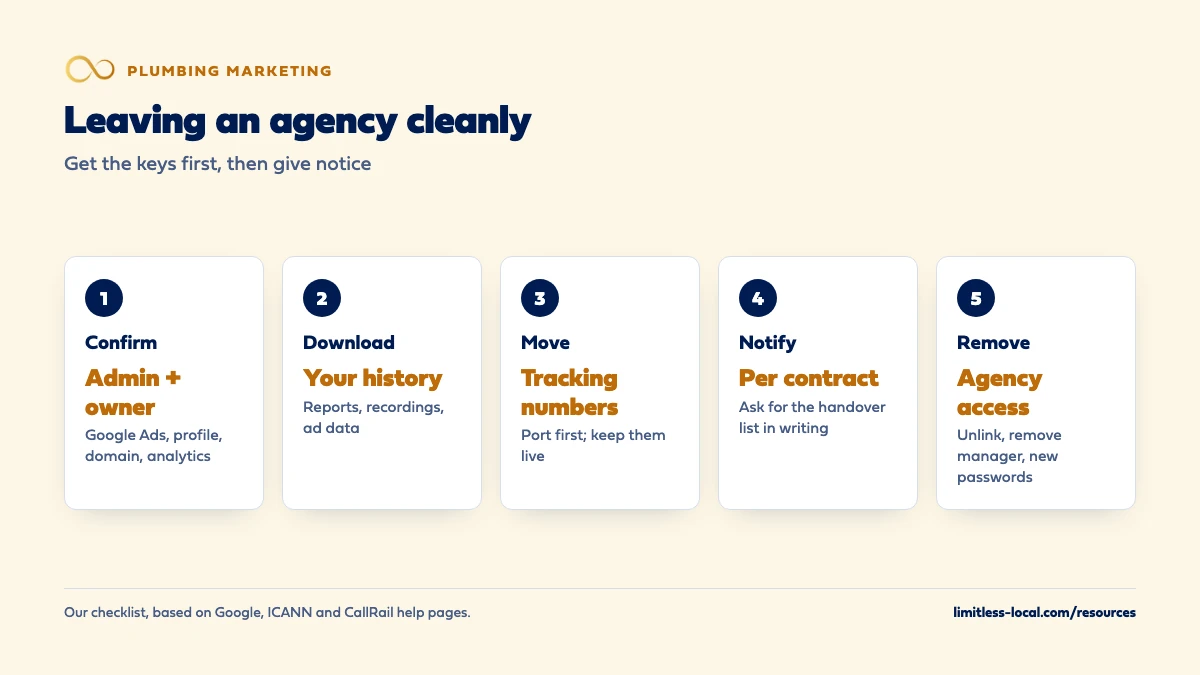
Get your access straight before you give notice, not after. In our judgement, a clean exit runs in this order:
- Confirm you’re the admin or primary owner on Google Ads, your Google profile, analytics and the domain. Fix anything that isn’t, allowing for Google’s 7-day wait on new owners.
- Download what you’ll want later: reports, call recordings, ad history and any Local Services Ads reports.
- Start the tracking number port or transfer, and keep the numbers live until it’s done.
- Give notice as the contract requires, and ask in writing for the handover list.
- Remove the agency’s access once the handover is complete: unlink its manager account in Google Ads, remove it as a manager on your profile, and change any shared passwords.
Keep it businesslike. Most handovers go smoothly when the owner already holds the keys. If you’re choosing a new agency, what makes a good marketing company covers what to look for this time.
What if my agency refuses to hand over my accounts?
Start with the parts Google and ICANN let you fix yourself. If you’re a client user with admin access on your Google Ads account, you can unlink a manager that owns it. If you’re not, the honest answer may be to open a new Google Ads account in your name and rebuild, keeping the history you downloaded. For your Google profile, use Google’s ownership request process. For the domain, ICANN’s FAQ explains when a registrar can and can’t refuse a transfer, and how to file a complaint if you think a transfer was wrongly denied.
Read your contract for what it says about ownership and handover, and put your requests in writing. This is general guidance for owners, not legal advice; if real money or a valuable domain is at stake, a business attorney’s review is worth the cost. Hiring an agency or doing it yourself covers what should stay in your name from day one.
Want to see where your company stands?
A free visibility audit shows where you show up on Google, Maps and AI answers, and what it's costing you in calls.
What's different about account ownership for plumbers
Your phone number is printed everywhere. Vans, yard signs, door hangers, magnets and the stickers on every water heater you’ve installed. A number you lose can keep costing calls for years, so tracking numbers deserve more care for a plumber than for most businesses.
Emergencies don’t wait for a handover. If ads stop or a number goes dead during a freeze, the burst-pipe calls go to whoever is next in the map pack. Plan any agency change for a normal week, with the numbers moved first.
Service-area profiles are harder to recover. Most plumbers hide their address, and Google handles ownership requests for service-area businesses through support rather than a simple request form. Owning your profile from the start is far easier than winning it back.
A worked example: what one lost tracking number could cost
These numbers are made up to show the math, not typical results. Say an agency set up a tracking number that’s now printed on 3 vans and a few hundred water heater stickers, and it brings in 15 calls a month.
- Booked jobs: if one in three of those calls books, that’s a third of 15 = 5 jobs a month.
- Revenue: at a made-up average ticket of $400, 5 jobs at $400 each is $2,000 a month.
- A year without it: 12 months at $2,000 is $24,000 in work that rings a dead line instead.
Repainting vans is the smaller cost. That’s why moving numbers comes before cancelling anything.
Frequently asked questions
Is it normal for an agency to own my Google Ads account?
It’s common for an agency’s manager account to be listed as owner when it created the account. What matters is that you’re an admin on it too, which lets you unlink the agency if you leave.
Can I still own my website if the agency built it?
Usually, if the contract says so. Ask for the domain in your name, an administrator login to the site and hosting, and a backup, and get any limits on exporting the site in writing.
What if a former employee set up our Google profile on a personal account?
Ask them to add you as an owner and transfer primary ownership to you. If they won’t or can’t, use Google’s ownership request process.
Should I share my passwords with my agency?
No. Google Ads and Business Profile both let you give people their own access, so you can remove one person without changing everything.
Do I lose my Google reviews if I change agencies?
No. Reviews belong to the profile, not the agency, so as long as you own the profile the reviews stay with it.
Can an agency keep my phone numbers?
It depends on whose account they’re in and what the contract says. Ask now, and move the numbers into an account you control before you leave.
Key takeaways
- Own the domain, website and hosting, Google profile, Google Ads, tracking numbers and customer data.
- Be the admin on Google Ads and the primary owner on your Google profile; give agencies their own access.
- Know the rules that slow a move: Google’s 7-day wait on new owners and ICANN’s 60-day transfer lock.
- Move tracking numbers before anything is cancelled; a deactivated CallRail number can’t be recovered after four weeks.
- Audit what you own today, and fix gaps while the relationship is friendly.
Not sure what's working right now?
Start with a free visibility audit: rankings, Google profile, reviews and tracking, checked against your service area.
More in this section
- Should I hire a plumbing marketing agency or do it myself?
- What should I look for in a plumbing marketing agency contract?
- Can I dispute bad Local Services Ads leads as a plumber?
- Should my plumbing company start with LSAs, Google Ads or SEO?
- Why are my plumbing Google Ads getting clicks but no calls?
Sources
- Manager Accounts (MCC): About ownership of client accounts — Google Ads Help
- About access levels in your Google Ads account — Google Ads Help
- Manage your Business Profile owners & managers — Google Business Profile Help
- Request ownership of a Business Profile — Google Business Profile Help
- FAQs for Registrants: Transferring Your Domain Name — ICANN
- Port a phone number away from CallRail — CallRail Help Center
- Deactivate a tracking number — CallRail Help Center
- Local Services Ads transition to Performance Max campaigns with pay-per-lead goals — Google Ads Help