
What Google Business Profile categories should a roofer choose?

- Which primary and additional Google categories fit a roofing company best?
- What does a Google category actually do for a roofing company?
- Which primary category should a roofer pick?
- Which additional categories make sense for a roofing company?
- Should I add categories for storm damage, insurance claims or roofing supplies?
- Where do replacements, repairs, metal roofs and commercial work go?
- When should a roofer add or drop a category?
- Will changing my primary category hurt my ranking?
- How do I change my roofing company's categories?
- Why does Google keep changing my roofing category back?
- How do I know if my categories are working?
- What's different about Google categories for roofing companies
- A worked example: cleaning up an overstuffed roofing profile
- Frequently asked questions
- Key takeaways
- More in this section
- Sources
The short version
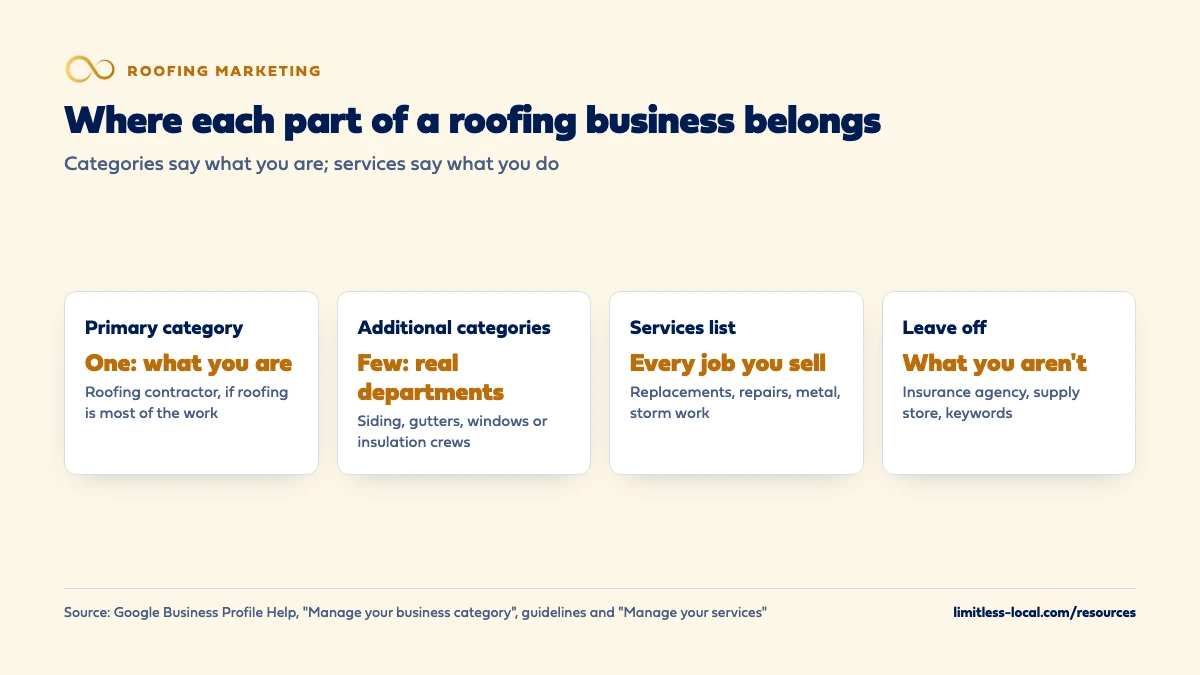
- Primary: Roofing contractor, if roofing is what the business mostly does.
- Additional: only real departments, such as siding, gutters, windows or insulation crews.
- Never: insurance, claims or supply store categories you aren't, or categories used as keywords.
- Everything else, from metal roofs to storm inspections, goes in the services list.
For roofing company owners setting up or cleaning up a Google profile, and deciding which categories to keep, add or drop.
Get a free visibility audit · Book a growth call
Which primary and additional Google categories fit a roofing company best?
For a company whose main work is roofing, make Roofing contractor the primary category, after confirming the exact name in Google’s category box. Add an additional category only for a real line of work you sell on its own, such as siding, gutters, windows or insulation, and never for things your business only has or helps with, like insurance claims or a supply store. Put replacements, repairs, metal roofs, storm work and commercial jobs in the services list instead, and change categories rarely, because Google says they affect local ranking and edits can trigger re-verification.
Your categories are one of the first things we check on a roofer’s Google profile, because they shape which searches the profile can show up for. Google Business Profile management, including categories and services, is part of our local SEO work for roofing companies. For where the profile fits among every other way to win roofing jobs, our roofing marketing guide covers the full plan, and the roofing marketing questions library takes the pieces one at a time.
What does a Google category actually do for a roofing company?
Your categories tell Google, and the homeowner looking at your profile, what kind of business you are. Google says categories help connect you with customers who search for your products or services, and that the categories you select affect your local ranking. Depending on your business type, Google says your categories might also be used to assign a label to your business. Source: Manage your business category.
Categories can also decide which tools you get: Google says businesses in certain categories, like service businesses, might have the option to list their services directly on the profile. Source: Manage your services on your Business Profile.
What categories don’t do is carry the whole profile. If you’re not showing up in Maps at all, the cause is usually elsewhere, and why a roofer is missing from Maps walks through the order to check.
Which primary category should a roofer pick?
Google’s rules for the primary category are short. Pick the category that best describes your business from the list that appears as you type; you can’t create your own. Choose the most specific option that still represents your main business, and if the specific one you want isn’t there, choose a more general one. Google’s test is that a category should complete the sentence “This business is a”, not “This business has a”. Whatever sits in the first category field is your primary category. Sources: Manage your business category, Guidelines for representing your business on Google and Edit your Business Profile.
For a company whose main work is putting roofs on buildings, that points to Roofing contractor. When we pulled roofing profiles from Google Maps in two metro areas for this page, it was by far the most common primary category, and none of them used a separate residential or commercial roofing category as the primary. Google doesn’t publish its category list in its help pages and the names can change, so type “roof” into the category box and read every option before you save.
In our judgement, the only reason to pick something else is that roofing isn’t really what the business mostly does, such as a full exteriors company where roofs are one job among many. If roofing is most of your revenue and calls, keep it as the primary.
Which additional categories make sense for a roofing company?
Google lets you select up to 9 categories beyond the primary, and its guidance is to use as few as possible. Additional categories are for special departments or services, not for every product or service you offer. Sources: Edit your Business Profile and Manage your business category.
In the roofing profiles we pulled, the additional categories that showed up most were these. They’re our observation from Maps, not a list Google publishes, and in our judgement each is worth adding only if it’s true:
- Siding contractor, if you sell siding jobs on their own, not just replace a few pieces around a roof.
- Gutter service, if you install and repair gutters as a line of work people call you for, not just reset gutters during a reroof.
- Window installation service, if you have a crew that installs windows as separate jobs.
- Insulation contractor, if attic insulation is something you sell and schedule on its own.
- Solar energy company, only if you sell or install solar yourself, not if you refer homeowners to a solar partner.
- General contractor, only if you really take on general construction work beyond the roof.
A short, true list beats a long one. Whether those extra lines of work are worth marketing at all is its own decision, covered in marketing gutters and siding.
Should I add categories for storm damage, insurance claims or roofing supplies?
No. Google’s guidelines say not to use categories solely as keywords or to describe attributes of your business, and not to use categories that belong to other businesses that are nearby or related to yours. Source: Guidelines for representing your business on Google.
This is where roofing profiles go wrong most visibly. Among the profiles we pulled were roofers listing categories like a home insurance agency, a small claims assistance service and a roofing supply store. A roofer that helps homeowners through a claim is not an insurance agency, and a roofer that buys shingles is not a supply store. Those are “this business has a” categories at best, and some describe a different kind of business altogether.
In our judgement, they send calls you don’t want and match what Google’s guidelines rule out. Storm damage, hail, insurance work and emergency tarping are services, so list them there and on your website.
Curious what your marketing is actually booking?
Get a free visibility audit — no obligation, no sales pitch.
Where do replacements, repairs, metal roofs and commercial work go?
Into the services list. Google says that when local customers search for something you offer, that service may be highlighted on your profile, and that in the Maps app customers can see your full list under Services. The services editor suggests options tailored to your business type, lets you add custom services, and lets you group services into categories with descriptions. Source: Manage your services on your Business Profile.
For a roofer, that’s where most of the detail belongs:
- Replacements by material: shingle, metal, tile, flat and low-slope.
- Repairs, leak repair, emergency tarping and storm damage inspections.
- Commercial roofing, if you do it, as its own group.
Google automatically rejects custom service names that contain profanity, gibberish, personal information, prices or phone numbers, so keep names plain: “Metal roof installation”, not “Metal roofs, best price, call now”. If commercial roofing is a growing part of the business, the wider plan for it is in marketing commercial roofing.
When should a roofer add or drop a category?
Categories should follow the business, not the season or the latest idea. In our judgement, these are the moments to change them:
- Add one when a new line of work is real: you have the crew or the licensed sub you manage, you’re quoting it as separate jobs, and your website has a page for it.
- Drop one when you’ve stopped doing the work, or when the category was added years ago by someone else and never described you.
- Swap the primary only if what the business mostly does has changed, for example a company that started in gutters and now mostly replaces roofs.
Make the website match first. Google says it can detect category information from your website and from mentions of your business across the web, so a siding category with no siding page and no siding photos is, in our view, a mismatch rather than more reach. Source: Guidelines for representing your business on Google.
Will changing my primary category hurt my ranking?
It can change it, in either direction, because Google says the categories you select affect your local ranking. Two practical points are worth planning around:
- Re-verification. Google says that if you add or edit a category, you might be asked to verify your business again. Source: Manage your business category.
- Review time. Edits to a verified profile are reviewed first. Google says that usually takes up to 10 minutes but can take up to 30 days, and that an edit may not be approved if Google can’t confirm it’s accurate. Source: Understand what happens to your Business Profile edits.
So change categories once, deliberately, and leave the rest of the profile alone until the change is accepted. Our advice is to make category changes in a quieter stretch, not the week after a hail storm when the phones should be ringing.

How do I change my roofing company's categories?
- Go to your Business Profile and select Edit profile.
- Next to Business category, select Edit.
- In the Primary category box, enter a category and pick it from the list that shows up.
- To add another, select Add another category and pick from the list again. To remove one, select Remove next to it.
- Select Save, then check the edit’s status: Accepted, Pending or Not approved.
Sources: Manage your business category and Understand what happens to your Business Profile edits. Two things that aren’t Google’s instructions but save headaches: write down your current categories before you touch anything, so you can put them back, and make the change from the Google Account that owns the profile, not one belonging to a former office manager or an old agency.
Why does Google keep changing my roofing category back?
Google says it gathers information about businesses from different sources, such as user reports and licensed content, and may update your profile if those sources say your info is wrong or outdated. In the profile editor, information Google changed shows in blue. If a suggested edit needs your review, you get an email or a notice and have 4 days to accept or reject it; if you don’t respond, Google may publish the update if it’s supported by other public information, such as your website. Source: Understand Google updates on your Business Profile.
In our experience, the usual cause is a website that tells a different story from the profile. Fix the site, correct the category, reject the suggested edits you disagree with, and check the editor for blue text every month or two.
How do I know if my categories are working?
Look at the Searches list in your profile’s Performance report. Google says it shows the search terms people used to find your business, that it’s updated at the start of each month, and that you can’t manage those terms directly. It also includes activity from Google Ads, so account for ad changes when you compare months. Source: Understand your Business Profile performance & insights.
Read the list the way a dispatcher would. If it’s full of the jobs you want, such as roofer, roof replacement, roof repair or metal roofing, your categories and services are pointing the right way. If it’s full of searches for insurance agents, building supplies or work you don’t do, they aren’t.
Remember that categories are only part of the picture. Google says local results are mainly based on relevance, distance and popularity, and that how well known a business is also draws on how many reviews it has and how many websites link to it. Source: Tips to improve your local ranking on Google. A perfect category won’t make up for a thin review count; getting reviews after a replacement covers that side.
Want to see where your company stands?
A free visibility audit shows where you show up on Google, Maps and AI answers, and what it's costing you in calls.
What's different about Google categories for roofing companies
Insurance work tempts the wrong categories. Helping a homeowner through a claim is a service you provide, not a kind of business you are. Describe it in your services and on your website, and keep the categories to what the company is.
Exterior companies have a real choice. Plenty of roofing companies grow into siding, gutters and windows. As long as roofing is most of the work, keep Roofing contractor as the primary and let the other crews earn additional categories once they’re real departments.
Storm seasons aren’t a reason to switch. Changing categories can mean re-verification and an edit review that Google says can take up to 30 days. In our judgement, the run-up to storm season is the worst time to be stuck in review, so settle categories in the slow months.
A worked example: cleaning up an overstuffed roofing profile
This is an illustration with made-up details, not a real client. Picture a roofing company whose profile was set up by a former office manager. The primary category is Gutter service, because gutters were the first thing the business did. The additional categories are Roofing contractor, Home insurance agency, Roofing supply store, Solar energy company and Window installation service. Today the company mostly replaces shingle roofs, runs one gutter crew, refers solar to a partner and has never installed a window.
The cleanup:
- Primary: Roofing contractor, because that’s what the business mostly does now.
- Additional: Gutter service, because the gutter crew is a real department that homeowners hire on its own.
- Removed: the insurance agency and supply store categories, because the company is neither; solar, because it only refers that work; windows, because it doesn’t do them.
- Services: shingle and metal replacements, repairs, leak repair, storm damage inspections and insurance claim help, each with a short description.
The change is made once, and nothing else is touched until it’s accepted. The check afterward is the Searches list: compare the same month a year apart and see whether more of the terms are for roofing jobs. That’s the measure, not a promise of a ranking change. Google Business Profile management, including categories and services, is part of our Essentials package at $3,500 a month.
Frequently asked questions
Is there a separate Google category for roof repair?
Google doesn’t publish its category list in its help pages, so check the category box yourself. Either way, repair work fits the services list on a Roofing contractor profile, since it’s part of what a roofing contractor does rather than a separate department.
How many categories can a roofing company have?
One primary and up to 9 additional, according to Google. Google’s guidance is to use as few as possible to describe your core business, so most roofers need far fewer than that.
Can I add a category for a town I want to rank in?
No. Categories describe what kind of business you are, not where you work. The towns you cover go in your service area and on your website.
Does Google pick categories for me?
You choose them, but Google says it can detect category information from your website and from mentions of your business around the web, and it can suggest or publish updates to your profile based on other sources.
Should my roofing company's name include the word roofing to help?
Only if it’s your real name. Google says your profile name should match your real-world name as used on your signage, website and stationery, and adding unnecessary information to it can get the profile suspended.
Do my categories affect my Local Services Ads?
They’re set up separately. In Local Services Ads you choose your industries, service areas and job types inside the ads account, according to Google. Whether those ads change your Maps ranking is covered in whether LSAs help a roofer rank on Maps.
Key takeaways
- Make Roofing contractor the primary category if roofing is what the business mostly does.
- Add additional categories only for real departments, like a gutter or siding crew, and keep the list short.
- Never add insurance, claims or supply store categories you aren’t, or categories used as keywords.
- Put replacements, repairs, metal roofs, storm work and commercial jobs in the services list.
- Change categories rarely and one at a time: Google says edits can trigger re-verification and take up to 30 days to review.
- Check the Searches list in your Performance report to see whether the profile is pulling the jobs you want.
Not sure what's working right now?
Start with a free visibility audit: rankings, Google profile, reviews and tracking, checked against your service area.
More in this section
- Which negative keywords should a roofer add to Google Ads?
- Are Google Local Services Ads worth it for a roofing company?
- Do Local Services Ads help a roofer rank on Google Maps?
- How many new Google reviews a month should a roofer get?
- How do I get commercial roofing leads with Google Ads?
Sources
- Manage your business category — Google Business Profile Help
- Guidelines for representing your business on Google — Google Business Profile Help
- Edit your Business Profile — Google Business Profile Help
- Manage your services on your Business Profile — Google Business Profile Help
- Understand what happens to your Business Profile edits — Google Business Profile Help
- Understand Google updates on your Business Profile — Google Business Profile Help
- Understand your Business Profile performance & insights — Google Business Profile Help
- Tips to improve your local ranking on Google — Google Business Profile Help