
Do AI chatbots on HVAC websites actually bring in leads?

- Is an AI chatbot worth adding to an HVAC company's website?
- What does an AI chatbot on an HVAC website actually do?
- Where do chatbot leads actually come from?
- When does a chatbot bring in leads for an HVAC company?
- When is a chatbot a waste of money for HVAC?
- Can an AI chatbot book HVAC jobs on its own?
- What happens when a chatbot tells a customer something wrong?
- How should a chatbot handle no-heat and no-cool emergencies?
- Should the chatbot tell customers it's AI?
- How do I tell whether the chatbot is booking jobs?
- What's different about website chat for HVAC companies
- A worked example: is the chatbot paying for itself?
- Frequently asked questions
- Key takeaways
- More in this section
- Sources
The short version
- A chatbot catches visitors already on your site; it doesn't bring new ones.
- Its best hours are nights, weekends and the busiest days of the season.
- Give it accurate information and clear limits: you're responsible for what it says.
- Emergencies and requests for a person go to a human, fast.
- Judge it by booked jobs, not by how many chats it handles.
For HVAC owners weighing an AI chat tool for their website, and wondering whether it books jobs or just adds another inbox to check.
Get a free visibility audit · Book a growth call
Is an AI chatbot worth adding to an HVAC company's website?
An AI chatbot can bring in leads an HVAC website would otherwise lose, mostly visitors who show up after hours or would rather type than call, because it can answer common questions, collect contact details and, in some tools, book the job. It doesn’t create demand: it only works on people already on your site, so a site with little traffic, or a business that already answers every call and form fast, will see a small difference. It pays off when it’s loaded with accurate information, hands emergencies and requests for a person to a human right away, and is judged by the jobs it books.
That’s also how we’d judge one for you: by the booked jobs it adds, not the number of conversations. AI website chat is one of the automation add-ons that plug into any of our HVAC marketing packages, with pricing shared on the discovery call. The HVAC lead generation guide shows where chat fits among the ways leads reach you, and the rest of the HVAC marketing questions library goes question by question.
What does an AI chatbot on an HVAC website actually do?
It answers the chat box on your website when nobody in the office does, or instead of the office. The newer tools built into field-service software go well past the old scripted chat widgets that asked for a name and an email and stopped there.
- Housecall Pro’s CSR AI Chat Answering responds to website chats in real time, can book jobs, manage existing appointments and use custom scripts, escalates the chat when the customer asks for a human, and leaves a summary in your inbox.
- Jobber’s Receptionist can handle website chat along with calls and texts. Its listed actions include booking jobs into your schedule, rescheduling or cancelling appointments, creating requests and follow-up tasks, and escalating specific inquiries to a team member.
So the question for an HVAC owner isn’t really whether chat works in general. It’s whether there are enough people on your site, at times nobody can answer them, to make a difference you’d notice in booked jobs.
Where do chatbot leads actually come from?
From people who are already on your website. A chatbot doesn’t move you up on Google or put your name in front of new homeowners; your Google Business Profile, ads and SEO do that. What chat can do is turn more of those visitors into contacts.
In our judgement, the visitors it helps most are:
- After-hours visitors, who find you at night when the phone goes to voicemail.
- People who can’t call right now: at work, in a meeting, or with a sleeping baby in the next room.
- Comparison shoppers who want a quick answer (do you service my brand, do you cover my town, is there a diagnostic fee) before they decide whether to call.
- Existing customers who want to reschedule without waiting on hold.
If your site gets little traffic, fix that first. A chatbot on a page nobody visits books nothing. Which pages an HVAC website should have is a better starting point.
When does a chatbot bring in leads for an HVAC company?
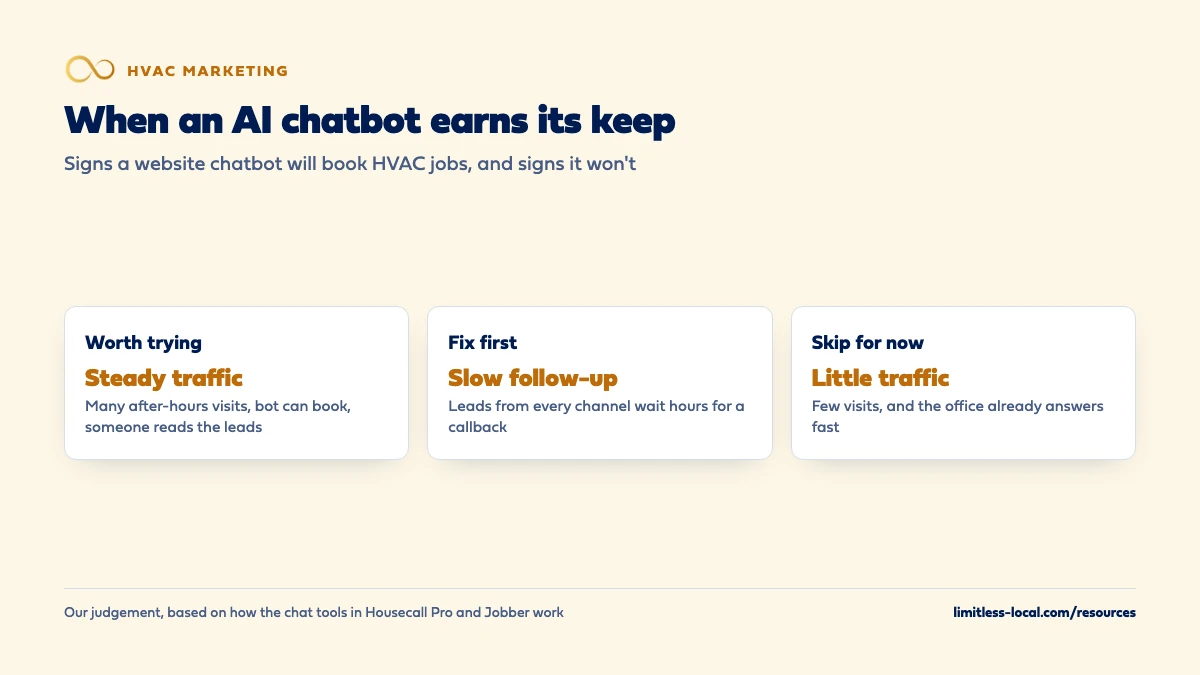
It tends to earn its place when most of these are true:
- Your website gets steady traffic from Google, Maps or ads.
- A real share of visits happen after hours or on weekends, when nobody answers the phone.
- The bot is allowed to do something useful: book a visit, or at least take the address, the problem and the best callback time.
- Someone reads what it collected first thing in the morning and calls those people before the trucks roll.
- It knows the basics about your business: service area, brands you work on, hours, how emergencies are handled.
The last two points matter most. A chatbot that captures a lead nobody follows up on is a contact form with extra steps.
When is a chatbot a waste of money for HVAC?
When the problem it solves isn’t your problem. If your office answers the phone live during the day and calls back web forms within minutes, a chatbot adds less, because the gap it fills is already covered. If your site gets a few dozen visits a month, there isn’t enough traffic for it to matter.
It also disappoints when it’s set up halfway: no information about your services, no permission to book, no escalation path, and transcripts nobody reads. And it can’t fix slow follow-up. If leads from every channel wait hours for a callback, how fast you respond to new leads is the place to start, because that’s where the jobs are being lost.
Curious what your marketing is actually booking?
Get a free visibility audit — no obligation, no sales pitch.
Can an AI chatbot book HVAC jobs on its own?
Some can, if you let them. In Housecall Pro, CSR AI has permission settings you control: whether it can book jobs and estimates, reschedule appointments and cancel them. Jobber’s Receptionist lists booking jobs in your schedule among its actions, and Housecall Pro says its chat answering now supports booking jobs and managing appointments.
Our suggestion is to start narrow. Let the bot book the visits that are simple to schedule, such as tune-ups and diagnostic calls, and have it collect details and hand off anything bigger, like replacement estimates, commercial work or anything that needs a judgment call about urgency. Widen its permissions once you’ve read enough transcripts to trust how it handles your customers.
What happens when a chatbot tells a customer something wrong?
Plan on being held to it. In a 2024 case, Moffatt v. Air Canada, a British Columbia tribunal ordered the airline to compensate a customer after its website chatbot wrongly said a bereavement fare could be claimed retroactively, after the trip was booked. The airline argued it couldn’t be held liable for what its chatbot said. The tribunal disagreed: a chatbot “is still just a part of” the company’s website, and the company hadn’t taken reasonable care to make sure it was accurate.
That was a Canadian small-claims decision about an airline, not a ruling on U.S. law or on HVAC companies, and this isn’t legal advice. But the lesson travels: customers will reasonably believe what your bot tells them. For an HVAC shop, the risky topics are prices, warranties, financing, rebates and arrival times. Housecall Pro lets you define how its AI handles pricing questions; whatever tool you use, give it exact answers for those topics or tell it to hand them to a person.
How should a chatbot handle no-heat and no-cool emergencies?
Fast, and with a person. Decide what counts as an emergency before you turn the bot on, and set it to pass those conversations to whoever is on call.
Most tools have a setting for this. Jobber’s Receptionist lets you set an escalation policy triggered by terms such as “emergency” or “urgent”, and either text your on-call contact a transcript snippet with a link to respond or transfer the call. Housecall Pro escalates a chat to your designated contact when the customer asks for a human, and notifies them to join.
For HVAC, add your own trigger words: no heat, no air, no cooling, water leaking, burning smell, carbon monoxide alarm. Anything that sounds like a safety problem should get a person, not a booking slot next Tuesday. Your call-handling rules for the office should apply to chat too.
Should the chatbot tell customers it's AI?
We think so. Jobber, for one, encourages businesses to let callers know when the phone is answered by AI, though it says that isn’t required, and it points owners to local and state rules about recording calls. A homeowner who later realizes they were talking to a bot that pretended otherwise is less likely to trust the rest of what you told them.
A short line at the top of the chat does it: “I’m an automated assistant for [Company] Heating & Air. I can book a visit or get you to a person.” It sets the right expectations and tells the customer how to reach a human, which is the thing most people want to know.
How do I tell whether the chatbot is booking jobs?
Count booked jobs, not conversations. A bot that handles hundreds of chats and books nothing is a cost.
- Use the tool’s own reporting. Housecall Pro’s CSR AI dashboard, for example, shows calls and chats handled, jobs and estimates booked, the booking conversion rate, how often it resolves a contact on its own versus escalating, and the revenue attributed to jobs it booked.
- Tag the lead source. Mark jobs that started in chat as “Website chat” in your field software, so they show up next to calls, forms and ads.
- Read transcripts weekly for the first couple of months. You’ll spot wrong answers, missed handoffs and questions your website should answer on its own.
- Compare before and after: after-hours bookings per month before the bot, and after.
Tracking whether your marketing is paying off covers how to tie each source to booked jobs and revenue. And if chat leads land in a different app from your calls and forms, what to look for in an HVAC CRM covers keeping them in one place.
What's different about website chat for HVAC companies
Emergencies don’t keep office hours. A lot of HVAC demand shows up at night and on weekends, when the system quits. That’s when a bot that can take details and alert the on-call tech earns its keep, and when one that only says “we’ll get back to you” loses the job.
Heat waves and cold snaps flood every channel at once. On the busiest days, a bot can take routine questions (hours, service area, brands, tune-up booking) off the office’s plate so the people on the phones can focus on the calls.
Replacement shoppers research late at night. Homeowners comparing system replacements often read and ask questions before they’re ready to talk. A bot can answer the basics and book an in-home estimate, but it shouldn’t quote system prices, financing terms or rebate amounts unless you’ve given it exact, current answers.
Members expect to be recognized. If you sell maintenance plans, the bot should be able to tell a plan member from a new customer, or at least hand plan members to someone who can.
Want to see where your company stands?
A free visibility audit shows where you show up on Google, Maps and AI answers, and what it's costing you in calls.
A worked example: is the chatbot paying for itself?
These numbers are made up to show the math, not a benchmark for your market. Say your website gets 60 chats a month, and 20 of them come in after hours, when nobody would have answered. If the bot books 5 of those 20 as diagnostic visits and 3 of those turn into paid repairs averaging $350, that’s $1,050 in a month from conversations that would otherwise have gone to voicemail or to the next company on Google.
Now compare that with what the tool costs you each month, including the time someone spends reading transcripts and fixing its answers. If the after-hours chats are mostly people asking whether you service their brand, and few of them book, the math won’t work, and a faster callback on your forms may do more for less.
Frequently asked questions
Will an AI chatbot replace my CSR or office manager?
No. It can take routine questions and simple bookings off their plate, especially after hours, but tools like Housecall Pro’s still escalate to a person when the customer asks, and someone has to follow up on what the bot collects.
Is website chat the same as chat on my Google Business Profile?
No. Google lets verified businesses in select regions add a text message or WhatsApp option to their Business Profile, which customers use from Google. Website chat lives on your own site. Both should land somewhere your office actually checks.
Should the chatbot quote prices?
Only prices you’ve given it exactly, like a fixed diagnostic or tune-up fee. Leave system replacement prices, financing and rebates to a person, because customers will reasonably rely on what the bot says.
What should the chatbot ask for first?
Name, phone number, address or ZIP code, what’s wrong with the system and how urgent it is. That’s enough for your office to call back and book the job even if the chat ends early.
Can I try a chatbot without committing long-term?
Usually. Both Housecall Pro and Jobber let you turn their AI answering on and off from settings, and Jobber suggests testing its Receptionist before fully relying on it. Run it for a couple of months and compare booked jobs.
Does a chatbot help with Google Local Services Ads leads?
Not directly. Google counts Local Services Ads leads as calls, messages, voicemails and booking requests made through the ad itself, not through your website chat. Those message leads need the same quick human reply as anything else.
Key takeaways
- A chatbot turns more of your existing website visitors into contacts; it doesn’t bring new ones.
- It’s most useful after hours, on weekends and on the busiest days of the season.
- Start with narrow booking permissions and widen them once the transcripts look right.
- You’re responsible for what your bot tells customers, so give it exact answers or hand tricky topics to a person.
- Route emergencies to whoever is on call, and judge the bot by booked jobs and revenue.
Not sure what's working right now?
Start with a free visibility audit: rankings, Google profile, reviews and tracking, checked against your service area.
More in this section
- Do Facebook ads work for getting HVAC calls?
- How do I know if AI search is sending my HVAC company calls?
- How do I get my HVAC company recommended by ChatGPT and AI search?
- How long does HVAC SEO take to bring in calls?
- How soon will Google Ads start bringing in HVAC calls?
Sources
- CSR AI Chat Answering — Housecall Pro Help Center
- CSR AI Overview — Housecall Pro Help Center
- Receptionist–powered by Jobber AI — Jobber Help Center
- Moffatt v. Air Canada, 2024 BCCRT 149 — Civil Resolution Tribunal of British Columbia (via CanLII)
- Chat with customers from your Business Profile — Google Business Profile Help
- How leads work — Google Local Services Help