
How should my HVAC office handle incoming calls from new customers?

- How do I make sure my HVAC office books the calls our marketing brings in?
- What should happen on every new-customer call?
- How should we answer the phone?
- What questions should the office ask a new customer?
- How do we tell an emergency from a routine call?
- How should the office handle "How much will it cost?"
- How should the office actually book the appointment?
- What should the office do when a caller isn't ready to book?
- How should calls be routed so new customers don't hit voicemail?
- How should we handle new-customer calls after hours?
- How do we know the office is handling calls well?
- What's different about handling HVAC calls
- A worked example: what changing the price answer can be worth
- Frequently asked questions
- Key takeaways
- More in this section
- Sources
The short version
- A person who can book answers live; no transfers, no voicemail during business hours.
- Same questions every call: what's wrong, how long, is it an emergency, who owns the home.
- End every real call by offering two specific times, then confirm the details back.
- Not ready to book? Log a lead with a follow-up date, then review recordings weekly.
For HVAC owners who want every new-customer call handled the same way, from the first ring to a time on the schedule.
Get a free visibility audit · Book a growth call
How do I make sure my HVAC office books the calls our marketing brings in?
Have a person who can book answer every new-customer call live, then follow the same short path on every call: greet with the company name, find out what’s wrong and whether it’s an emergency, take the address and contact details, offer two specific appointment times, and confirm the booking before hanging up. When a caller isn’t ready to book, log them as a lead with a follow-up date instead of ending on “we’ll call you back.” Record calls, listen to a handful each week, and coach to the script.
Calls are where marketing money turns into booked jobs or quietly disappears, so in our view they belong in any honest judgement of whether the marketing is working. Every one of our HVAC marketing packages includes call tracking with recording and transcription, and automation add-ons such as after-hours answering, unified messaging and calendar reminders plug into any of them. The HVAC lead generation guide covers getting leads that book, and the rest of the HVAC marketing questions library goes question by question.
What should happen on every new-customer call?
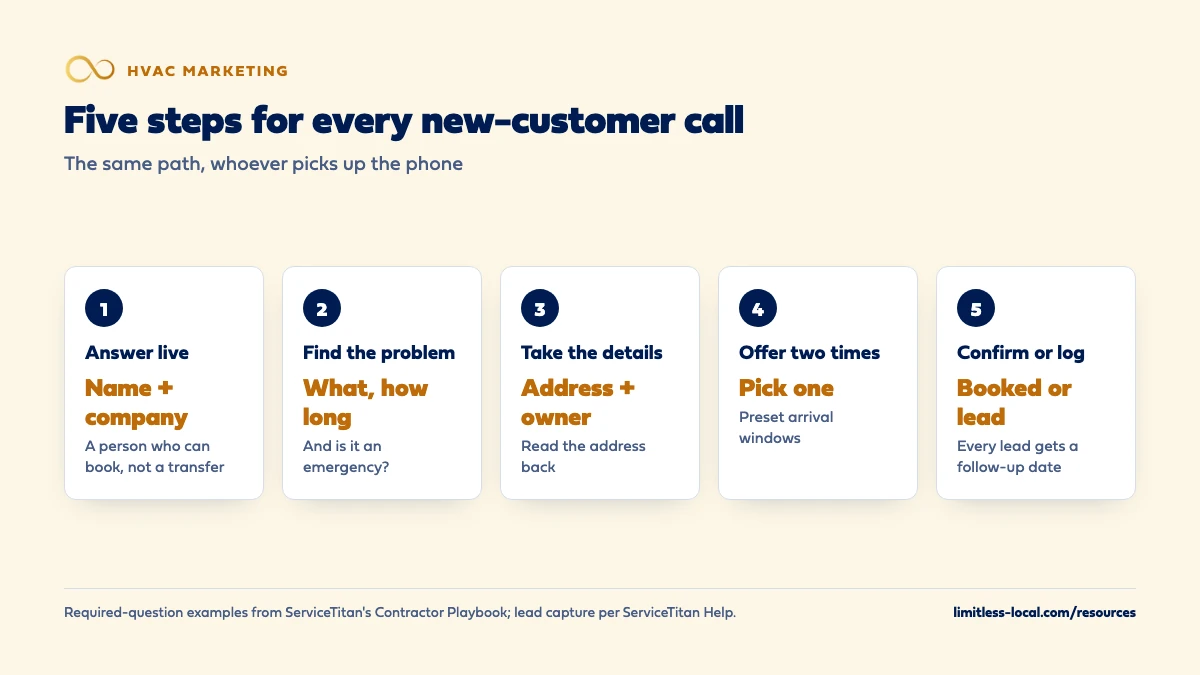
The same five steps, in the same order, no matter who picks up:
- Answer live with the company name and your first name.
- Find out what’s wrong, how long it’s been going on, and whether it’s an emergency.
- Take the details: name, phone, service address, and whether they own the home.
- Offer two specific times and let the homeowner pick one.
- Confirm and log it: read the time and address back, say what happens next, and record the outcome. If they won’t book, capture them as a lead with a follow-up date.
Writing it down matters more than the exact words. ServiceTitan’s contractor playbook recommends deciding your required questions as a company and adding them to the call script (Call Center Practices: Required Information). A consistent call is also one you can coach and measure.
How should we answer the phone?
With a person who can book the job, not someone who takes a message or transfers the call. ServiceTitan’s industry advisors make the same point in its booking-rate report: the call taker isn’t there to answer and pass the phone along, but to assess what the customer needs and create and schedule the job.
Keep the greeting short: “Thanks for calling Smith Heating and Air, this is Dana, how can I help?” The company name confirms they reached the right place, and a first name makes it a conversation.
Two things happen before your greeting that are worth knowing about:
- Calls from Local Services Ads play a “Call from Google” message to whoever answers, so the office knows the caller came from the ad. You may not hear it if you use call forwarding or a VoIP system (Manage leads and jobs).
- A recording notice, if you record calls. Housecall Pro, for example, can play “This call may be recorded for quality assurance purposes” before the call connects (Voice Settings Overview).
What questions should the office ask a new customer?
Two sets: questions about the system and questions about the customer. ServiceTitan’s playbook lists examples of both that fit HVAC well.
About the system:
- What’s going on with your system today?
- How long has that been going on?
- Where is the equipment, and can we get to it?
- How many units or systems are there?
- How old are the home and the system?
About the customer: contact information, whether they own the property (and if not, who does), whether it’s residential or commercial, and who’s responsible for payment.
The system-age question does double duty: a 15-year-old system with a big repair is a different conversation from a newer one under warranty. Keep the list short enough to get through in a couple of minutes.
How do we tell an emergency from a routine call?
Decide the rule before the season, write it on the script, and don’t make the person on the phone judge it fresh every time. In our judgement, a workable HVAC rule looks like this:
- Emergency: no heat during a cold snap, no cooling during a heat wave, a system leaking water into the house, or a burning or gas smell (which also gets your standard safety instruction to leave the house and call the gas company or 911).
- Urgent but not an emergency: the system is running poorly, making a new noise, or cycling on and off.
- Routine: tune-ups, a second opinion, a replacement quote, a thermostat question.
Emergencies get the first open slot or the on-call tech, urgent calls the next day at the latest, routine calls the homeowner’s preferred time.
When the office isn’t sure, the default should be more urgent, not less.
Curious what your marketing is actually booking?
Get a free visibility audit — no obligation, no sales pitch.
How should the office handle "How much will it cost?"
Price is often the first question, and how it’s handled decides a lot of calls. Treat it as a buying signal, not a reason to end the call. ServiceTitan’s playbook says every call should be classified as a lead or not a lead so booking rates stay accurate, and in our view a homeowner asking what a repair costs belongs in the lead column.
In our judgement, a good answer has three parts:
- Say what you can price. If you charge a set fee to come out and diagnose, say what it is and what it covers.
- Say why you can’t price the repair yet. “It could be a part that costs very little or something bigger, and the tech will give you the price before doing any work.”
- Offer two times. Move from the price straight to the appointment.
Replacement calls are different. The homeowner is usually comparing companies, so book the in-home estimate, ask who else needs to be there to decide, and set expectations for how long the visit takes. If a lot of your calls are price shoppers who never book, the fix may be upstream; attracting fewer price shoppers covers that side.
How should the office actually book the appointment?
Offer two specific times instead of asking “When works for you?” A choice between “tomorrow morning between eight and ten, or tomorrow afternoon between one and three” gets a decision; an open question gets “let me check and call you back.”
Use arrival windows, not exact times, and make them the same every time. ServiceTitan lets you set up preset arrival windows that CSRs pick from when booking or rescheduling, so the office doesn’t invent a new window on every call, and techs can be tracked against the window the customer was promised (Set up arrival windows). Other field software has its own version; the point is that the customer is promised a window the schedule can actually keep.
Then close the call properly:
- Read back the address, the time window and the phone number. The playbook calls a job booked to the wrong address one of the most preventable costs in a service business.
- Ask about gate codes, pets and where to park.
- Say what happens next: a confirmation text, a reminder, a heads-up when the tech is on the way.
What should the office do when a caller isn't ready to book?
Capture them as a lead, with a follow-up date, before the call is closed out. “We’ll call you back” with nothing written down is how calls disappear.
ServiceTitan’s process is a good model even if you use other software (Capture a lead from an incoming call):
- Check whether a lead already exists for the caller, so you don’t create a duplicate.
- Close the call with a call reason set up as a lead, pick the marketing campaign, and log a follow-up with a start date.
- Include at least a name, a phone number and a city, plus a summary of what they wanted.
One detail catches offices out: if nobody logs the follow-up, ServiceTitan creates the lead as dismissed, and it won’t show up on the follow-up list. Whatever system you use, a lead without a date on it is a lead nobody will call.
Write down why the caller didn’t book, too: price, timing, “need to talk to my spouse”, out of area. Those reasons, totaled up, show you what to fix. What share of calls the office should book covers how to turn them into a booking rate.
How should calls be routed so new customers don't hit voicemail?
Set up the phone system so a new-customer call rings a person, then a second person, before it ever reaches voicemail. Most business phone tools can do this. Housecall Pro’s call flows, for example, can route by business hours, ring several people or phones at once, hold callers in a queue with the option to leave a voicemail instead of waiting, and forward calls elsewhere (Voice Settings Overview).
Keep phone menus short for new customers. Every “press 1 for” step is a chance for a homeowner with no AC to hang up and call the next company.
If you run Local Services Ads, how calls are routed also affects what you pay (How leads work):
- A call you miss during business hours can be charged as a lead if the caller stays on the line for more than 20 seconds.
- A call that goes to voicemail or an automated greeting during business hours is treated as connected, and charged on the same rule, whether or not they leave a message.
- If your phone menu asks callers to press a key, the 20-second timer starts once they press the first key, and you aren’t charged if they hang up without pressing anything.
So voicemail during your listed hours can cost you money on LSAs as well as jobs. Whether LSAs are worth it depends heavily on this.
How should we handle new-customer calls after hours?
The same way as daytime calls, as far as possible. If an answering service or on-call tech takes the call, give them the same short script: the greeting, the questions, the emergency rule, and either a booked time or a lead with a follow-up time.
What breaks after hours is usually the handoff. Ask for every after-hours call in writing, with the caller’s answers to your required questions, so the first person in can call back and book without starting over.
On Local Services Ads, your business hours come from your Google Business Profile, and if your ad schedule differs, unanswered calls are only charged when they come in during both your ad schedule and your business hours. Set those hours to match when someone will really answer. How quickly to call back overnight leads, and what the missed-call text should say, is covered in how fast to respond to new leads.
How do we know the office is handling calls well?
Listen to the calls. Recording is the only way to know what happened on a call, and most call tools can do it: CallRail, for example, can record inbound calls to its tracking numbers and names training your team with real examples as one use (Inbound call recording). Recording laws differ by state, and some states require every party to consent, so check yours and use a recording notice where needed.
If you run Local Services Ads, Google records calls that come through its forwarding number in the US and Canada, and in the US you can play them back from your lead inbox.
A simple weekly routine:
- Pick a handful of calls that didn’t book and listen to them with the person who took them. ServiceTitan’s advisors recommend spot-checking, since few shops can listen to every call.
- Call your own business now and then, during the day and after hours, and listen to what a homeowner hears.
- Track one number: the share of real calls that ended with a time on the schedule.
If the software you use doesn’t make any of this easy, that’s worth fixing. What to look for in an HVAC CRM covers call recording, lead capture and follow-up features.
Not sure which of these is costing you jobs?
A free visibility audit checks the Google profile, reviews, site and tracking, and shows what to fix first.
What's different about handling HVAC calls
Volume arrives with the weather. The first heat wave or cold snap can bury the office in a morning. Decide before the season who takes overflow, how the call queue works, and which calls wait. A script matters most on the days nobody has time to think.
The person calling is often uncomfortable, and sometimes at risk. No cooling in extreme heat or no heat in a freeze is different from a noisy fan. Your emergency rule should be written down and easy to follow under pressure.
Repairs and replacements are two kinds of call. A repair call is won by booking the visit fast. A replacement call is won by booking the in-home estimate with the right people present, and by how the estimate visit goes. Train the office to recognize which call they’re on.
A worked example: what changing the price answer can be worth
These numbers are made up to show the math, not a benchmark for your market. Say your office gets 30 calls a week where the homeowner’s first question is the price of a repair. With the old habit, the office gives a vague range and waits, and 6 of those calls book. After switching to the three-part answer, which gives the diagnostic fee, explains why the repair can’t be priced yet and offers two times, 10 of them book.
That’s four more booked calls a week. At a made-up average repair ticket of $350, it’s $1,400 a week in work from calls the business was already getting, without spending another dollar on marketing. If some of those calls came from Local Services Ads, you were paying for them either way; the script is what decides whether a paid lead turns into a job.
Frequently asked questions
Should techs answer new-customer calls from the field?
Not as the plan. A tech in an attic can’t take down the address, check the schedule and book a time. Route new-customer calls to the office or an answering service, with the owner’s or a manager’s phone as backup.
Do we need a written call script?
Yes, but it should read like a checklist, not a speech. The required questions, the emergency rule, the price answer and the two-times close are the parts that need to be the same on every call.
Should the office give prices over the phone?
Give the prices you can stand behind, such as a set diagnostic fee, and explain why a repair can’t be priced until a tech sees the system. Then offer two times.
Do we have to tell callers we're recording?
It depends on your state. CallRail notes that some states require both parties to consent to a recording, and most call tools can play a recording notice before the call connects.
How do we know which calls came from Local Services Ads?
Calls from the ad play a “Call from Google” message when you answer, unless call forwarding or a VoIP setup on your number blocks it. Every phone lead also shows up in your lead inbox.
Key takeaways
- Every new-customer call follows the same five steps: answer, find the problem, take details, offer two times, confirm or log.
- Write the required questions, the emergency rule and the price answer into a short script.
- A price question is a buying signal; answer what you can, explain the rest, and offer two times.
- A caller who won’t book becomes a lead with a follow-up date, never “we’ll call you back.”
- On Local Services Ads, a missed or voicemail call during business hours can still be a charged lead.
- Record calls, listen to a handful each week, and track the share of real calls that book.
Want a second set of eyes on your setup?
We'll look at how you show up locally and where calls are leaking, then send you a plain-English breakdown.
More in this section
- What percentage of calls should my HVAC office be booking?
- How do I keep HVAC calls coming in during slow months?
- How fast should an HVAC company respond to new leads?
- Which HVAC services should I advertise first?
- How should a commercial HVAC company market itself?
Sources
- Required Information: Chapter 8. Call Center Practices — ServiceTitan Contractor Playbook
- Data Report: Average Call Booking Rates — ServiceTitan
- Capture a lead from an incoming call — ServiceTitan Help
- Set up arrival windows — ServiceTitan Help
- Voice Settings Overview — Housecall Pro Help Center
- Inbound call recording — CallRail Help Center
- How leads work — Google Local Services Help
- Manage leads and jobs — Google Local Services Help