
Can a roofer target specific neighborhoods with ads?
- How do I aim roofing ads at the ZIP codes and towns I actually want?
- Which ad platforms let a roofer target by neighborhood?
- Step 1: How do I decide which neighborhoods to target?
- Step 2: How do I set ZIP code or radius targeting in Google Ads?
- Step 3: Should I use 'Presence' or 'Presence or interest'?
- Step 4: How do I exclude areas I don't want to serve?
- Step 5: How do Local Services Ads service areas work?
- Step 6: Can Facebook ads target specific neighborhoods for roofing?
- Step 7: How do I check whether my targeting is working?
- Should my website have neighborhood pages to match my ads?
- What mistakes do roofers make with neighborhood targeting?
- What's different about neighborhood targeting for roofers
- A worked example: narrowing a county campaign to the ZIPs that sign
- Frequently asked questions
- Key takeaways
- More in this section
- Sources
The short version
- Google Ads: target ZIP codes, cities or a radius, and exclude what you don't serve.
- Switch Google Ads to 'Presence' if you only want people in or regularly in your areas.
- Local Services Ads: set service areas by county, city or ZIP code.
- Meta's housing category limits ZIP targeting, so it can't aim as tightly.
For roofing company owners who want their ad budget spent on the streets they want to work, not the whole metro.
Get a free visibility audit · Book a growth call
How do I aim roofing ads at the ZIP codes and towns I actually want?
Yes, within limits. Google Ads lets a roofer target cities, ZIP codes or a radius around a point, exclude areas it doesn’t serve, and choose to reach only people physically in or regularly in those areas. Local Services Ads use service areas set by county, city or ZIP code. Meta is looser: if your ads fall under its housing special ad category, you can’t target by ZIP code and city targeting includes an expanded radius, so neighborhood-level aim mostly happens in Google.
Our second phase with any client is turning on lead flow: local SEO and ads aimed at the towns and jobs you want. Our local ads service covers how we set that up, and our roofing marketing page shows how we work with roofers. Whether Google Ads are worth it for roofers covers the bigger decision, and the roofing marketing questions library goes question by question.
Which ad platforms let a roofer target by neighborhood?
Each platform draws the map differently:
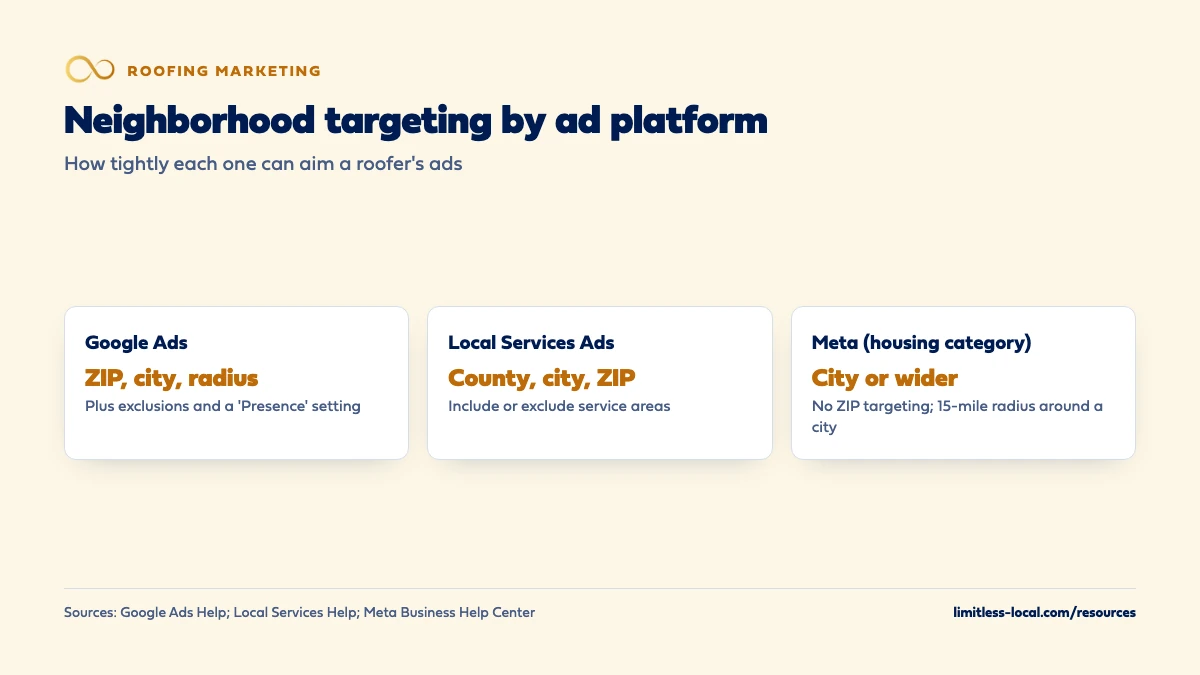
- Google Ads campaigns: countries, areas within a country such as cities and postal codes, or a radius around a location. Google also lets you exclude areas.
- Local Services Ads: service areas you include or exclude by county, city or ZIP code.
- Meta (Facebook and Instagram): location targeting by country, region, state or city, but if your ads are in a special ad category such as housing, Meta says ZIP code targeting and location exclusions aren’t available.
None of these targets a single subdivision perfectly. Google itself says its location targeting is a best effort and that 100% accuracy isn’t guaranteed. Treat “neighborhood targeting” as aiming at a small set of ZIP codes or a tight radius, then checking where the leads actually come from.
Step 1: How do I decide which neighborhoods to target?
Start from the jobs, not the map. In our judgement, the best neighborhoods for a roofer’s ads share a few traits: homes of an age where roofs are due, a housing type you install well, a drive time your crews can handle, and a history of jobs you’ve won there. Pull the addresses of your signed jobs from the last year or two and mark them by ZIP code. The ZIP codes that keep showing up are your first targets.
Also list the areas you don’t want: too far, permit headaches, or places where you’ve lost on price over and over. Those become exclusions.
Step 2: How do I set ZIP code or radius targeting in Google Ads?
In campaign settings, under Locations, you can enter cities or postal codes, or use a radius around an address. Google describes radius targeting as showing ads to people within a certain distance of your business and says it requires a radius of at least 1 km.
For roofers, ZIP codes are usually easier to read in reports than a radius, because you can see results per ZIP and raise or lower bids by area. A radius is quicker to set up when your shop sits in the middle of the area you serve. Google also warns that a very small radius or location might show ads only intermittently or not at all, because small targets might not meet its targeting criteria. In our judgement, that’s the main reason not to target one subdivision alone.
Step 3: Should I use 'Presence' or 'Presence or interest'?
This setting decides whether people outside your area can see your ads. By default, Google uses both physical location and location of interest: someone in another city searching for a roofer in your town can see your ad. Google recommends the broader setting as a best practice for Search, but says “Presence” makes sense when you only want to reach people in specific locations.
For most roofers, in our judgement, Presence is the safer choice. Roofing buyers are usually homeowners at or near the property. The exception is out-of-town owners, such as landlords or adult children handling a parent’s house; if those are a real share of your jobs, test the broader setting and watch the leads.
Curious what your marketing is actually booking?
Get a free visibility audit — no obligation, no sales pitch.
Step 4: How do I exclude areas I don't want to serve?
Google Ads lets you exclude locations inside a larger target, such as a city within a county, and add exclusions in bulk. Google’s own example is targeting a whole state but excluding one island the business doesn’t serve. For a roofer, that might mean targeting the county and excluding the far side of the river your crews won’t cross at rush hour.
Exclusions save money only when the setting above is right. If you’re on the broad setting, people interested in the excluded area may still see ads in some cases, so check the location reports after the change.
Step 5: How do Local Services Ads service areas work?
In your Local Services Ads account, the Service areas card lets you add and remove areas by county, city or ZIP code. That makes it simple to drop ZIP codes you don’t want leads from, which matters on a pay-per-lead channel.
Local Services Ads are moving into Google Ads as Performance Max campaigns with pay-per-lead goals, starting with home service categories including roofing in August 2026. In our judgement, the same discipline applies after the move: keep the areas to where you want the work. For how much to spend on each channel, see splitting budget between Google Ads and LSAs.
Step 6: Can Facebook ads target specific neighborhoods for roofing?
Less precisely. Meta’s help page for housing, employment and financial products ads says that for those categories you can target by country, region, state, province or city, but not by ZIP code, and you can’t exclude locations. It says city, address or pin-drop audiences include an expanded radius; its US example adds a 15-mile radius around a city’s center.
Whether a roofing ad falls under the housing category depends on what you’re advertising and how Meta classifies it, so check the category when you set up the campaign. In our judgement, Meta is better for staying in front of people who already visited your site than for aiming at one neighborhood. Facebook ads for roofing leads covers that channel in full.
Step 7: How do I check whether my targeting is working?
- Location reports in Google Ads. See where clicks and conversions came from, by targeted area and by user location.
- Lead addresses. Compare the addresses of leads and signed jobs against your target ZIP codes. If a third of leads come from outside them, your location setting is probably too broad.
- Results by ZIP. Raise bids where leads turn into signed roofs; lower or cut ZIPs that bring calls but no jobs.
Google suggests checking performance metrics and changing settings as needed, since location signals vary. For the full lead-to-job view, see tracking leads to signed jobs.
Should my website have neighborhood pages to match my ads?
It helps when the page a homeowner lands on mentions their area and the work you do there. In our judgement, a few strong town or area pages beat dozens of copies with the name swapped. How many city pages a roofer needs covers that decision.
What mistakes do roofers make with neighborhood targeting?
- Targeting too small. A single subdivision may barely show ads at all.
- Leaving the broad location setting on and paying for clicks from people far outside the area.
- Forgetting exclusions for areas crews won’t drive to.
- Never checking the location report after launch.
- Assuming Facebook can aim like Google. In a special ad category it can’t.
Not sure which of these is costing you jobs?
A free visibility audit checks the Google profile, reviews, site and tracking, and shows what to fix first.
What's different about neighborhood targeting for roofers
Storms move the map. After hail or high wind, demand concentrates in the areas that were hit. In our judgement, a roofer who can add the affected ZIP codes quickly, and remove them when the rush passes, spends better than one with a fixed map all year.
Housing age matters more than income. Roofs wear out on a schedule, so neighborhoods built around the same time often need roofs around the same time. Your own job history shows which ones.
Drive time is a real cost. Inspections, crews, material drops and dumpsters all travel. Targeting areas your crews can reach efficiently protects your margin, not just your ad budget.
Yard signs and canvassing follow ads. Many roofers pair ads in a target area with signs on finished jobs there; the two work in the same streets.
A worked example: narrowing a county campaign to the ZIPs that sign
These numbers are made up to show the method, not a benchmark. Say your Google Ads target a whole county with 20 ZIP codes. Over a quarter, you look at signed jobs and find that 5 of those ZIP codes produced most of them, 10 produced leads but few signed roofs, and 5 produced nothing but clicks.
You keep the county target but switch to Presence, raise bids in the 5 strong ZIP codes, leave the 10 middle ones alone for another quarter, and exclude the 5 that produced nothing. Then you check the location report monthly.
For context on our side: our Essentials package is $3,500 a month and includes Google Ads management up to $2,500 a month in ad spend for one location; Local Services Ads management starts with Growth. Ad spend is paid directly to Google. We don’t promise a set number of leads from any targeting change.
Frequently asked questions
What's the smallest area I can target with Google Ads?
Google says radius targeting requires at least 1 km, and that very small targets may show ads only intermittently or not at all.
Can I target homeowners only?
Search ads target what people search for and where they are, not whether they own a home. In our judgement, roofing search terms and tight location targeting do most of that filtering.
Why am I getting leads from outside my target area?
Usually the location setting. The default includes people who’ve shown interest in your area; switching to Presence limits ads to people in or regularly in it.
Can I bid more in some ZIP codes than others?
In our judgement, yes, it’s worth doing once you know which ZIP codes sign jobs. Target them separately so you can see and adjust results by area.
Should I target the whole metro after a big storm?
Not the whole metro. In our judgement, add the ZIP codes that were actually hit, and remove them once demand settles.
Do Local Services Ads let me exclude a ZIP code?
Yes. In the Service areas card you can exclude a county, city or ZIP code.
Key takeaways
- Google Ads can target ZIP codes, cities or a radius, with exclusions.
- Switch to ‘Presence’ when you only want people in or regularly in your areas.
- Local Services Ads service areas are set by county, city or ZIP code.
- Meta’s housing category blocks ZIP targeting and adds a wide radius.
- Pick neighborhoods from your signed jobs, then check location reports monthly.
Want a second set of eyes on your setup?
We'll look at how you show up locally and where calls are leaking, then send you a plain-English breakdown.
More in this section
- Do Facebook ads work for getting roofing leads?
- Do Local Services Ads help a roofer rank on Google Maps?
- Are Google Local Services Ads worth it for a roofing company?
- Should roofing ads send people to my homepage or a landing page?
- Why are my roofing ads getting clicks but no calls?
Sources
- Target ads to geographic locations — Google Ads Help
- About targeting geographic locations — Google Ads Help
- About advanced location options — Google Ads Help
- Exclude ads from geographic locations — Google Ads Help
- Edit your industries, service areas, and job types — Local Services Help
- Local Services Ads transition to Performance Max campaigns with pay-per-lead goals — Google Ads Help
- About Audiences for Housing, Employment or Financial Products and Services Campaigns — Meta Business Help Center