
What does impression share mean for electrical Google Ads?

- What does impression share tell an electrician about budget and bids in Google Ads?
- What is impression share in Google Ads?
- What do lost impression share (budget) and lost impression share (rank) mean?
- When is raising the budget the right fix?
- When is raising the budget not the fix?
- How do I fix impression share lost to rank?
- Should an electrician aim for 100% impression share?
- Does my service area change my impression share?
- What are top and absolute top impression share?
- Where do I find impression share in my account?
- What does auction insights tell me about other electricians?
- What's different about impression share for electricians
- A worked example: two campaigns, two different fixes
- Frequently asked questions
- Key takeaways
- More in this section
- Sources
The short version
- Impression share = impressions you got / impressions you were eligible for.
- Lost to budget: your budget ran short. Lost to rank: your Ad Rank was too low.
- More budget helps only lost-to-budget, and only if the campaign books jobs at a good cost.
- Lost to rank is fixed with bids, ads and landing pages, not budget.
For electrical contractors looking at the impression share columns in Google Ads and trying to decide whether the answer is more budget, better ads or neither.
Get a free visibility audit · Book a growth call
What does impression share tell an electrician about budget and bids in Google Ads?
Impression share is the percentage of times your electrical ads actually showed out of the times Google estimates they were eligible to show, so 40% means you appeared in roughly four of every ten searches you could have. The two columns next to it tell you why you missed the rest: lost impression share (budget) means your budget ran short, and lost impression share (rank) means your Ad Rank wasn’t strong enough, which comes from your bid and the quality of your ads and landing pages. Raising the budget only helps the first, and only makes sense when that campaign is already booking jobs at a cost you can carry.
Reading impression share next to cost per booked job is part of how we run Google Ads for local service businesses, so budget goes to the campaigns that book work rather than the ones that simply spend. Our electrical contractor marketing page shows how ads, tracking and follow-up fit together, and the rest of the electrical marketing questions library goes question by question.
What is impression share in Google Ads?
Google’s page About impression share defines it as the percentage of impressions your ads receive compared with the total number of impressions they could get: impressions divided by total eligible impressions. An impression is one showing of your ad on a search results page.
The “eligible” part is an estimate. Google says eligible impressions are estimated using many factors, including targeting settings, approval statuses and quality, and that to estimate it, Google looks at the ad auctions over the course of the day. It includes auctions where your ad was competitive enough to show; Google’s example is that it could include auctions where your ad could show at twice its current bid, but could exclude ones where it would need a 1,000% bid increase.
So impression share isn’t the share of every electrical search in your town. It’s the share of the searches your current settings, ads and bids made you a realistic contender for. Google calls it a good way to understand whether your ads might reach more people if you increase your bid or budget.
What do lost impression share (budget) and lost impression share (rank) mean?
These two columns explain the searches you missed. Google’s page on getting impression share data defines them:
- Search lost IS (budget): the percentage of time your ads weren’t shown on the Search Network due to insufficient budget. It’s available at the campaign level only.
- Search lost IS (rank): the percentage of time your ads weren’t shown on the Search Network due to poor Ad Rank in the auction.
In our reading of those definitions, every search you were eligible for ends up in one of three places: your ad showed, your ad missed because the money ran out, or your ad missed because it didn’t rank well enough. That’s why the three columns are worth reading together. A campaign that shows in 40% of eligible searches is in a very different position if the searches it missed went to budget than if they went to rank.
When is raising the budget the right fix?
When two things are true at once. First, a meaningful share of impressions is lost to budget. Second, that campaign is already turning clicks into booked jobs at a cost per job under your ceiling. If both hold, more budget buys more of the same searches that are already working.
Google gives a second signal. Its page on fixing a “Limited by budget” status says one of the cases where Google Ads marks a campaign that way is when it’s underperforming due to a limited budget, and that it may show a recommended budget based on recent performance, your current budget, keywords and targeting. It won’t show one if you rarely reach your average daily budget or the campaign has limited data.
In our judgement, raise the budget in steps rather than all at once, and check cost per booked job after each step, once enough calls have come in to read it; our page on how much ad spend you need to judge Google Ads covers how many. Our page on how much an electrician should spend on Google Ads each month covers how to work the monthly figure out from the jobs you want.
When is raising the budget not the fix?
In three common situations:
- Most of the loss is to rank, not budget. More money doesn’t change Ad Rank on its own. The campaign will keep missing the same auctions, just with a bigger budget sitting unspent or going to weaker searches.
- The campaign is losing to budget but booking jobs at a bad cost. In our judgement, more budget then means losing money faster. Fix keywords, the landing page or follow-up first. Our page on a good cost per booked job covers setting that ceiling.
- The campaign uses Maximize conversions. Google’s page on Maximize conversions bidding says it doesn’t recommend using the Lost IS (budget) column with that strategy, because the strategy is designed to spend the full daily budget and is limited by budget by design. Google recommends the budget simulator and impression share metrics to understand the budget opportunity instead.
Curious what your marketing is actually booking?
Get a free visibility audit — no obligation, no sales pitch.
How do I fix impression share lost to rank?
By improving Ad Rank. Google’s page About Ad Rank lists what goes into it: your bid, the quality of your ads and landing page, Ad Rank thresholds, the competitiveness of the auction, the context of the person’s search, and the expected impact of your ad assets, such as a phone number.
For an electrician, in our judgement the usual places to start are:
- Ad and landing page match. A panel upgrade search should see a panel upgrade ad and land on a panel upgrade page, not the home page. Our page on how Quality Score affects an electrician’s Google Ads costs covers the three quality parts in detail.
- Assets. A call asset and location details give Google more to work with.
- Bids on the jobs that matter. If a job type books well and loses to rank, a higher bid there may be worth it; a job type that books poorly isn’t worth bidding up.
Google’s page on improving impression share also lists raising your bid and improving ad quality among its general tips.
Should an electrician aim for 100% impression share?
Usually not, in our judgement. The last slice of impression share tends to be the most expensive: the hardest auctions, against the strongest competitors, often for searches that book less well. Paying to win them can raise your cost per booked job without adding many jobs.
A better target is high impression share on the searches that book well, such as emergency service in your core towns or a job type with a strong margin, and less on the rest. Google also notes that impression share is an estimate and that small fluctuations over time don’t necessarily indicate that action is needed. A move of a few points from one week to the next isn’t a reason to change anything.
Does my service area change my impression share?
Yes, in both directions. Google’s tips on improving impression share say that if you decrease your regional targets, you may see an increase in impression share, but it also reduces the potential number of impressions available to you. If you increase your regional targets, you may see a decrease, because there are now more potential impressions, and Google suggests re-adjusting your budget to cover the new settings.
That matters for electricians who widen their area to chase more calls. Adding three towns to the same budget will often lower impression share, not because anything got worse, but because the pie got bigger. Our page on setting your service area in Google Ads covers how to draw it around where your trucks actually go.

What are top and absolute top impression share?
They measure where on the page you showed, not just whether. Google’s page on top and absolute top metrics defines Search top impression share as the impressions you received among top ads divided by the estimated impressions you were eligible to receive there, and Search absolute top impression share as the same for the very first ad among top ads. It also has lost-to-budget and lost-to-rank versions of both.
Google separates these share metrics, which you can use as bid targets, from the top and absolute top impression rates, which it doesn’t recommend as bid targets because they may decrease as bids increase: higher bids may let you enter more competitive auctions in a worse location. In our judgement, few electrical companies need to chase the very first spot; showing among the top ads on the searches that book is usually enough.
Where do I find impression share in my account?
Google’s instructions: open Campaigns (or Ad groups, or Search keywords), select the columns icon, open the Competitive metrics menu and add Search impr. share, then apply. Google lists Search lost IS (budget) and Search lost IS (rank) among the metrics to view alongside it. A few things Google notes about the data:
- Lost IS (budget) is only available at the campaign level.
- Impression share metrics are reported separately for each campaign type and aren’t added up across the account.
- The metrics are updated within 1 to 2 days.
- A dash instead of a number might be due to insufficient data, such as low traffic or new keywords.
For Performance Max campaigns, Google calculates impression share from Search and Shopping impressions combined.
What does auction insights tell me about other electricians?
Google’s page on auction insights says the report lets you compare your performance with other advertisers in the same auctions, for Search, Shopping and Performance Max campaigns. For Search it shows impression share, overlap rate (how often another advertiser’s ad showed when yours did), outranking share, position above rate, top of page rate and absolute top of the page rate.
Two limits: the report doesn’t show insights when impression share is less than 10%, and keywords and ad groups need a minimum level of activity to have one. In our judgement, auction insights is most useful for spotting a new advertiser who suddenly overlaps with most of your auctions, which often explains a drop in impression share better than anything in your own settings.
Want to see where your company stands?
A free visibility audit shows where you show up on Google, Maps and AI answers, and what it's costing you in calls.
What's different about impression share for electricians
Emergency hours. If you take emergency calls at night and on weekends, impression share during those hours matters more than the daily average. In our judgement, check it by time of day: a budget that runs out by mid-afternoon misses the evening outage calls that often book fastest.
Storms and outages. Demand can jump after a storm, and a fixed budget will lose share to budget for a few days. That’s a time to decide deliberately whether to add budget, not a sign that the campaign is broken.
Service calls and bigger jobs behave differently. A service-call campaign and a panel upgrade or EV charger campaign compete in different auctions with different bids. Read impression share per campaign, never as one account-wide number; Google doesn’t add it up across campaign types anyway.
Commercial work. Commercial electrical searches are often fewer, so impression share on a small commercial campaign can swing a lot from week to week. Give it longer before reacting.
A worked example: two campaigns, two different fixes
These numbers are made up to show how to read the columns, not a benchmark for your market.
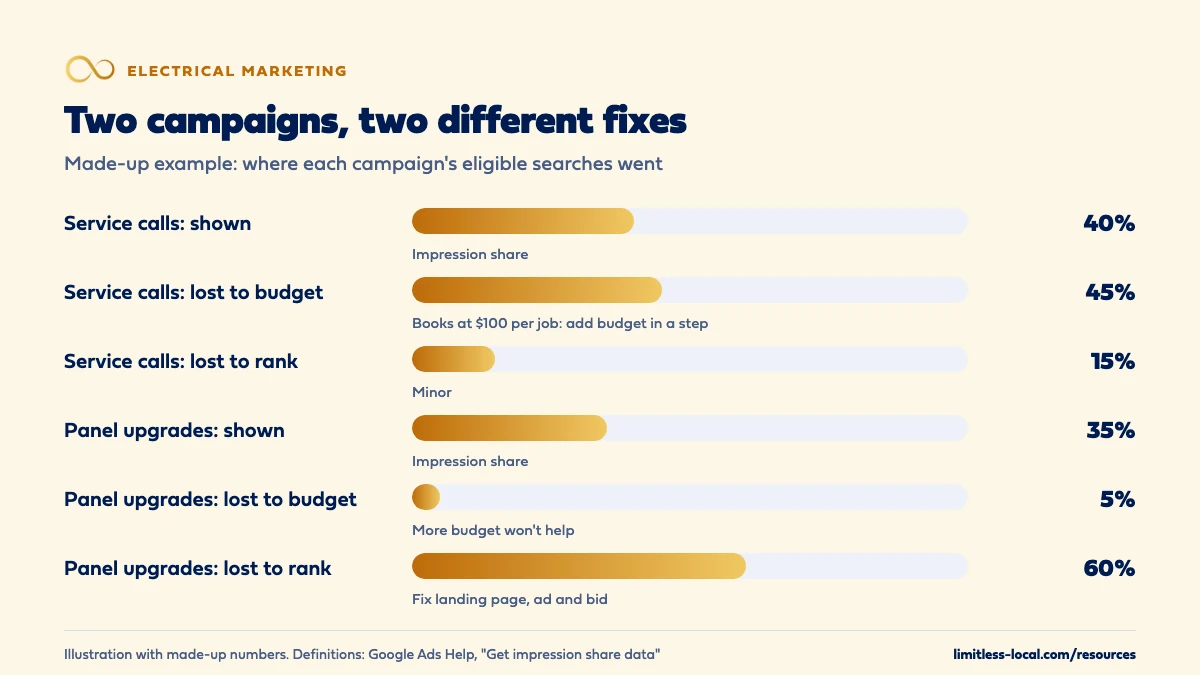
Service-call campaign: impression share 40%, lost to budget 45%, lost to rank 15%. It spent $1,200 last month and booked 12 jobs, so each booked job cost $100 in ad spend. Your ceiling for a service call is $150. This campaign is mostly missing searches because the money runs out, and the searches it does win book at a good cost. Raising the budget in a step, then rechecking cost per booked job, is a reasonable next move.
Panel upgrade campaign: impression share 35%, lost to budget 5%, lost to rank 60%. Doubling its budget would barely change anything, because it almost never runs out of money. It loses on Ad Rank. The fix is a dedicated panel upgrade landing page, a tighter ad, and possibly a higher bid if panel jobs book well.
In this example the three numbers add to 100% for each campaign, because every eligible search was either won, lost to budget or lost to rank. Same account, same month, two opposite answers to “should I spend more?”
For reference, our Essentials package is $3,500 a month and includes Google Ads management for up to $2,500 a month in spend; Growth, at $4,500 a month, covers up to $5,000 in spend and adds Local Services Ads management. Ad spend is paid to Google directly and isn’t part of any package.
Frequently asked questions
Is impression share the same as my share of all electrical searches in town?
No. Google calculates it against the impressions you were eligible for, which depends on your targeting, approval status and quality, not against every related search.
Why does my impression share show a dash?
Google says a dash might be due to insufficient data, such as low traffic or new keywords, and that data for these metrics can take 24 to 48 hours to update.
Do Local Services Ads have impression share?
Google’s impression share pages don’t cover pay-per-lead Local Services Ads directly, so check what your own account reports. In our judgement, judge LSAs mainly on cost per booked job.
Can I see impression share by keyword?
Yes. Google says impression share data is available for campaigns, ad groups and keywords, though lost impression share to budget is only shown at the campaign level.
My impression share dropped this week. Should I raise bids?
Not straight away. Google notes that small fluctuations don’t necessarily indicate that action is needed. Check whether you changed targeting, whether lost-to-rank or lost-to-budget moved, and whether cost per booked job changed first.
Does a higher impression share mean more booked jobs?
Only if the extra searches are from people who need work you do in places you serve. In our judgement, impression share on the right searches matters far more than the overall number.
Key takeaways
- Impression share is impressions received divided by the impressions Google estimates you were eligible for.
- Lost impression share (budget) means the money ran out; lost impression share (rank) means Ad Rank was too low.
- Raise budget only where share is lost to budget and the campaign already books jobs under your ceiling.
- Lost to rank is fixed with better ads, landing pages and bids, not budget.
- Widening your service area can lower impression share because there are more searches to win.
- Read impression share per campaign and job type, and ignore small week-to-week swings.
Not sure what's working right now?
Start with a free visibility audit: rankings, Google profile, reviews and tracking, checked against your service area.
More in this section
- How does Quality Score affect an electrician's Google Ads costs?
- How much ad spend does an electrician need to judge Google Ads?
- What Google Ads campaigns work best for electricians?
- How much should an electrician spend on Google Ads each month?
- What happens to my electrical leads if I pause Google Ads?
Sources
- About impression share — Google Ads Help
- Get impression share data — Google Ads Help
- Improve your impression share — Google Ads Help
- About top and absolute top metrics — Google Ads Help
- About Ad Rank — Google Ads Help
- Fix "Limited by budget" status — Google Ads Help
- About Maximize conversions bidding — Google Ads Help
- Use auction insights to compare performance — Google Ads Help