
What should an HVAC website include to turn visitors into calls?

- What makes an HVAC website get more calls from the visitors it already has?
- What turns an HVAC website visitor into a call?
- Step 1: Put a tap-to-call number at the top of every page
- Step 2: Say the job and the town in the first screen
- Step 3: Give people a second way to reach you
- Step 4: Show proof homeowners can check
- Step 5: Make offers clear, and keep the terms honest
- Step 6: Make every page fast and clean on a phone
- Step 7: Send ad clicks to the page that matches the ad
- Step 8: Track calls and forms so you know what's working
- Should I rebuild my HVAC website or fix the one I have?
- What's different about HVAC websites
- A worked example: what better conversion is worth
- Frequently asked questions
- Key takeaways
- More in this section
- Sources
The short version
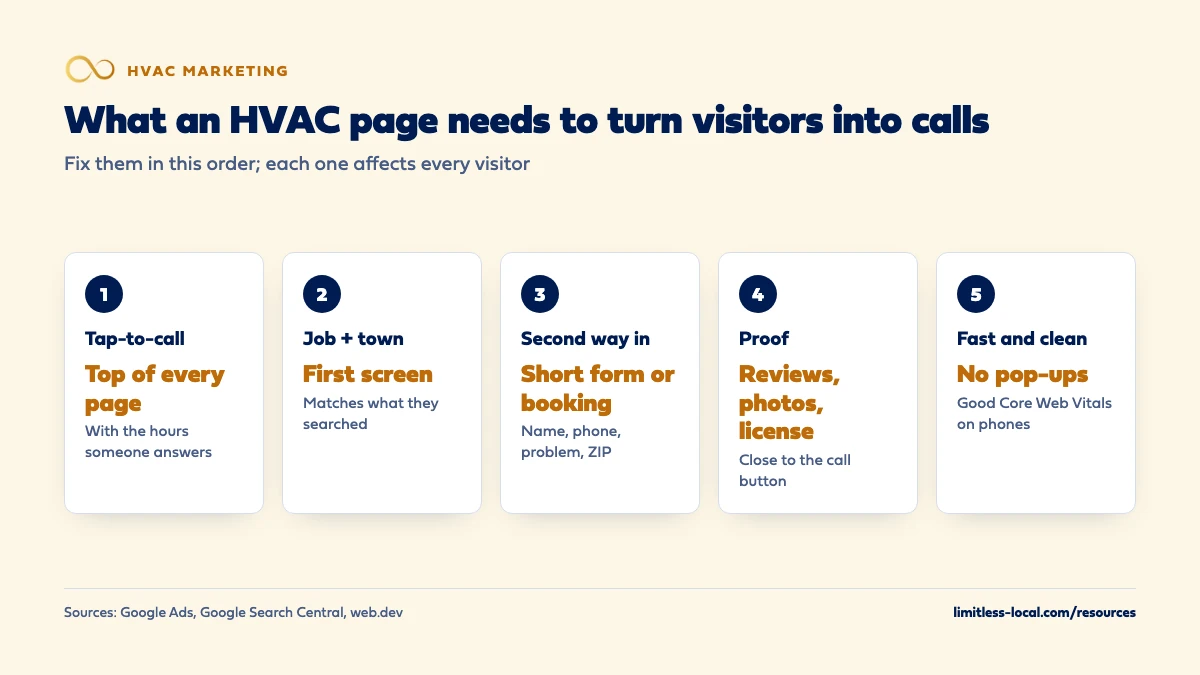
- Tap-to-call number at the top of every page, with your answering hours.
- First screen names the job and the towns you serve.
- A short form or online booking as a second way in.
- Reviews, real photos and license near the call button; fast, no pop-ups.
For HVAC owners whose site gets visitors from Google or ads but not enough calls, and who want to know what to fix before paying for a rebuild.
Get a free visibility audit · Book a growth call
What makes an HVAC website get more calls from the visitors it already has?
An HVAC website turns visitors into calls when every page has a tap-to-call number at the top, a headline that names the job and the towns you serve, and a short form or online booking for people who won’t call. Back that up with proof homeowners can check (recent reviews, real photos, your license), clear and honest offers, and pages that load fast on a phone without pop-ups. Then track calls and form submissions by page so you can see what’s working before deciding whether you need a new site.
That’s the checklist we build to: every page answers what you do, where you work and how to reach you, and every call and form is tracked back to the page that produced it. Our website builds are $3,750 for a themed site ($3,000 with any Limitless Engine package) or from $5,000 for a custom site, and the HVAC marketing packages include call, web and form tracking. For how the site fits with Maps, reviews and ads, see the HVAC marketing guide and the rest of the HVAC marketing questions library.
What turns an HVAC website visitor into a call?
A homeowner who lands on your site is usually trying to answer three questions as fast as possible: do you do the job I need, do you come to my area, and how do I reach you right now. A site that answers all three on the first screen of a phone, and then backs them up with reasons to trust you, turns more of its visitors into calls than a site that makes them hunt.
Most of what follows is small and specific: where the phone number sits, what the headline says, how long the form is, whether a pop-up covers the page. None of it needs a new website on its own. The steps are in the order we’d fix them, starting with the ones that cost the least and affect every visitor. Which pages the site should have in the first place is a separate question, covered in what pages an HVAC company website should have; this page is about what goes on them.
Step 1: Put a tap-to-call number at the top of every page
On a phone, your number should be a button at the top of every page that dials when tapped, and ideally it stays in view as the visitor scrolls. Use the same number in the header, the page body and the footer, written out in full, so nobody has to copy it by hand.
Next to it, say when someone will answer: “Call now, we answer 7 a.m. to 9 p.m.” or “24/7 emergency line”, but only if it’s true. A visitor with no heat at night needs to know whether calling is worth it. If nobody answers after hours, say what happens instead, such as a callback first thing in the morning.
This button is also what you measure. For visitors who came from one of your ads, Google Ads can track clicks on a phone number, button or link on the mobile version of your website, though in that case it tracks only the clicks, not the calls themselves. Counting the actual calls takes a forwarding or tracking number, covered in step 8.
Step 2: Say the job and the town in the first screen
The first thing a visitor reads should match what they searched. On an AC repair page, that’s a headline like “AC repair in Brookfield and nearby towns” (a made-up town), not “Welcome to our company”. Under it, one or two lines: what you fix, how soon you can come out, and the towns you serve.
Google’s advice on landing pages makes the same point about relevance. Its example is that an ad for blue men’s trainers should go straight to the blue men’s trainers page, not the general page or the homepage, so people don’t have to start their search over. Google Ads describes pages with higher landing page experience ratings as usually well organized, with text that relates to a person’s search terms.
For HVAC, that means separate pages for the jobs people search separately, with each page’s first screen written for that job. A visitor searching for a furnace repair shouldn’t land on a page that opens with a photo of an AC condenser and a slogan.
Step 3: Give people a second way to reach you
Not everyone wants to call. Some homeowners are at work, some want a quote for a replacement without a sales call, and some find you at 11 p.m. Give them a short form or online booking as a second option, placed right under the call button.
Keep the form short: name, phone, what’s wrong, and town or ZIP code. Google’s mobile landing page advice warns that forms are inconvenient on mobile and can cause visitors to leave. Job software can do much of the work here. Jobber, for example, lets you create request and booking forms that collect job details, let clients schedule based on your availability, and notify you as soon as someone submits one.
A form only helps if someone replies fast, so route submissions to a phone that’s watched. Chat widgets are another option with their own trade-offs; whether AI chatbots on HVAC websites bring in leads looks at when they help and when they get in the way.
Curious what your marketing is actually booking?
Get a free visibility audit — no obligation, no sales pitch.
Step 4: Show proof homeowners can check
A homeowner letting a stranger into the house wants evidence. In our judgement, the proof that earns calls on an HVAC site is:
- Your Google rating and a few recent reviews, with names and towns, near the top of service pages.
- Real photos of your own techs, trucks and installs, not stock images.
- Your license and insurance stated plainly, and who owns the company.
- Warranty terms and what’s included, especially on replacement pages.
Put the proof close to the call button, not on a separate page nobody visits. Google’s mobile landing page article notes that image-led pages can help users learn about a business without reading a lot of copy, which suits a trade where a photo of a clean install says more than a paragraph. How to make your HVAC company look trustworthy online covers reviews, licensing and photos in more depth.
Step 5: Make offers clear, and keep the terms honest
An offer gives a visitor who isn’t in a hurry a reason to act: a seasonal tune-up price, a maintenance plan, financing on a new system, or a free estimate on a replacement. Put one relevant offer on each page where it fits, not a wall of coupons on every page.
If an offer says “free”, the Federal Trade Commission’s guide on the word says all the terms and conditions for getting it should be set out clearly and conspicuously at the outset of the offer, so there’s no reasonable chance they’ll be misunderstood. A free estimate that only applies to full-system replacements, or a tune-up price that excludes some equipment, should say so right next to the offer, not in a footnote. Financing offers have their own rules, so check that wording with the financing company. This isn’t legal advice.
Step 6: Make every page fast and clean on a phone
Google’s mobile landing page article says prospects will wait only seconds for a mobile page to load before going elsewhere, and recommends sites that are free of clutter, easy to read and quick to load. It suggests reducing image sizes, shortening videos and removing unnecessary features, and it points to PageSpeed Insights, a free Google tool for checking speed.
For a measurable target, web.dev’s Core Web Vitals set the “good” marks: the main content should load within 2.5 seconds, the page should respond to a tap within 200 milliseconds, and the layout should stay stable, with a Cumulative Layout Shift of 0.1 or less. Google says Core Web Vitals are used by its ranking systems, though it also says good scores don’t guarantee your pages will rank at the top.
Watch for pop-ups. The mobile article warns that full-size pop-ups covering the page disrupt the visit, and Google’s page experience guidance asks whether your pages avoid intrusive interstitials. A coupon pop-up that hides the phone number is a lead you paid for and lost.
Step 7: Send ad clicks to the page that matches the ad
If you run Google Ads, every click costs money, so where it lands matters even more. An ad for furnace repair should land on the furnace repair page, with the same words in the headline that were in the ad, and the call button in plain view. Sending every ad to the home page makes the visitor find the right page themselves, and many won’t.
Google Ads uses landing page experience to estimate how relevant and useful your page will be to people who click your ad, and it rates keywords above average, average or below average on it. A below-average status is Google telling you the page may be costing you. Whether you need separate ad pages or can use your service pages is covered in whether your HVAC company needs landing pages for Google Ads.
Step 8: Track calls and forms so you know what's working
You can’t improve what you don’t count. In Google Analytics, any event you collect can become a key event, such as a click on your phone number or a form submission, and reports like Landing pages then show how many key events each page produced. That tells you which pages turn visitors into contacts and which ones don’t.
Clicks on a number aren’t the same as calls, and calls aren’t the same as booked jobs. Google Ads can count calls to a forwarding number shown on your website for people who clicked an ad, and it can import call conversions tracked in another system, so you can count only the calls that turned into sales. Tie those calls to jobs in your job software and you’ll know which pages are worth more work. The full setup is in how to track whether your HVAC marketing is paying off.
Should I rebuild my HVAC website or fix the one I have?
Fix the one you have if you can edit it yourself (or easily get edits made), it can be made fast on a phone, and you own the domain and the content. Steps 1 through 8 are mostly edits, not a rebuild, and most of them can be done on almost any platform.
A rebuild makes sense when you can’t add or change pages without paying someone every time, the site stays slow on phones after the obvious fixes, or it’s locked inside a platform you don’t control. If you do rebuild, carry over the pages and addresses that already bring in traffic and calls. Whether the bigger problem is your site or your search visibility is a separate question, covered in whether SEO or website design matters more for HVAC leads.
Not sure which of these is costing you jobs?
A free visibility audit checks the Google profile, reviews, site and tracking, and shows what to fix first.
What's different about HVAC websites
Emergencies at all hours. No-heat and no-cool calls come in at night and on weekends. In our judgement, an HVAC site should say plainly whether you take emergency calls, during which hours, and what happens if someone reaches you after hours, because a visitor who can’t tell will call the next company.
Repairs and replacements need different pages. A repair visitor wants the phone number and a time. A replacement visitor wants to compare: what’s included, warranties, financing, a free estimate. Putting both on one page usually serves neither well.
The season changes the first screen. A banner that matches the weather (AC tune-ups before summer, furnace checks before the first cold snap) gives visitors a reason to book now and keeps the site from reading as out of date.
Maintenance plans are a call-to-action too. A visible plan signup on service pages turns one repair visit into a customer you’ll see every season.
A worked example: what better conversion is worth
These numbers are made up to show the math, not a benchmark for your market. Say your site gets 500 visitors a month and 3% of them call or submit a form: 15 contacts. After you add a sticky call button, a job-and-town headline, reviews near the top and a shorter form, 5% of visitors make contact: 25 contacts from the same 500 visitors.
If your office books 2 in 5 of those contacts, that’s 6 booked jobs a month before the changes and 10 after, without one more visitor or one more dollar of ad spend. That’s why we’d fix conversion before buying more traffic: every visitor the site already gets becomes worth more. A free visibility audit checks your pages against this list and shows which fix to make first.
Frequently asked questions
Where should the phone number go on an HVAC website?
At the top of every page, as a tap-to-call button on phones, and again near the main call to action on each service page. Keep it the same number everywhere.
Should I put prices on my HVAC website?
Fixed-price items like tune-ups or diagnostic fees are easy to show. For repairs and replacements, explaining how pricing works and offering an estimate is usually clearer than a single number.
How long should a contact form be?
As short as you can make it: name, phone, what’s wrong and where. Google’s mobile advice notes that forms are inconvenient on mobile and can cause visitors to leave.
Do I need online booking on my HVAC website?
It helps people who won’t call, especially after hours, but only if your schedule in the booking tool is accurate and someone confirms each booking quickly.
Do coupon pop-ups get more HVAC calls?
Full-screen pop-ups often hide the phone number and the content people came for. Google’s mobile advice suggests discreet banners or offers within the page instead.
How do I know which page brings in the most calls?
Mark phone clicks and form submissions as key events in Google Analytics and check the Landing pages report, then add call tracking to count the calls themselves.
Key takeaways
- Put a tap-to-call number and your answering hours at the top of every page.
- The first screen should name the job and the towns you serve, matching what people searched.
- Offer a short form or online booking for visitors who won’t call.
- Keep proof near the call button, offers honest and clearly worded, and pages fast with no pop-ups.
- Track phone clicks, calls and forms by page before deciding to rebuild.
Want a second set of eyes on your setup?
We'll look at how you show up locally and where calls are leaking, then send you a plain-English breakdown.
More in this section
- What pages should an HVAC company website have?
- How long does HVAC SEO take to bring in calls?
- How can an HVAC company get more leads?
- How should my HVAC office handle incoming calls from new customers?
- What does good HVAC advertising look like?
Sources
- 5 things to consider when optimizing your mobile landing page — Google Ads
- Understanding page experience in Google Search results — Google Search Central
- Web Vitals — web.dev
- Landing page experience: Definition — Google Ads Help
- About phone call conversion tracking — Google Ads Help
- About key events — Google Analytics Help
- Add your Request and Booking Forms to your Website and Social Media — Jobber Help Center
- Guide Concerning Use of the Word "Free" and Similar Representations — Federal Trade Commission