
How does a roofer see which searches and pages bring leads?
- Which free reports show a roofer the searches and pages that turn into estimate requests?
- Why can't one report show which searches bring roofing leads?
- Step 1: What does Search Console show a roofer?
- Step 2: How do I separate my company name from real roofing searches?
- Step 3: How do I count estimate requests and calls on my website?
- Step 4: How do I connect Search Console to Google Analytics?
- Step 5: How do I see which searches found my Google Business Profile?
- Step 6: How do I see which Google Ads searches brought leads?
- Step 7: How do I tie searches and pages to actual roofing leads?
- What should a roofer do with what these reports show?
- How often should a roofer check which searches bring leads?
- What can't these reports tell a roofer?
- What's different for roofing companies reading search data
- A worked example: a town page versus a blog post
- Frequently asked questions
- Key takeaways
- More in this section
- Sources
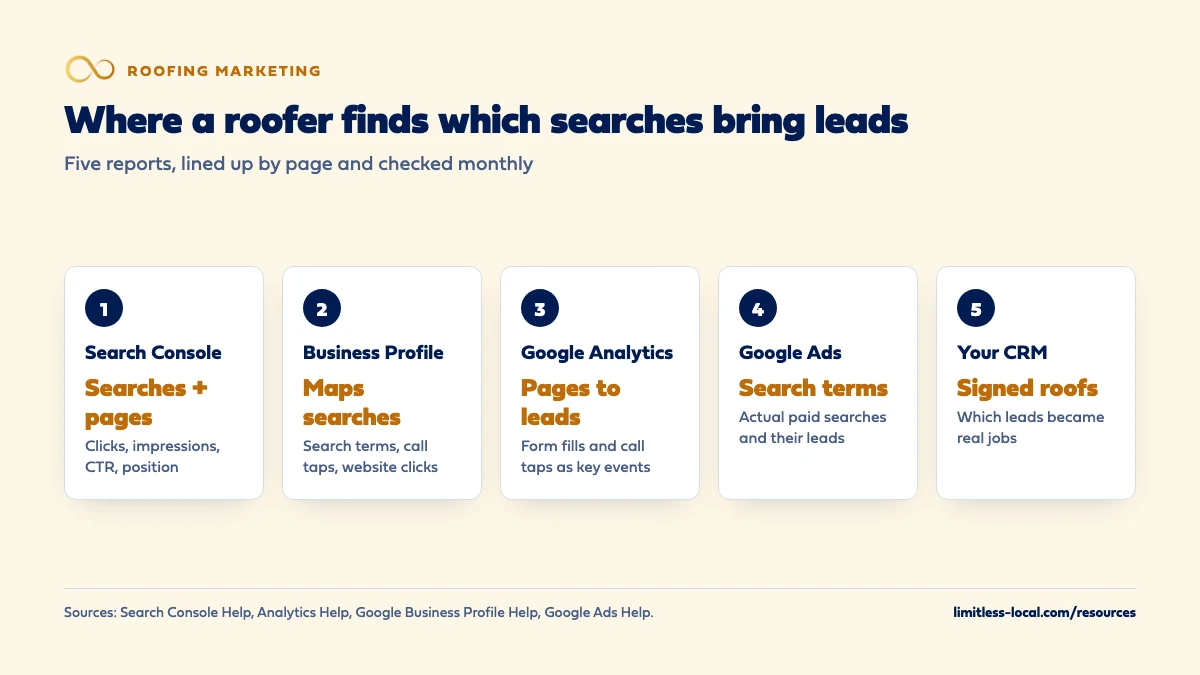
The short version
- Search Console: which searches show your site, and which pages get the clicks.
- Google Analytics: which landing pages turn visits into estimate requests and calls.
- Business Profile performance: which searches found your Maps listing and how many people tapped call.
- Google Ads search terms report: which paid searches led to leads.
- Your CRM: which of those leads became signed roofs.
For roofing owners who have a website and a Google profile and want to know which searches and which pages actually make the phone ring.
Get a free visibility audit · Book a growth call
Which free reports show a roofer the searches and pages that turn into estimate requests?
No single report shows it, so you line up three free Google tools by page. Search Console shows the searches your site appears for and the pages people click into; Google Analytics, once it’s linked to Search Console and your estimate forms and call clicks are marked as key events, shows which of those landing pages produce leads; and your Business Profile’s performance report shows the searches that found your Maps listing and the calls it got. Check them together once a month, then match the leads to your CRM to see which pages lead to inspections and signed roofs.
This is the monthly read our local SEO work runs on: which searches find you in the regular results, the Maps 3-pack and AI answers, and which pages turn that into calls. It’s covered on our local SEO page, and every package adds call tracking, source tagging and a monthly report with a cost-per-lead breakdown. See how it fits a roofing company on our roofing marketing page. If you’re still deciding whether search is worth the effort, read is SEO worth it for roofers, and the roofing marketing questions library takes the follow-ups one at a time.
Why can't one report show which searches bring roofing leads?
Because Google splits the story across tools that each see one piece. Search Console sees the search and the click but has no idea whether the person filled out your form. Google Analytics sees the form fill but, for regular search traffic, doesn’t see the words the homeowner typed. Your Business Profile sees Maps searches and call taps but not what happened on your website.
The thread that ties them together is the page. Search Console can tell you which searches sent people to your roof replacement page; Analytics can tell you how many estimate requests started on that same page. Line those up and you can say, with reasonable confidence, which searches are bringing leads. Ads are the exception, since Google Ads reports leads against search terms directly, and we’ll get to that in step six.
Before you start, make sure calls and forms are being counted at all. Tracking calls and forms from Google covers that setup, and the steps below assume it’s done.
Step 1: What does Search Console show a roofer?
Open the Performance report. Google’s Search Console Help lays out the four numbers it gives you:
- Clicks: how many times someone clicked your site from Google Search results.
- Impressions: how many times your site appeared in search results.
- CTR: clicks divided by impressions.
- Average position: roughly where you showed up.
The report opens on the past three months. Use the Pages tab to see which pages get clicks, then click one page and switch to the Queries tab to see the searches that brought people to it. That pairing, page plus the searches behind it, is the raw material for everything else on this page.
Don’t panic if you search one of those queries yourself and can’t find your site. Results depend on the time, place, device and recent history of the person searching, so you’ll often see something different from a homeowner across town.
Step 2: How do I separate my company name from real roofing searches?
Searches for your company name tell you people already know you, from a yard sign, a neighbor or a truck. They’re good news, but they aren’t SEO bringing in new homeowners. The searches you’re really after are the ones without your name: “roof replacement near me”, “roof leak repair” plus your town, “hail damage roof inspection”.
Search Console now has a branded queries filter that splits branded and non-branded searches automatically. It’s only available for top-level properties and for sites with enough search volume, so a smaller roofing site may not see it. If you don’t, use the query filter to exclude your company name and its common misspellings. Then make the non-branded view your default; that’s where new customers show up.
Step 3: How do I count estimate requests and calls on my website?
In Google Analytics, any action that matters to your business can be marked as a key event, and then many reports, including the Landing pages report, show a key events column for it (Analytics Help). For a roofer, mark at least these two:
- Estimate or inspection form submitted. Count the thank-you page or the form submission, not just a visit to the contact page.
- Tap on your phone number. Most roofing leads still call, and on a phone the tap is the lead.
A tap on your number isn’t proof the call connected. Call tracking fills that gap by showing which calls came from website visitors and how long they lasted, and what call tracking does for a roofing company covers how. With key events set up, the Landing pages report becomes a list of the pages that start leads.
Step 4: How do I connect Search Console to Google Analytics?
Link the two so the search data and the lead data sit side by side. In Analytics, go to Admin, then Search Console Links, and follow the steps to connect Search Console. You need the Editor role in Analytics and to be a verified owner in Search Console.
A few things to know once it’s linked:
- The new Search Console reports are hidden by default. Find the collection under Library in the left menu and publish it.
- Search Console data can be combined with only a few Analytics dimensions, and landing page is the one that matters here.
- Search data shows up about 48 hours after Search Console collects it, and you’ll see at most 16 months of it.
The useful view is the landing page report with Search Console data next to engagement and key events. You’ll see which pages get clicks from organic search and which of those pages actually start estimate requests.
Curious what your marketing is actually booking?
Get a free visibility audit — no obligation, no sales pitch.
Step 5: How do I see which searches found my Google Business Profile?
Your Business Profile has its own performance report, and for many roofers it matters more than the website, because a lot of homeowners call straight from the map. In the Business Profile performance report you’ll find:
- Searches: the search terms people used to find your business. This number is updated at the start of each month and can take up to 5 days to appear.
- Calls: how many times someone tapped the call button on your profile.
- Website clicks: taps on the website link on your profile.
- Directions and Messages, if they apply to you.
Two catches. The numbers include both organic results and Google Ads, so they aren’t purely free traffic. And you can’t choose which searches your profile appears for; you can only make the profile more relevant. Add tracking tags to the website link on your profile so visits from Maps show up as their own source in Analytics instead of blending into regular search.
Step 6: How do I see which Google Ads searches brought leads?
If you run Google Ads, the search terms report shows the actual searches that triggered your ads and how each one performed, including conversions when conversion tracking is on. A keyword is what you bid on; a search term is what the homeowner actually typed, and the two are often further apart than you’d guess.
Read it with the leads column sorted high to low, and then low to high. The top shows the searches worth more budget. The bottom, and anything with spend but no leads, shows where money is leaking, such as “roofing jobs”, “DIY roof repair” or a town you don’t serve. Which negative keywords a roofer should add explains how to block those. Some low-volume search terms are left out of the report for privacy, so the list won’t add up to every click.
Step 7: How do I tie searches and pages to actual roofing leads?
Once a month, build one simple sheet with a row for each page that gets search traffic:
- The page
- Its top non-branded searches (from Search Console)
- Clicks from organic search
- Key events: form fills and call taps (from Analytics)
- Real leads from that page, checked against your CRM or call log
- Inspections and signed roofs from those leads
Column five matters more than it looks. Key events include spam form fills, vendors and wrong numbers, so count the real ones. Column six is where the website meets the money, and it only works if your CRM records a source on every lead. How a CRM tracks a roofer’s marketing ROI covers that half.
What should a roofer do with what these reports show?
Each pattern points to a different fix:
- Lots of impressions, few clicks. You’re showing up but not getting picked. Rewrite the page title and description so they say the job and the town plainly.
- Clicks but no leads. People come and leave. Check the page on a phone: is the number easy to tap, is the form short, does it show your reviews and real roofs? How to tell if your roofing website is losing leads has a full checklist.
- Buying searches where you sit on page two. Searches like “roof replacement” plus a town where your average position is in the low teens are your best SEO targets. Strengthen the matching page or build one. Which keywords a roofer should target helps pick them.
- Traffic you don’t want. Job seekers, DIY questions, towns you don’t serve. Don’t chase them, and don’t let them make a page look better than it is.
How often should a roofer check which searches bring leads?
Once a month is right for most roofing companies, looking at the last three months each time. Weekly numbers are too thin to mean much for a business that might get a dozen website leads in a month, and a single storm can flip a week’s data on its head.
Keep a few months of the sheet so you can compare like with like. Spring against spring tells you more than spring against December. And if you’ve just started SEO work, give it time: organic growth typically takes 3 to 6 months to show up meaningfully, so early months are about rising impressions and positions, not leads.
What can't these reports tell a roofer?
- Calls that skip the website. A homeowner who finds you on Maps and taps call never touches your site, so Analytics never sees them. That’s why the profile report counts.
- Calls to the number on the page. A homeowner who dials your number from a desktop screen instead of tapping it won’t show up as a key event unless you use call tracking.
- The whole journey. Someone might read a blog post today, see your truck next week and search your company name before calling. The reports credit the last step.
- Which roofs signed. None of these tools sees the contract. Only your CRM or job software does.
Read the reports for direction, then let the CRM settle what actually signed.
Not sure which of these is costing you jobs?
A free visibility audit checks the Google profile, reviews, site and tracking, and shows what to fix first.
What's different for roofing companies reading search data
Storms rewrite the queries. After hail or high wind, searches like “hail damage roof” and “storm damage roof inspection” spike for a few weeks. Compare storm months to storm months, and don’t judge a page by a calm month alone.
Research traffic isn’t lead traffic. Posts answering “how long does a roof last” can bring in far more visitors than your service pages and almost no leads. They help build trust and rankings, but judge them differently from your money pages.
Repair and replacement are different searches. Repair searches are urgent and often local (“roof leak repair” plus a town); replacement searches are researched over weeks. Track them as separate pages and separate rows.
Town names matter. If you serve several towns, look for the town names inside the queries. They tell you where you’re winning and which towns need their own page.
A worked example: a town page versus a blog post
These numbers are made up to show how to read the reports, not a benchmark for your site. Over three months, a roofer’s sheet shows two pages side by side:
- Roof replacement page for their main town: 2,400 impressions, 60 clicks, an average position of 9, 6 key events in Analytics, and 5 real leads in the CRM, 2 of which became inspections and 1 a signed roof.
- Blog post about how long metal roofs last: 9,000 impressions, 210 clicks, 1 key event, and no real leads.
The blog post brings in more than three times the visitors, and the town page is where the money is. Its click rate is 60 divided by 2,400, or 2.5%, and it’s sitting near the bottom of page one. That makes it the page to work on: a sharper title, more reviews and photos from that town, and a stronger call to action. Moving it up a few spots would likely bring more leads than doubling the blog’s traffic.
Frequently asked questions
Is Search Console free?
Yes. Search Console, Google Analytics and your Business Profile reports cost nothing. The work is in setting them up and reading them every month.
Why does Search Console show different numbers than Google Analytics?
They count different things. Search Console counts clicks from Google Search results; Analytics counts visits and what happened on your site from every source. Use Search Console for searches and Analytics for leads, and match them by page.
Can I see which search led to a specific phone call?
For Google Ads calls, often yes, through the search terms report and call tracking. For free search traffic, not reliably. You can see which page the caller came from, and which searches send people to that page.
Do AI answers show up in these reports?
Only partly, and it takes a few extra steps. How to tell if AI search is sending you leads covers what to look for.
My Business Profile shows calls but my CRM shows fewer. Why?
The profile counts taps on the call button, not answered calls. Some taps are hang-ups, vendors or repeat callers, and some calls go unanswered. That gap is a good reason to check how fast your office picks up.
Should I let my marketing company access these reports?
Yes, as a user you add, not as the owner. Keep ownership of Search Console, Analytics and your Business Profile in your own Google account so the history stays with you if you ever switch.
Key takeaways
- Search Console shows searches and pages; Analytics shows which pages start leads; your Business Profile shows Maps searches and call taps.
- Link Search Console to Analytics and mark form fills and call taps as key events, so pages and leads line up.
- Filter out searches for your company name to see how new homeowners find you.
- Build one monthly sheet by page, then check it against your CRM for real leads and signed roofs.
- Pages with clicks but no leads need fixing; buying searches on page two are your best targets.
Want a second set of eyes on your setup?
We'll look at how you show up locally and where calls are leaking, then send you a plain-English breakdown.
More in this section
- What is the fastest way for a roofer to get leads online?
- What pages should a roofing website have to bring in leads?
- What can a roofer do this month to get more leads without waste?
- How do I know if my roofing website is losing leads?
- How do I know if AI search is sending my roofing company leads?
Sources
- Performance report (Search results): Overview and basic setup — Search Console Help
- Introducing the branded queries filter in Search Console — Google Search Central Blog
- About key events — Analytics Help
- Connect Search Console to Google Analytics — Analytics Help
- Understand your Business Profile performance & insights — Google Business Profile Help
- About the search terms report — Google Ads Help