
What pages should a roofing website have to bring in leads?
- Which pages does a roofing company website need to turn visitors into inspection requests?
- What does each page on a roofing website have to do?
- What should the home page of a roofing website say?
- Which service pages does a roofer need?
- Do I need a page for every town I serve?
- Should a roofing website have a project gallery?
- Does a roofer need a reviews page?
- What goes on the about page of a roofing website?
- What should the estimate request page include?
- Do roofing ads need their own landing pages?
- Which pages can a roofing website skip?
- How do these pages need to work on phones?
- What's different about website pages for roofing companies
- A worked example: a starter page plan for a roofing site
- Frequently asked questions
- Key takeaways
- More in this section
- Sources
The short version
- Home page: what you do, where you work, and how to book an inspection.
- One page per roofing service you want more of, plus pages only for towns where you have real work.
- Proof pages: project gallery, reviews and an about page that shows who you are.
- An estimate request page with a short form, and a phone number on every page.
For roofing owners planning a new site or fixing an old one, who want to know which pages actually earn their place and which ones are just filler.
Get a free visibility audit · Book a growth call
Which pages does a roofing company website need to turn visitors into inspection requests?
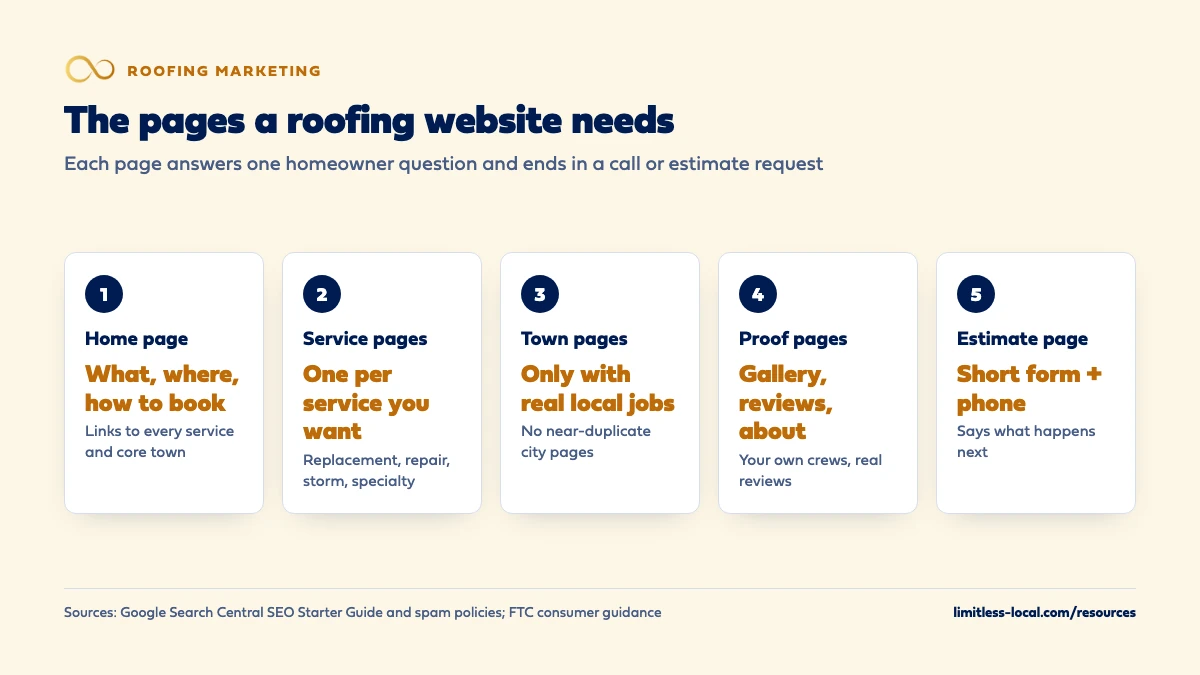
A roofing website that brings in leads needs a home page that says what you do and where, one page for each roofing service you want more of, a page for each core town where you have real jobs to show, proof pages (a project gallery, reviews and an about page with the real owner and crew), and an estimate request page with a short form and a tap-to-call number. Every page should answer something a homeowner asks before calling and end in the same next step: call or request an inspection. A small site that does this well will usually do more for you than a big one padded with near-identical town pages.
Each of these pages should be judged by the inspection requests and signed roofs it helps produce, not by page count. We build and run websites for roofing companies as part of our roofing marketing work, and the website service page lays out how a build works. For the wider plan (Google profile, ads, reviews and follow-up) start with the roofing marketing guide, and the roofing marketing questions library goes one question at a time.
What does each page on a roofing website have to do?
Every page has one job: answer a question a homeowner has before they call, then make calling or requesting an inspection the obvious next step. A page that doesn’t answer a real question, or that leaves the visitor wondering what to do next, is filler.
That lines up with what Google says about both search and ads. Its SEO Starter Guide says creating content people find compelling and useful “will likely influence your website’s presence in search results more than any of the other suggestions” in the guide, and lists easy-to-read, well-organized, unique and up-to-date content as common traits. For ads, Google describes landing pages with higher landing page experience ratings as “usually well organized” with “text that relates to a person’s search terms.” A roofing site built from focused pages, each about one service or one town, fits both.
What should the home page of a roofing website say?
The home page has to answer three things in the first screen on a phone: what you do (residential roofing, repairs and replacements, storm work if you take it), where you do it, and how to book. After that, it works as a hub. It should link to each service page and your main town pages, show a few recent jobs and reviews, and repeat the call and estimate buttons further down.
The home page is also where owners tend to cram everything in. Keep the detail on the service pages and let the home page point to them. If you want the line-by-line on the first screen, the form and the buttons, the page on what a roofing website should include to get more estimate requests covers it.
Which service pages does a roofer need?
One page for each service you want more of, and none for work you don’t want. For most residential roofers that list looks something like this:
- Roof replacement. The materials you install, how an inspection and estimate work, what’s in your written warranty, and financing if you offer it.
- Roof repair. Leaks, missing shingles, flashing, and how quickly you can get out.
- Storm, hail and wind damage. Only if you do this work. Explain your inspection, what you document and what the homeowner should expect, without promising anything about their claim.
- Specialty work you sell: metal, tile, flat roofs, gutters or commercial. Each gets its own page only if you actively want that work.
Give each page a plain, descriptive web address such as /roof-replacement/. Google’s starter guide notes that parts of the URL can show in search results as breadcrumbs, so words in the address help people judge whether the page fits what they searched. The same goes for gutters or siding: give them a page only if you want to be known for them.
Do I need a page for every town I serve?
No. Build a town page only where you can say something true and specific: roofs you’ve done there, the housing and weather you deal with, and how fast you get out. Google’s spam policies list “having multiple domain names or pages targeted at specific regions or cities that funnel users to one page” as an example of doorway abuse, so a stack of town pages with the name swapped is a risk, not a shortcut.
Start with your strongest towns and add more as you build up real jobs in each one. How many to build, and in what order, is covered in how many city pages a roofing website should have.
Should a roofing website have a project gallery?
Yes, and it should be your own work. A homeowner choosing who gets on their roof wants to see roofs like theirs: before and after shots, close-ups of flashing and ridge lines, the crew with safety gear on, the cleanup at the end. Stock photos of a smiling roofer tell them nothing.
Put photos on the service and town pages too, not only in a gallery. Google’s starter guide recommends images that are “sharp and clear” placed “near text that’s relevant to the image,” because the nearby text helps Google understand what the image is about. A photo of a metal roof install on your metal roofing page, with a line on where and what it was, does more than the same photo in a grid of fifty.
Curious what your marketing is actually booking?
Get a free visibility audit — no obligation, no sales pitch.
Does a roofer need a reviews page?
A reviews or testimonials page helps, as long as everything on it is real. Pull in recent reviews with first names and towns where the customer is fine with that, and link to your Google profile so people can read the rest there.
Be careful how you collect them. The FTC’s rule on consumer reviews and testimonials, which went into effect on October 21, 2024, addresses deceptive and unfair conduct involving consumer reviews and testimonials, and the FTC’s questions-and-answers guidance says a business can be liable if it gives incentives conditioned on reviews expressing a particular sentiment. This isn’t legal advice; if you’re paying or rewarding anyone for reviews, read the FTC guidance or ask a lawyer first.
What goes on the about page of a roofing website?
Who you are, in a way a homeowner can check. The owner’s name and photo, how long the company has run, the crew, your license number if your state or county issues one, proof of insurance on request, any manufacturer certifications you actually hold, and the area you serve.
Homeowners are told to look for this. The FTC’s advice on avoiding home improvement scams tells them to consider only contractors who are licensed and insured, to check with their state or county about a license, and to ask for proof of insurance. Google’s guidance on helpful, reliable content makes a related point for search: content is easier to trust when it’s clear who created it, with background about the author or the site. Pulling all of those trust signals together is the subject of how a roofer can look local and trustworthy enough to rank.
What should the estimate request page include?
A short form, a phone number, and a plain explanation of what happens after someone asks. Name, phone, address or town, the type of work (repair, replacement, storm inspection) and an optional note or photo upload is enough. Every extra field is one more reason to quit.
Say what happens next: who calls back, roughly when, and what the inspection involves. Then make sure every request lands somewhere your office works from and gets marked with where it came from, so you can see which pages and channels produce signed roofs. Setting that up is covered in how a roofer can track calls and forms from Google.
Do roofing ads need their own landing pages?
Often, yes. If you run Google Ads for roof replacement, the ad should land on a page about roof replacement, not the home page. Google’s Ads help says to make sure the landing page is “clear and useful to customers” and related to your keyword and what people are searching for, and that these factors can play a role in its landing page experience status.
Your service pages can double as ad landing pages if they’re focused enough. Some roofers build a separate, stripped-down page for each ad group instead, with fewer links out and a stronger push to call. Which way fits your budget and setup is weighed in whether roofing ads should go to the home page or a landing page.
Which pages can a roofing website skip?
- Pages for services you don’t want. If you hate small repairs, don’t build a page asking for them.
- Near-duplicate town pages. See the doorway warning above.
- Two pages saying the same thing. Google’s starter guide says duplicate content isn’t a violation of its spam policies, but “it can be a bad user experience” and can waste crawling on URLs you don’t care about. Merge them and redirect the extra one.
- A blog nobody updates. A few useful articles that answer real homeowner questions are fine. A blog last updated three years ago tells visitors the site isn’t looked after.
- Generic filler pages such as “Why choose us” pages that repeat the home page.
How do these pages need to work on phones?
Every page on the list has to work on a phone first. Google’s mobile-first indexing guidance says it uses the mobile version of a site’s content for indexing and ranking, and recommends that the mobile site contain the same content as the desktop site. So if your mobile layout hides the gallery or cuts the service details, Google may not see them either.
On a phone, that means the call button stays easy to reach, the form fits on the screen, photos load without a long wait, and nothing pops up over the content. To check your own site, see how to know your roofing website works well on phones.
Not sure which of these is costing you jobs?
A free visibility audit checks the Google profile, reviews, site and tracking, and shows what to fix first.
What's different about website pages for roofing companies
Long, high-stakes decisions. A roof replacement is a big purchase, and in our judgement many homeowners come back to a roofer’s site more than once before they call, often to show a spouse the gallery or the warranty. That’s why the proof pages carry more weight for roofers than for a quick-fix trade.
Storm spikes. If you take storm work, have the storm damage page written before the hail season, not the week after. A page with real inspection photos and plain wording reads very differently from a rushed page that sounds like the door-knockers homeowners are warned about.
Insurance questions. Homeowners will ask about claims. Keep your pages to what you do (inspect, document, explain your estimate) and stay away from promising what an insurer will pay.
Repairs versus replacements. A repair page and a replacement page attract different people with very different job values, so keep them separate and track which one each request came from.
A worked example: a starter page plan for a roofing site
This is a made-up roofing company to show the planning, not a client and not a promise of results. Say the company wants more roof replacements and storm inspections, does some repair work, and has real jobs to show in three core towns.
- Home page: 1
- Service pages: replacement, repair, storm damage and metal roofing, so 4
- Town pages for the three core towns: 3
- Proof pages: gallery, reviews and about, so 3
- Estimate request page: 1
That’s 1 + 4 + 3 + 3 + 1 = 12 pages, each with a reason to exist. More town pages get added only once the company has work to show in those towns.
How we’d handle it: our themed website is $3,750, or $3,000 with any Limitless Engine package, and covers up to 25 pages, so a plan like this has room to grow. Custom sites start at $5,000. Themed sites take about 60 days and we quote concept to launch at 100 days or less, with the buffer there because client feedback is usually the wait. We don’t guarantee rankings or lead counts; nobody honestly can.
Frequently asked questions
How many pages should a roofing website have?
As many as you can fill with something useful, and no more. A home page, your main service pages, your core towns, proof pages and an estimate page is a solid start; add pages as you add services or real work in new towns.
Should I put roofing prices on my website?
That’s your call. Some roofers show a starting range or explain what drives the price; others prefer to explain it at the inspection. Either way, say clearly how the estimate works and whether it’s free.
Do I need a blog on my roofing website?
Not to start. Service, town and proof pages matter more. A handful of articles answering questions homeowners really ask can help later, if you keep them current.
Can I use stock photos on my roofing website?
You can, but photos of your own crews and roofs show homeowners the work they’ll actually get. Replace stock photos with real job photos as you collect them.
Should every page have a form, or just the estimate page?
Put a call button and a link to the estimate request on every page. A short form on the main service pages can help too, as long as it sends requests to the same place as the main form.
Do I need a separate page for each roofing material?
Only for materials you want to sell more of and can show real work in. If you install metal roofs and want more of them, a metal roofing page makes sense; a page for a material you rarely install doesn’t.
Key takeaways
- Build a home page, a page per service you want more of, town pages only where you have real work, proof pages and an estimate request page.
- Google’s spam policies name city pages that funnel users to one page as doorway abuse, so skip near-duplicate town pages.
- Use your own job photos near the text they relate to, and only real reviews.
- Every page needs a call button and a clear next step, and has to work on a phone first.
- Track which page each request came from, so you can judge pages by signed roofs.
Want a second set of eyes on your setup?
We'll look at how you show up locally and where calls are leaking, then send you a plain-English breakdown.
More in this section
- How many city pages should a roofing website have?
- What should a roofing website include to get more estimate requests?
- Should roofing ads send people to my homepage or a landing page?
- How does a roofing company get links from local websites?
- What blog posts should a roofing company publish?
Sources
- SEO Starter Guide: The Basics — Google Search Central
- Spam Policies for Google Web Search — Google Search Central
- Creating Helpful, Reliable, People-First Content — Google Search Central
- Mobile-first Indexing Best Practices — Google Search Central
- Landing page experience: Definition — Google Ads Help
- The Consumer Reviews and Testimonials Rule: Questions and Answers — Federal Trade Commission
- How To Avoid a Home Improvement Scam — FTC Consumer Advice